
iftracer-sdk
Iftracer’s Python SDK allows you to easily start monitoring and debugging your LLM execution. Tracing is done in a non-intrusive way, built on top of OpenTelemetry. The repo contains standard OpenTelemetry instrumentations for LLM providers and Vector DBs, as well as a Iftracer SDK that makes it easy to get started with OpenLLMetry, while still outputting standard OpenTelemetry data that can be connected to your observability stack.
Installation Guide
1. Install directly from PyPI
Run the following command to install iftracer-sdk from PyPI
pip install iftracer-sdk
2. Install packages directly from the Git repository
- Example with poetry pyproject.toml:
Add the github link
iftracer-sdk = {git = "https://github.com/insightfinder/iftracer-sdk"}directly to your package'spyproject.tomlunder[tool.poetry.dependencies]. Then runpoetry install - Example with pip install requirements.txt:
pip install git+https://github.com/insightfinder/iftracer-sdk
3. Download the code to local. Example with poetry pyproject.toml
Download the iftracer-sdk package to local. Add the local path iftracer-sdk = { path = "/path-to-iftracer-sdk-pkg/iftracer-sdk", develop = true } directly to your package's pyproject.toml under [tool.poetry.dependencies]. Then run poetry install.
You can also use other ways like sys.path.
Quick Start Guide
Add the decorators like @workflow, @aworkflow, @task, and @atask over the methods to get the tracing details. Add @workflow or @aworkflow over a function if you want to see more tags in tracing report.
You can copy & paste the following code example to test if the iftracer-sdk is configured properly. Feel free to replace openai by other LLM models like claude or ollama.
@workflow(name="get_chat_completion_test")
def get_gpt4o_mini_completion(messages, model="gpt-4o-mini", temperature=0.7):
    """
    Note: Set your OpenAI API key before using this api

    Function to get a response from the GPT-4o-mini model using the updated OpenAI API.

    Args:
        messages (list): List of messages (system, user, assistant).
        model (str): The model to use, default is "gpt-4o-mini".
        temperature (float): Controls the randomness of the response.

    Returns:
        str: The model-generated response.
    """
    try:
        # Make a request to OpenAI's new Chat Completions API
        response = openai.chat.completions.create(
            model=model, messages=messages, temperature=temperature
        )

        # Return the content of the first choice from the response
        return response
    except openai.OpenAIError as e:
        # Catching OpenAI-specific errors
        print(f"OpenAI API error: {e}")
        return None


# Example Usage
if __name__ == "__main__":
    openai.api_key = "sk-proj-..."  # Set your OpenAI API key here or export it as environment variable.
    # You need to call Iftracer.init only once to set the environment variables. You can also call Iftracer.init() without any arguments, if you have set the environment variables somewhere else.
    Iftracer.init(
        api_endpoint=http://<IF_ENDPOINT>:<PORT> # Contact our devops to get the unique url.
        ifuser="...", # The value can be found on the first line of [User Account Information](https://app.insightfinder.com/account-info) page.
        iflicenseKey="...", # The value can be found on the 5th line of [User Account Information](https://app.insightfinder.com/account-info) page.
        ifproject="...", # Your project's name. You can fill in any strings.
    )
    messages = [
        {"role": "system", "content": "You are a helpful assistant."},
        {
            "role": "user",
            "content": "Can you write a haiku about recursion in programming?",
        },
    ]

    response = get_gpt4o_mini_completion(messages)

    if response:
        print("GPT-4o-mini Response:", response)
Successful response example:
GPT-4o-mini Response: ChatCompletion(id='chatcmpl-...', choices=[Choice(finish_reason='stop', index=0, logprobs=None, message=ChatCompletionMessage(content='Functions call themselves,  \nInfinite loops of logic,  \nDepths of thought unfold.', refusal=None, role='assistant', audio=None, function_call=None, tool_calls=None))], created=1733945910, model='gpt-4o-mini-2024-07-18', object='chat.completion', service_tier=None, system_fingerprint='...', usage=CompletionUsage(completion_tokens=17, prompt_tokens=28, total_tokens=45, completion_tokens_details=CompletionTokensDetails(accepted_prediction_tokens=0, audio_tokens=0, reasoning_tokens=0, rejected_prediction_tokens=0), prompt_tokens_details=PromptTokensDetails(audio_tokens=0, cached_tokens=0)))
Choosing Between Iftracer Decorators
- Use @aworkflow, @atask over an asynchronous function. Use @workflow, @task over a synchronous function.
- Use @aworkflow or @workflow when the function calls multiple tasks or workflows and combines their results, when the function is a high-level orchestration of a process, when you need to get more tags, or when you intend to create a logical boundary for a workflow execution. Otherwise, use @atask or @task.
Trace Prompt and Response Content
Sometimes, the tracer can't catch the details of LLM model. For example, response from langchain ainvoke()/invoke() will normally require users to use LLM callback_handler to show more LLM model details like prompt token. iftracer-sdk package provides the function trace_model_response(<Response which you want to get details>) to catch the details and avoid the handler. For example:
@task(name="joke_invoke")
def create_joke():
    response = await joke_generator_langchain.ainvoke(
        {"question": prompt},
        config=config,
    )
    trace_model_response(response) # optional. Required if must show LLM model details.
    return response
Step by Step Guide
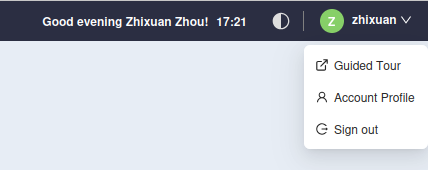
- Register InsightFinder account. After logging in, click on the top-right profile icon:
- Click on the account profile option. You will be redirected to the User Account Information page. On first line, you can find your user name. On 5th line, you can find your license key (not encrypted license key).
- Install and import iftracer-sdk to your packages.
- In your project's entry init.py file, call Iftracer.init():
Iftracer.init(
        api_endpoint=http://<IF_ENDPOINT>:<PORT>, # Contact our devops to get the unique url.
        ifuser="...", # The value can be found on the first line of [User Account Information](https://app.insightfinder.com/account-info) page.
        iflicenseKey="...", # The value can be found on the 5th line of [User Account Information](https://app.insightfinder.com/account-info) page.
        ifproject="...", # Your project's name. You can fill in any strings.
    )
- Above the function you want to trace, add decorators like @aworkflow, @atask, @workflow, @task.
- If you are using langchain, you can use trace_model_response on the response returned by
ainvoke()/invoke(). - Run your program. The tracing data will be received by InsightFinder.
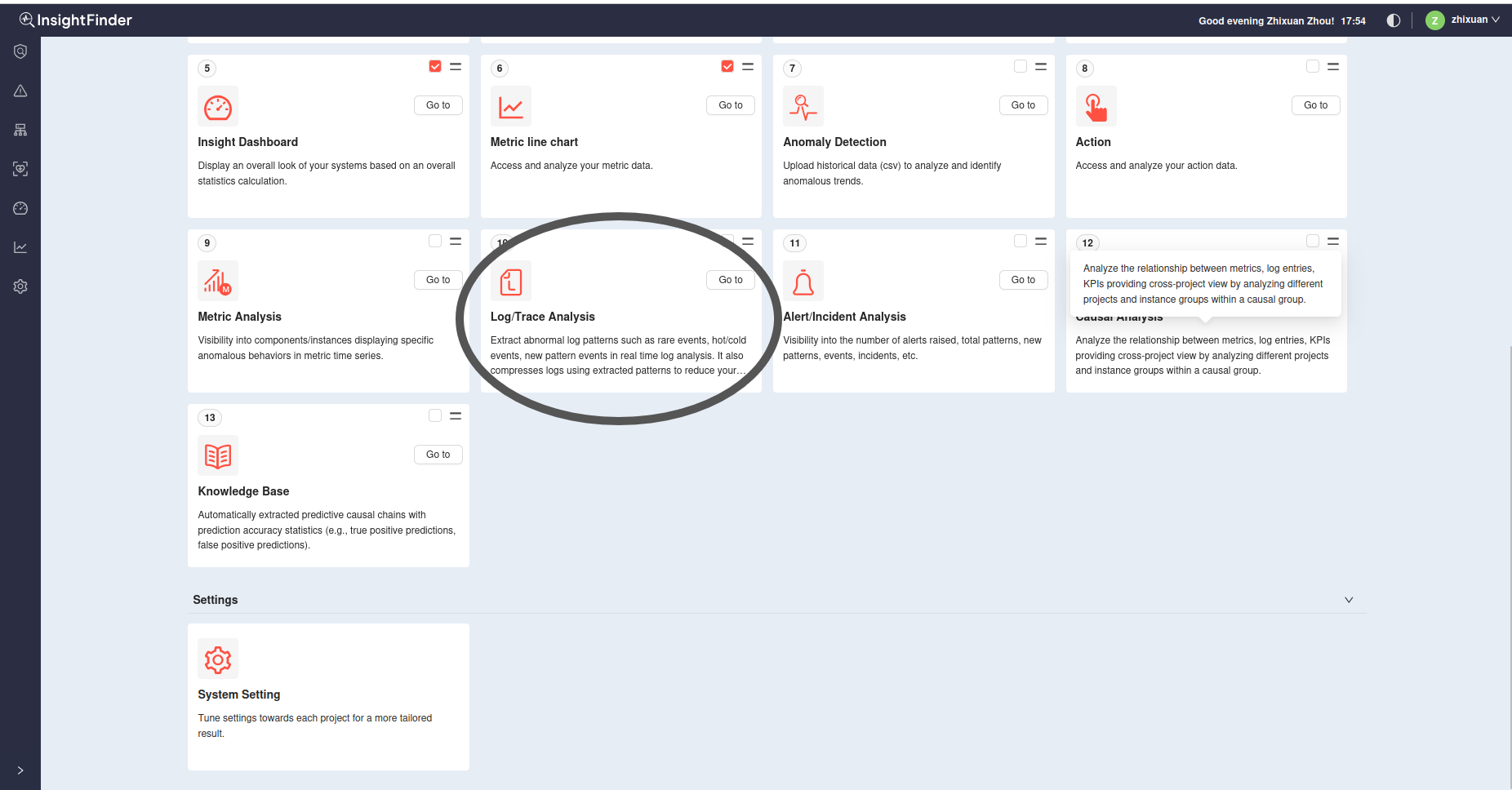
- You can find the data in Log Analysis page from Log/Trace Analysis in InsightFinder:
Unique features
- New Tags: We have extracted additional data from LLM models to tags to assist tracing. For example, we have extracted the LLM model's name, PG vector's embedding model name, and the dataset retrieved by RAG, and so on, to the workflow spans' tags.
- Customizable: We can add more tags if you need them. We can adjust the tracers' behaviors based on your needs.
- Easy to use: Compared to other tracer packages, we don't require users to create an opentelemetry link. Users can easily use the username, licensekey and api endpoint provided by us to access the service.
LICENSE
Uses the Apache License 2.0
FAQ:
-
Why I can't find the new tags? 1.1. This package won't extract the metadata like
prompt tokenfrom response if the chain (e.g.:joke_generator_langchain) contains StrOutputParser(). Try to removeStrOutputParser()from the chain and stringify the result later. 1.2. Contact our support team if the issue still persists. -
What LLM models does this package support? This
iftracer-sdkpackage utilizes the opentelemetry packages from ifllmetry. It supports LLM models like Claude (anthropic), ChatGPT (openai), ollama, etc.
3 maintainers


Release files for iftracer-sdk 0.2.1
For a detailed explanation of source distributions (sdists) and built distributions (wheels), please see the package formats documentation.
Source distribution (sdist)
| File | Size | Uploaded | |
|---|---|---|---|
| iftracer_sdk-0.2.1.tar.gz | 26.4 kB | Details |
Built distribution (wheel)
| File | Interpreter | ABI | Platform | Reset |
|---|---|---|---|---|
| iftracer_sdk-0.2.1-py3-none-any.whl | Python 3 | none | any | Details |
Total release size: 57.3 kB
Release files / iftracer_sdk-0.2.1.tar.gz
| Download URL | iftracer_sdk-0.2.1.tar.gz |
|---|---|
| Size | 26.4 kB |
| Tags | Source |
|
SHA-256 checksum How to use checksums |
3dfe32ca2c586132c3b7fb2a1f7d91a2942a948c702d97fb7c973fd8bbd46808
|
|
BLAKE2b-256 checksum How to use checksums |
e836a5ad329b6d529a429bdc8ea15d2b828119a9e0f004f5bad86a6c04e53ee9
|
| Upload date | |
|
Uploaded using Trusted Publishing? What is trusted publishing? |
Yes |
| Uploaded via |
twine/6.1.0 CPython/3.12.9
|
Provenance
Provenance describes where a file came from. On PyPI, provenance is shared via attestations, which provide a verifiable record of the build or publishing details. View details, limitations and caveats.


PyPI Publish Attestation
PyPI verified that this artifact, at this checksum, originated from the publisher listed below.
Signed by GitHub Actions, verified by PyPI on Mar 18, 2025.
Transparency logRelease files / iftracer_sdk-0.2.1-py3-none-any.whl
| Download URL | iftracer_sdk-0.2.1-py3-none-any.whl |
|---|---|
| Size | 30.9 kB |
| Tags | Python 3 |
|
SHA-256 checksum How to use checksums |
af4d676390b42e872c0fe65759d635b873a207a0e2043b67a08c68faefa7b6a2
|
|
BLAKE2b-256 checksum How to use checksums |
544694afa61af692e11cd167038842e5edc4d2d4d6f5e866a143369dec20447a
|
| Upload date | |
|
Uploaded using Trusted Publishing? What is trusted publishing? |
Yes |
| Uploaded via |
twine/6.1.0 CPython/3.12.9
|
Provenance
Provenance describes where a file came from. On PyPI, provenance is shared via attestations, which provide a verifiable record of the build or publishing details. View details, limitations and caveats.
PyPI Publish Attestation
PyPI verified that this artifact, at this checksum, originated from the publisher listed below.
Signed by GitHub Actions, verified by PyPI on Mar 18, 2025.
Transparency log













