
Implementation of Interpretable Generalized Additive Neural Networks

Project description
IGANN - Interpretable Generalized Additive Neural Networks
--- This project is under active development ---
IGANN is a novel machine learning model from the family of generalized additive models (GAMs). This GAM is special in the sense that it uses a combination of extreme learning machines and gradient boosting.
Some of the main features are:
- Training is very fast and can be performed on CPU and GPU
- The rate of change of so-called shape functions can be influenced through hyperparameter ELM_scale
- The initial model is simply linear, thus IGANN generally also performs well on small datasets
Main developers of this project are:
Mathias Kraus, FAU Erlangen-Nürnberg
Daniel Tschernutter, ETH Zurich
Sven Weinzierl, FAU Erlangen-Nürnberg
Patrick Zschech, FAU Erlangen-Nürnberg
Nico Hambauer, FAU Erlangen-Nürnberg
Sven Kruschel, FAU Erlangen-Nürnberg
Lasse Bohlen, FAU Erlangen-Nürnberg
Julian Rosenberger, FAU Erlangen-Nürnberg
Theodor Stöcker, FAU Erlangen-Nürnberg
Installation
Available through
pip install igann
For the latest features, use this repository.
Dependencies
The project depends on PyTorch and abess (version 0.4.5).
Usage
IGANN can in general be used similar to sklearn models. The methods to interact with IGANN are the following:
- .fit(X, y) for training IGANN on (X, y) dataset. Categorical variables are derived based on their dtypes. That's why the feature marix X needs to be a pandas DataFrame.
- .predict_raw(X) to compute simple prediction for regression or raw logits for classification tasks. Per default values greater than 0 could be interpreted as belonging to class 1 and values smaller than 0 as belonging to class -1.
- .predict(X) to compute simple prediction for regression or class prediction in {-1, 1} for classification tasks. If the IGANN parameter optimize_threshold is set to True, the threshold for the class prediction is optimized on the training data and hence deviates from the decision boundary of 0.
- .predict_proba(X) to compute probability estimates
- .plot_single() to show shape functions
- .plot_learning() to show the learning curve on train and validation set
Parameters
When initializing IGANN, the following parameters can be set:
- task: defines the task, can be 'regression' or 'classification'
- n_hid: the number of hidden neurons for one feature
- n_estimators: the maximum number of estimators (ELMs) to be fitted.
- boost_rate: Boosting rate.
- init_reg: the initial regularization strength for the linear model.
- elm_scale: the scale of the random weights in the elm model.
- elm_alpha: the regularization strength for the ridge regression in the ELM model.
- act: the activation function in the ELM model. Can be 'elu', 'relu' or a torch activation function.
- early_stopping: If there has been no improvements for 'early_stopping' number of iterations, training is stopped.
- device: the device on which the model is optimized. Can be 'cpu' or 'cuda'
- random_state: random seed.
- optimize_threshold: if True, the threshold for the classification is optimized using train data only and using the ROC curve. Otherwise, per default the raw logit value greater 0 means class 1 and less 0 means class -1.
- verbose: verbosity level. Can be 0 for no information, 1 for printing losses, and 2 for plotting shape functions every 5 iterations.
Examples
Basic regression example
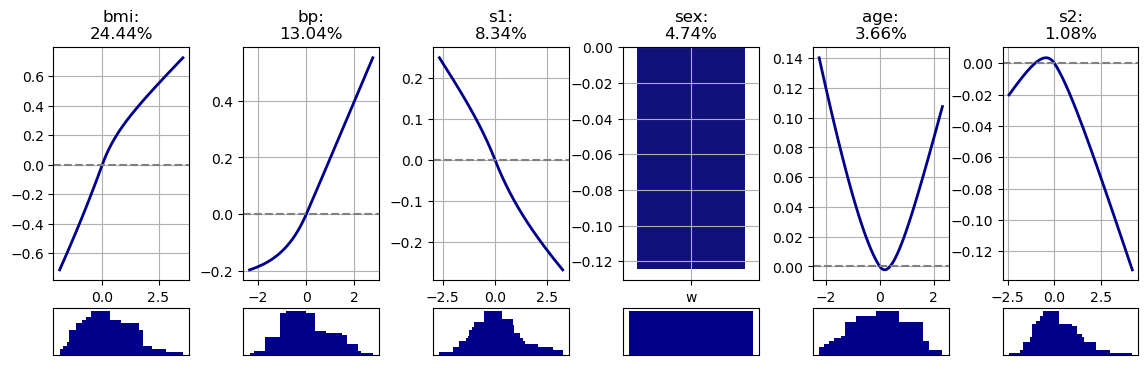
In the following, we use the common diabetes dataset from sklearn (https://scikit-learn.org/0.16/modules/generated/sklearn.datasets.load_diabetes.html). After loading the dataset via
import pandas as pd
from sklearn.datasets import load_diabetes
from sklearn.preprocessing import StandardScaler

X, y = load_diabetes(return_X_y=True, as_frame=True)
scaler = StandardScaler()
X_names = X.columns

X = scaler.fit_transform(X)
X = pd.DataFrame(X, columns=X_names)
X['sex'] = X.sex.apply(lambda x: 'w' if x > 0 else 'm')
and !important scale the target values
y = (y - y.mean()) / y.std()
we can simply initialize and fit IGANN with
from igann import IGANN
model = IGANN(task='regression')
model.fit(X, y)
With
model.plot_single()
we obtain the following shape functions
Scikit-Learn Integration with IGANN
or scikit-learn users, we offer IGANNClassifier and IGANNRegressor classes. These are optimized for scikit-learn's ecosystem, ensuring full compatibility with its tools and conventions. IGANNClassifier is ideal for classification tasks, and IGANNRegressor for regression. Both integrate smoothly with scikit-learn's features like cross-validation and grid search, allowing easy incorporation of IGANN's capabilities into your machine learning projects.
Import them directly from the igann package:
import pandas as pd
from igann import IGANNClassifier, IGANNRegressor
from sklearn.model_selection import GridSearchCV
from sklearn.datasets import load_breast_cancer

# Load sample data
X, y = load_breast_cancer(return_X_y=True)

X = pd.DataFrame(X)

# Initialize the IGANNClassifier
igann_classifier = IGANNClassifier()

# Define the parameter grid to search
param_grid = {
    'boost_rate': [0.01, 0.1, 0.2],
    # add other parameters you wish to tune
}

# Create GridSearchCV object
grid_search = GridSearchCV(igann_classifier, param_grid, cv=5, scoring='accuracy')

# Perform grid search on the data
grid_search.fit(X, y)

# Best parameters and score
print("Best parameters:", grid_search.best_params_)
print("Best score:", grid_search.best_score_)
Citations
@article{kraus2023interpretable,
  title={Interpretable Generalized Additive Neural Networks},
  author={Kraus, Mathias and Tschernutter, Daniel and Weinzierl, Sven and Zschech, Patrick},
  journal={European Journal of Operational Research},
  year={2023},
  publisher={Elsevier}
}


Download files
Download the file for your platform. If you're not sure which to choose, learn more about installing packages.
Source Distribution
Built Distribution
Filter files by name, interpreter, ABI, and platform.
If you're not sure about the file name format, learn more about wheel file names.
Copy a direct link to the current filters
File details
Details for the file igann-0.1.5.tar.gz.
File metadata
- Download URL: igann-0.1.5.tar.gz
- Upload date:
- Size: 36.9 kB
- Tags: Source
- Uploaded using Trusted Publishing? No
- Uploaded via: twine/6.0.1 CPython/3.12.4
File hashes
| Algorithm | Hash digest | |
|---|---|---|
| SHA256 |
d54d6348c117fcdc3e4f43570731fe3498b15da410836ca50177ec005774b475
|
|
| MD5 |
7093bc7930e9623137cf88d7bb7910df
|
|
| BLAKE2b-256 |
47f063f553bc22b51ee4af3ac999412dac6b63ed6c8b64d88644ffaa2bce7f2d
|
File details
Details for the file igann-0.1.5-py3-none-any.whl.
File metadata
- Download URL: igann-0.1.5-py3-none-any.whl
- Upload date:
- Size: 33.5 kB
- Tags: Python 3
- Uploaded using Trusted Publishing? No
- Uploaded via: twine/6.0.1 CPython/3.12.4
File hashes
| Algorithm | Hash digest | |
|---|---|---|
| SHA256 |
d37bbdc4155b303565a7f20cac74951b2c62141393826bb0785d4993e08ed363
|
|
| MD5 |
d12007af35a136c788658a79142c8fa4
|
|
| BLAKE2b-256 |
8be005a174342a556d86257fe9c8124b1909a13d31f97a60fd8b0cb148cf1678
|






