
IGN LiDAR HD Dataset Processing Library for Building LOD Classification

Project description
IGN LiDAR HD Processing Library




 A comprehensive Python library for processing IGN (Institut National de l'Information Géographique et Forestière) LiDAR HD data into machine learning-ready datasets for Building Level of Detail (LOD) classification tasks.
📺 Video Demo
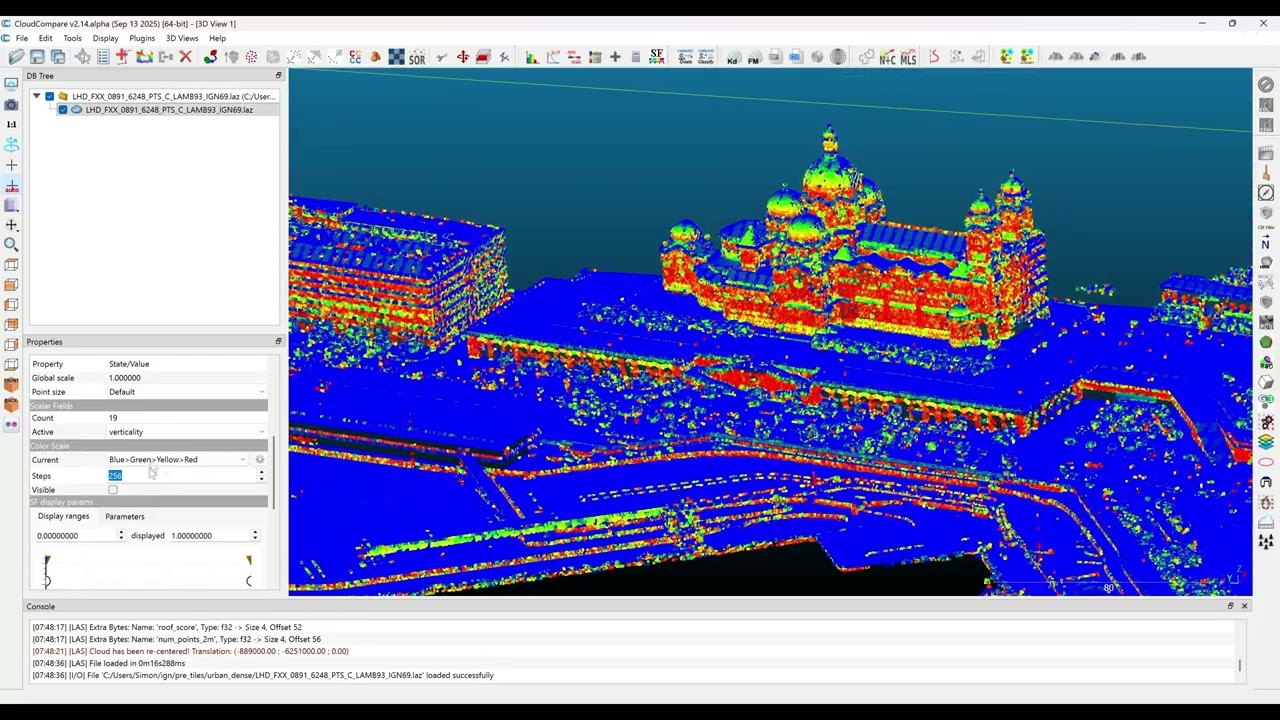
▶️ Watch the Demo Video - Learn how to process LiDAR data for machine learning applications
📊 Project Overview
This library transforms raw IGN LiDAR HD point clouds into structured datasets ready for machine learning applications. Built specifically for building classification tasks, it handles the complete pipeline from data acquisition to training-ready patches.
🔄 Processing Workflow
flowchart TD
    A[IGN LiDAR HD Data] --> B[Download Tiles]
    B --> C[Enrich with Features]
    C --> D[Create Training Patches]
    D --> E[ML-Ready Dataset]

    B --> B1[Smart Skip Detection]
    C --> C1[GPU/CPU Processing]
    C --> C2[Geometric Features]
    D --> D1[Data Augmentation]
    D --> D2[LOD Classification]

    style A fill:#e1f5fe
    style E fill:#e8f5e8
    style B1 fill:#fff3e0
    style C1 fill:#fff3e0
    style D1 fill:#fff3e0
📈 Project Stats:
- 🏗️ 14 core modules - Comprehensive processing toolkit
- 📝 10 example scripts - From basic usage to advanced workflows
- 🧪 Comprehensive test suite - Ensuring reliability and performance
- 🌍 50+ curated tiles - Covering diverse French territories
- ⚡ GPU & CPU support - Flexible computation backends
- 🔄 Smart resumability - Never reprocess existing data
🚀 Quick Start
Installation
# Standard installation
pip install ign-lidar-hd

# Optional: GPU acceleration (requires NVIDIA GPU + CUDA)
pip install ign-lidar-hd[gpu]  # Basic GPU support with CuPy

# Advanced GPU with RAPIDS cuML (best performance, conda recommended)
pip install ign-lidar-hd[gpu-full]  # Includes RAPIDS cuML
# Or via conda for better compatibility:
# conda install -c rapidsai -c conda-forge -c nvidia cuml

# Manual GPU setup:
# pip install cupy-cuda11x  # For CUDA 11.x
# pip install cupy-cuda12x  # For CUDA 12.x
# pip install cuml-cu11     # RAPIDS for CUDA 11.x (optional)
GPU Requirements (optional):
- NVIDIA GPU with CUDA support
- CUDA Toolkit 11.0 or higher
- CuPy package matching your CUDA version
- Optional: RAPIDS cuML for advanced GPU-accelerated algorithms
- Expected speedup: 5-6x faster than CPU (CuPy), up to 10x with RAPIDS
📖 GPU Documentation:
- 📘 Complete GPU Guide - Full documentation
- 🚀 Quick Start - Get started in 30 seconds
- 📊 Performance Benchmarks - Expected speedups
Basic Usage
from ign_lidar import LiDARProcessor

# Initialize processor
processor = LiDARProcessor(lod_level="LOD2")

# Process a single tile
patches = processor.process_tile("data.laz", "output/")

# Process multiple files
patches = processor.process_directory("data/", "output/", num_workers=4)
Command Line Interface
# Download tiles
ign-lidar-hd download --bbox -2.0,47.0,-1.0,48.0 --output tiles/ --max-tiles 10

# Enrich LAZ files with geometric features
ign-lidar-hd enrich --input-dir tiles/ --output enriched/ --num-workers 4

# Enrich with geometric features
ign-lidar-hd enrich --input-dir tiles/ --output enriched/

# Enrich with GPU acceleration (requires CuPy)
# Automatically falls back to CPU if GPU unavailable
ign-lidar-hd enrich --input-dir tiles/ --output enriched/ --use-gpu

# Enrich with RGB augmentation from IGN orthophotos
ign-lidar-hd enrich --input-dir tiles/ --output enriched/ --add-rgb --rgb-cache-dir cache/

# Create training patches
ign-lidar-hd patch --input-dir enriched/ --output patches/ --lod-level LOD2

# 🆕 Run complete workflow with YAML configuration
ign-lidar-hd pipeline config.yaml
🆕 Pipeline Configuration (Recommended)
Use YAML configuration files for reproducible workflows:
# Create example configuration
ign-lidar-hd pipeline my_config.yaml --create-example full

# Edit configuration (my_config.yaml)
# Then run complete pipeline
ign-lidar-hd pipeline my_config.yaml
Example YAML configuration:
global:
  num_workers: 4

download:
  bbox: "2.3, 48.8, 2.4, 48.9"
  output: "data/raw"
  max_tiles: 10

enrich:
  input_dir: "data/raw"
  output: "data/enriched"
  mode: "building"
  add_rgb: true
  rgb_cache_dir: "cache/orthophotos"
  use_gpu: true

patch:
  input_dir: "data/enriched"
  output: "data/patches"
  lod_level: "LOD2"
  num_points: 16384
  augment: true
Benefits:
- ✅ Reproducible - Version control your workflows
- ✅ Declarative - Define what you want, not how
- ✅ Flexible - Run only the stages you need
- ✅ Shareable - Easy team collaboration
📋 Key Features
🏗️ Core Processing Capabilities
- LiDAR-only processing: Pure geometric analysis without RGB dependencies
- RGB augmentation: Optional color enrichment from IGN BD ORTHO® orthophotos
- Multi-level classification: Support for LOD2 (15 classes) and LOD3 (30+ classes)
- Rich feature extraction: Surface normals, curvature, planarity, verticality, local density
- Architectural style inference: Automatic building style classification
- Patch-based processing: Configurable 150m × 150m patches with overlap control
⚡ Performance & Optimization
- GPU acceleration: CUDA-accelerated feature computation with automatic CPU fallback
- Parallel processing: Multi-worker support with automatic CPU core detection
- Memory optimization: Chunked processing for large datasets
- Smart skip detection: ⏭️ Automatically skip existing files and resume interrupted workflows
- Batch operations: Process hundreds of tiles efficiently
🔧 Workflow Automation
- Pipeline configuration: 🆕 YAML-based declarative workflows for reproducibility
- Integrated downloader: IGN WFS tile discovery and batch downloading
- Format flexibility: Choose between LAZ 1.4 (full features) or QGIS-compatible output
- Data augmentation: Rotation, jitter, scaling, and dropout for ML training
- Unified CLI: Single
ign-lidar-hdcommand with intuitive subcommands - Idempotent operations: Safe to restart - never reprocesses existing data
🌍 Geographic Intelligence
- Strategic locations: Pre-configured urban, coastal, and rural area processing
- Bounding box filtering: Spatial subsetting for targeted analysis
- Coordinate system handling: Automatic Lambert93 to WGS84 transformations
- Tile management: Curated collection of 50+ test tiles across France
🏗️ Library Architecture
🎯 Component Architecture
graph TB
    subgraph "Core Processing"
        P[processor.py<br/>🔧 Main Engine]
        F[features.py<br/>⚡ Feature Extraction]
        GPU[features_gpu.py<br/>🖥️ GPU Acceleration]
    end

    subgraph "Data Management"
        D[downloader.py<br/>📥 IGN WFS Integration]
        TL[tile_list.py<br/>📂 Tile Management]
        SL[strategic_locations.py<br/>�️ Geographic Zones]
        MD[metadata.py<br/>📊 Dataset Metadata]
    end

    subgraph "Classification & Styles"
        C[classes.py<br/>🏢 LOD2/LOD3 Schemas]
        AS[architectural_styles.py<br/>🎨 Style Inference]
    end

    subgraph "Integration & Config"
        CLI[cli.py<br/>🖱️ Command Interface]
        CFG[config.py<br/>⚙️ Configuration]
        QGIS[qgis_converter.py<br/>🔄 QGIS Compatibility]
        U[utils.py<br/>🛠️ Core Utilities]
    end

    CLI --> P
    CLI --> D
    P --> F
    P --> GPU
    P --> C
    F --> AS
    D --> TL
    D --> SL
    P --> MD

    style P fill:#e3f2fd
    style F fill:#e8f5e8
    style D fill:#fff3e0
    style CLI fill:#f3e5f5
📋 Module Responsibilities
| Module | Purpose | Key Features |
|---|---|---|
🔧 processor.py |
Main processing engine | Patch creation, LOD classification, workflow orchestration |
📥 downloader.py |
IGN WFS integration | Tile discovery, batch download, smart skip detection |
⚡ features.py |
Feature extraction | Normals, curvature, geometric properties |
�️ features_gpu.py |
GPU acceleration | CUDA-optimized feature computation |
🏢 classes.py |
Classification schemas | LOD2/LOD3 building taxonomies |
🎨 architectural_styles.py |
Style inference | Building architecture classification |
🔄 Example Workflows
examples/
├── 🚀 basic_usage.py           # Getting started
├── 🏙️ example_urban_simple.py  # Urban processing
├── ⚡ parallel_processing_example.py # Performance
├── 🔄 full_workflow_example.py # End-to-end pipeline
├── 🎨 multistyle_processing.py # Architecture analysis
├── 🧠 pytorch_dataloader.py    # ML integration
├── 🆕 pipeline_example.py      # YAML pipeline usage
├── 🆕 enrich_with_rgb.py       # RGB augmentation
└── workflows/               # Production pipelines

config_examples/
├── 🆕 pipeline_full.yaml       # Complete workflow
├── 🆕 pipeline_enrich.yaml     # Enrich-only
└── 🆕 pipeline_patch.yaml      # Patch-only
⚙️ CLI Commands
The package provides a unified ign-lidar-hd command with four subcommands:
🔗 CLI Workflow Chain
sequenceDiagram
    participant User
    participant CLI as ign-lidar-hd
    participant D as Downloader
    participant E as Enricher
    participant P as Processor

    User->>CLI: download --bbox ...
    CLI->>D: Initialize downloader
    D->>D: Fetch available tiles
    D->>D: Smart skip check
    D-->>CLI: Downloaded tiles
    CLI-->>User: ✓ Tiles ready

    User->>CLI: enrich --input-dir ...
    CLI->>E: Initialize enricher
    E->>E: Compute geometric features
    E->>E: Optional RGB augmentation
    E->>E: GPU/CPU processing
    E-->>CLI: Enriched LAZ files
    CLI-->>User: ✓ Features computed

    User->>CLI: patch --input-dir ...
    CLI->>P: Initialize processor
    P->>P: Create training patches
    P->>P: Apply augmentations
    P-->>CLI: ML-ready dataset
    CLI-->>User: ✓ Dataset ready

    Note over User,CLI: 🆕 Or use pipeline command
    User->>CLI: pipeline config.yaml
    CLI->>CLI: Load YAML config
    CLI->>D: Execute download stage
    CLI->>E: Execute enrich stage
    CLI->>P: Execute patch stage
    CLI-->>User: ✓ Complete workflow
🆕 Pipeline Command (Recommended)
Execute complete workflows using YAML configuration:
# Create example configuration
ign-lidar-hd pipeline my_config.yaml --create-example full

# Run configured pipeline
ign-lidar-hd pipeline my_config.yaml
See Pipeline Configuration Guide for detailed examples.
Download Command
Download LiDAR tiles from IGN:
ign-lidar-hd download \
  --bbox lon_min,lat_min,lon_max,lat_max \
  --output tiles/ \
  --max-tiles 50
Enrich Command
Enrich LAZ files with geometric features and optional RGB:
# CPU version (automatically skips existing enriched files)
ign-lidar-hd enrich \
  --input-dir tiles/ \
  --output enriched/ \
  --num-workers 4 \
  --k-neighbors 10

# 🆕 With RGB augmentation from IGN orthophotos
ign-lidar-hd enrich \
  --input-dir tiles/ \
  --output enriched/ \
  --add-rgb \
  --rgb-cache-dir cache/orthophotos

# Force re-enrichment (ignore existing files)
ign-lidar-hd enrich \
  --input-dir tiles/ \
  --output enriched/ \
  --force

# GPU version (requires CUDA)
ign-lidar-hd enrich \
  --input-dir tiles/ \
  --output enriched/ \
  --use-gpu
💡 Smart Skip: By default, the enrich command skips files that have already been enriched, making it safe to resume interrupted operations.
Patch Command
Create training patches from enriched LAZ files:
# Automatically skips tiles with existing patches
ign-lidar-hd patch \
  --input-dir enriched/ \
  --output patches/ \
  --lod-level LOD2 \
  --patch-size 150.0 \
  --num-workers 4 \
  --num-augmentations 3

# Force reprocessing (ignore existing patches)
ign-lidar-hd patch \
  --input-dir enriched/ \
  --output patches/ \
  --force
💡 Smart Skip: The patch command automatically detects existing patches and skips reprocessing, allowing you to resume interrupted batch jobs.
🔧 Configuration
LOD Levels
- LOD2: Simplified building models (15 classes)
- LOD3: Detailed building models (30 classes)
Processing Options
processor = LiDARProcessor(
    lod_level="LOD2",           # LOD2 or LOD3
    augment=True,               # Enable augmentation
    num_augmentations=3,        # Augmentations per patch
    patch_size=150.0,          # Patch size in meters
    patch_overlap=0.1,         # 10% overlap
    bbox=[xmin, ymin, xmax, ymax]  # Spatial filter
)
📊 Output Format
📁 Data Structure Overview
graph TB
    subgraph "Raw Input"
        LAZ[LAZ Point Cloud<br/>XYZ + Intensity<br/>Classification]
    end

    subgraph "Enriched Data"
        ELAZ[Enhanced LAZ<br/>+ 30 Features<br/>+ Building Labels]
    end

    subgraph "ML Dataset"
        NPZ[NPZ Patches<br/>16K points each<br/>Ready for Training]
    end

    subgraph "NPZ Contents"
        COORD[Coordinates<br/>X, Y, Z]
        GEOM[Geometric Features<br/>Normals, Curvature]
        SEMANTIC[Semantic Features<br/>Planarity, Verticality]
        META[Metadata<br/>Intensity, Return#]
        LABELS[Building Labels<br/>LOD2/LOD3 Classes]
    end

    LAZ --> ELAZ
    ELAZ --> NPZ
    NPZ --> COORD
    NPZ --> GEOM
    NPZ --> SEMANTIC
    NPZ --> META
    NPZ --> LABELS

    style LAZ fill:#ffebee
    style ELAZ fill:#e3f2fd
    style NPZ fill:#e8f5e8
🔢 NPZ File Structure
Each patch is saved as an NPZ file containing:
{
    'points': np.ndarray,          # [N, 3] XYZ coordinates
    'normals': np.ndarray,         # [N, 3] surface normals
    'curvature': np.ndarray,       # [N] principal curvature
    'intensity': np.ndarray,       # [N] normalized intensity
    'return_number': np.ndarray,   # [N] return number
    'height': np.ndarray,          # [N] height above ground
    'planarity': np.ndarray,       # [N] planarity measure
    'verticality': np.ndarray,     # [N] verticality measure
    'horizontality': np.ndarray,   # [N] horizontality measure
    'density': np.ndarray,         # [N] local point density
    'labels': np.ndarray,          # [N] building class labels
}
📏 Data Dimensions
| Component | Shape | Data Type | Description |
|---|---|---|---|
points |
[N, 3] | float32 |
3D coordinates (X, Y, Z) |
normals |
[N, 3] | float32 |
Surface normal vectors |
features |
[N, 27] | float32 |
Geometric feature matrix |
labels |
[N] | uint8 |
Building component classes |
metadata |
[4] | object |
Patch info (bbox, tile_id) |
📦 Typical patch: 16,384 points, ~2.5MB compressed, ~8MB in memory
🌍 Batch Download
from ign_lidar import IGNLiDARDownloader

# Initialize downloader
downloader = IGNLiDARDownloader("downloads/")

# Download tiles by bounding box (WGS84)
tiles = downloader.download_by_bbox(
    bbox=(-2.0, 47.0, -1.0, 48.0),  # West France
    max_tiles=10
)

# Download specific tiles
tile_names = ["LHD_FXX_0186_6834_PTS_C_LAMB93_IGN69"]
downloader.download_tiles(tile_names)
📝 Examples
Urban Processing
# High-detail urban processing
processor = LiDARProcessor(lod_level="LOD3", num_augmentations=5)
patches = processor.process_tile("urban_area.laz", "output/urban/")
Rural Processing
# Simplified rural processing
processor = LiDARProcessor(lod_level="LOD2", num_augmentations=2)
patches = processor.process_tile("rural_area.laz", "output/rural/")
Batch Processing
from ign_lidar import WORKING_TILES, get_tiles_by_environment

# Get coastal tiles
coastal_tiles = get_tiles_by_environment("coastal")

# Process all coastal areas
for tile_info in coastal_tiles:
    patches = processor.process_tile(
        f"data/{tile_info['tile_name']}.laz",
        f"output/coastal/{tile_info['tile_name']}/"
    )
🛠️ Development
Setup Development Environment
git clone https://github.com/your-username/ign-lidar-hd-downloader
cd ign-lidar-hd-downloader
pip install -e ".[dev]"
Run Tests
pytest tests/
Code Formatting
black ign_lidar/
flake8 ign_lidar/
📚 Documentation & Resources
📖 Complete Documentation Hub
For comprehensive documentation, see the Documentation Hub:
- 📖 User Guides - Quick start guides, QGIS integration, troubleshooting
- ⚡ Features - Smart skip detection, format preferences, workflow optimization
- 🔧 Technical Reference - Memory optimization, performance tuning
- 📦 Archive - Bug fixes history, release notes, migration guides
🚀 Essential Quick Links
- 🎯 Quick Reference Card - Fast reference for all commands
- ⚡ Smart Skip Features - Resume workflows efficiently
- 🗺️ QGIS Integration - GIS compatibility guide
- ⚙️ Memory Optimization - Performance tuning
- 📋 Output Formats - LAZ 1.4 vs QGIS formats
💡 Examples & Workflows
- Basic Usage - Simple processing examples
- Urban Processing - City-specific workflows
- Parallel Processing - Multi-worker optimization
- Full Workflow - End-to-end pipeline
- 🆕 Pipeline Configuration - YAML-based workflows
- 🆕 RGB Augmentation - Orthophoto integration
- PyTorch Integration - ML training setup
🚀 Coming Soon: Interactive Documentation
We're working on a comprehensive Docusaurus documentation site that will include:
- 🌐 Multi-language support (English & French)
- 🔍 Full-text search
- 📱 Mobile-responsive design
- 📖 Interactive tutorials
- 🔗 Auto-generated API reference
- 💡 Live code examples
See the Docusaurus Plan for details.
📚 API Reference
Core Classes
LiDARProcessor: Main processing engineIGNLiDARDownloader: Batch download functionalityLOD2_CLASSES,LOD3_CLASSES: Classification taxonomies
Utility Functions
compute_normals(): Surface normal computationcompute_curvature(): Principal curvature calculationextract_geometric_features(): Comprehensive feature extractionget_tiles_by_environment(): Filter tiles by environment type
🔗 Requirements
- Python 3.8+
- NumPy >= 1.21.0
- laspy >= 2.3.0
- scikit-learn >= 1.0.0
- tqdm >= 4.60.0
- requests >= 2.25.0
- PyYAML >= 6.0 (for pipeline configuration)
- Pillow >= 9.0.0 (for RGB augmentation)
📄 License
MIT License - see LICENSE file for details.
🤝 Contributing
Contributions are welcome! Please feel free to submit a Pull Request.
📧 Support
For issues and questions, please use the GitHub Issues page.
Release history Release notifications | RSS feed


Download files
Download the file for your platform. If you're not sure which to choose, learn more about installing packages.
Source Distribution
Built Distribution
Filter files by name, interpreter, ABI, and platform.
If you're not sure about the file name format, learn more about wheel file names.
Copy a direct link to the current filters
File details
Details for the file ign_lidar_hd-1.5.1.tar.gz.
File metadata
- Download URL: ign_lidar_hd-1.5.1.tar.gz
- Upload date:
- Size: 98.6 kB
- Tags: Source
- Uploaded using Trusted Publishing? No
- Uploaded via: twine/6.2.0 CPython/3.12.3
File hashes
| Algorithm | Hash digest | |
|---|---|---|
| SHA256 |
ba6c7b02eff3402677235831c4f269dec58a433d3672c6023032bc6923f6484f
|
|
| MD5 |
c5ace8ee5427f489c2335a075ed73f87
|
|
| BLAKE2b-256 |
72f71156aa418a670dab750921a9bf38e615cbf320aabff97d8f72dcf9db849e
|
File details
Details for the file ign_lidar_hd-1.5.1-py3-none-any.whl.
File metadata
- Download URL: ign_lidar_hd-1.5.1-py3-none-any.whl
- Upload date:
- Size: 81.1 kB
- Tags: Python 3
- Uploaded using Trusted Publishing? No
- Uploaded via: twine/6.2.0 CPython/3.12.3
File hashes
| Algorithm | Hash digest | |
|---|---|---|
| SHA256 |
885378b5e66aa3c3f2ffc0fa70976bd62924fb3cd8f6be79eeaf433bd077be6c
|
|
| MD5 |
c92ec398c6e98d5dd4a13b5d1b6d76db
|
|
| BLAKE2b-256 |
ad52ea2dd05eddac3f1050624e073da6947b80c864eec161681ad61d25f5a177
|






