
Download almost everything from instagram, from public accounts and from your followers

Project description
igpd-linux
Note: This package works only on linux operating system
This package helps you to download the following from instagram
-
Posts (Reels,IGTV)
-
Story
-
Highlights
-
Entire profile
Installation
Run the following to install:
pip install igpd-linux
Usage
Open in terminal and type the following command
python3 -m igpd_l
Things to Remember
-
Please enter the url in with a forward slash at the end when you wanna download a post Example: https://www.instagram.com/reel/CbfbXuCg5lf/"
-
If you want to download a private user's post story and etc choose option 1
-
If you want to download a public user's post/Igtv/EntireProfile choose option 2
-
If you want to download a public user's story/reels/hightlights choose option 1, because these can't be downloaded without login
Most important thing:
When you enter your username and password for the first time, the data is stored in a folder in home called .igpd/user_data/. The data is stored in order to prevent you from tying the data again and agin.
The problem
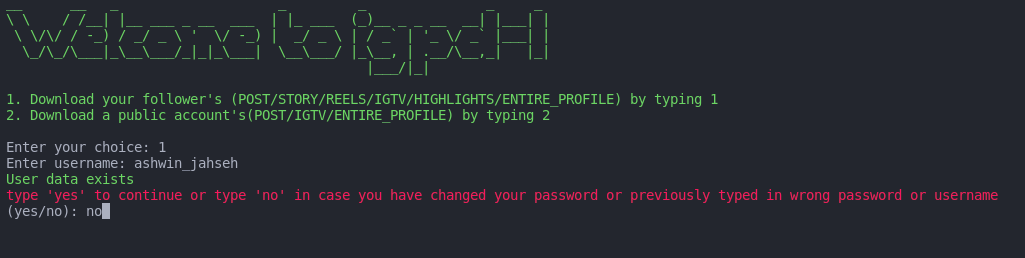
Even if you have entered a wrong username or password the data gets stored since the bad credentials exception handling feature is not available yet. Since the data gets stored, when you run the tool for the next time it asks to validate your login by typing yes, but you won't be able to login since wrong data is stored.
How to fix it
Run the program, type in username and the following prompt will be shown and type in no when it appers to reset your username and password.
Release history Release notifications | RSS feed

Download files
Download the file for your platform. If you're not sure which to choose, learn more about installing packages.
Source Distribution
Built Distribution
Filter files by name, interpreter, ABI, and platform.
If you're not sure about the file name format, learn more about wheel file names.
Copy a direct link to the current filters
File details
Details for the file igpd-linux-0.1.6.tar.gz.
File metadata
- Download URL: igpd-linux-0.1.6.tar.gz
- Upload date:
- Size: 5.0 kB
- Tags: Source
- Uploaded using Trusted Publishing? No
- Uploaded via: twine/3.3.0 pkginfo/1.6.1 requests/2.24.0 setuptools/50.3.2 requests-toolbelt/0.9.1 tqdm/4.54.1 CPython/3.8.10
File hashes
| Algorithm | Hash digest | |
|---|---|---|
| SHA256 |
569e6f1f000a3fc584d9260ffcd2edb3040043bdac545b1274d357cabc84fdee
|
|
| MD5 |
8aa74f8b2b83d955d90c3eaf21e77b97
|
|
| BLAKE2b-256 |
61f509cbf8c8a15072d1d272ba39d7da7cb4792e2bff1f75f709c4a34e63b08b
|
File details
Details for the file igpd_linux-0.1.6-py3-none-any.whl.
File metadata
- Download URL: igpd_linux-0.1.6-py3-none-any.whl
- Upload date:
- Size: 4.3 kB
- Tags: Python 3
- Uploaded using Trusted Publishing? No
- Uploaded via: twine/3.3.0 pkginfo/1.6.1 requests/2.24.0 setuptools/50.3.2 requests-toolbelt/0.9.1 tqdm/4.54.1 CPython/3.8.10
File hashes
| Algorithm | Hash digest | |
|---|---|---|
| SHA256 |
e20c3a9cd9bc6fb919add5243707945dfb1d963859b71cf8734e838c9f12f005
|
|
| MD5 |
1947b0730834723e51719d145f8aa0d9
|
|
| BLAKE2b-256 |
697443d7b78458b9c1b8c235eb68458cea00ef094b05e5b240de8b88a9e0b168
|






