
Toolkit for the IILABS 3D dataset

Project description



This toolkit provides a set of utilities to work with the IILABS 3D Dataset. It enables you to list available dataset sequences and sensors, download sequences along with sensor data, convert ROS1 bag files to ROS2 format, evaluate trajectories using accuracy metrics, and correct trajectory reference frames.
With this version, it is possible to do:
- List Sequences and Sensors: Easily view all available dataset sequences (benchmark, calibration, etc.) and 3D LiDAR sensors.
- Download Data: Download sequences and sensor data with a single command.
- Bag File Conversion: Convert ROS1 bag files to ROS2 format using the rosbags Python library.
- Trajectory Evaluation: Calculate accuracy metrics between ground truth and odometry trajectories using the evo Python library.
- Reference Frame Correction: Adjust trajectory reference frames to the reference frame of the ground-truth data (
base_link).
Installation
To install the IILABS 3D Toolkit, run the following command:
pip install iilabs3d-toolkit
You can also install autocompletion for the package by typing:
iilabs3d --install-completion
Note: You need to restart your shell for the autocompletion to take effect.
Usage
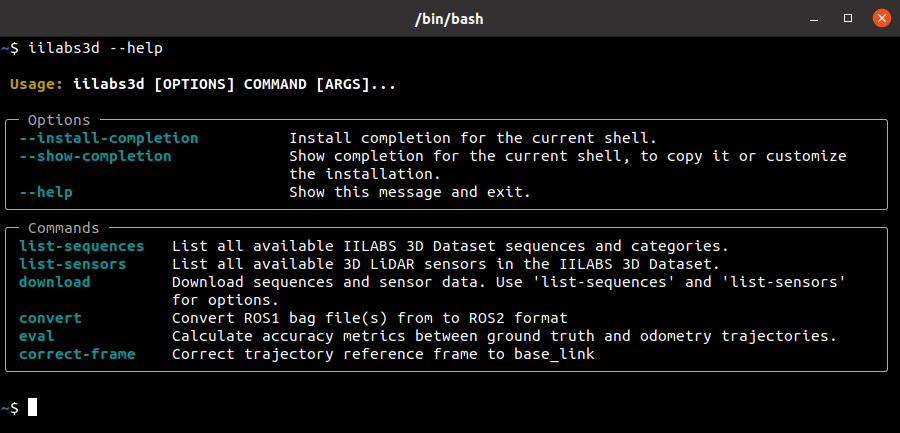
To see all the available commands type:
iilabs3d --help
Listing Commands
List Available Sequences
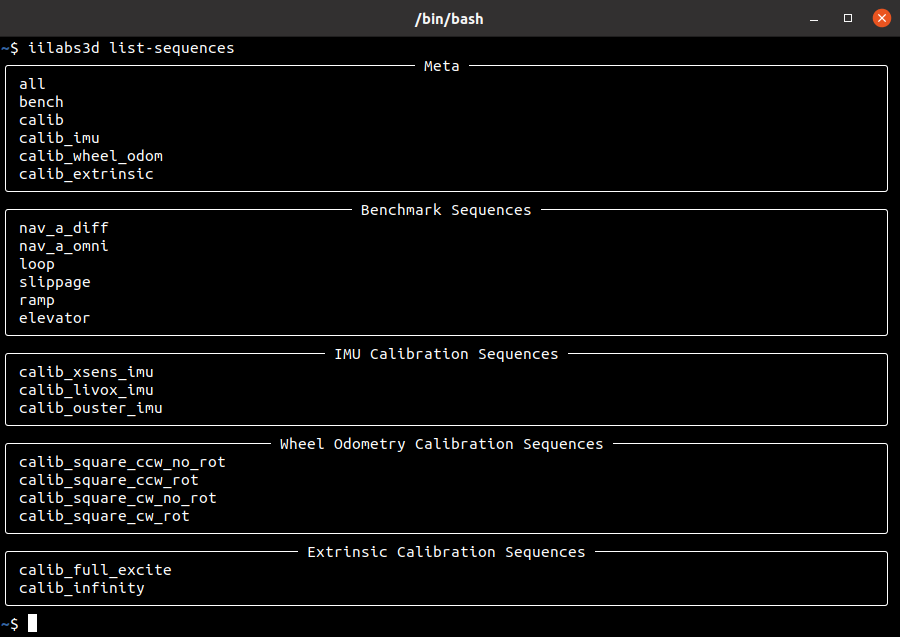
You can list the available sequences in the IILABS 3D dataset by typing:
iilabs3d list-sequences
List Available Sensors
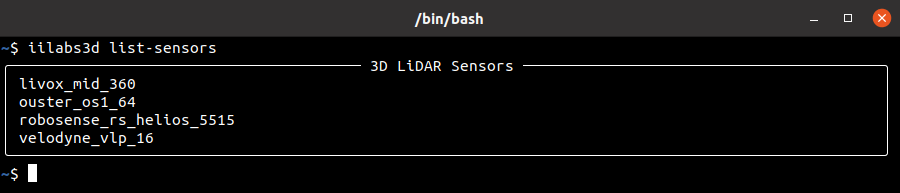
The IILABS 3D dataset provides all the sequences for different 3D LiDAR sensors, such as the Livox Mid 360, Velodyne VLP-16, etc. You can list the available 3D LiDAR sensors present in the IILABS 3D dataset by typing:
iilabs3d list-sensors
Data Download
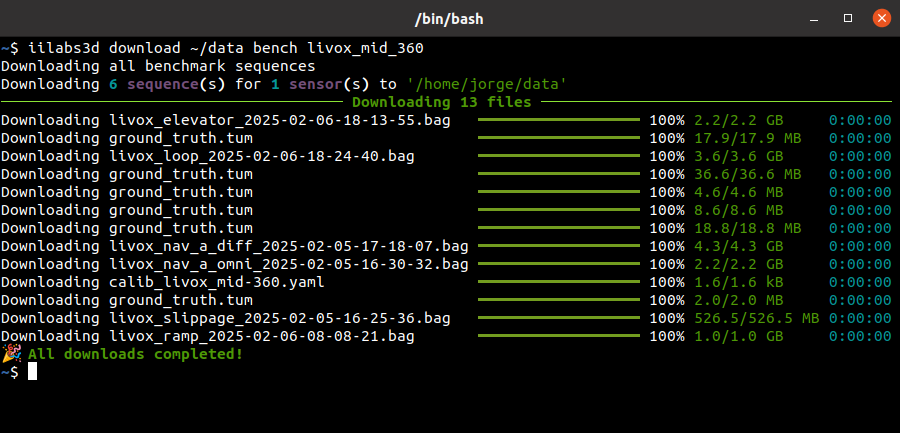
Once you've chosen your sequence and sensor, you can download it with the following command:
iilabs3d download <output_directory> <sequence_name> <sensor_name>
For instance, you could download all benchmark sequences for all sensors as follows:
iilabs3d download ~/data bench all
Note: The sequence will be saved at
<save_directory>/iilabs3d-dataset/<sequence_prefix>/<sequence_name>. For example:
data
  - iilabs3d-dataset
    - benchmark
      - livox_mid-360
        - calib_livox_mid-360.yaml
        - elevator
          - *.bag
          - ground_truth.tum
        - loop
          - *.bag
          - ground_truth.tum
        ...
      - ouster_os1-64
        - calib_ouster_os1-64.yaml
        - elevator
          - *.bag
          - ground_truth.tum
        - loop
          - *.bag
          - ground_truth.tum
        ...
      ...
Bag File Conversion
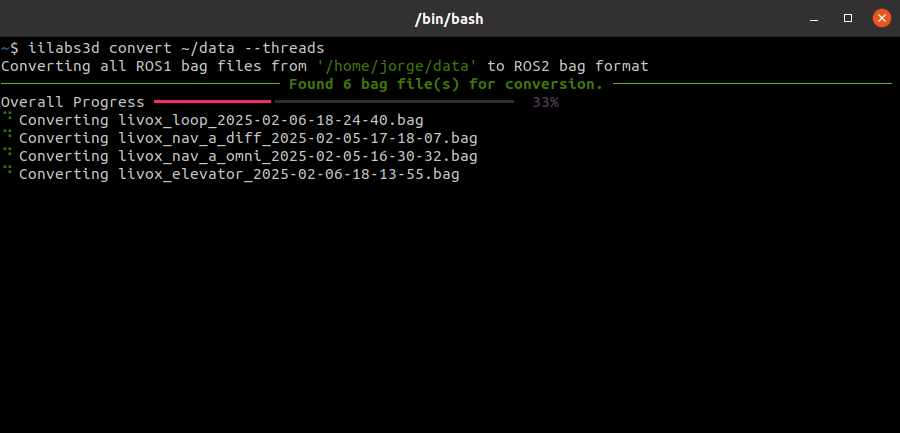
The dataset sequences are provided in ROS1 bag format. We offer a convenient tool to convert them to ROS2 format, making use of the rosbags open-source Python library to perform the conversion. To convert a bag or a sequence of bags, type:
iilabs3d convert <input_bag_or_directory> [--threads]
Note: We provide a option
--threadsto allow concurrent conversion of multiple bag files.
Trajectory Evaluation
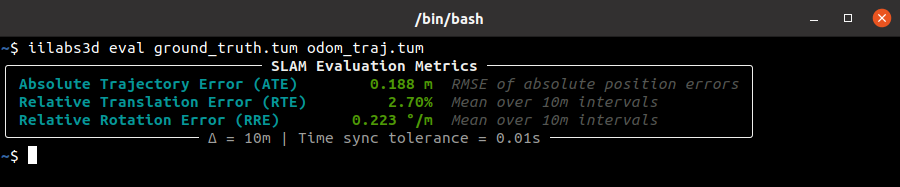
After downloading the desired sequence and retrieving the odometry trajectory using a SLAM algorithm, you can calculate the accuracy metrics using both the ground-truth and the odometry trajectories in TUM file format. In this toolkit we use the evo open-source Python library for metric computation. Therefore, to calculate the metrics you can type:
iilabs3d eval <ground_truth.tum> <odometry.tum>
If you don't have the odometry trajectory in a tum file format, you can use the evo script to make a conversion from different formats. for example, if your odometry trajectory is provided as a ROS1 bag file, you can run:
evo_traj bag <bag_file_name> <topic_name> --save_as_tum
To check all the available supported formats, please refer to the official evo documentation.
Reference Frame Correction
Since the ground-truth data is provided in the robot base_link frame it is important to have the odometry trajectory data in the same reference frame when calculating the accuracy metrics. As such, we provide a command to make the required correction using the transformations retrieved from the CAD models of the robot. The supported reference frames are base_footprint, imu, and lidar, where the last one requires the specification of the 3D LiDAR sensor to be considered (e.g. livox_mid_360). To perform this correction type:
iilabs3d correct-frame <trajectory.tum> <ref_frame> [--sensor <sensor_name>]

License
Distributed under the BSD 3-Clause License. See LICENSE for more information.
References
If you use iilabs3d-toolkit in a work that leads to a scientific publication, we would appreciate it if you would kindly cite the IILABS 3D dataset in your manuscript:
J.D. Ribeiro, R.B. Sousa, J.G. Martins, A.S. Aguiar, F.N. Santos and H.M. Sobreira, "IILABS 3D: iilab Indoor LiDAR-based SLAM Dataset" [Dataset], INESC TEC, 2025, DOI: https://doi.org/10.25747/VHNJ-WM80.
Contacts
If you have any questions or you want to know more about this work, please contact one of the contributors of this package:
- Jorge Diogo Ribeiro (github, gitlab, mail)
- Ricardo B. Sousa (github, gitlab, mail)
- Héber Miguel Sobreira (github, gitlab, mail)
Acknowledgements
- CRIIS - Centre for Robotics in Industry and Intelligent Systems from INESC TEC - Institute for Systems and Computer Engineering, Technology and Science
- Faculty of Engineering, University of Porto (FEUP)
Funding
This work is co-financed by Component 5 - Capitalisation and Business Innovation, integrated in the Resilience Dimension of the Recovery and Resilience Plan within the scope of the Recovery and Resilience Mechanism (MRR) of the European Union (EU), framed in the Next Generation EU, for the period 2021-2026, within project GreenAuto, with reference 54.
Release history Release notifications | RSS feed


Download files
Download the file for your platform. If you're not sure which to choose, learn more about installing packages.
Source Distribution
File details
Details for the file iilabs3d_toolkit-0.1.1.tar.gz.
File metadata
- Download URL: iilabs3d_toolkit-0.1.1.tar.gz
- Upload date:
- Size: 12.3 kB
- Tags: Source
- Uploaded using Trusted Publishing? No
- Uploaded via: twine/6.1.0 CPython/3.12.9
File hashes
| Algorithm | Hash digest | |
|---|---|---|
| SHA256 |
e432ceb8795eafdb7be5c75ffcddef5be0797dbcd4855cfde597f953148788a6
|
|
| MD5 |
aafa98c53a960246cba41480741d8ee5
|
|
| BLAKE2b-256 |
2d82a9895e22b950e97467af02872230bf512e6b6eb7e74e94069d8bc4e821c8
|






