
iinfer: An application that executes AI model files in onnx or mmlab format.

Project description
iinfer (Image Inference Application)
- onnx又はmmlabフォーマットのAIモデルファイルを実行するアプリケーションです。
- ドキュメントはこちら。
- このアプリケーションはcmdboxをベースにしています。
- iinferを使用することで、AIモデルを簡単に実行することが出来ます。
- 動作確認したモデルは動作確認済みモデルに記載しています。
- 主なAIタスクは、画像分類、物体検知、領域検知、顔検知、顔認識です。
- 複数の
iinferコマンドの入出力をつなげる、パイプライン処理を行うことが出来ます。 - GUIモードを使用することで、
iinferコマンド操作を簡単に行うことが出来ます。
iinferの動作イメージ
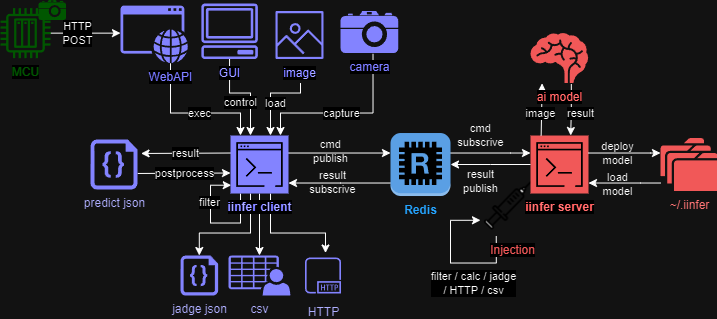
- iinfer client は imageファイル や camera から画像を取得し、 推論結果 predict.json を出力します。
- iinfer server は推論を行うサーバーです。 iinfer client からの要求に応えて、推論結果を iinfer client に返します。
- iinfer server は予め ai model をロードしておくことで、推論を高速化します。
- iinfer client と iinfer server は Redis 経由で通信します。
- iinfer server と Redis は dockerコンテナ を使用して起動させることが出来ます。
インストール方法
- 次のコマンドで iinfer をインストールしてください。
- また、Docker 版の Redis サーバーもインストールしてください。
- 詳細なインストール方法は こちら を参照してください。
docker run -p 6379:6379 --name redis -e REDIS_PASSWORD=password -it ubuntu/redis:latest
pip install iinfer
iinfer -v
- WebモードでSAMLを使用する場合、依存関係のあるモジュールをインストールしてください。
pip install iinfer[saml]
apt-get install -y pkg-config libxml2-dev libxmlsec1-dev libxmlsec1-openssl build-essential libopencv-dev
- Webモードで
--agent useを使用する場合、依存関係のあるモジュールをインストールしてください。
pip install "pydantic>=2.0.0,<3.0.0"
pip install "fastmcp>=2.14.0" "mcp>=1.10.0,<2.0.0"
pip install "google-adk>=1.21.0" "litellm"
iinferの使用方法
iinferを使用するには、次のコマンドを実行します:
- guiモードで利用する場合:
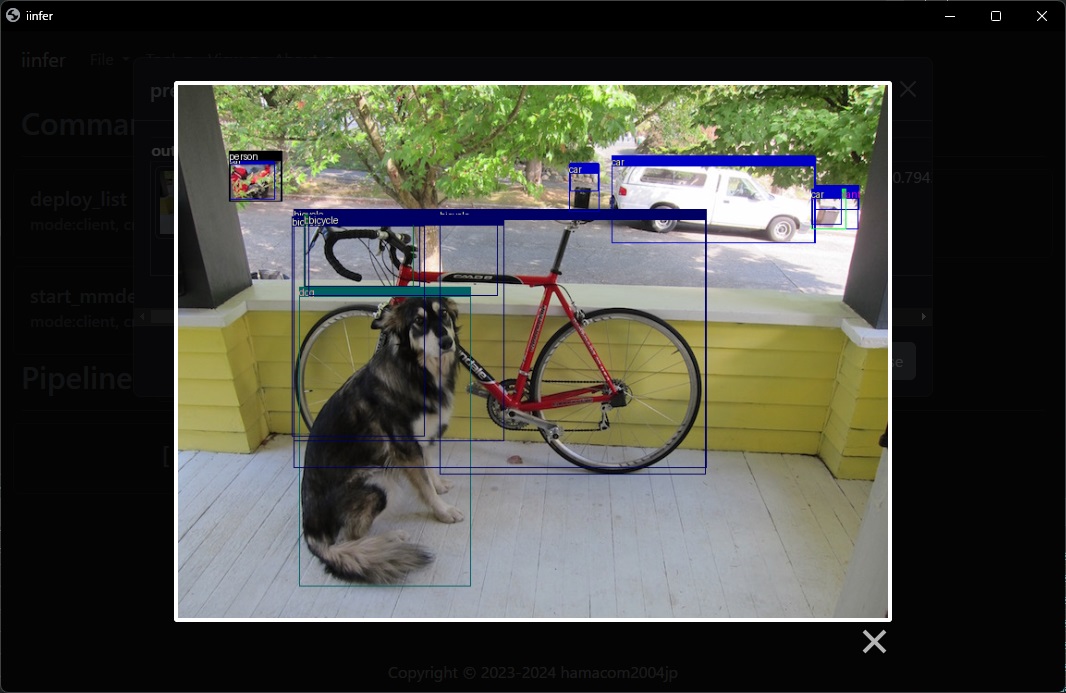
iinfer -m gui -c start
-
コマンドモードで利用する場合
- AIモデルのデプロイ:
# 画像AIモデルのデプロイ
# 推論タイプはモデルのAIタスクやアルゴリズムに合わせて指定する。指定可能なキーワードは"iinfer -m client -c predict_type_list"コマンド参照。
iinfer -m client -c deploy -n <任意のモデル名> -f \
                           --model_file <モデルファイル> \
                           --model_conf_file <モデル設定ファイル> \
                           --predict_type <推論タイプ> \
                           --label_file <ラベルファイル>

# デプロイされている画像AIモデルの一覧
iinfer -m client -c deploy_list -f
- AIモデルのセッションを開始:
# 画像AIモデルを起動させて推論可能な状態に(セッションを確保)する
# use_trackを指定するとObjectDetectionタスクの結果に対して、MOT(Multi Object Tracking)を実行しトラッキングIDを出力する。
iinfer -m client -c start -n <モデル名> -f \
                          --use_track
- 推論を実行:
# 推論を実行する
# output_previewを指定するとimshowで推論結果画像を表示する(GUI必要)
iinfer -m client -c predict -n <モデル名> -f \
                            -i <推論させる画像ファイル> \
                            -o <推論結果の画像ファイル> \
                            --output_preview

# カメラキャプチャー画像を元に推論を実行し、クラススコアが0.8以上の物体のみを検出する
# --stdin --image_type capture で標準入力のキャプチャー画像を推論する
iinfer -m client -c capture | \
iinfer -m client -c predict -n <モデル名> \
                            --stdin \
                            --image_type capture \
                            --nodraw | \
iinfer -m postprocess -c det_filter -f -P \
                            --stdin \
                            --score_th 0.8
- AIモデルのセッションを開放:
# 画像AIモデルを停止させてセッションを開放
iinfer -m client -c stop -n <モデル名> -f
Lisence
This project is licensed under the MIT License, see the LICENSE file for details
Release history Release notifications | RSS feed


Download files
Download the file for your platform. If you're not sure which to choose, learn more about installing packages.
Source Distribution
iinfer-0.13.1.tar.gz
(692.9 kB
view details)
Built Distribution
Filter files by name, interpreter, ABI, and platform.
If you're not sure about the file name format, learn more about wheel file names.
Copy a direct link to the current filters
File details
Details for the file iinfer-0.13.1.tar.gz.
File metadata
- Download URL: iinfer-0.13.1.tar.gz
- Upload date:
- Size: 692.9 kB
- Tags: Source
- Uploaded using Trusted Publishing? No
- Uploaded via: twine/6.2.0 CPython/3.11.8
File hashes
| Algorithm | Hash digest | |
|---|---|---|
| SHA256 |
01961fadba5bdd745f3778b4e63b10d496a1a8db6a9d58d29e9fbb00b9994c77
|
|
| MD5 |
48a44990775dfb92627838b27bc316c2
|
|
| BLAKE2b-256 |
ea6ef9e6132bac12cb48bc6b8b79202619dae5248d04d960dc82ac0bcb7afe9c
|
File details
Details for the file iinfer-0.13.1-py3-none-any.whl.
File metadata
- Download URL: iinfer-0.13.1-py3-none-any.whl
- Upload date:
- Size: 1.2 MB
- Tags: Python 3
- Uploaded using Trusted Publishing? No
- Uploaded via: twine/6.2.0 CPython/3.11.8
File hashes
| Algorithm | Hash digest | |
|---|---|---|
| SHA256 |
be772649407675209fafa9bb978c002d4157bdb75df76d15f692e80f713a18a3
|
|
| MD5 |
62209f3b2eaaecf891b3db19d8780019
|
|
| BLAKE2b-256 |
cb5159cb510bc130d9172703283348ae372673a23d9db64a5d3a2243baf1a84a
|






