
Iiwi
Iiwi · /ˈiː.wiː/ "ee-wee" — Agent Session Intelligence for engineering work
Probe coding-agent sessions. Surface the work that matters.
The ʻiʻiwi is a scarlet Hawaiian honeycreeper whose long curved bill reaches nectar others cannot. This project uses the anglicised pronunciation.





English | 繁體中文
Iiwi turns coding-agent sessions into weekly reports for managers, saving engineers time.
Why
- Nothing leaves your machine. The narrative review is written by your locally
installed
opencode run— no network request, no API key. - Finds your sessions wherever they are. All projects, no matter which folder you run from.
- Groups by repository. Git worktrees of the same repository collapse into one entry, with child and subagent sessions kept alongside it.
- Redacts before it writes. Session content is checked for common secret patterns locally, before any report or narrative call.
Supports OpenCode, Claude Code, and Codex.
Requirements
- Python 3.11 or newer.
- Git available as
git. - One coding-agent harness: OpenCode (default), Claude Code, or Codex. OpenCode needs
an
opencodeexecutable; Claude Code and Codex need no CLI, only a readable transcript store (~/.claude/projectsor~/.codex).
Install
pipx install iiwi
Or pip install iiwi in a regular Python environment.
Quick start
Run it with no arguments for the terminal-native menu:
$ iiwi
Iiwi
══════════════════════════════════════════════════════
Turn coding-agent sessions into engineering reports

▶ Generate Report
  Browse Sessions
  Check Setup
  Settings

↑↓ jk │ Enter Select │ 1-4 │ ? Help │ q Quit
Choosing Generate a report opens the settings first, so you can change only what matters
before scanning — the cursor sits on the value it changes. Generate report sits below
them, or press g; a line under the list says what the setting you are on actually does.
r opens Review sessions, which groups the scan by repository; press Space on a
repository to toggle the whole group, or expand it and toggle individual sessions.
Generate Report
══════════════════════════════════════════════════════

  Harness      OpenCode
  Period       Aug 03 – Aug 10
▶ Detail       Full
  Subagents    Included
  Narrative    Enabled
  Sanitize     Off
  Dry run      Off

  Generate report

Full keeps every section. Brief drops files, sessions and usage.

↑↓ jk │ ←→ hl Change │ Enter Select │ r Review │ g Generate │ ? Help │ b Back
Review Sessions weighs each repository by how much of the period it actually accounts for, so the biggest contributors are visible without opening anything:
Review Sessions   6 / 6 selected │ 252 / 252 msgs
══════════════════════════════════════════════════════
Select sessions to include in the report:

  1. ▾ ████████████  71% ● iiwi   3 / 3    Aug 5 │ 180 msgs
▶      ████░░░░░░░░  24% ● Add the interactive menu Aug 5 │ 60 msgs
       ████░░░░░░░░  24% ● Redact before writing    Aug 5 │ 60 msgs
       ████░░░░░░░░  24% ● Group worktrees          Aug 5 │ 60 msgs
  2. ▸ ████░░░░░░░░  24% ● obsidian-wiki   2 / 2    Aug 4 │ 60 msgs
  3. ▸ █░░░░░░░░░░░   5% ● dotfiles   1 / 1         Aug 3 │ 12 msgs

↑↓ jk │ ←→ hl │ Space Toggle │ p Preview │ e Exclude │ a All │ g Generate │ / Search │ ? Help │ b Back
Press p on a session row to scroll its transcript inline — redacted before
it is drawn, so the preview never shows more than the report itself would.
Your selection is remembered per period: a rescan (or a changed setting that
rescans) restores what you unselected, and sessions that no longer exist are
dropped automatically. Press e on a repository row to exclude it from every
future scan — the repository is appended to report.exclude_repositories, the
same persistent setting config set writes, and the review rescans so the
repository disappears immediately. Undo with
iiwi config unset report.exclude_repositories.
Or drive the commands directly:
iiwi doctor                       # is the harness ready?
iiwi scan --period last-week      # preview how sessions group
iiwi report --period last-week    # write the report
iiwi history                      # list the reports already written
iiwi update                       # check PyPI for a newer release
scan, doctor, history, and update emit JSON when stdout is piped, or
when asked with --json — iiwi scan --period last-week | jq '.repositories' works out of the box, and every value is redacted before it is
emitted. --no-json forces the human output, and history --json returns the
recorded reports as an array.
The report defaults to a narrative weekly review written by your local opencode run.
Add --no-llm for the deterministic structured report, which works for every harness
whether or not OpenCode is installed:
iiwi report --period last-week --no-llm
Output lands under reports/. For another harness, add --harness claude-code or
--harness codex — the narrative default behaves the same for all of them, reading
that harness's sessions and still calling your local opencode run.
Prefer to be asked instead of remembering flags? The run command keeps the linear
wizard and previews the scan before writing:
iiwi run
Pass --dry-run to print the report to the terminal instead of writing a file.
Use iiwi --help for the command list. In scripts, name a subcommand
directly — with no terminal to prompt at, the menu exits with status 3 rather than
reading from stdin.
Documentation
| Page | What's in it |
|---|---|
| CLI reference | Every command, option, and exit code |
| Configuration | Settings file, environment variables, precedence |
| Privacy and security | Data flow, redaction boundary, what reports still contain |
| Security policy | Threat model and how to report a vulnerability |
| Usage guides | Reporting periods, subagents, repository grouping, output handling |
| Usage statistics | How the usage section is built, and its window caveat |
| Support and limits | The per-harness caveat list |
| Releasing | How a release is cut |
Privacy
OpenCode exports are raw by default so reports retain useful work details. Iiwi
redacts common secret patterns locally, then hands a grouped, redacted transcript to
your locally installed opencode run, which writes the narrative — nothing leaves your
machine and no API key is needed. The only command that touches the network is
update, which checks PyPI for a newer release when you run it. Use --no-llm for the
deterministic structured report, or --sanitize for OpenCode's stronger redaction,
which intentionally removes most work evidence.
Reports may still contain private goals, filenames, commands, and full working paths. Always review a report before sharing it. See Privacy and security for the full data-flow details and current limits.
Configuration
Settings come from an environment variable first, then the settings file, then the
default. config init walks through every setting; config set writes one:
iiwi config init                                          # walk through all
iiwi config set harnesses.opencode.cli.model deepseek-r1  # write one
iiwi config list                                          # show all, with sources
iiwi config unset report.timezone                         # back to the default
See the configuration guide for the complete list of settings and their environment-variable names.
Architecture
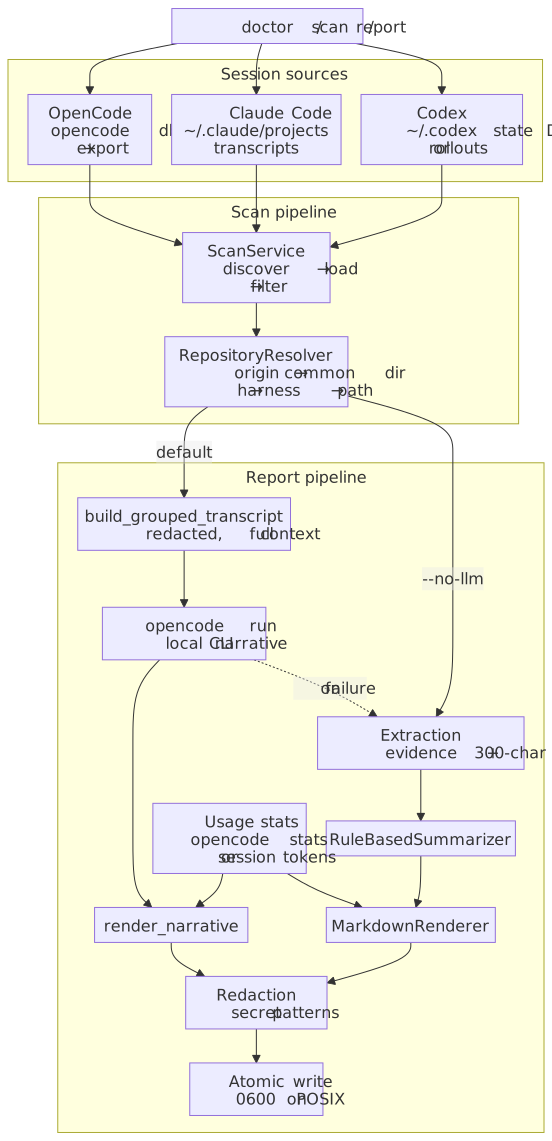
Iiwi runs one of three sources per harness, loads only the sessions that overlap the requested period, groups them by repository, redacts and summarizes the evidence, and writes the Markdown report atomically with owner-only permissions.
Development
git clone https://github.com/mike840609/iiwi.git
cd iiwi
uv sync --locked --extra dev

uv run pytest --cov=iiwi --cov-fail-under=80
uv run ruff check .
uv run pyright
License
MIT
1 maintainer

Download files
Download the file for your platform. If you're not sure which to choose, learn more about installing packages.
Source Distribution
Built Distribution
Filter files by name, interpreter, ABI, and platform.
If you're not sure about the file name format, learn more about wheel file names.
Copy a direct link to the current filters
File details
Details for the file iiwi-0.9.0.tar.gz.
File metadata
- Download URL: iiwi-0.9.0.tar.gz
- Upload date:
- Size: 1.9 MB
- Tags: Source
- Uploaded using Trusted Publishing? Yes
- Uploaded via: twine/7.0.0 CPython/3.13.14
File hashes
| Algorithm | Hash digest | |
|---|---|---|
| SHA256 |
39ce96606f8ae3c5e2fa076b2494436335fe54e71baeebd51329f00bd1722854
|
|
| MD5 |
c8190d2153fec661640411e8ab2270c2
|
|
| BLAKE2b-256 |
3f207c564d3b66cfbf927c1f3a8b0ab9b094be1fbfde8b2ef0bf163073ad5acf
|
Provenance
The following attestation bundles were made for iiwi-0.9.0.tar.gz:
Publisher:
release.yml on mike840609/iiwi
-
Statement:
-
Statement type:
https://in-toto.io/Statement/v1 -
Predicate type:
https://docs.pypi.org/attestations/publish/v1 -
Subject name:
iiwi-0.9.0.tar.gz -
Subject digest:
39ce96606f8ae3c5e2fa076b2494436335fe54e71baeebd51329f00bd1722854 - Sigstore transparency entry: 2396605018
- Sigstore integration time:
-
Permalink:
mike840609/iiwi@a2e7a2a50265704554d1acb11cbbf7e5a20acf33 -
Branch / Tag:
refs/tags/v0.9.0 - Owner: https://github.com/mike840609
-
Access:
public
-
Token Issuer:
https://token.actions.githubusercontent.com -
Runner Environment:
github-hosted -
Publication workflow:
release.yml@a2e7a2a50265704554d1acb11cbbf7e5a20acf33 -
Trigger Event:
push
-
Statement type:
File details
Details for the file iiwi-0.9.0-py3-none-any.whl.
File metadata
- Download URL: iiwi-0.9.0-py3-none-any.whl
- Upload date:
- Size: 118.3 kB
- Tags: Python 3
- Uploaded using Trusted Publishing? Yes
- Uploaded via: twine/7.0.0 CPython/3.13.14
File hashes
| Algorithm | Hash digest | |
|---|---|---|
| SHA256 |
7a84f0368809b413ff6e29e19ac247346de7bcf2f26f768b42464e035a0001f6
|
|
| MD5 |
7e7405d882eae37b899c6901278c10dc
|
|
| BLAKE2b-256 |
dae2ce3bc4ecfc276869f90a8c87aa6138b0af75fe17cfed2c4d5b4421e9c46f
|
Provenance
The following attestation bundles were made for iiwi-0.9.0-py3-none-any.whl:
Publisher:
release.yml on mike840609/iiwi
-
Statement:
-
Statement type:
https://in-toto.io/Statement/v1 -
Predicate type:
https://docs.pypi.org/attestations/publish/v1 -
Subject name:
iiwi-0.9.0-py3-none-any.whl -
Subject digest:
7a84f0368809b413ff6e29e19ac247346de7bcf2f26f768b42464e035a0001f6 - Sigstore transparency entry: 2396605094
- Sigstore integration time:
-
Permalink:
mike840609/iiwi@a2e7a2a50265704554d1acb11cbbf7e5a20acf33 -
Branch / Tag:
refs/tags/v0.9.0 - Owner: https://github.com/mike840609
-
Access:
public
-
Token Issuer:
https://token.actions.githubusercontent.com -
Runner Environment:
github-hosted -
Publication workflow:
release.yml@a2e7a2a50265704554d1acb11cbbf7e5a20acf33 -
Trigger Event:
push
-
Statement type:







