
A scalable library designed to compute data importance scores for interaction data in sequential kNN-based recommender systems.

Project description
Illoominate - Data Importance for Recommender Systems






Illoominate is a library that implements the KMC-Shapley algorithm for computing data importance scores in recommender systems. The KMC-Shapley algorithm leverages the sparsity and nearest-neighbor structure of sequential kNN-based recommendation models to efficiently compute Data Shapley values (DSV) and leave-one-out (LOO) scores. This algorithmic approach enables scalable data debugging and importance analysis for real-world datasets with millions of interactions in session-based and next-basket recommendation tasks.
This repository contains the official code for the Illoominate framework, which accompanies our paper accepted at RecSys 2025. The paper is available with open access at https://dl.acm.org/doi/10.1145/3705328.3748049.
Citation:
@inproceedings{kersbergen-2025-kmc-shapley,
author = {Kersbergen, Barrie and Sprangers, Olivier and Karla{\v s}, Bojan and de Rijke, Maarten and Schelter, Sebastian},
booktitle = {RecSys 2025: 19th ACM Conference on Recommender Systems},
date-added = {2025-07-03 20:57:23 +0200},
date-modified = {2025-07-03 21:01:57 +0200},
month = {September},
publisher = {ACM},
title = {Scalable Data Debugging for Neighborhood-based Recommendation with Data Shapley Values},
year = {2025}}
Key Features
- KMC-Shapley Algorithm: Implements the novel K-Monte Carlo Shapley algorithm that exploits the sparsity and nearest-neighbor structure of kNN-based models to efficiently compute Data Shapley values.
- Scalable Data Debugging: Enables data importance analysis on large datasets with millions of interactions through algorithmic optimization rather than just computational efficiency.
- Multiple Model Support: Works with sequential kNN-based recommendation models including VMIS-kNN (session-based) and TIFU-kNN (next-basket), supporting popular metrics such as MRR, NDCG, Recall, F1 etc.
- Practical Applications: Designed for real-world use cases including data debugging, quality assessment, data pruning, and sustainable recommendation systems.
Overview
Illoominate implements the KMC-Shapley algorithm, which is specifically designed for sequential kNN-based recommendation models. The algorithm's key insight is that most data points in kNN-based systems only influence a small subset of predictions through their nearest-neighbor relationships. By exploiting this sparsity, KMC-Shapley avoids redundant computations and enables scalable Data Shapley value estimation.
The library provides a Python frontend with Rust backend implementation, supporting KNN-based models VMIS-kNN (session-based) and TIFU-kNN (next-basket) for real-world recommendation scenarios.
By leveraging the KMC-Shapley algorithm, Illoominate enables data scientists and engineers to:
- Debug potentially corrupted data through efficient importance scoring
- Improve recommendation quality by identifying the most impactful data points
- Prune training data for sustainable and efficient recommendation systems
Getting Started
Quick Installation
Illoominate is available via PyPI.
pip install illoominate
Ensure Python >= 3.10 is installed. We provide precompiled binaries for Linux, Windows and macOS.
Note
It is recommended to install and run Illoominate from a virtual environment. If you are using a virtual environment, activate it before running the installation command.
python -m venv venv       # Create the virtual environment (Linux/macOS/Windows)
source venv/bin/activate  # Activate the virtualenv (Linux/macOS)
venv\Scripts\activate     # Activate the virtualenv (Windows)
Example Use Cases
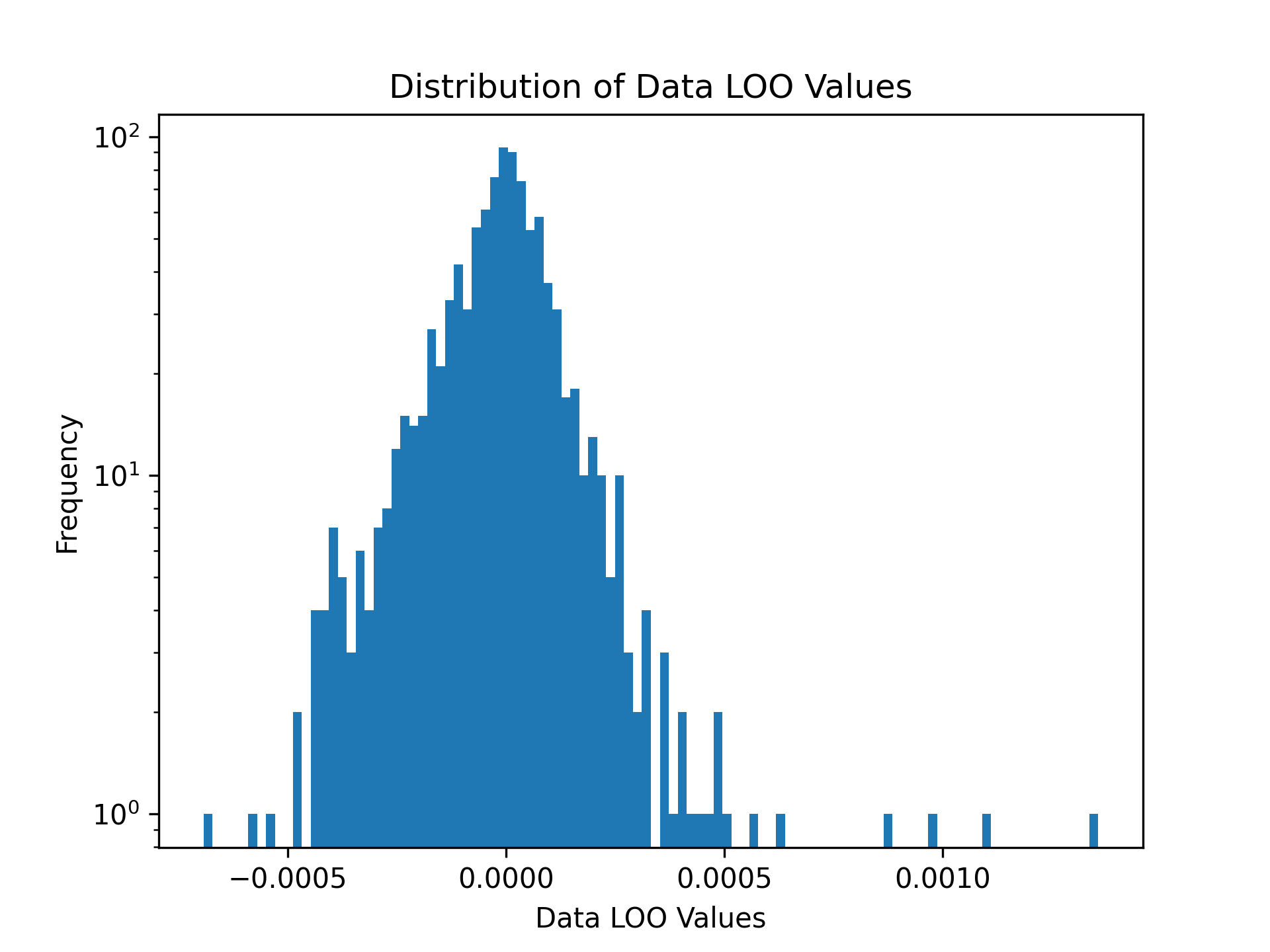
Example 1: Data Leave-One-Out values for Next-Basket Recommendations with TIFU-kNN
# Load training and validation datasets
train_df = pd.read_csv('data/tafeng/processed/train.csv', sep='\t')
validation_df = pd.read_csv('data/tafeng/processed/valid.csv', sep='\t')

#  Data Leave-One-Out values
loo_values = illoominate.data_loo_values(
    train_df=train_df,
    validation_df=validation_df,
    model='tifu',
    metric='ndcg@10',
    params={'m':7, 'k':100, 'r_b': 0.9, 'r_g': 0.7, 'alpha': 0.7, 'seed': 42},
)

# Visualize the distribution of Data Leave-One-Out Values
plt.hist(shapley_values['score'], density=False, bins=100)
plt.title('Distribution of Data LOO Values')
plt.yscale('log')
plt.ylabel('Frequency')
plt.xlabel('Data Leave-One-Out Values')
plt.savefig('images/loo.png', dpi=300)
plt.show()
Example 2: Computing Data Shapley Values for Session-Based Recommendations
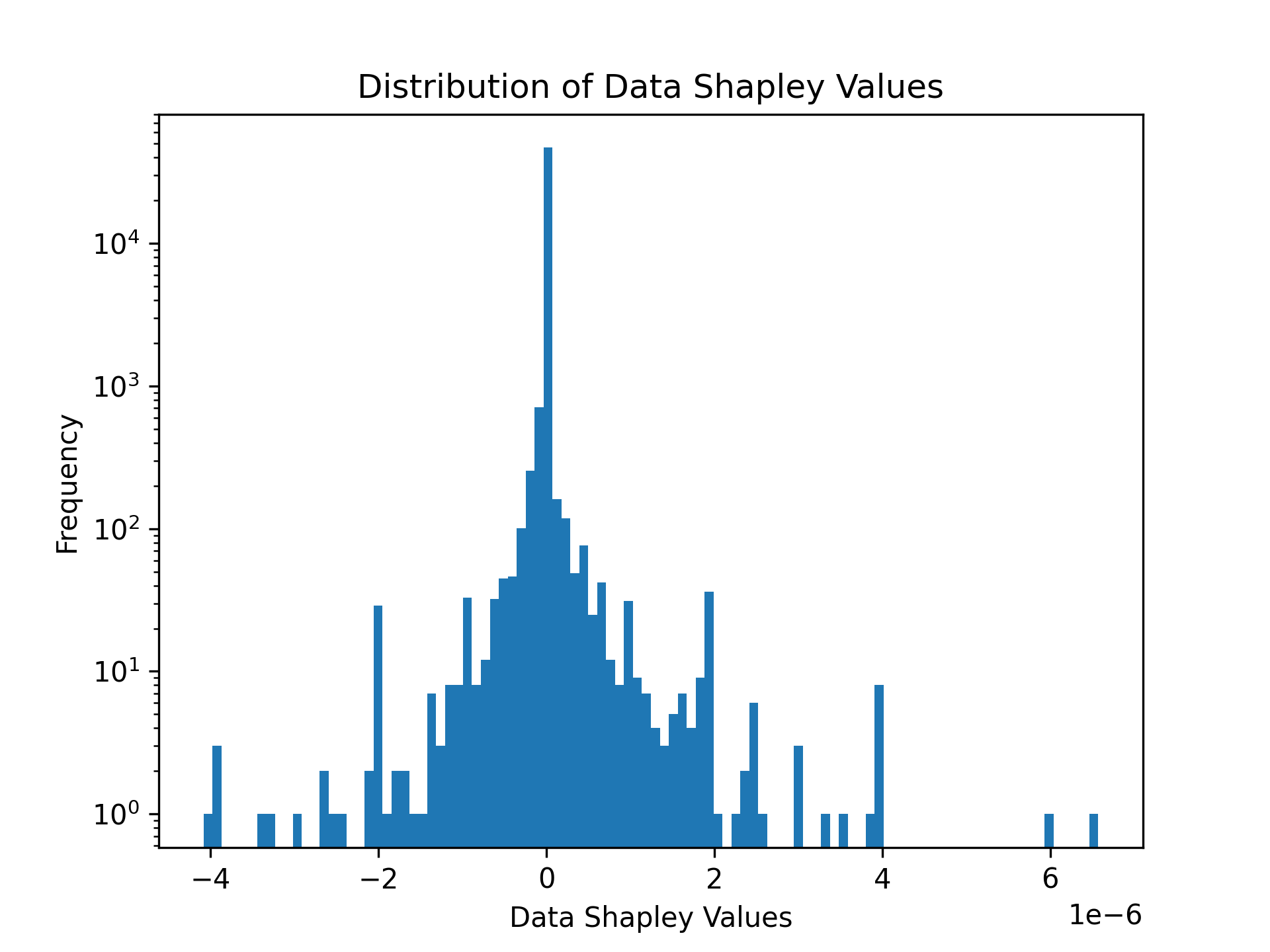
Illoominate computes Data Shapley values to assess the contribution of each data point to the recommendation performance. Below is an example using the public Now Playing 1M dataset.
import illoominate
import matplotlib.pyplot as plt
import pandas as pd

# Load training and validation datasets
train_df = pd.read_csv("data/nowplaying1m/train.csv", sep='\t')
validation_df = pd.read_csv("data/nowplaying1m/valid.csv", sep='\t')

# Compute Data Shapley values
shapley_values = illoominate.data_shapley_values(
    train_df=train_df,
    validation_df=validation_df,
    model='vmis',  # Model to be used (e.g., 'vmis' for VMIS-kNN)
    metric='mrr@20',  # Evaluation metric (e.g., Mean Reciprocal Rank at 20)
    params={'m':100, 'k':100, 'seed': 42},  # Model-specific parameters
)

# Visualize the distribution of Data Shapley values
plt.hist(shapley_values['score'], density=False, bins=100)
plt.title('Distribution of Data Shapley Values')
plt.yscale('log')
plt.ylabel('Frequency')
plt.xlabel('Data Shapley Values')
plt.savefig('images/shapley.png', dpi=300)
plt.show()

# Identify potentially corrupted sessions
negative = shapley_values[shapley_values.score < 0]
corrupt_sessions = train_df.merge(negative, on='session_id')
Sample Output
The distribution of Data Shapley values can be visualized or used for further analysis.
print(corrupt_sessions)

    session_id	item_id	timestamp	score
0	5076	64	1585507853	-2.931978e-05
1	13946	119	1584189394	-2.606203e-05
2	13951	173	1585417176	-6.515507e-06
3	3090	199	1584196605	-2.393995e-05
4	5076	205	1585507872	-2.931978e-05
...	...	...	...	...
956	13951	5860	1585416925	-6.515507e-06
957	447	3786	1584448579	-5.092383e-06
958	7573	14467	1584450303	-7.107826e-07
959	5123	47	1584808576	-4.295939e-07
960	11339	4855	1585391332	-1.579517e-06
961 rows × 4 columns
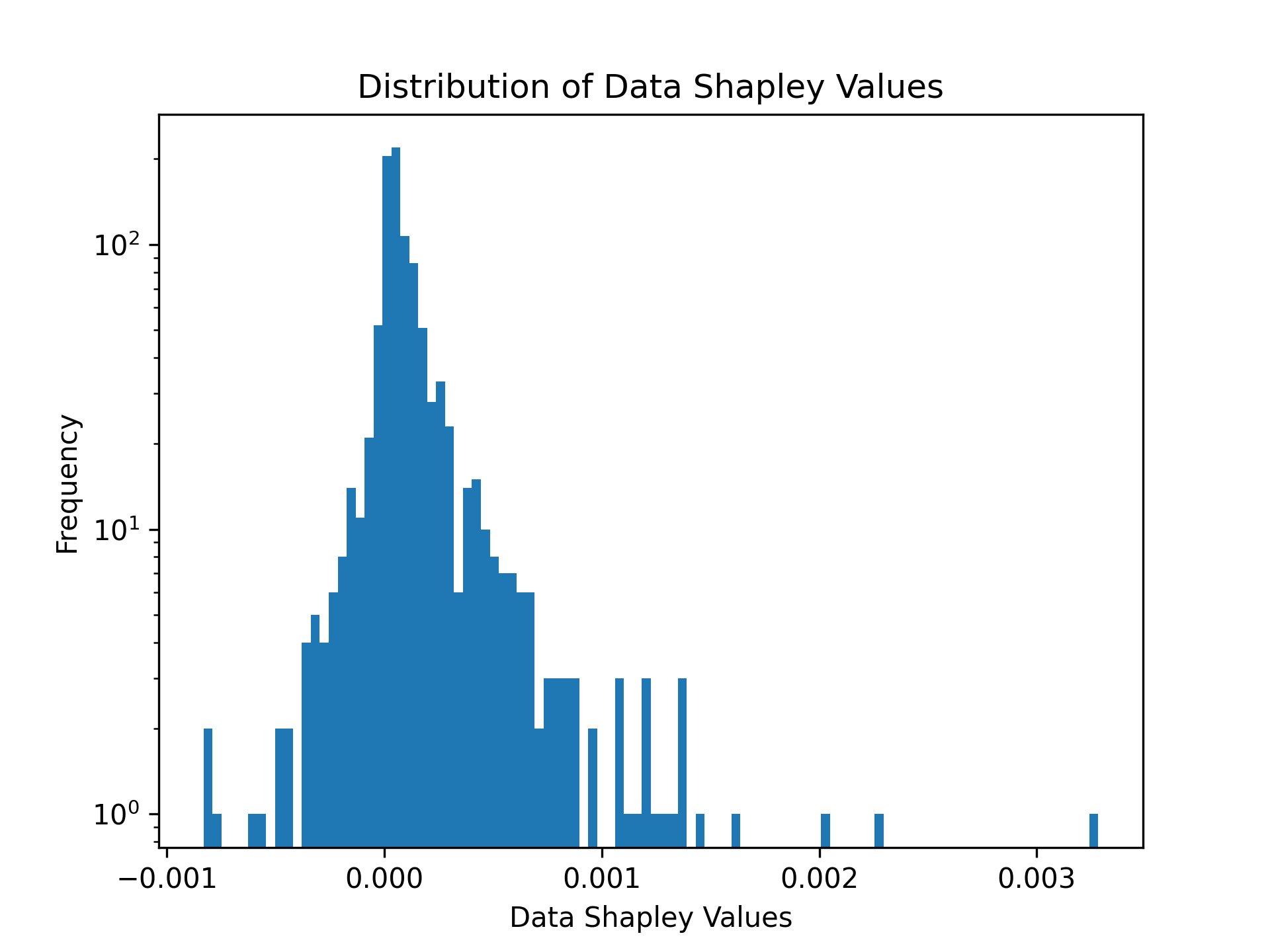
Example 3: Data Shapley values for Next-Basket Recommendations with TIFU-kNN
To compute Data Shapley values for next-basket recommendations, use the Tafeng dataset.
# Load training and validation datasets
train_df = pd.read_csv('data/tafeng/processed/train.csv', sep='\t')
validation_df = pd.read_csv('data/tafeng/processed/valid.csv', sep='\t')

# Compute Data Shapley values
shapley_values = illoominate.data_shapley_values(
    train_df=train_df,
    validation_df=validation_df,
    model='tifu',
    metric='ndcg@20',
    params={'m': 7, 'k': 100, 'r_b': 0.9, 'r_g': 0.7, 'alpha': 0.7, 'seed': 42, 'convergence_threshold': .1},
)

# Visualize the distribution of Data Shapley values
plt.hist(shapley_values['score'], density=False, bins=100)
plt.title('Distribution of Data Shapley Values')
plt.yscale('log')
plt.ylabel('Frequency')
plt.xlabel('Data Shapley Values')
plt.savefig('images/shapley.png', dpi=300)
plt.show()
Example 4: Increasing the Sustainability of Recommendations via Data Pruning
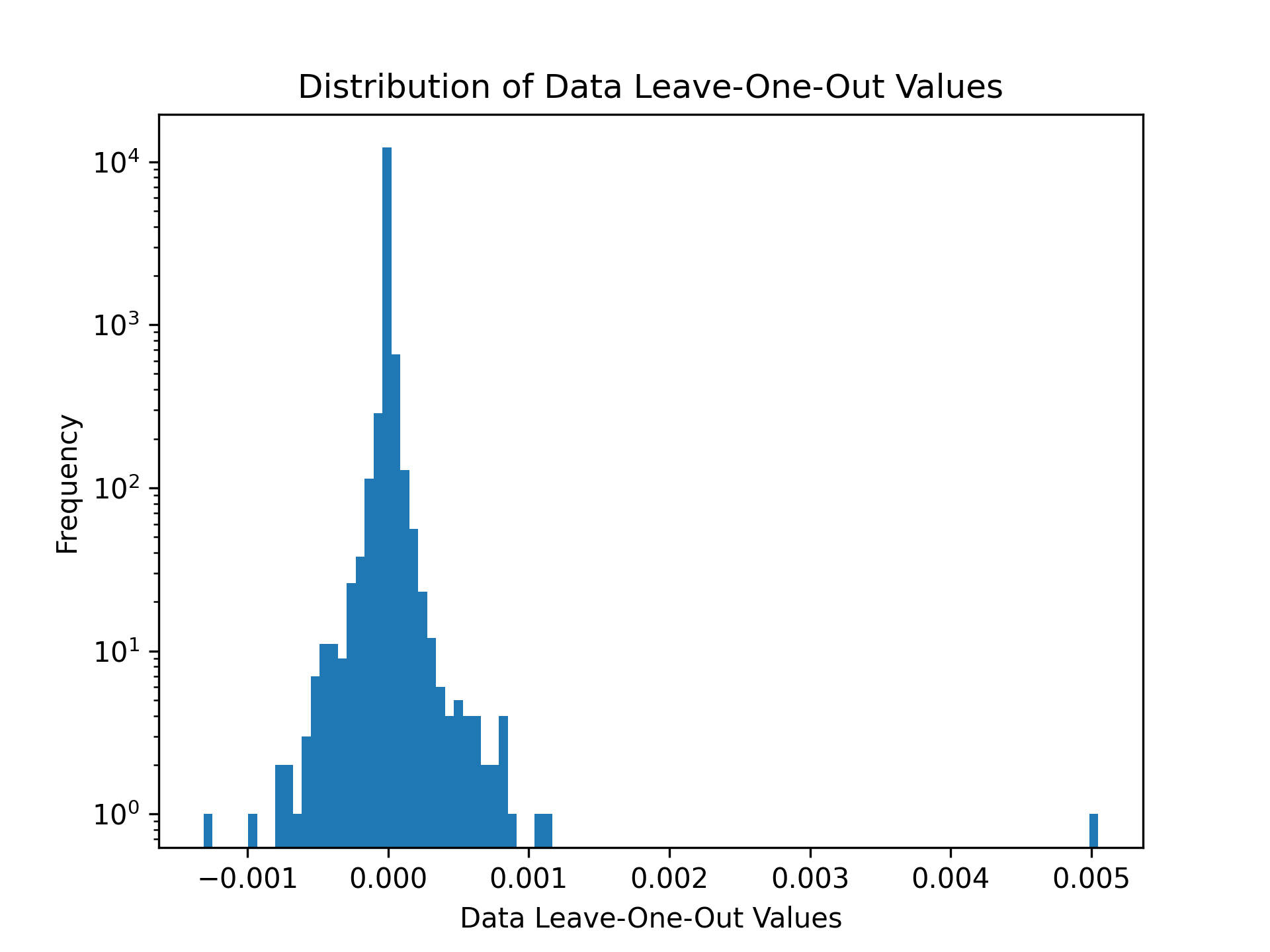
Illoominate supports metrics to include a sustainability term that expresses the number of sustainable products in a given recommendation. SustainableMRR@t as 0.8·MRR@t + 0.2· st . This utility combines the MRR@t with the “sustainability coverage term” st , where s denotes the number of sustainable items among the t recommended items.
The function call remains the same, you only change the metric to SustainableMRR, SustainableNDCG or st (sustainability coverage term) and provide a list of items that are considered sustainable.
import illoominate
import matplotlib.pyplot as plt
import pandas as pd

train_df = pd.read_csv('data/rsc15_100k/processed/train.csv', sep='\t')
validation_df = pd.read_csv('data/rsc15_100k/processed/valid.csv', sep='\t')
# rsc15 items considered sustainable. (Randomly chosen for this dataset)
sustainable_df = pd.read_csv('data/rsc15_100k/processed/sustainable.csv', sep='\t')

importance = illoominate.data_loo_values(
    train_df=train_df,
    validation_df=validation_df,
    model='vmis',
    metric='sustainablemrr@20',
    params={'m':500, 'k':100, 'seed': 42},
    sustainable_df=sustainable_df,
)

plt.hist(importance['score'], density=False, bins=100)
plt.title('Distribution of Data Leave-One-Out Values')
plt.yscale('log')
plt.ylabel('Frequency')
plt.xlabel('Data Leave-One-Out Values')
plt.savefig('data/rsc15_100k/processed/loo_responsiblemrr.png', dpi=300)
plt.show()

# Prune the training data
threshold = importance['score'].quantile(0.05)  # 5th percentile threshold
filtered_importance_values = importance[importance['score'] >= threshold]
train_df_pruned = train_df.merge(filtered_importance_values, on='session_id')
This demonstrates the pruned training dataset, where less impactful or irrelevant interactions have been removed to focus on high-quality data points for model training.
print(train_df_pruned)
	session_id	item_id	timestamp	score
0	3	214716935	1.396437e+09	0.000000
1	3	214832672	1.396438e+09	0.000000
2	7	214826835	1.396414e+09	-0.000003
3	7	214826715	1.396414e+09	-0.000003
4	11	214821275	1.396515e+09	0.000040
...	...	...	...	...
47933	31808	214820441	1.396508e+09	0.000000
47934	31812	214662819	1.396365e+09	-0.000002
47935	31812	214836765	1.396365e+09	-0.000002
47936	31812	214836073	1.396365e+09	-0.000002
47937	31812	214662819	1.396365e+09	-0.000002
Evaluating a Dataset Using the Python API
Illoominate allows you to train a kNN-based model and evaluate it directly using Python.
Example: Training & Evaluating VMIS-kNN on NowPlaying1M
import illoominate
import pandas as pd

# Load training and validation datasets
train_df = pd.read_csv("data/nowplaying1m/train.csv", sep="\t")
validation_df = pd.read_csv("data/nowplaying1m/valid.csv", sep="\t")

# Define model and evaluation parameters
model = 'vmis'
metric = 'mrr@20'
params = {
    'm': 500,      # session memory
    'k': 100,      # number of neighbors
    'seed': 42     # random seed
}

# Run training and evaluation
scores = illoominate.train_and_evaluate_for_sbr(
    train_df=train_df,
    validation_df=validation_df,
    model=model,
    metric=metric,
    params=params
)

print(f"Evaluation score ({metric}):", scores['score'][0])
You can also evaluate against a separate test set if needed:
validation_scores = illoominate.train_and_evaluate_for_sbr(
    train_df=train_df,
    validation_df=val_df,
    model='vmis',
    metric='mrr@20',
    params=params
)

test_scores = illoominate.train_and_evaluate_for_sbr(
    train_df=train_df,
    validation_df=test_df,
    model='vmis',
    metric='mrr@20',
    params=params
)
Large Dataset Path
For large session-based datasets, you can avoid loading pandas DataFrames entirely and evaluate directly from delimited files:
import illoominate

scores = illoominate.train_and_evaluate_for_sbr_files(
    train_path="data/bol35m/bolcom-clicks-50m_train.txt",
    validation_path="data/bol35m/bolcom-clicks-50m_test.txt",
    metric="mrr@20",
    params={"m": 100, "k": 100, "seed": 42},
    sep="\t",
)

print(scores)
This path is intended for large datasets where the pandas to Polars conversion and Python-side indexing overhead would otherwise dominate memory use.
Supported Recommendation models and Metrics
model (str): Name of the model to use. Supported values:
metric (str): Evaluation metric to calculate importance. Supported values:
mrr@20Mean Reciprocal Rankndcg@20Normalized Discounted Cumulative Gainst@20Sustainability coveragehitrate@20HitRatef1@20F1precision@20Precisionrecall@20Recallsustainablemrr@20Combines the MRR with a Sustainability coverage termsustainablendcg@20Combines the NDCG with a Sustainability coverage term
params (dict): Model specific parameters
sustainable_df (pd.DataFrame):
- This argument is only mandatory for the sustainable related metrics
st,sustainablemrrorsustainablendcg
The KMC-Shapley Algorithm
KMC-Shapley (K Monte Carlo Shapley) is a novel algorithm specifically designed for computing Data Shapley values in kNN-based recommendation systems. The algorithm's core innovation lies in recognizing that most data points in kNN-based models only influence predictions through their nearest-neighbor relationships, creating inherent sparsity in the importance computation.
Key Algorithmic Insights:
- Sparsity Exploitation: The algorithm identifies that most data points only affect a small subset of predictions, avoiding unnecessary computations
- Nearest-Neighbor Structure: Leverages the kNN model's structure to focus importance calculations on relevant neighbor relationships
- Monte Carlo Optimization: Uses strategic sampling to estimate Shapley values while maintaining theoretical guarantees
This algorithmic approach enables scalable Data Shapley value computation on datasets with millions of interactions, making it practical for real-world recommendation systems.
Development Installation
To get started with developing Illoominate or conducting the experiments from the paper, follow these steps:
Requirements:
- Rust >= 1.82
- Python >= 3.10
- Clone the repository:
git clone https://github.com/bkersbergen/illoominate.git
cd illoominate
- Create the python wheel by:
pip install -r requirements.txt
maturin develop --release
The package runtime dependencies are declared in pyproject.toml, so pip install illoominate, pip install ., and maturin develop all install the Python libraries required at runtime. The requirements.txt file is only for development tooling such as notebooks and local release builds.
Conduct experiments from paper
The experiments from the paper are implemented in Rust for performance benchmarking. Rust's memory safety and performance characteristics make it well-suited for the computational benchmarks, while the core KMC-Shapley algorithm provides the algorithmic efficiency for scalable Data Shapley value computation.
Prepare a config file for a dataset, describing the model, model parameters and the evaluation metric.
$ cat config.toml
[model]
name = "vmis"

[hpo]
k = 50
m = 500

[metric]
name="MRR"
length=20
The software expects the config file for the experiment in the same directory as the data files.
DATA_LOCATION=data/tafeng/processed CONFIG_FILENAME=config.toml cargo run --release --bin removal_impact
Licensing and Copyright
This project is licensed under the Apache License 2.0 - see the LICENSE file for details.
© 2026 All rights reserved.
Notes
For any queries or further support, please refer to our RecSys 2025 paper. Contributions and discussions are welcome!
Releasing a new version of Illoominate
Increment the version number in pyproject.toml and Cargo.toml.
Trigger a build using the CI pipeline in Github, via either:
- A push is made with a tag matching
v*(e.g.,v1.0.0). - A pull request is made to the main branch.
- A push occurs on a branch that starts with branch-*.
Download the wheels mentioned in the CI job output and place them in a directory. Navigate to that directory and then
twine upload dist/* -u __token__ -p pypi-SomeSecretAPIToken123
This will upload all files in the dist/ directory to PyPI. dist/ is the directory where the wheel files will be located after you unpack the artifact from GitHub Actions.
Release history Release notifications | RSS feed


Download files
Download the file for your platform. If you're not sure which to choose, learn more about installing packages.
Source Distributions
Built Distributions
Filter files by name, interpreter, ABI, and platform.
If you're not sure about the file name format, learn more about wheel file names.
Copy a direct link to the current filters
File details
Details for the file illoominate-1.0.0-cp310-none-win_amd64.whl.
File metadata
- Download URL: illoominate-1.0.0-cp310-none-win_amd64.whl
- Upload date:
- Size: 3.8 MB
- Tags: CPython 3.10, Windows x86-64
- Uploaded using Trusted Publishing? No
- Uploaded via: twine/6.2.0 CPython/3.10.11
File hashes
| Algorithm | Hash digest | |
|---|---|---|
| SHA256 |
28cd39042e48663a92ea0a1d272ca6d5de03a544933055514ca77b1c6206d42b
|
|
| MD5 |
deb027adaaf5723515724a6cf5172c58
|
|
| BLAKE2b-256 |
7265b3dd25b0dc904b2e1f673caa5337596d4936f0275cdb71d9b0fe21485362
|
File details
Details for the file illoominate-1.0.0-cp310-cp310-manylinux_2_34_x86_64.whl.
File metadata
- Download URL: illoominate-1.0.0-cp310-cp310-manylinux_2_34_x86_64.whl
- Upload date:
- Size: 4.5 MB
- Tags: CPython 3.10, manylinux: glibc 2.34+ x86-64
- Uploaded using Trusted Publishing? No
- Uploaded via: twine/6.2.0 CPython/3.10.11
File hashes
| Algorithm | Hash digest | |
|---|---|---|
| SHA256 |
09a1bd79a60b4832949f20218786e3c1c892734588bb514fcf680666b8d01115
|
|
| MD5 |
51c4491c1a6da1d942272ae538a80f54
|
|
| BLAKE2b-256 |
154fd2e609a2532da0bede3bf39a7bbaaa75739e3f429920c20ef1d5ef4f62e9
|
File details
Details for the file illoominate-1.0.0-cp310-cp310-macosx_11_0_arm64.whl.
File metadata
- Download URL: illoominate-1.0.0-cp310-cp310-macosx_11_0_arm64.whl
- Upload date:
- Size: 3.8 MB
- Tags: CPython 3.10, macOS 11.0+ ARM64
- Uploaded using Trusted Publishing? No
- Uploaded via: twine/6.2.0 CPython/3.10.11
File hashes
| Algorithm | Hash digest | |
|---|---|---|
| SHA256 |
017a07cf9fb0d5b29115543ae8d036895051c793fb46cdcad825aab3777c54e0
|
|
| MD5 |
7a49041e46913622e19f8c4d7a92da5b
|
|
| BLAKE2b-256 |
091ff4bed98bbc565e6e85f5e64c6500cf941bed69e6f22f5f4da053711f5b0c
|
File details
Details for the file illoominate-1.0.0-cp310-cp310-macosx_10_15_x86_64.whl.
File metadata
- Download URL: illoominate-1.0.0-cp310-cp310-macosx_10_15_x86_64.whl
- Upload date:
- Size: 4.1 MB
- Tags: CPython 3.10, macOS 10.15+ x86-64
- Uploaded using Trusted Publishing? No
- Uploaded via: twine/6.2.0 CPython/3.10.11
File hashes
| Algorithm | Hash digest | |
|---|---|---|
| SHA256 |
8d19471f705d1787be21260bf9642ee81f91f7bd1a63244d194d53e65370a94f
|
|
| MD5 |
9ac0afb6d1a8f1ea89c51beb964123ec
|
|
| BLAKE2b-256 |
dc2491ac7157dbd91f6d02058797a8b2dc965345017e780a9439739378335c64
|






