
iLyrics



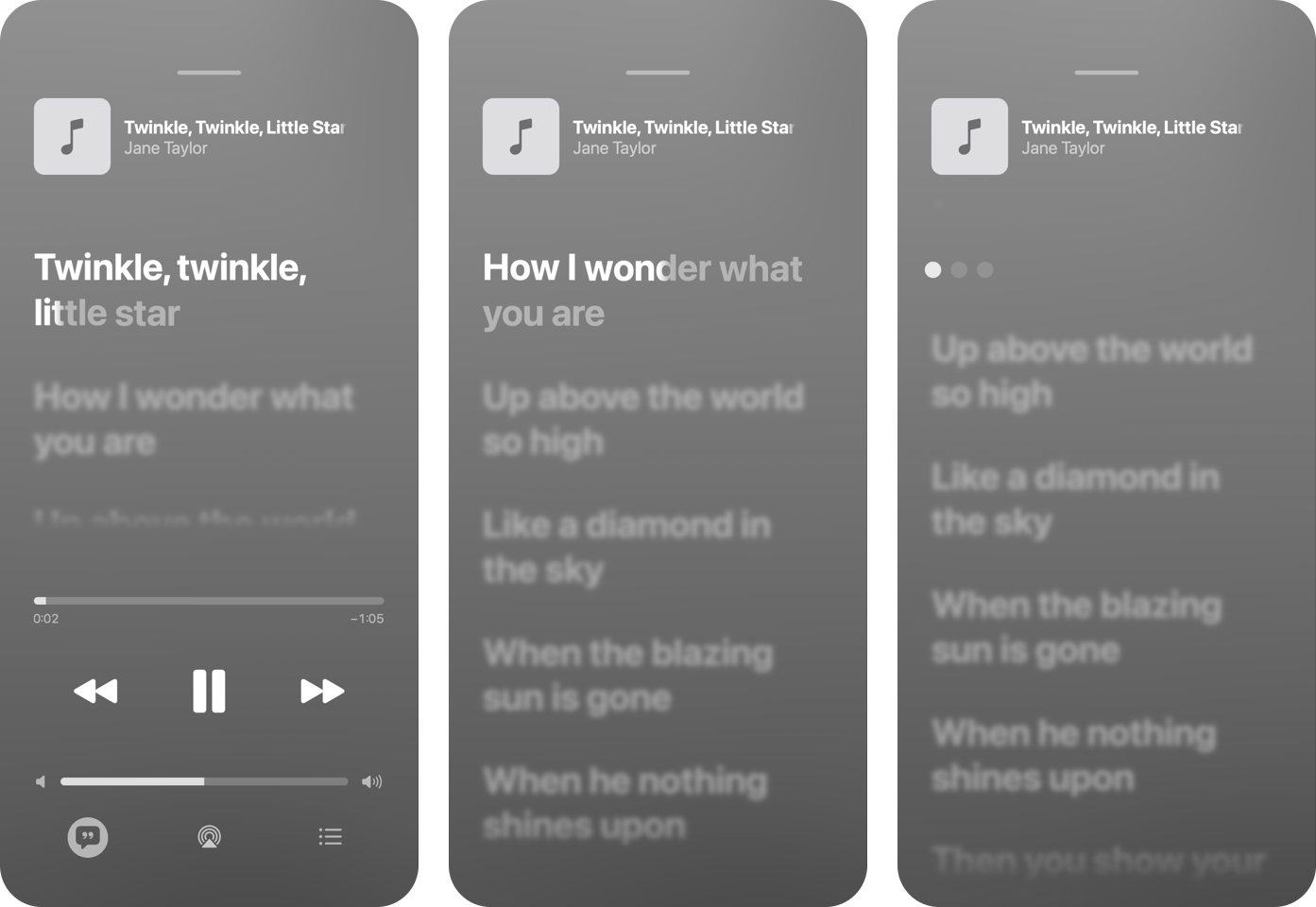
iLyrics renders lyrics videos that reproduce the Lyrics screen of the Music app on iPhone, and synchronizes plain lyrics to a recording automatically. It runs entirely on your Mac: vocal separation and speech recognition run through Core ML, and no network service is involved after the one-time model installation.
This package installs the native ilyrics command for macOS on Apple silicon. It contains no JavaScript or Python code beyond what is needed to place the binary on your PATH.
ilyrics render song.m4a lyrics.txt -o video.mp4
Note: iLyrics is a public preview. English synchronization was qualified on 80 unseen recordings; the visual preset is not yet qualified, and options may change. iLyrics is not affiliated with, endorsed by, or sponsored by Apple.
Features
- Automatic synchronization. Plain text lyrics are aligned line by line and word by word against a separated vocal stem; lines without reliable timing are placed between their neighbours and reported.
- A faithful Lyrics screen. Focus motion, word fill, background vocals, instrumental-gap indicators, a scrolling title, an artwork-derived background, and auto-hiding controls, measured from the Music app on iOS 27.
- Supplied timing. TTML, LRC, and Enhanced LRC files are rendered as supplied.
- Deterministic and local. Every frame is a pure function of its timestamp, and recordings, lyrics, and videos never leave your Mac.
Requirements
- macOS 14 or later on Apple silicon
- About 600 MB of disk space for the alignment models
Installation
npm install -g ilyrics        # npm
pipx install ilyrics          # pip (or: pip install ilyrics)
brew install x96x64/tap/ilyrics
Then check the environment and install the alignment models, about 460 MB downloaded once from their publishers and rebuilt on your Mac:
ilyrics doctor
ilyrics models install
Usage
# Align plain lyrics and render a video
ilyrics render song.m4a lyrics.txt -o video.mp4

# Render supplied timing as is
ilyrics render song.m4a lyrics.ttml -o video.mp4

# Only align, writing word-timed TTML and a JSON report
ilyrics align song.m4a lyrics.txt -o lyrics.ttml --report report.json
The title, artist, and artwork are read from the audio file's metadata. Common options:
| Option | Meaning |
|---|---|
--title TEXT, --artist TEXT, --artwork FILE |
Override the header and artwork |
--background artwork|static |
Artwork-derived or static background |
--controls auto-hide|visible |
Hide the lower controls after playback starts, or keep them |
-j, --jobs N |
Parallel rendering workers |
--fast |
GPU and Neural Engine inference; faster but not reproducible |
--force |
Replace an existing output |
Plain lyrics are UTF-8 text with one sung line per line and blank lines between sections. Section labels such as [Chorus] are ignored, and parenthesized phrases are shown as background vocals. See the command reference for every option.
Rights
Control icons are SF Symbols, resolved at render time from your Mac and never bundled. Apple's terms do not expressly permit their use in exported videos, so you are responsible for how you publish the videos you create, and for holding the rights to the recordings, lyrics, and artwork you render.
Links
License
Apache License, Version 2.0. The alignment models are downloaded from their publishers under their own licenses: Demucs (MIT) and wav2vec 2.0 (Apache-2.0).
1 maintainer

Metadata
1 maintainer
Release files for ilyrics 0.2.0
For a detailed explanation of source distributions (sdists) and built distributions (wheels), please see the package formats documentation.
Built distribution (wheel)
| File | Interpreter | ABI | Platform | Reset |
|---|---|---|---|---|
| ilyrics-0.2.0-py3-none-macosx_14_0_arm64.whl | Python 3 | none | macOS 14.0+ ARM64 | Details |
Release files / ilyrics-0.2.0-py3-none-macosx_14_0_arm64.whl
| Download URL | ilyrics-0.2.0-py3-none-macosx_14_0_arm64.whl |
|---|---|
| Size | 3.6 MB |
| Tags | Python 3 macOS 14.0+ ARM64 |
|
SHA-256 checksum How to use checksums |
76852792cf256cca5701e463061a0eb4820cd4710f5e6ae488afd4b01ba42f8a
|
|
BLAKE2b-256 checksum How to use checksums |
927a055e64f0c10c3f17d53fd6dd36f9ef328e98298a7851f2fad47a61c0195e
|
| Upload date | |
|
Uploaded using Trusted Publishing? What is trusted publishing? |
Yes |
| Uploaded via |
twine/7.0.0 CPython/3.13.14
|
Provenance
Provenance describes where a file came from. On PyPI, provenance is shared via attestations, which provide a verifiable record of the build or publishing details. View details, limitations and caveats.


PyPI Publish Attestation
PyPI verified that this artifact, at this checksum, originated from the publisher listed below.
Signed by GitHub Actions, verified by PyPI on Oct 11, 2026.
Transparency log













