
Image Functions Library
Library for image pre-processing, with functions to handle and prepare images for machine learning and image processing. This library accounts for functions to load and plot a group of images, pre-processing, choose ROI regions (even polygonal), choose points, get image properties, align and transform images (including rotate, scale, etc.), filter signals and images (2D data), among others. All the functions with GUI (stands for graphical user interface) have an interface to interact with the user.
1. Functions to Load and Plot
load_gray_images: loads all images from a folder, in grayscaleload_color_images: loads all color images from a folderplot_gray_images: prints all grayscale images from a variable 'I'plot_color_images: prints all color images from a variable 'I'plot_gray: prints a grayscale imageplot_bgr: prints a color image in BGR formatlist_folders: list all folders inside a directorylist_images: list all images inside a folderread_lsm: reading and mounting images of '.lsm' extension from Zeiss microscope
2. Pre-Processing for Machine Learning and Computer Vision *
2.1. Preparing Data for Artificial Intelligence (e.g. labeling) *
label_image_segments: label segments from all images in a given folders (with a GUI to interact with the mouse, very automated function!). It remenbers the images you previously segmented.*label_sequence_from_image: label sequences in profiles acquried from images (interact with the mouse to choose the profile in the image and the points in the graph!) *select_points_from_sequence: label points in a sequence interacting with the mouse (choose points in a sequence for labeling part of that sequence or for labeling points)
2.2. ROI and Handling (Most Important Ones)
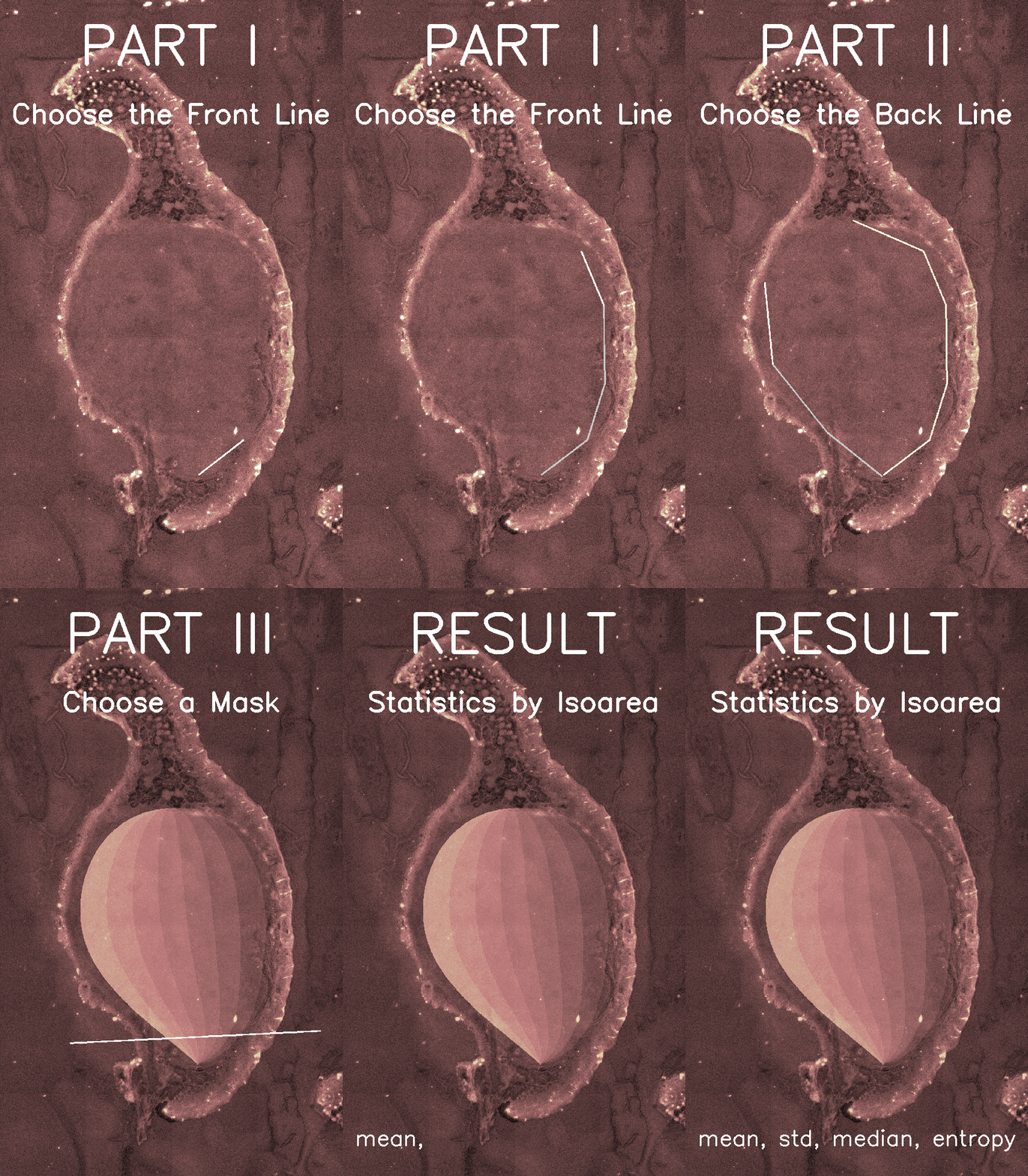
polyroi: GUI to create a polygonal region of interest (ROI)crop_image: GUI to create a rectangular crop in an imagecrop_multiple: crops multiple images using the same crop from 1st imagecrop_poly_multiple: polygonal crop multiple images based on 1st croppingchoose_points: GUI to interact with the user to choose points in an imageimchoose: function to choose images in a given set of images (with GUI)imroiprop: getting properties from an image ROIroi_stats: get statistics from a region choosen by the user, for images of multiple experiments (important!)roi_stats_in_detph: choose a region, and get the detailed statistics of this region, as a function of a given direction defined by the user. Applications: statistics of pixels from a tumor, from surface to the depth, e.g. in microscope fluorescence of histological slides (see an example in the next gif image):
2.3. Image Alignment and Transformation
rotate2D: rotate points by an angle about a centerflat2im: transforms a flat vector into a 2D imageim2flat: transforms a 2D image in a flat vectorscale255: scales an image to the [0, 255] rangealign_features: Align images with Feature-Based algorithm, from OpenCV (maybe not working)align_ECC: image alignment using ECC algorithm from OpenCV (diffuse image)imwarp: function to warp a set of images using a warp matrix (maybe not working)
3. Filtering Images and Signals
filter_finder: study and find which filter to use (for signals, 1D)highpass_gauss: high-pass Gaussian filter for images (2D)highpass_fft: high-pass image (2D) filter based on FFTlowpass_fft: low-pass image (2D) filter based on FFTfilt_hist: filtering histograms with zero/null values (removing zeros)
4. Bonus Functions
beep: making 'beeps' to help warn when a long algorithm has finishedgood_colormaps: visualizing the best Matplotlib colormaps in an imageimprofile: finds the pixels' intensity profile between two points (GUI) (maybe not working)
5. Tutorials and Examples
Inside the tutorials folder there are some examples of using the functions of this library. In this folder, the files with name imex_name.py present an example of using the function indicated by the name part.
6. How to Install
You can install using pip:
pip install image-functions==0.1.12
OBS: some functions use the 'pynput' and 'windsound' libraries, which may be difficult to install and do not works on non-windows platforms. Comment on these library imports if there are problems during installation or loading.
If you have other versions of this library installed, please remove it first:
pip uninstall image-functions

pip install image-functions==0.1.12
- author: Marlon Rodrigues Garcia
- contact: marlon.garcia@unesp.br
- institution: Sao Paulo State University (Unesp)
- website1: https://sites.google.com/view/lab-biomedical-optics/
- website2: https://www.ifsc.usp.br/~prata/php/index.php
7. Scientific Research
This work is the product of the research being conducted at two universities in Brazil:
Sao Paulo State University (Unesp)
- Dept. of Electronic and Telecommunication Engineering
- School of Engineering, Campus of Sao Joao da Boa Vista
- website: https://www.sjbv.unesp.br/
University of São Paulo (USP)
- Biophotonics Laboratory, Optics Group (GO)
- São Carlos Institute of Physics (IFSC)
- website: https://www2.ifsc.usp.br/english/
1 maintainer

Metadata
1 maintainer
Release files for image-functions 0.1.12
For a detailed explanation of source distributions (sdists) and built distributions (wheels), please see the package formats documentation.
Source distribution (sdist)
| File | Size | Uploaded | |
|---|---|---|---|
| image_functions-0.1.12.tar.gz | 38.8 kB | Details |
Built distribution (wheel)
| File | Interpreter | ABI | Platform | Reset |
|---|---|---|---|---|
| image_functions-0.1.12-py3-none-any.whl | Python 3 | none | any | Details |
Total release size: 78.6 kB
Release files / image_functions-0.1.12.tar.gz
| Download URL | image_functions-0.1.12.tar.gz |
|---|---|
| Size | 38.8 kB |
| Tags | Source |
|
SHA-256 checksum How to use checksums |
4a2aa08cb1da9ea896a9e5f71e427e6211f06a17e31d01bbe920e66b1c2beebb
|
|
BLAKE2b-256 checksum How to use checksums |
6d5aedd39093ff9666bc48fdad537bcc8e7016146c3e903f7d7dd9368a06911a
|
| Upload date | |
|
Uploaded using Trusted Publishing? What is trusted publishing? |
No |
| Uploaded via |
twine/6.1.0 CPython/3.9.19
|
Release files / image_functions-0.1.12-py3-none-any.whl
| Download URL | image_functions-0.1.12-py3-none-any.whl |
|---|---|
| Size | 39.8 kB |
| Tags | Python 3 |
|
SHA-256 checksum How to use checksums |
bb0c0fa67875a74130ff3ce6e3441e75018d9bb58c3326ed6a21322690d645ff
|
|
BLAKE2b-256 checksum How to use checksums |
efeab3c53273070409f5580c2614396de099819db90ed92da24c477c76f5fa32
|
| Upload date | |
|
Uploaded using Trusted Publishing? What is trusted publishing? |
No |
| Uploaded via |
twine/6.1.0 CPython/3.9.19
|














