
image-merger
A small Python library to merge images easily
Installation
pip install image-merger
Usage
Simple use case
from ImageMerger import Merger, ImageToMerge, MERGE_GRID

# Initialize list of images
list_images = [
	ImageToMerge(path='images/samples/1.png'),
	ImageToMerge(path='images/samples/2.png'),
	ImageToMerge(path='images/samples/3.png'),
	ImageToMerge(path='images/samples/4.png')
]

# Load merger with different settings
m = Merger(list_images=list_images)

# Save merged image
m.save_image(filename="images/results/output_4_grid.png")
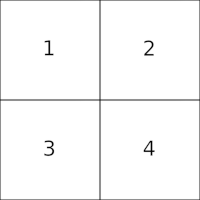
Parameters
limit_horizontal: int: Optional int to define the maximum number of images to append horizontallylimit_vertical: int: Optional int to define the maximum number of images to append verticallysuffle: bool: Optional boolean to decide iflist_imagesmust be shuffled prior to process. DefaultFalsemerge_strategy: int: Optional int to set the merging strategy. EitherMERGE_HORIZONTALLY, -MERGE_VERTICALLYorMERGE_GRID(default)preserve_aspect_ratio: bool: Optional boolean that defines if proportion of each image should be kept or if image can be squeezed/extended to fit. DefaultFalse- Setting it to
Truecan lead to images being distored to fit layout but there will be no gaps. - Setting it to
Falsewill kept each image aspect ratio but can lead to black gaps in output image.
- Setting it to
Configuration examples
ImageToMerge.pathcan either be a path(local or relative) or HTTP(S) URLlimit_horizontalandlimit_verticalare optional and can also be used at the same time- If
limit_horizontalandlimit_verticalare not set, andmerge_strategyis set toMERGE_GRIDThe process will try to fit as best as possible all images in a square grid. - List of images can be shuffled randomly using
shuffle=Trueparameter
More examples
from ImageMerger import Merger, ImageToMerge

# Initialize list of images
list_images = [
	ImageToMerge(path='images/samples/1.png'),
	ImageToMerge(path='images/samples/2.png'),
	ImageToMerge(path='https://raw.githubusercontent.com/ggouzi/image-merger/main/images/samples/3.png'),
	ImageToMerge(path='https://raw.githubusercontent.com/ggouzi/image-merger/main/images/samples/4.png'),
	ImageToMerge(path='https://raw.githubusercontent.com/ggouzi/image-merger/main/images/samples/5.png')
]

# Load merger with different settings
m = Merger(
    list_images=list_images,
    preserve_aspect_ratio=True,
    limit_vertical=2
  )

# Save merged image
m.save_image(filename="images/results/output_5_grid_keep_aspect_ratio.png")
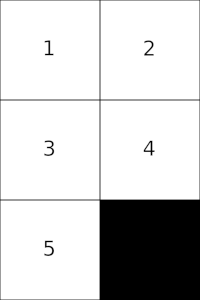
from ImageMerger import Merger, ImageToMerge

# Initialize list of images
list_images = [ImageToMerge(path=f"images/samples/{i}.png") for i in range(1, 11)]

# Load merger with different settings
m = Merger(
    list_images=list_images,
    limit_horizontal=2
)

# Save merged image
m.save_image(filename="images/results/output_10_2rows.png")
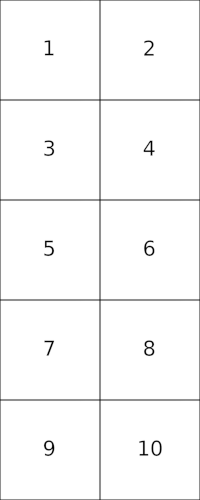
from ImageMerger import Merger, ImageToMerge

# Initialize list of images
list_images = [ImageToMerge(path=f"images/samples/{i}.png") for i in range(1, 11)]

# Load merger with different settings
m = Merger(
    list_images=list_images,
    shuffle=True
)

# Save merged image
m.save_image(filename="images/results/output_10_grid_shuffled.png")
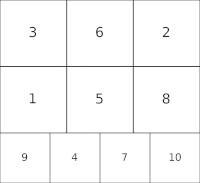
References
1 maintainer

Release files for image-merger 0.2
For a detailed explanation of source distributions (sdists) and built distributions (wheels), please see the package formats documentation.
Source distribution (sdist)
| File | Size | Uploaded | |
|---|---|---|---|
| image-merger-0.2.tar.gz | 7.3 kB | Details |
Built distribution (wheel)
| File | Interpreter | ABI | Platform | Reset |
|---|---|---|---|---|
| image_merger-0.2-py3-none-any.whl | Python 3 | none | any | Details |
Total release size: 17.7 kB
Release files / image-merger-0.2.tar.gz
| Download URL | image-merger-0.2.tar.gz |
|---|---|
| Size | 7.3 kB |
| Tags | Source |
|
SHA-256 checksum How to use checksums |
04b2f6dc2ed139356ae609bc5f9258a512c4aaa3e9fff00709b06f4b67162032
|
|
BLAKE2b-256 checksum How to use checksums |
a588bb36288d5d0eebad39a608ecbcea8f7b99a993ac89144dca08867a5051db
|
| Upload date | |
|
Uploaded using Trusted Publishing? What is trusted publishing? |
No |
| Uploaded via |
twine/4.0.1 CPython/3.10.4
|
Release files / image_merger-0.2-py3-none-any.whl
| Download URL | image_merger-0.2-py3-none-any.whl |
|---|---|
| Size | 10.3 kB |
| Tags | Python 3 |
|
SHA-256 checksum How to use checksums |
25d7b7b5fdd140c62c328ed0ce0008c187d75eb8ed81443557c454711c4d4819
|
|
BLAKE2b-256 checksum How to use checksums |
489f12d25e894aeed4afbdf04761361d3f85dd8f9f9be8fca16d3fadb9d9c408
|
| Upload date | |
|
Uploaded using Trusted Publishing? What is trusted publishing? |
No |
| Uploaded via |
twine/4.0.1 CPython/3.10.4
|













