
Test 1 version - Image processing. This project belongs to Karina Tiemi Kato, Tech Lead, Machine Learning Engineer, Data Scientist Specialist at Take. This package is a demo for simulation of upload on the Test Pypi website, and it's from one of the classes from Tech Generation Unimed - BH - Data Science Bootcamp. E-mail:karinatkato@gmail.com

Project description
Projeto: Criação de pacote de Processamento de Imagens
Descrição: O pacote image_processing-test1 é usado para:
Processing:
	- Correspondência de histograma
	- Semelhança estrutural
	- Redimensionar imagem
Utils:
	- Ler imagem
	- Salvar imagem
	- Plotar imagem
	- Resultado da plotagem
	- Plotar histograma
Overview (template)
Este é um overview do que faremos:
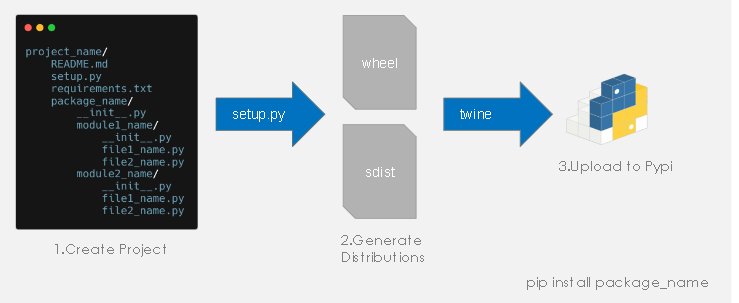
Fonte: Karina Kato - Machine Learning Engineer/Machine Learning Tech Lead - Take
Passo a passo
1. Criar um projeto
Você pode realizar um fork deste projeto para utilizá-lo como modelo. Ele já segue a organização da imagem apresentada acima.
2. Editar os arquivos "setup.py", "requirements.txt" e "README.md"
Após criado o projeto e editado os arquivos "setup.py", "requirements.txt" e "README.md" é necessário gerar as distribuições "wheel" e "sdist". Para isso, você deve:
3. Acessar a raiz do seu projeto
Acesse a raiz do seu projeto para aplicar os próximos passos.
4. Aplicar os comandos de instalação
No seu terminal, aplique os seguintes comandos:
python -m pip install --upgrade pip
python -m pip install --user twine
python -m pip install --user setuptools
pip install wheel
5. Aplicar o comando para criar a distribuição
Crie a distribuição, aplicando o seguinte comando:
python setup.py sdist bdist_wheel
6. Publicar pacote
Realizada as etapas anteriores com êxito, o próximo passo é a publicação do pacote. Você precisa ter uma conta no Test Pypi e no Pypi para realizar essa etapa. A seguir os links:
https://test.pypi.org/account/register/
https://pypi.org/account/register/
Test Pypi
6.1. Primeiro, publique no Teste Pypi, aplicando o seguinte comando:
python -m twine upload --repository-url https://test.pypi.org/legacy/ dist/*
6.2. Agora, instale o pacote de teste:
pip install -i https://test.pypi.org/simple/ image-processing-test1
Pypi
6.3. Com tudo testado, é hora de publicar o pacote no Pypi:
python -m twine upload --repository-url https://upload.pypi.org/legacy/ dist/*
6.4. Instale o pacote publicado:
Utilize o gerenciador de pacotes pip para instalar image_processing-test1
pip install image-processing-test1
Autor
Projeto original: by Karina Kato
Este exercÃcio: by Tiago de Freitas Faustino
Este projeto tem o objetivo apenas de exercitar a criação publicação e utilização de pacotes. Para este fim, como ainda não tenho um projeto próprio, foram realizados apenas pequenos ajustes no projeto original de Karina Kato.
Licença
Release history Release notifications | RSS feed

Download files
Download the file for your platform. If you're not sure which to choose, learn more about installing packages.
Source Distribution
Built Distribution
Filter files by name, interpreter, ABI, and platform.
If you're not sure about the file name format, learn more about wheel file names.
Copy a direct link to the current filters
File details
Details for the file image_processing_exercise-0.0.1.tar.gz.
File metadata
- Download URL: image_processing_exercise-0.0.1.tar.gz
- Upload date:
- Size: 4.4 kB
- Tags: Source
- Uploaded using Trusted Publishing? No
- Uploaded via: twine/4.0.1 CPython/3.10.6
File hashes
| Algorithm | Hash digest | |
|---|---|---|
| SHA256 |
d01ace591e85e982f96944f363c2b74d52d7e9f26a852f280ded7196234c27f9
|
|
| MD5 |
7d65804a70e92919210e5ca921addfde
|
|
| BLAKE2b-256 |
3a4a983b23042f97ec41dd1ab3051e06029391ce30fcdd73f9b51e69064f8f11
|
File details
Details for the file image_processing_exercise-0.0.1-py3-none-any.whl.
File metadata
- Download URL: image_processing_exercise-0.0.1-py3-none-any.whl
- Upload date:
- Size: 5.3 kB
- Tags: Python 3
- Uploaded using Trusted Publishing? No
- Uploaded via: twine/4.0.1 CPython/3.10.6
File hashes
| Algorithm | Hash digest | |
|---|---|---|
| SHA256 |
57d4d2f418f4a8520b20553e325677716c8e2ae8245ec07b5f8dbadf311ccbf7
|
|
| MD5 |
df3335fccfb80818578fef3edce97e2c
|
|
| BLAKE2b-256 |
a27402597ad74dbb7e9c6222e6be4ef8f81c6f241eb10f9ef232c96c55e5fd0b
|






