
Graphical tool to sort images into a folder structure based on the date the images were taken

Project description
Image Sorting Tool



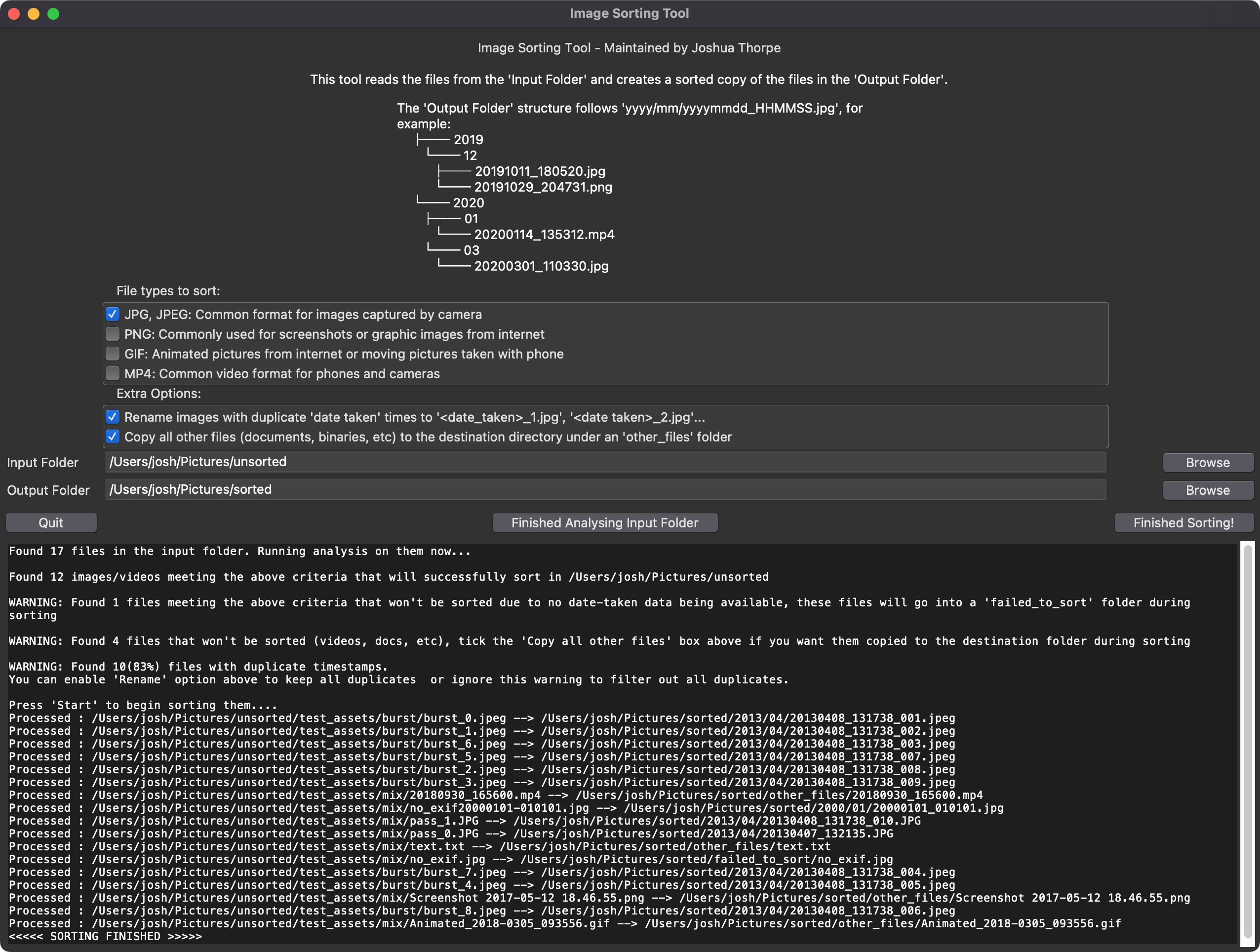
The date-taken for JPG files is extracted from the EXIF data and for all other file formats the filename is used to extract the date-taken. The files destination name will be in format 'yyyymmdd_HHMMSS'. For example '20201225_234532.jpg' The default output structure is year and month folders. For example:
/
├── 2019/
├── 07/
├── 20190712_141507.jpg
└── 20190719_224521.jpg
└── 10/
├── 20191011_180520.jpg
└── 20191029_204731.jpg
└── 2020/
├── 01/
└── 20200114_135312.jpg
└── 03/
└── 20200301_110330.jpg
Files that cannot have the date-taken extracted (missing EXIF or bad filenames) will be copied to a 'failed_to_sort' folder in the root directory of the above structure without any renaming. These files are commonly ones downloaded from the internet or shared through social media.
If your source folder has other files such as binaries, documents, audio recordings, or music, you can choose if you want to ignore them or copy them to an 'other_files' folder with the 'Copy all other files' option.
This tool is multi-threaded to increase performance on high speed storage such as SSDs.
No data in the source directory is altered. It only reads from the source, and then copy operations are performed during the sorting process.
Installation
The tool can be run on Linux, MacOS and Windows provided the following requirements are met
Requirements
- Python (compatible versions are listed at top of readme)
- python3-tk (Comes with Python 3, but may need installing separately in linux)
- pipx (highly recommended, but
pipwill also work)
It is recommended to install image-sorting-tool with pipx as it will manage a dedicated environment and all paths for you, eliminating risk of dependency conflicts, etc.
To install run the following
pipx install image-sorting-tool
Usage
Run the following to launch
image-sorting-tool
Upgrading
Run the following to upgrade
pipx upgrade image-sorting-tool
Uninstalling
Run the following to remove the tool from your machine
pipx uninstall image-sorting-tool
Development
To contribute, clone this repo and then install the dev dependencies. Note that this project requires the system's tkinter library, so uv must be configured to use the system Python interpreter instead of its isolated builds.
# Create a virtual environment using the system Python
uv venv --python python

# Installs package locally so code changes will affect behaviour
uv sync --python python

#Launch with -vv flag for debug logs
uv run --python python image-sorting-tool -vv
Automated checks
Linting and unit tests should be checked before committing by running the following:
# Code formatting
uvx ruff format

# Linting
uvx ruff check --fix

# Unit test on current environment python version with coverage
uv run --python python pytest --cov=image_sorting_tool
Release history Release notifications | RSS feed


Download files
Download the file for your platform. If you're not sure which to choose, learn more about installing packages.
Source Distribution
Built Distribution
Filter files by name, interpreter, ABI, and platform.
If you're not sure about the file name format, learn more about wheel file names.
Copy a direct link to the current filters
File details
Details for the file image_sorting_tool-1.3.0.tar.gz.
File metadata
- Download URL: image_sorting_tool-1.3.0.tar.gz
- Upload date:
- Size: 5.3 MB
- Tags: Source
- Uploaded using Trusted Publishing? No
- Uploaded via: twine/6.1.0 CPython/3.13.12
File hashes
| Algorithm | Hash digest | |
|---|---|---|
| SHA256 |
f554e09ff696de706ef04520f3d1ec1f492718bf0e6589bfe85601202d8c970e
|
|
| MD5 |
385d16af9184c15554e7c7f3dd2fc3d8
|
|
| BLAKE2b-256 |
a0d6707b968ef8294ada604e3e2fb9b3bf398c2086a11769b0bf370d10644a45
|
File details
Details for the file image_sorting_tool-1.3.0-py3-none-any.whl.
File metadata
- Download URL: image_sorting_tool-1.3.0-py3-none-any.whl
- Upload date:
- Size: 14.0 kB
- Tags: Python 3
- Uploaded using Trusted Publishing? No
- Uploaded via: twine/6.1.0 CPython/3.13.12
File hashes
| Algorithm | Hash digest | |
|---|---|---|
| SHA256 |
b96adf9476a63c3e2decb767600642da8401f7136e19e7c66081716efb52a603
|
|
| MD5 |
68d30ac6756aac12493119c2dedcabb6
|
|
| BLAKE2b-256 |
ee4620d9b6f1539696a850b5cb9d5304ec161f8eb0d8701e5d5f4245c782833e
|






