
Image Titler

The Image Titler is a tool which provides options for generating thumbnails for various social media platforms. Currently, the tool has a predefined style which looks roughly like the following image:
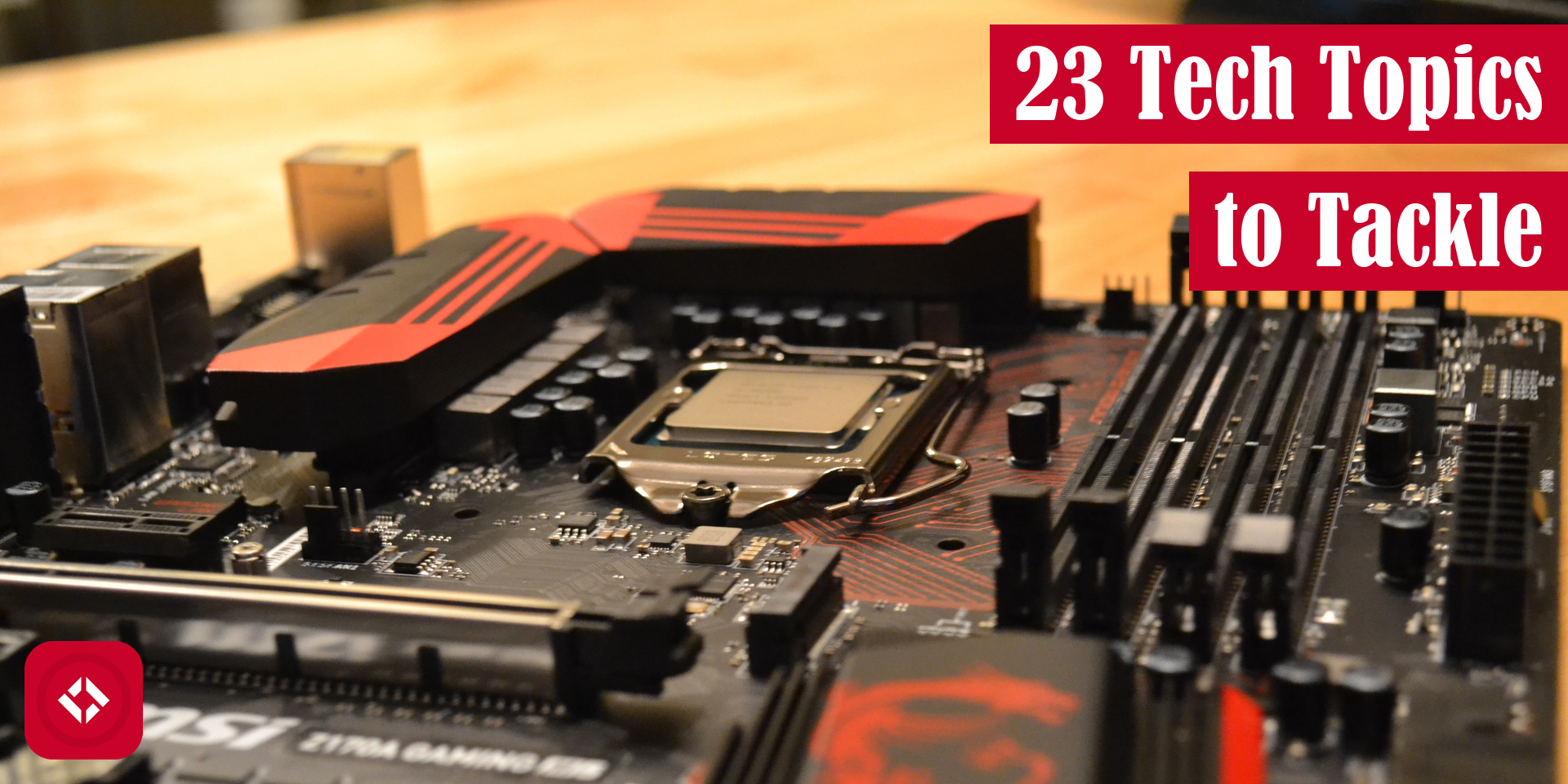
To see more examples, check out our list of samples.
How to Run
The following code snippet demonstrates a few ways you might use the script:
pip install image-titler # Installs the script

image-titler # Runs as default
image-titler --title "Hello, World!"  # Adds a custom title
image-titler --output_path "path/to/output"  # Sets the output path
image-titler --path "path/to/image"  # Sets the image path
image-titler --tier "free"  # Sets the membership tier which changes the rectangle borders
image-titler --logo_path "path/to/logo"  # Adds a 145x145 logo to the lower left corner of the image
image-titler --batch  # Runs the program in batch mode on a directory
image-titler --font "path/to/font"  # Changes the default title font
image-titler --size YouTube  # Changes the aspect ratio of the output file
image-titler --no_title  # Do not add title
Alternatively, you can spin up the GUI version of the software as of 2.0.0 as follows:
image-titler-gui

# Options can be used to preload GUI as of 2.2.0
image-titler-gui --title "Hello, World!"  # Adds a custom title
image-titler-gui --output_path "path/to/output"  # Sets the output path
image-titler-gui --path "path/to/image"  # Sets the image path
image-titler-gui --tier "free"  # Sets the membership tier which changes the rectangle borders
image-titler-gui --logo_path "path/to/logo"  # Adds a 145x145 logo to the lower left corner of the image
image-titler-gui --batch  # Runs the program in batch mode on a directory
image-titler-gui --font "path/to/font"  # Changes the default title font
image-titler-gui --size YouTube  # Changes the aspect ratio of the output file
image-titler-gui --no_title  # Do not add title
Default Behavior
Currently, the image-titler script makes a few assumptions about the images it processes automatically:
- This tool scrapes file names for image titles. To do this, it assumes file names are written in kebab-case where each word is separated by a hyphen. Then, words are extracted and title cased before being printed on the image.
- The color of the title bars defaults to The Renegade Coder Red (201, 2, 41, 255). If you'd like a different color, the script automatically extracts the most dominant color from logos. At this time, there is no way to customize bar color.
- Added elements have fixed position. Logos will always appear in the bottom left. Titles will always appear in the top right.
There are likely other default behaviors not documented here. Feel free to experiment with the tool and share any issues you find.
Full List of Options
Here's a description of all the option used in the samples above.
| Option | Domain | Description |
|---|---|---|
| --batch, -b | True/False | Turns on batch processing |
| --font, -f | Any valid font file | Overrides the default title font |
| --logo_path, -l | Any valid image file | Loads a logo onto the input image |
| --output_path, -o | Any valid directory | Determines where files will be saved (has no effect in GUI) |
| --path, -p | Any valid file or directory | Loads the input image (or directory when in batch mode) |
| --size, -s | Choose between "Twitter", "WordPress", and "YouTube" | Sets the aspect ratio of the output image |
| --tier, -r | Choose between "free" (silver) or "premium" (gold) | Adds a border color to the title |
| --title, -t | Any string | Overrides the automatic title feature |
| --no_title, -n | Do not add title |
Python Version Compatibility
As this utility has grown and changed, it has also changed its support for different versions of Python.
| Python | 3.12 | 3.11 | 3.10 | 3.9 | 3.8 |
|---|---|---|---|---|---|
| image-titler >= 2.5 | yes | yes | |||
| image-titler 1.8 - 2.4 | yes | yes | yes | ||
| image-titler <= 1.8 |
1 maintainer

Metadata
1 maintainer
Release files for image-titler 2.5.1
For a detailed explanation of source distributions (sdists) and built distributions (wheels), please see the package formats documentation.
Source distribution (sdist)
| File | Size | Uploaded | Provenance | |
|---|---|---|---|---|
| image_titler-2.5.1.tar.gz | 8.3 MB | Without provenance | Details |
Built distribution (wheel)
| File | Interpreter | ABI | Platform | Reset |
|---|---|---|---|---|
| image_titler-2.5.1-py3-none-any.whl | Python 3 | none | any | Details |
Total release size: 16.6 MB
Release files / image_titler-2.5.1.tar.gz
| Download URL | image_titler-2.5.1.tar.gz |
|---|---|
| Size | 8.3 MB |
| Tags | Source |
|
SHA-256 checksum How to use checksums |
d636c66f923d649de312e140cdc63b33f4b7af05c1b26b272af7d2b86bfeedc1
|
|
BLAKE2b-256 checksum How to use checksums |
df2ccb1907ccb98311ee7cb9f30af349b6ef69b2d86c376e7e9b093296c16cf8
|
| Upload date | |
|
Uploaded using Trusted Publishing? What is trusted publishing? |
No |
| Uploaded via |
poetry/1.7.0 CPython/3.11.7 Linux/6.2.0-1018-azure
|
Release files / image_titler-2.5.1-py3-none-any.whl
| Download URL | image_titler-2.5.1-py3-none-any.whl |
|---|---|
| Size | 8.3 MB |
| Tags | Python 3 |
|
SHA-256 checksum How to use checksums |
20d4da036caa9bb70842f00e72ffacd50f333153fd7f7df3d0e84dfaccfda1f0
|
|
BLAKE2b-256 checksum How to use checksums |
d00af35b38caf86b025d61d3c6fec5fefa543e7b08a575703048d235d91873b5
|
| Upload date | |
|
Uploaded using Trusted Publishing? What is trusted publishing? |
No |
| Uploaded via |
poetry/1.7.0 CPython/3.11.7 Linux/6.2.0-1018-azure
|
Security for image-titler 2.5.1
Provenance
Provenance describes where a file came from. On PyPI, provenance is shared via attestations, which provide a verifiable record of the build or publishing details. View details, limitations and caveats.
No provenance found
None of the files in this release were uploaded with provenance metadata.
A note on package security
PyPI is a repository for distributing packages, not a service for auditing them. While third-party security researchers and our staff do their best to detect and remove malicious packages, PyPI cannot guarantee the quality, security or suitability of any given package.
To learn more about protecting yourself from malicious actors, visit our package security documentation.














