
imagecorruptions-imaug
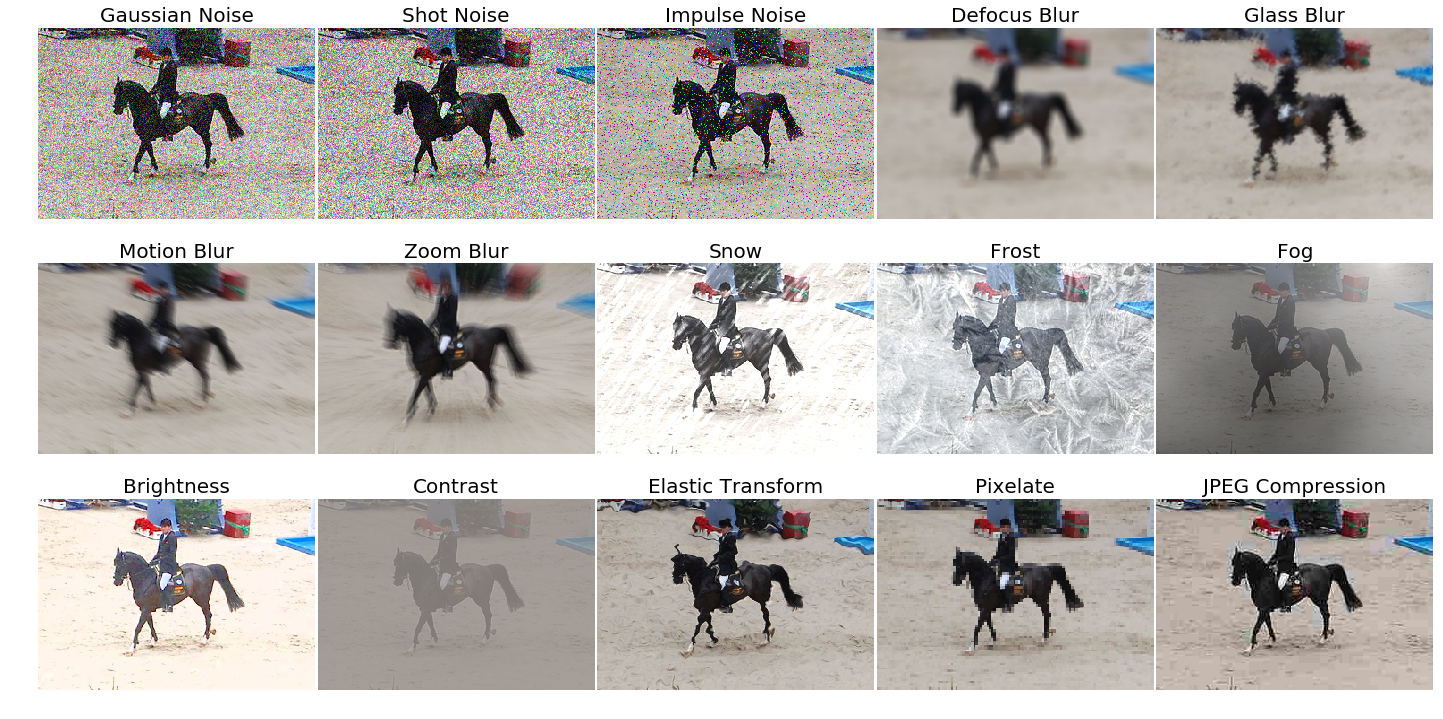
This package provides a set of corruptions that can be applied to images in order to benchmark the robustness of neural networks. These corruptions are not meant to be used as training data augmentation but rather to test the networks against unseen perturbations. For more information have a look at the paper on the original corruption package by Hendrycks and Dietterich: Benchmarking Neural Network Robustness to Common Corruptions and Surface Variations.
Installation and Usage
This package is pip installable via pip3 install imagecorruptions-imaug. An example of how to use the corruption function is given below:
from imagecorruptions import corrupt
...
corrupted_image = corrupt(image, corruption_name='gaussian_blur', severity=1)
...
Looping over all available corruptions can be done either by name or by index:
# via name
from imagecorruptions import get_corruption_names
for corruption in get_corruption_names():
    for severity in range(5):
        corrupted = corrupt(image, corruption_name=corruption, severity=severity+1)
        ...

# via number:
for i in range(15):
    for severity in range(5):
        corrupted = corrupt(image, corruption_number=i, severity=severity+1)
        ...
Note that the first 15 image corruptions are the common corruptions (the ones you get via get_corruption_names()). If you really wish to use these as data augmentation, there exist four additional validation corruptions which can be accessed via get_corruption_names('validation') which should then be used to test the corruption robustness of the trained model.
Apply Image Corruption to a Batch of Images
A script corrupt_images.py helps to apply any kind of corruption to a given folder of images. The original folder structure is maintained.
Here is how you can use the script:
usage: corrupt_images.py [-h] [-su {common,validation,all,noise,blur,weather,digital}]
                         [-c {gaussian_noise,shot_noise,impulse_noise,defocus_blur,glass_blur,motion_blur,zoom_blur,snow,frost,fog,brightness,contrast,elastic_transform,pixelate,jpeg_compression,speckle_noise,gaussian_blur,spatter,saturate} [{gaussian_noise,shot_noise,impulse_noise,defocus_blur,glass_blur,motion_blur,zoom_blur,snow,frost,fog,brightness,contrast,elastic_transform,pixelate,jpeg_compression,speckle_noise,gaussian_blur,spatter,saturate} ...]]
                         [-se [{1,2,3,4} ...]] [-j J] [-n N]
                         in_path out_path {subdirs,filename}

positional arguments:
  in_path               Directory which has to be processed
  out_path              Output folder
  {subdirs,filename}    How should the output be organized

optional arguments:
  -h, --help            show this help message and exit
  -su {common,validation,all,noise,blur,weather,digital}, --subset {common,validation,all,noise,blur,weather,digital}
                        Which subsets of corruptions should be applied
  -c {gaussian_noise,shot_noise,impulse_noise,defocus_blur,glass_blur,motion_blur,zoom_blur,snow,frost,fog,brightness,contrast,elastic_transform,pixelate,jpeg_compression,speckle_noise,gaussian_blur,spatter,saturate} [{gaussian_noise,shot_noise,impulse_noise,defocus_blur,glass_blur,motion_blur,zoom_blur,snow,frost,fog,brightness,contrast,elastic_transform,pixelate,jpeg_compression,speckle_noise,gaussian_blur,spatter,saturate} ...], --corruptions {gaussian_noise,shot_noise,impulse_noise,defocus_blur,glass_blur,motion_blur,zoom_blur,snow,frost,fog,brightness,contrast,elastic_transform,pixelate,jpeg_compression,speckle_noise,gaussian_blur,spatter,saturate} [{gaussian_noise,shot_noise,impulse_noise,defocus_blur,glass_blur,motion_blur,zoom_blur,snow,frost,fog,brightness,contrast,elastic_transform,pixelate,jpeg_compression,speckle_noise,gaussian_blur,spatter,saturate} ...]
                        Kind of corruptions to be applied, can be mixed with subset
  -se [{1,2,3,4} ...], --severity [{1,2,3,4} ...]
                        Severity level of corruption, if not provided all 5 levels will be applied
  -j J                  Multiprocessing, default is 1 core
  -n N                  Limit the number of input images to be corrupted
Positional arguments are input and output folder, along with either subdirs or filename to tell the script how to organize the output files. Either each corrupted file is placed in subfolders (e.g. $INPUT_DIR/dir1/image1.png becomes $OUTPUT_DIR/dir1/brightness/1/image1.png) or the filename is altered (e.g. $INPUT_DIR/dir1/image1.png becomes $OUTPUT_DIR/dir1/image1_brightness_1.png)
Optimal arguments:
-suWhich subsets of corruptions should be applied. One of: common,validation,all,noise,blur,weather,digital-cWhich corruptions should be applied, can be list and can be mixed with subset-seSeverity level of corruption (1-5), if not provided all 5 levels will be applied-jNumber of cores for multiprocessing, default is 1 core-nLimit the number of input images to be corrupted
Citation
If you use our code or the imagecorruptions package, please consider citing:
@article{michaelis2019dragon,
  title={Benchmarking Robustness in Object Detection:
    Autonomous Driving when Winter is Coming},
  author={Michaelis, Claudio and Mitzkus, Benjamin and
    Geirhos, Robert and Rusak, Evgenia and
    Bringmann, Oliver and Ecker, Alexander S. and
    Bethge, Matthias and Brendel, Wieland},
  journal={arXiv preprint arXiv:1907.07484},
  year={2019}
}
Credit and Changelog
This package is an extension of the image corruption functions provided by Dan Hendrycks in the repository corruptions; please consider citing it. The image corruptions implemented by Hendrycks are generalized to work on images with arbitrary image dimensions and aspect ratios aswell as on grayscale images. We furthermore removed the dependency to libmagickwand and the python api Wand and reimplemented motion_blur in python.
Metadata
Release files for imagecorruptions-imaug 1.1.5
For a detailed explanation of source distributions (sdists) and built distributions (wheels), please see the package formats documentation.
Source distribution (sdist)
| File | Size | Uploaded | Provenance | Actions |
|---|---|---|---|---|
| imagecorruptions_imaug-1.1.5.tar.gz | 2.1 MB | With provenance | Details for imagecorruptions_imaug-1.1.5.tar.gz |
Built distribution (wheel)
| File | Interpreter | ABI | Platform | Actions Reset |
|---|---|---|---|---|
| imagecorruptions_imaug-1.1.5-py3-none-any.whl | Python 3 | none | any | Details for imagecorruptions_imaug-1.1.5-py3-none-any.whl |
Total release size: 4.2 MB
Release files / imagecorruptions_imaug-1.1.5.tar.gz
| Download URL | imagecorruptions_imaug-1.1.5.tar.gz |
|---|---|
| Size | 2.1 MB |
| Tags | Source |
|
SHA-256 checksum How to use checksums |
b55edda9f6eead3ee4ba8956cc65122ab47a9b71605bfe0f74d3bc9ee04ae955
|
|
BLAKE2b-256 checksum How to use checksums |
2ba5df801f1d282284faec34b04d444c35328765bef955960821916f1c34ec48
|
| Upload date | |
|
Uploaded using Trusted Publishing? What is trusted publishing? |
Yes |
| Uploaded via |
twine/6.1.0 CPython/3.13.12
|
Provenance
Provenance describes where a file came from. On PyPI, provenance is shared via attestations, which provide a verifiable record of the build or publishing details. View details, limitations and caveats.


PyPI Publish Attestation
PyPI verified that this artifact, at this checksum, originated from the publisher listed below.
Signed by GitHub Actions, verified by PyPI on Jul 15, 2026.
Transparency logRelease files / imagecorruptions_imaug-1.1.5-py3-none-any.whl
| Download URL | imagecorruptions_imaug-1.1.5-py3-none-any.whl |
|---|---|
| Size | 2.1 MB |
| Tags | Python 3 |
|
SHA-256 checksum How to use checksums |
aed6ab43c24f70d7b36a7823991ec28f233062eb96ca968b9c56c9c166cd103c
|
|
BLAKE2b-256 checksum How to use checksums |
9fee7773d05989636353522015216bbb95b05de321947805f099a4f53479c282
|
| Upload date | |
|
Uploaded using Trusted Publishing? What is trusted publishing? |
Yes |
| Uploaded via |
twine/6.1.0 CPython/3.13.12
|
Provenance
Provenance describes where a file came from. On PyPI, provenance is shared via attestations, which provide a verifiable record of the build or publishing details. View details, limitations and caveats.
PyPI Publish Attestation
PyPI verified that this artifact, at this checksum, originated from the publisher listed below.
Signed by GitHub Actions, verified by PyPI on Jul 15, 2026.
Transparency logSecurity for imagecorruptions-imaug 1.1.5
Provenance
Provenance describes where a file came from. On PyPI, provenance is shared via attestations, which provide a verifiable record of the build or publishing details. View details, limitations and caveats.
Full provenance
All 2 files in this release have been uploaded with provenance metadata.
Attestation for imagecorruptions_imaug-1.1.5.tar.gz
PyPI Publish Attestation
PyPI verified that this artifact, at this checksum, originated from the publisher listed below.
Signed by GitHub Actions, verified by PyPI on Jul 15, 2026.
Transparency logA note on package security
PyPI is a repository for distributing packages, not a service for auditing them. While third-party security researchers and our staff do their best to detect and remove malicious packages, PyPI cannot guarantee the quality, security or suitability of any given package.
To learn more about protecting yourself from malicious actors, visit our package security documentation.














