
This package provides a set of image corruptions.
Project description
imagecorruptions-imaug
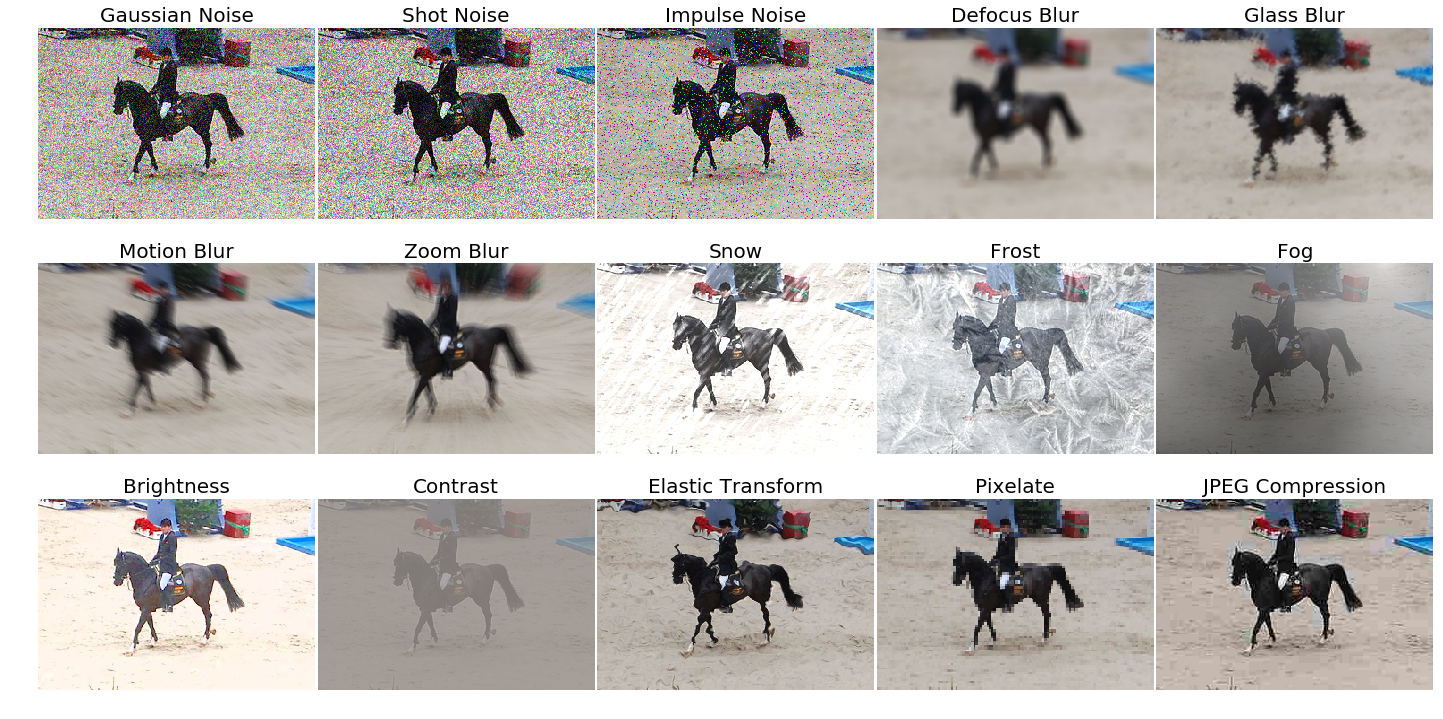
This package provides a set of corruptions that can be applied to images in order to benchmark the robustness of neural networks. These corruptions are not meant to be used as training data augmentation but rather to test the networks against unseen perturbations. For more information have a look at the paper on the original corruption package by Hendrycks and Dietterich: Benchmarking Neural Network Robustness to Common Corruptions and Surface Variations.
Installation and Usage
This package is pip installable via pip3 install imagecorruptions-imaug. An example of how to use the corruption function is given below:
from imagecorruptions import corrupt
...
corrupted_image = corrupt(image, corruption_name='gaussian_blur', severity=1)
...
Looping over all available corruptions can be done either by name or by index:
# via name
from imagecorruptions import get_corruption_names
for corruption in get_corruption_names():
    for severity in range(5):
        corrupted = corrupt(image, corruption_name=corruption, severity=severity+1)
        ...

# via number:
for i in range(15):
    for severity in range(5):
        corrupted = corrupt(image, corruption_number=i, severity=severity+1)
        ...
Note that the first 15 image corruptions are the common corruptions (the ones you get via get_corruption_names()). If you really wish to use these as data augmentation, there exist four additional validation corruptions which can be accessed via get_corruption_names('validation') which should then be used to test the corruption robustness of the trained model.
Apply Image Corruption to a Batch of Images
A script corrupt_images.py helps to apply any kind of corruption to a given folder of images. The original folder structure is maintained.
Here is how you can use the script:
usage: corrupt_images.py [-h] [-su {common,validation,all,noise,blur,weather,digital}]
                         [-c {gaussian_noise,shot_noise,impulse_noise,defocus_blur,glass_blur,motion_blur,zoom_blur,snow,frost,fog,brightness,contrast,elastic_transform,pixelate,jpeg_compression,speckle_noise,gaussian_blur,spatter,saturate} [{gaussian_noise,shot_noise,impulse_noise,defocus_blur,glass_blur,motion_blur,zoom_blur,snow,frost,fog,brightness,contrast,elastic_transform,pixelate,jpeg_compression,speckle_noise,gaussian_blur,spatter,saturate} ...]]
                         [-se [{1,2,3,4} ...]] [-j J] [-n N]
                         in_path out_path {subdirs,filename}

positional arguments:
  in_path               Directory which has to be processed
  out_path              Output folder
  {subdirs,filename}    How should the output be organized

optional arguments:
  -h, --help            show this help message and exit
  -su {common,validation,all,noise,blur,weather,digital}, --subset {common,validation,all,noise,blur,weather,digital}
                        Which subsets of corruptions should be applied
  -c {gaussian_noise,shot_noise,impulse_noise,defocus_blur,glass_blur,motion_blur,zoom_blur,snow,frost,fog,brightness,contrast,elastic_transform,pixelate,jpeg_compression,speckle_noise,gaussian_blur,spatter,saturate} [{gaussian_noise,shot_noise,impulse_noise,defocus_blur,glass_blur,motion_blur,zoom_blur,snow,frost,fog,brightness,contrast,elastic_transform,pixelate,jpeg_compression,speckle_noise,gaussian_blur,spatter,saturate} ...], --corruptions {gaussian_noise,shot_noise,impulse_noise,defocus_blur,glass_blur,motion_blur,zoom_blur,snow,frost,fog,brightness,contrast,elastic_transform,pixelate,jpeg_compression,speckle_noise,gaussian_blur,spatter,saturate} [{gaussian_noise,shot_noise,impulse_noise,defocus_blur,glass_blur,motion_blur,zoom_blur,snow,frost,fog,brightness,contrast,elastic_transform,pixelate,jpeg_compression,speckle_noise,gaussian_blur,spatter,saturate} ...]
                        Kind of corruptions to be applied, can be mixed with subset
  -se [{1,2,3,4} ...], --severity [{1,2,3,4} ...]
                        Severity level of corruption, if not provided all 5 levels will be applied
  -j J                  Multiprocessing, default is 1 core
  -n N                  Limit the number of input images to be corrupted
Positional arguments are input and output folder, along with either subdirs or filename to tell the script how to organize the output files. Either each corrupted file is placed in subfolders (e.g. $INPUT_DIR/dir1/image1.png becomes $OUTPUT_DIR/dir1/brightness/1/image1.png) or the filename is altered (e.g. $INPUT_DIR/dir1/image1.png becomes $OUTPUT_DIR/dir1/image1_brightness_1.png)
Optimal arguments:
-suWhich subsets of corruptions should be applied. One of: common,validation,all,noise,blur,weather,digital-cWhich corruptions should be applied, can be list and can be mixed with subset-seSeverity level of corruption (1-5), if not provided all 5 levels will be applied-jNumber of cores for multiprocessing, default is 1 core-nLimit the number of input images to be corrupted
Citation
If you use our code or the imagecorruptions package, please consider citing:
@article{michaelis2019dragon,
  title={Benchmarking Robustness in Object Detection:
    Autonomous Driving when Winter is Coming},
  author={Michaelis, Claudio and Mitzkus, Benjamin and
    Geirhos, Robert and Rusak, Evgenia and
    Bringmann, Oliver and Ecker, Alexander S. and
    Bethge, Matthias and Brendel, Wieland},
  journal={arXiv preprint arXiv:1907.07484},
  year={2019}
}
Credit and Changelog
This package is an extension of the image corruption functions provided by Dan Hendrycks in the repository corruptions; please consider citing it. The image corruptions implemented by Hendrycks are generalized to work on images with arbitrary image dimensions and aspect ratios aswell as on grayscale images. We furthermore removed the dependency to libmagickwand and the python api Wand and reimplemented motion_blur in python.
Project details
Release history Release notifications | RSS feed

Download files
Download the file for your platform. If you're not sure which to choose, learn more about installing packages.
Source Distribution
Built Distribution
Filter files by name, interpreter, ABI, and platform.
If you're not sure about the file name format, learn more about wheel file names.
Copy a direct link to the current filters
File details
Details for the file imagecorruptions_imaug-1.1.3.tar.gz.
File metadata
- Download URL: imagecorruptions_imaug-1.1.3.tar.gz
- Upload date:
- Size: 2.1 MB
- Tags: Source
- Uploaded using Trusted Publishing? No
- Uploaded via: twine/6.1.0 CPython/3.12.9
File hashes
| Algorithm | Hash digest | |
|---|---|---|
| SHA256 |
dd103a5b7a1d1d8d173aec26fe8b4be93ef83de122bea4ad88c08695daa76d00
|
|
| MD5 |
c42f8c78355cf36de06d62d4933e3f55
|
|
| BLAKE2b-256 |
766934b6038c9976bfdc842262650e8edc824d0d87f0638d319376c474d8786b
|
File details
Details for the file imagecorruptions_imaug-1.1.3-py3-none-any.whl.
File metadata
- Download URL: imagecorruptions_imaug-1.1.3-py3-none-any.whl
- Upload date:
- Size: 2.1 MB
- Tags: Python 3
- Uploaded using Trusted Publishing? No
- Uploaded via: twine/6.1.0 CPython/3.12.9
File hashes
| Algorithm | Hash digest | |
|---|---|---|
| SHA256 |
e0278dacaaa9074969a254beb8df519d14d720fdcb2da3768c1d0c51ffeb8280
|
|
| MD5 |
ba6d35ae626b66e2603da7d3e526b299
|
|
| BLAKE2b-256 |
1e98a6d563887be3288b7b6aee2e19d21d639f15c71c0a32a093a4ef8da0ba22
|






