

imail
Triage your inbox in five seconds per email.
Local app · multi-provider · 3 LLM-drafted replies per message · keyboard-first.





🧭 The idea
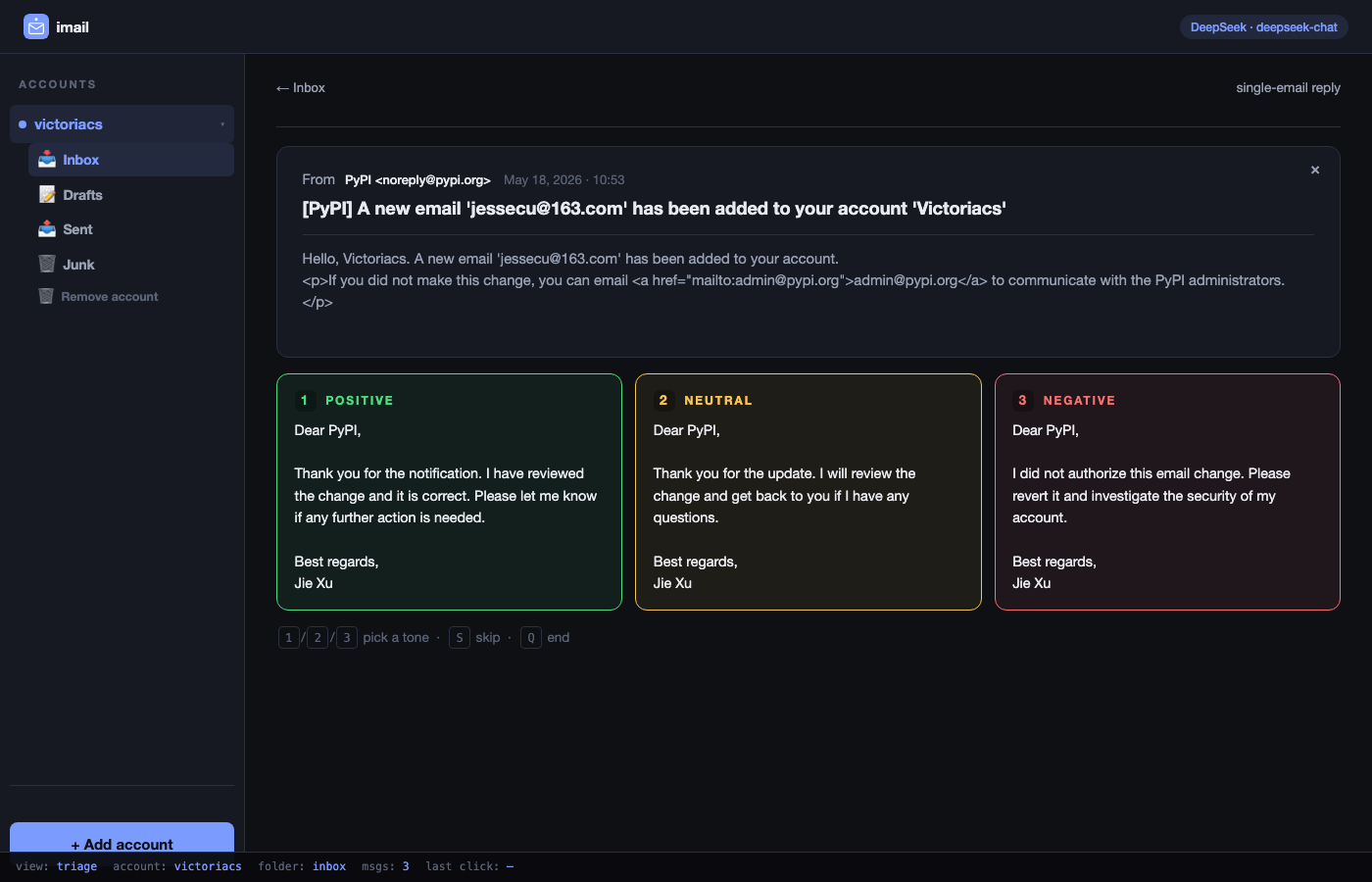
You wake up to 30 emails. Each one needs a yes / no / "let me get back to you." Each takes 30 seconds of phrasing even though the decision takes one. imail flips it: the phrasing is one keystroke, the decision is yours.
┌──────────────────────────────────────────────────────────────┐
│  From       advisor@uni.edu                                  │
│  Subject    Can you join the panel on Thursday?              │
│  …                                                           │
└──────────────────────────────────────────────────────────────┘
  ┌─────────────┐   ┌─────────────┐   ┌─────────────┐
  │ 1·POSITIVE  │   │ 2·NEUTRAL   │   │ 3·NEGATIVE  │
  │ Yes, I'll … │   │ Let me  …   │   │ Thanks for  │
  │             │   │             │   │ asking, but │
  └─────────────┘   └─────────────┘   └─────────────┘
   1 / 2 / 3 → save draft     S → skip     Q → end session
🚀 Install
Pick whichever fits your setup. The command after install is always imail.
| uv (recommended) | pipx | Homebrew (macOS) | Docker |
|---|---|---|---|
uv tool install \
  imail-cli
|
pipx install \
  imail-cli
|
brew install \
  jessecu2024/tap/imail
|
docker pull \
  ghcr.io/jessecu2024/imail
|
💡 Distribution name on PyPI is
imail-cli(the bareimailslot was taken). The command you run after install is stillimail.
⚡ First run
export DEEPSEEK_API_KEY=sk-...   # https://platform.deepseek.com/api_keys (free signup)
imail                             # opens http://127.0.0.1:8765
First boot lands on an "Add account" screen. Pick Gmail / Outlook / 163 / etc., sign in once, you're triaging.
Docker variant (no Python needed locally):
docker run --rm -p 8765:8765 \
  -v ~/.config/imail:/root/.config/imail \
  -e DEEPSEEK_API_KEY=sk-... \
  ghcr.io/jessecu2024/imail:latest
The mounted ~/.config/imail keeps your accounts and saved replies between
container restarts.
✨ Why imail
| 💸 3 drafts in one API call | DeepSeek sees the email once and returns positive / neutral / negative in a single response. ~$0.0002 per triage. The model never gets a follow-up "rephrase more polite" prompt because all three angles are already on screen. |
| 📥 Your mailbox stays where it is | imail logs into your existing Gmail / Outlook / 163 via OAuth or IMAP. Saved drafts land in the same Drafts folder you already use — they show up on your phone too. |
| 🔒 Local-first | The web UI runs at 127.0.0.1:8765 on your machine. Email content stays local; the only network hop is to DeepSeek for the draft itself. No imail server, no inbox uploaded anywhere. |
| ⌨️ Keyboard-first | 1 / 2 / 3 to save a draft, S to skip, Q to end. The triage view is built to be flown through. |
| 🟢 Tracks what you've handled | Already-replied emails get a green "Replied" badge in the inbox; clicking re-shows the saved reply instead of re-drafting (no token waste). The Sent folder mirrors what you handled, served from local cache. |
| ❌ Delete that syncs everywhere | Hitting × on an email expunges it on the IMAP server, so 163 webmail / phone / any other client logged into the mailbox stops seeing it too. |
🔌 Mail providers
| Provider | How | Setup doc |
|---|---|---|
| ✦ Gmail | OAuth (readonly + modify + compose + send) |
gmail-setup.md |
| ▦ Microsoft 365 / Office | IMAP + app password | imap-setup.md |
| ▣ Outlook.com / Hotmail | IMAP + app password | imap-setup.md |
| ✱ 163 / 126 / QQ | IMAP + 授权码 | imap-setup.md |
| ✿ Yahoo / iCloud | IMAP + app-specific password | imap-setup.md |
| ⚙ Any custom IMAPS host | Host + port + login | — |
🚧 Work or school account locked down? (CityU, many universities, some enterprises.) See docs/forwarding-workflow.md for the validated forwarding-to-personal fallback — adds your work mail to imail in 5 minutes of server-side setup, no code needed.
⚙️ Configuration
All settings come from .env or environment variables.
| Variable | Default | Notes |
|---|---|---|
DEEPSEEK_API_KEY |
(required) | DeepSeek API key. OPENAI_API_KEY is a fallback for non-DeepSeek endpoints. |
IMAIL_BASE_URL |
https://api.deepseek.com |
Any OpenAI-compatible endpoint (Together, Groq, Moonshot, 302.AI, …) |
IMAIL_MODEL |
deepseek-chat |
Or deepseek-reasoner for sharper, slower drafts |
USER_SIGNOFF |
Jie Xu |
Name that appears under "Best regards," in every drafted reply |
IMAIL_PORT |
8765 |
Local server port |
IMAIL_HOST |
127.0.0.1 |
Bind address (loopback by default — don't expose this on a LAN) |
IMAIL_CONFIG_DIR |
~/.config/imail |
Where accounts.json + OAuth tokens + replies-*.json live |
🧑💻 Develop
git clone https://github.com/jessecu2024/imail
cd imail
uv sync                      # install dev + runtime deps
cp .env.example .env         # fill in DEEPSEEK_API_KEY
uv run imail                 # → opens http://127.0.0.1:8765
CI quartet, run anything before pushing:
uv run ruff check .          # lint
uv run ruff format .         # format
uv run mypy src              # type check
uv run pytest                # tests
Release flow: see docs/release.md. The short version is
"bump pyproject + tag vX.Y.Z + push" — the workflow publishes to PyPI via
Trusted Publishing and to GHCR via OIDC, then attaches the wheel to a GitHub
release.
📁 Project layout
src/imail/
  cli.py                Launcher — boots uvicorn + opens browser
  config.py             .env loader
  server.py             FastAPI app — status, accounts, triage session
  accounts.py           Account manifest + keyring-backed secrets
  reply_generator.py    DeepSeek call + JSON parser
  reply_store.py        On-disk pending/done state per account
  providers/
    base.py             EmailMsg + MailProvider Protocol
    gmail.py            Gmail API provider (OAuth)
    imap.py             Generic IMAP provider with presets (Outlook/163/QQ/…)
  static/
    index.html          Single-page UI (Alpine.js)
    app.js              SPA state + handlers
    style.css           Light theme
    icon.svg            Brand mark
docs/
  gmail-setup.md        Google Cloud Console walk-through
  imap-setup.md         Per-provider app-password steps
  forwarding-workflow.md Locked-tenant fallback (163 as relay)
  release.md            How to cut a PyPI release
  troubleshooting.md    Recurring problems (macOS keychain after brew upgrade, …)
🔒 Security
- 📧 Gmail OAuth scopes:
gmail.readonly(fetch),gmail.modify(mark-read / archive),gmail.compose(drafts), andgmail.send(one-keystroke send from the triage view). If you'd rather only ever save drafts and send manually from Gmail, removegmail.sendfromSCOPESinsrc/imail/providers/gmail.pyand revoke the token. - 🔑 IMAP app passwords stay in the OS keyring, never in
accounts.jsonor.env. - 🔐 OAuth tokens live at
~/.config/imail/token-<account-id>.json(mode0600). - 🏠 Local-only by default. Server listens on
127.0.0.1. Don't move it to0.0.0.0on a shared machine. - ☁️ Email content reaches DeepSeek's servers. If you'd rather keep all
bodies on-device, point
IMAIL_BASE_URLat a self-hosted Ollama / vLLM endpoint running an instruction model.
📜 License
Dual-licensed. Pick whichever fits your use.
- 🆓 AGPL-3.0-or-later (default) — full text in LICENSE. You're free to use, modify, fork, and self-host. The catch: if you modify and either redistribute or run it as a network service (SaaS, hosted product, anything end users reach over a network), your modifications must also be AGPL-3.0. The standard "no closed-source forks, no proprietary SaaS rebrand" guarantee — see the GNU AGPL FAQ for the rationale.
- 💼 Commercial license — if AGPL's copyleft obligations don't fit your product (proprietary version, closed-source SaaS, distributing imail as a library without exposing your source), email wzh4464@gmail.com.
Versions ≤ 1.3.0 on PyPI were published under MIT. From v1.3.1 onward the license is AGPL-3.0-or-later (or commercial). If you installed
imail-cli==1.3.0you remain on MIT terms for that copy.
🤝 Contributing
Issues and PRs welcome — use the bug report or feature request templates. For substantial changes, open an issue first so we can align on the shape before you write code.
See CHANGELOG.md for what shipped in each version.
1 maintainer

Metadata
1 maintainer
Release files for imail-cli 1.4.3
For a detailed explanation of source distributions (sdists) and built distributions (wheels), please see the package formats documentation.
Source distribution (sdist)
| File | Size | Uploaded | Provenance | Actions |
|---|---|---|---|---|
| imail_cli-1.4.3.tar.gz | 369.2 kB | With provenance | Details for imail_cli-1.4.3.tar.gz |
Built distribution (wheel)
| File | Interpreter | ABI | Platform | Actions Reset |
|---|---|---|---|---|
| imail_cli-1.4.3-py3-none-any.whl | Python 3 | none | any | Details for imail_cli-1.4.3-py3-none-any.whl |
Total release size: 472.5 kB
Release files / imail_cli-1.4.3.tar.gz
| Download URL | imail_cli-1.4.3.tar.gz |
|---|---|
| Size | 369.2 kB |
| Tags | Source |
|
SHA-256 checksum How to use checksums |
c851bac1bf01e8f9710c0376f880a0d9d841b35f0ec798c038525a035b8b2028
|
|
BLAKE2b-256 checksum How to use checksums |
7b4768fd282c5a9f927ac68d803ef23032a63a488f45ea338593633eb45bc59c
|
| Upload date | |
|
Uploaded using Trusted Publishing? What is trusted publishing? |
Yes |
| Uploaded via |
twine/6.1.0 CPython/3.13.12
|
Provenance
Provenance describes where a file came from. On PyPI, provenance is shared via attestations, which provide a verifiable record of the build or publishing details. View details, limitations and caveats.


PyPI Publish Attestation
PyPI verified that this artifact, at this checksum, originated from the publisher listed below.
Signed by GitHub Actions, verified by PyPI on Jun 12, 2026.
Transparency logRelease files / imail_cli-1.4.3-py3-none-any.whl
| Download URL | imail_cli-1.4.3-py3-none-any.whl |
|---|---|
| Size | 103.3 kB |
| Tags | Python 3 |
|
SHA-256 checksum How to use checksums |
c01dd5a0bd393fe92abfb27686365b63705d19a23fb6bbfab84205027dcce0cb
|
|
BLAKE2b-256 checksum How to use checksums |
99d80a2d96eee073a5ec3e7c2fc8c4e974cc33bde74b2ac56ae2e57e02dae34f
|
| Upload date | |
|
Uploaded using Trusted Publishing? What is trusted publishing? |
Yes |
| Uploaded via |
twine/6.1.0 CPython/3.13.12
|
Provenance
Provenance describes where a file came from. On PyPI, provenance is shared via attestations, which provide a verifiable record of the build or publishing details. View details, limitations and caveats.
PyPI Publish Attestation
PyPI verified that this artifact, at this checksum, originated from the publisher listed below.
Signed by GitHub Actions, verified by PyPI on Jun 12, 2026.
Transparency logSecurity for imail-cli 1.4.3
Provenance
Provenance describes where a file came from. On PyPI, provenance is shared via attestations, which provide a verifiable record of the build or publishing details. View details, limitations and caveats.
Full provenance
All 2 files in this release have been uploaded with provenance metadata.
Attestation for imail_cli-1.4.3.tar.gz
PyPI Publish Attestation
PyPI verified that this artifact, at this checksum, originated from the publisher listed below.
Signed by GitHub Actions, verified by PyPI on Jun 12, 2026.
Transparency logA note on package security
PyPI is a repository for distributing packages, not a service for auditing them. While third-party security researchers and our staff do their best to detect and remove malicious packages, PyPI cannot guarantee the quality, security or suitability of any given package.
To learn more about protecting yourself from malicious actors, visit our package security documentation.














