
imaugtools contains tools used for image augmentation: translate, rotate, crop. This library is for you if you do NOT want to stretch or skew, or pad pixels when doing any of these operations.

Project description
imaugtools



imaugtools contains tools used for image augmentation: translate, rotate, crop. This library is for you if you do NOT want to stretch or skew, or pad pixels that would make your images look strange when doing any of these operations.
Installation
To install imaugtools, simply run in your terminal
pip install imaugtools
Usage
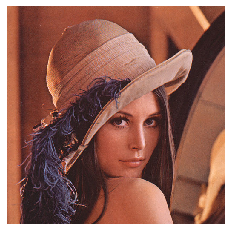
Example image
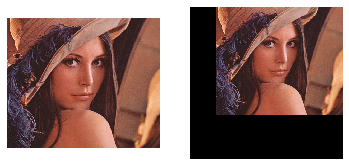
Translation
from imaugtools import translate_image
my_image_translated = translate_image(my_image, 0.1, 0.2)
my_image_translated_uncropped = translate_image(my_image, 0.1, 0.2, crop=False)
imshow(my_image_translated, my_image_translated_uncropped, mode='BGR')
imshow function used here is to simply display the images, you can use it from imshowtools library.
With and without crop:
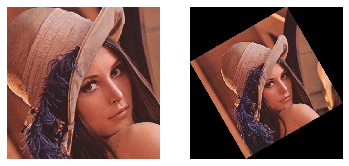
Rotation
from imaugtools import rotate_image
my_image_rotated = rotate_image(my_image, 30) # angle in degrees
my_image_rotated_uncropped = rotate_image(my_image, 30, crop=False)
imshow(my_image_rotated, my_image_rotated_uncropped, mode='BGR')
With and without crop:
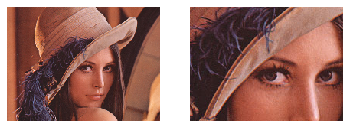
Cropping
from imaugtools import center_crop, crop_around_center
my_image_center_cropped = center_crop(my_image, (150, 200))
my_image_cropped_around_center = crop_around_center(my_image, (150, 200))
imshow(my_image_center_cropped, my_image_cropped_around_center, mode='BGR')
Aspect ratio preserving center crop and crop around center:
print(my_image_center_cropped.shape, my_image_cropped_around_center.shape)
# Output: (150, 200, 3) (150, 200, 3)
Advanced Usage
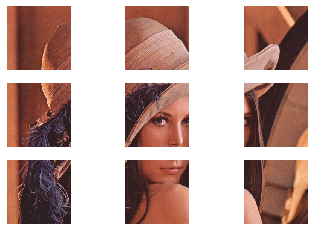
Strided Translation
Strided translation is one of the powerful image augmentation techniques used in training neural networks.
tx_max = 1 and ty_max = 1 is equivalent to a stride of 1 in both directions. After you specify tx_max, you can specify tx (translation in x-axis) from -tx_max to +tx_max. The same applies to ty and ty_max.
my_images_translated = []
for j in range(-1, 2):
    for i in range(-1, 2):
        my_images_translated.append(translate_image(my_image, i, j, tx_max=1, ty_max=1))
imshow(*my_images_translated, mode='BGR')
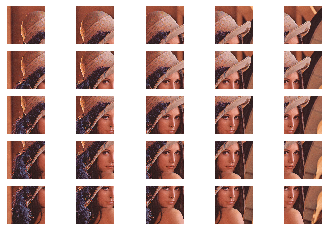
tx_max = 0.5 and ty_max = 0.5 is equivalent to a stride of 0.5 in both directions
my_images_translated = []
for j in range(-2, 3):
    for i in range(-2, 3):
        my_images_translated.append(translate_image(my_image, i/4, j/4, tx_max=0.5, ty_max=0.5))
imshow(*my_images_translated, mode='BGR')
Contributing
Pull requests are very welcome.
- Fork the repo
- Create new branch with feature name as branch name
- Check if things work with a jupyter notebook
- Raise a pull request
Licence
Please see attached Licence


Download files
Download the file for your platform. If you're not sure which to choose, learn more about installing packages.
Source Distribution
Built Distribution
Filter files by name, interpreter, ABI, and platform.
If you're not sure about the file name format, learn more about wheel file names.
Copy a direct link to the current filters
File details
Details for the file imaugtools-0.1.2.tar.gz.
File metadata
- Download URL: imaugtools-0.1.2.tar.gz
- Upload date:
- Size: 5.7 kB
- Tags: Source
- Uploaded using Trusted Publishing? No
- Uploaded via: twine/2.0.0 pkginfo/1.5.0.1 requests/2.22.0 setuptools/41.4.0 requests-toolbelt/0.9.1 tqdm/4.36.1 CPython/3.7.4
File hashes
| Algorithm | Hash digest | |
|---|---|---|
| SHA256 |
565a80e4050143288d0ecdb932293532204ae22cb65dd8238e67ea6decb9af5f
|
|
| MD5 |
9799e58473acf6eec5df6630522b5413
|
|
| BLAKE2b-256 |
f02200da76867be672384d67c87441cc91b2a99114c06131e48c084672160f82
|
File details
Details for the file imaugtools-0.1.2-py3-none-any.whl.
File metadata
- Download URL: imaugtools-0.1.2-py3-none-any.whl
- Upload date:
- Size: 7.9 kB
- Tags: Python 3
- Uploaded using Trusted Publishing? No
- Uploaded via: twine/2.0.0 pkginfo/1.5.0.1 requests/2.22.0 setuptools/41.4.0 requests-toolbelt/0.9.1 tqdm/4.36.1 CPython/3.7.4
File hashes
| Algorithm | Hash digest | |
|---|---|---|
| SHA256 |
892903a3ac4bb8315ac3628573308325fd2ec3399b5914b3a58db406c2f2a568
|
|
| MD5 |
4db0f79d92135e2547194bdee913dc1c
|
|
| BLAKE2b-256 |
a58dcd6da48e9754f544aba63c00c49db8538d55116261fb0613b9398c8bbdf4
|






