
imbot
imbot - create a bot to control any website.



















Languages:
* python3Requirements
[✓] hexor[✓] asciitext
[✓] selenium
Docker pull,build & run:
# pull:
❯ docker pull yasserbdj96/imbot:latest

# build:
❯ docker build -t docker.io/yasserbdj96/imbot:latest .

# run:
❯ docker run -e headless=<True/False>* -e json_data='<PATH_TO_YOUR_JSON_FILE>*' -e opiration_title='<TITLE_OF_OPIRATION>*' -e argvs='<ARGV_DATA_ID>="<DATA_TO_INPUT>"' -i -t imbot:latest
# EX:
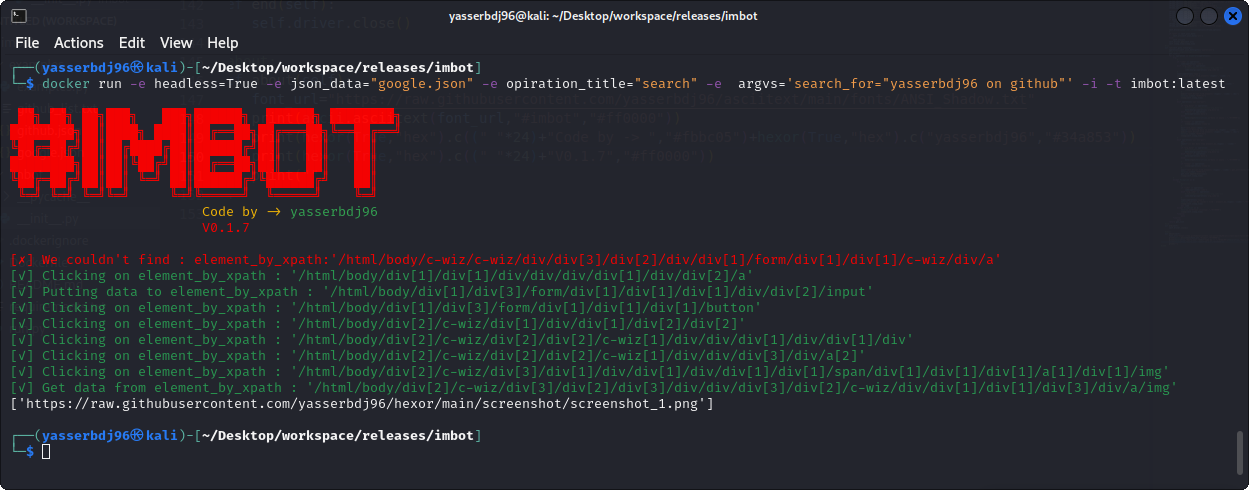
# docker run -e headless=True -e json_data="google.json" -e opiration_title="search" -e  argvs='search_for="yasserbdj96 on github"' -i -t imbot:latest
# *    = All inputs must be entered.
Github Packages pull,build & run:
# pull:
❯ docker pull ghcr.io/yasserbdj96/imbot:latest

# build:
❯ docker build -t ghcr.io/yasserbdj96/imbot:latest .

# run:
❯ docker run -e headless=<True/False>* -e json_data='<PATH_TO_YOUR_JSON_FILE>*' -e opiration_title='<TITLE_OF_OPIRATION>*' -e argvs='<ARGV_DATA_ID>="<DATA_TO_INPUT>"' -i -t ghcr.io/yasserbdj96/imbot:latest
# EX:
# docker run -e headless=True -e json_data="google.json" -e opiration_title="search" -e  argvs='search_for="yasserbdj96 on github"' -i -t ghcr.io/yasserbdj96/imbot:latest
# *    = All inputs must be entered.
Python Package Installation:
# Install from pypi:
❯ pip install imbot
# OR
❯ python -m pip install imbot

# Local install:
❯ git clone https://github.com/yasserbdj96/imbot.git
❯ cd imbot
❯ pip install -r requirements-pypi.txt
❯ sudo python setup.py install

# Uninstall:
❯ pip uninstall imbot
Run without installation:
❯ git clone https://github.com/yasserbdj96/imbot.git
❯ cd imbot
❯ pip install -r requirements.txt
❯ python run.py --headless <True/False> --json_data '<PATH_TO_YOUR_JSON_FILE>*' --opiration_title '<TITLE_OF_OPIRATION>*' --argvs '{"<ARGV_DATA_ID>":"<DATA_TO_INPUT>"}' --exec_path '<CHROMEDRIVER_PATH>'
# EX:
# python run.py --headless False --json_data './imbot-examples/google.json' --opiration_title 'search' --argvs '{"search_for":"yasserbdj96 github"}' --exec_path './chromedriver'
# *    = All inputs must be entered.

# Run with Makefile:
❯ make run headless=<True/False> json_data='<PATH_TO_YOUR_JSON_FILE>*' opiration_title='<TITLE_OF_OPIRATION>*' argvs='{"<ARGV_DATA_ID>":"<DATA_TO_INPUT>"}' exec_path='<CHROMEDRIVER_PATH>'
Usage:
from imbot import *

p1=imbot(json_data="<PATH_TO_JSON_FILE>*",sleep_time=2,url="<URL_TO_JSON_FILE>*",headless=True,exec_path="<CHROMEDRIVER_PATH>")

p1.run(<OPIRATION_TITLE>*,<VARIABLE_NAME>)
# *    = All inputs must be entered.

p1.end()

"""
Default json code:
{
    "url":"<WEBSITE_URL>",
    "<OPIRATION_TITLE>":{
        "operations":[
           {"element_by":"<xpath/link_text/id/name/tag_name>","element_code":"<ELEMENT_CODE>","element_arg":"<VARIABLE_NAME>","opt":"<click/put/get>","arg_data":"<VARIABLE_NAME>","data":"<YOUR_DATA>","sleep":<Seconds>}
        ]
    }
}

Help:
# Types of finding elements : "element_by"=[id,name,xpath,link_text,partial_link_text,tag_name,class_name,css_selector]
# If you don't use the 'code' key, you must use the 'element_arg' key to enter data from your script.
# If you don't use the 'data' key, you must use the 'arg_data' key to enter data from your script.
# When using the 'put' option you must use 'data' or 'arg_data', Unlike the "click" option.
# When using the 'get' option you must use 'data' or 'arg_data', Unlike the "click" option, data=get_attribute("<src/herf/name/id>").
# 'arg_data' and 'element_arg' are 'variable name'.
# 'arg_data' and 'element_arg' are the variable name of the element to be inserted from the list. //Example: p1.run(<OPIRATION_TITLE>,password="123456789")
# 'data' and 'element_code' for entering data like password or username from json file (this is a common option if the variables you want to use are static).
# 'sleep' To wait for a certain period before starting an operation.
"""
Examples:
from imbot import *

# Examples
# Example 1:
# Open the website link:
p1=imbot("google.json")#,headless=False

# Here, search for a movie poster in Google Images and get the link:
print(p1.run("search",search_for="yasserbdj96 on github"))
print(p1.run("search",search_for="luffy one piece"))

# end
p1.end()
Screenshot:
Changelog History:
Click to See changelog HistoryLimitations:
# Types of finding elements : "element_by"=[id,name,xpath,link_text,partial_link_text,tag_name,class_name,css_selector]# If you don't use the 'code' key, you must use the 'element_arg' key to enter data from your script.
# If you don't use the 'data' key, you must use the 'arg_data' key to enter data from your script.
# When using the 'put' option you must use 'data' or 'arg_data', Unlike the "click" option.
# When using the 'get' option you must use 'data' or 'arg_data', Unlike the "click" option, data=get_attribute("").
# 'arg_data' and 'element_arg' are 'variable name'.
# 'arg_data' and 'element_arg' are the variable name of the element to be inserted from the list. //Example: p1.run(,password="123456789")
# 'data' and 'element_code' for entering data like password or username from json file (this is a common option if the variables you want to use are static).
# 'sleep' To wait for a certain period before starting an operation.
Development By:
Developer / Author: yasserbdj96
License:
The content of this repository is bound by the following LICENSE.
Support:
If you like `imbot` and want to see it improve furthur or want me to create intresting projects , You can buy me a coffee

BTC: bc1q2dks8w8uurca5xmfwv4jwl7upehyjjakr3xga9
website . github . gitlab . linkedin . twitter . instagram . facebook . youtube . pypi . docker . telegram . gitter . e-mail . sponsor
1 maintainer

Metadata
1 maintainer
Release files for imbot 0.1.8
For a detailed explanation of source distributions (sdists) and built distributions (wheels), please see the package formats documentation.
Source distribution (sdist)
| File | Size | Uploaded | |
|---|---|---|---|
| imbot-0.1.8.tar.gz | 7.6 kB | Details |
Built distribution (wheel)
| File | Interpreter | ABI | Platform | Reset |
|---|---|---|---|---|
| imbot-0.1.8-py3-none-any.whl | Python 3 | none | any | Details |
Total release size: 15.3 kB
Release files / imbot-0.1.8.tar.gz
| Download URL | imbot-0.1.8.tar.gz |
|---|---|
| Size | 7.6 kB |
| Tags | Source |
|
SHA-256 checksum How to use checksums |
9d71adb047f4605a3d328240ab19a76c0a2d46de1f8f1f3adab616eccf3cb770
|
|
BLAKE2b-256 checksum How to use checksums |
273a34b998aabbfe1f7ed0a9ca3ed4f6b5df9f7afe00d55e2a278120dc69e0d7
|
| Upload date | |
|
Uploaded using Trusted Publishing? What is trusted publishing? |
No |
| Uploaded via |
twine/4.0.2 CPython/3.9.16
|
Release files / imbot-0.1.8-py3-none-any.whl
| Download URL | imbot-0.1.8-py3-none-any.whl |
|---|---|
| Size | 7.7 kB |
| Tags | Python 3 |
|
SHA-256 checksum How to use checksums |
db63c24e844ec546b02dc210cb0a821b2ef6de57211d24c782e3ddf23973beca
|
|
BLAKE2b-256 checksum How to use checksums |
d546990e766aa8142ee35b877a268b483c2f617d2df2bc3c976edc6fdea337ff
|
| Upload date | |
|
Uploaded using Trusted Publishing? What is trusted publishing? |
No |
| Uploaded via |
twine/4.0.2 CPython/3.9.16
|














