
No project description provided

Project description

iMCAr: The interactive MCA recorder
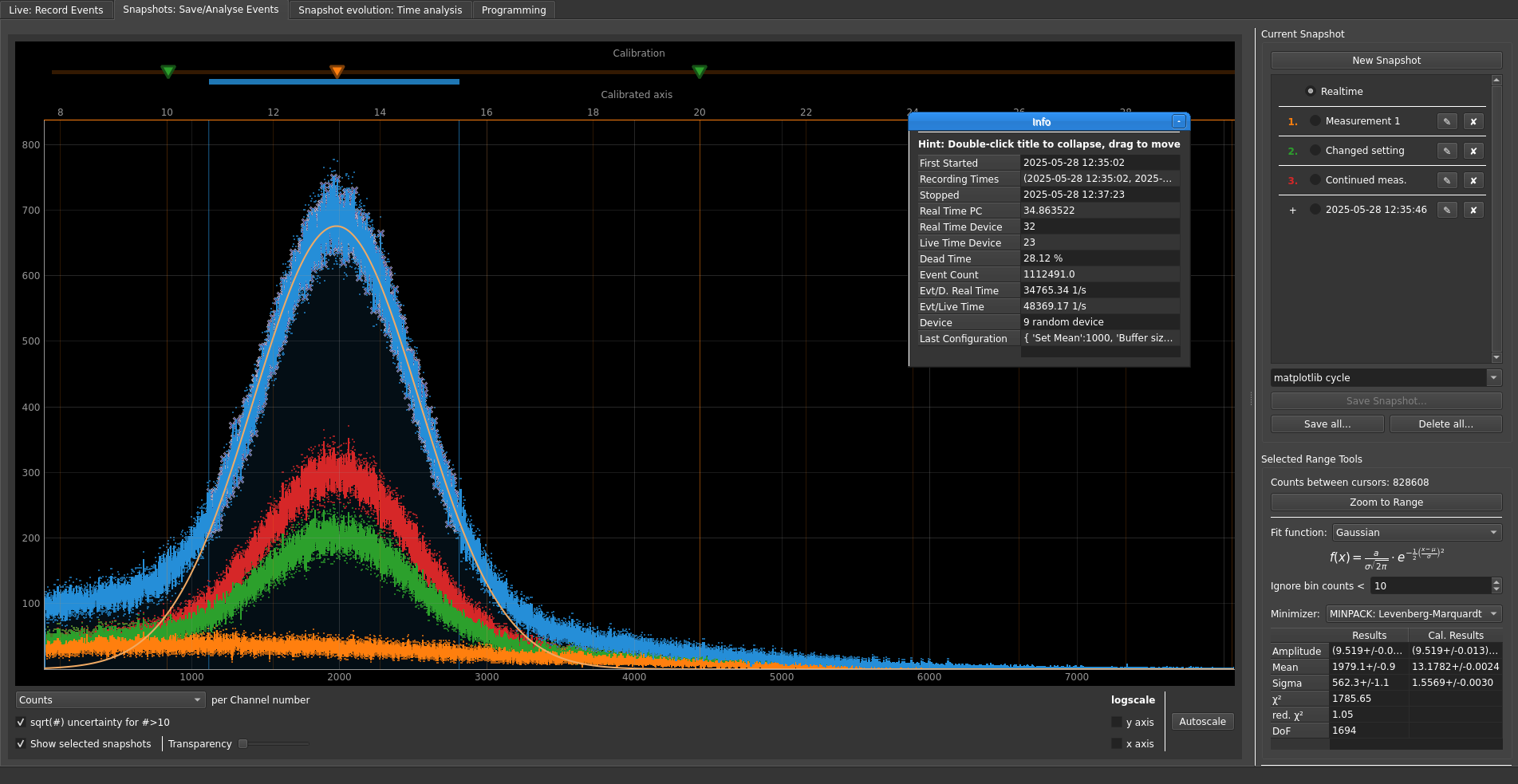
This software provides a user-friendly application to use Multi-Channel Analyzers (MCA).
Contributing
If you e.g. develop your own drivers for iMCAr or extend the application in a different way, consider contributing the code back to this repository through a Pull Request! There is no guarantee that the changes are merged since they may go into a different direction than the original aim of the software, so before implementing a large change consider opening an issue suggesting that feature so it can be discussed beforehand.
SAFETY NOTE
This software is not developed for usage in medical or other high precision environments. It does implement data recovery after application crashes, however that may not be perfect.
If you can, please run this software through a terminal so you can report stack traces of crashes on GitHub if you encounter a crash.
Be careful!
Installation
Pre-built binaries (experimental)
Experimentally, with each GitHub release, pre-compiled binaries are shipped with each GitHub release that can be launched without installing Python or any dependencies. As always, please report any issues regarding them in the issue tracker.
Linux binaries require a system with GLIBC version of (currently) at least 2.31, which should cover all major current Linux distributions.
Python package
This software can also be installed as a Python package, for which Python has to be installed and part of the PATH variable. For that, Python's Windows install wizard conveniently offers to edit the PATH at the beginning. Under Windows, possibly at the end of the installation the adjustment of the PATH length has to be accepted.
Many Linux distributions ship Python 3 as "python3" with "pip3" (opposed to "python" and "pip"). If that does not work, the commands have to be entered without the number 3.
After downloading the source code, in the folder with this README.md file the following commands have to be executed:
pip3 install --upgrade setuptools
python3 setup.py install
You now can already start the software. To add your device to the software, open the documentation by either clicking the "➕" sign next to the device list.
Uninstallation
pip3 uninstall imcar
Start
After installation the program can be launched with the command
imcar
. To add a desktop shortcut, the location of the launcher can be found with where imcar (Windows) or whereis imcar (Linux/Unix). An icon is included in form of the file imcar/gui/icon.ico.
Warning: This only works if no virtual environment (e.g. via Anaconda) is used. For Anaconda3 under Windows, a solution would be to right click on the on the desktop shortcut, go to the 'Shortcut' tab and change "Start in" to C:\Users\<username>\Anaconda3\Library\bin or the equivalent path in your installation.
Troubleshooting
If the application does not launch, executing
sudo pip3 uninstall pyqt5-sip pyqt5 pyqtwebengine
sudo pip3 install pyqtwebengine
may solve the problem. The reason is that pyqt5-sip has to be installed BEFORE pyqt5. Also, both have to be installed in the same directory (sudo pip3 and pip3 must not be mixed). The installer of PyQtWebEngine installs everything in the right order, so the problem can be solved by uninstalling everything and purely executing the latest installer.
License
If not stated otherwise in the corresponding files, source code is distributed unter the GPLv3 license. This is at the moment required since this library uses the free version of PyQt5.
Dependencies
The following requirements are automatically installed if the recommended setup.py is used.
NumPy: https://www.numpy.org/
Matplotlib: https://matplotlib.org/
SciPy: https://www.scipy.org/
Uncertainties: https://pythonhosted.org/uncertainties/
PyUSB: https://pyusb.github.io/pyusb/
PyQt5: https://www.riverbankcomputing.com/software/pyqt/
PyQTGraph: http://www.pyqtgraph.org/
Markdown2: https://github.com/trentm/python-markdown2
faultguard: https://github.com/2xB/faultguard
faultguard was initially developed for this project.
Currently supported MCAs
As a design principle, this software has no dependencies to binaries from third partys such as MCA manufacturers. This allows the software to be platform independent and open source, but also makes it necessary to reverse engineer every MCA USB protocol for every supported product. If you are a vendor or want to contribute out of other reasons, please get in touch by e.g. creating a GitHub issue with your contact address.
| Name | Vendor ID | Product ID | Data Transfer Type | Notes |
|---|---|---|---|---|
| CAEN N957 8K MCA | 0x0547 | 0x1002 | Eventwise channel IDs | Reading first 8064 channels [1] |
Notes
[1] The last channels are ignored since they can be invalid depending on internal settings.
Credits
Funding: Institute for Nuclear Physics, University of Münster, Germany
Release history Release notifications | RSS feed


Download files
Download the file for your platform. If you're not sure which to choose, learn more about installing packages.
Source Distribution
Built Distribution
Filter files by name, interpreter, ABI, and platform.
If you're not sure about the file name format, learn more about wheel file names.
Copy a direct link to the current filters
File details
Details for the file imcar-1.0.8.tar.gz.
File metadata
- Download URL: imcar-1.0.8.tar.gz
- Upload date:
- Size: 261.2 kB
- Tags: Source
- Uploaded using Trusted Publishing? Yes
- Uploaded via: twine/6.1.0 CPython/3.13.7
File hashes
| Algorithm | Hash digest | |
|---|---|---|
| SHA256 |
2be6d9fae0ad545ad44a03e6c0e0796e81e9669d3af9415a7fc060c9a61623b7
|
|
| MD5 |
a4981217b2cdc35bb12d79f65216898a
|
|
| BLAKE2b-256 |
668a0f474f15cc04d96dc0f77cfe6f864cced25580c165a5ea0f3c4ab7fa05d1
|
Provenance
The following attestation bundles were made for imcar-1.0.8.tar.gz:
Publisher:
publish-python.yml on 2xB/imcar
-
Statement:
-
Statement type:
https://in-toto.io/Statement/v1 -
Predicate type:
https://docs.pypi.org/attestations/publish/v1 -
Subject name:
imcar-1.0.8.tar.gz -
Subject digest:
2be6d9fae0ad545ad44a03e6c0e0796e81e9669d3af9415a7fc060c9a61623b7 - Sigstore transparency entry: 760369775
- Sigstore integration time:
-
Permalink:
2xB/imcar@17066ffdf21bbc507f6c9fa75b746a6ab110b39f -
Branch / Tag:
refs/tags/v1.0.8 - Owner: https://github.com/2xB
-
Access:
public
-
Token Issuer:
https://token.actions.githubusercontent.com -
Runner Environment:
github-hosted -
Publication workflow:
publish-python.yml@17066ffdf21bbc507f6c9fa75b746a6ab110b39f -
Trigger Event:
release
-
Statement type:
File details
Details for the file imcar-1.0.8-py3-none-any.whl.
File metadata
- Download URL: imcar-1.0.8-py3-none-any.whl
- Upload date:
- Size: 264.3 kB
- Tags: Python 3
- Uploaded using Trusted Publishing? Yes
- Uploaded via: twine/6.1.0 CPython/3.13.7
File hashes
| Algorithm | Hash digest | |
|---|---|---|
| SHA256 |
58406dd3196055bc5b8463ca1ee7ff1ee3605576d877311d07df56bcbf5a3ac4
|
|
| MD5 |
251ea5fdc2c34a3fc3c471e1d48872fb
|
|
| BLAKE2b-256 |
d38dc3b49539dedc1bc9e592b7932a2fe8a99db6e62e43d3757ca070e60bf516
|
Provenance
The following attestation bundles were made for imcar-1.0.8-py3-none-any.whl:
Publisher:
publish-python.yml on 2xB/imcar
-
Statement:
-
Statement type:
https://in-toto.io/Statement/v1 -
Predicate type:
https://docs.pypi.org/attestations/publish/v1 -
Subject name:
imcar-1.0.8-py3-none-any.whl -
Subject digest:
58406dd3196055bc5b8463ca1ee7ff1ee3605576d877311d07df56bcbf5a3ac4 - Sigstore transparency entry: 760369776
- Sigstore integration time:
-
Permalink:
2xB/imcar@17066ffdf21bbc507f6c9fa75b746a6ab110b39f -
Branch / Tag:
refs/tags/v1.0.8 - Owner: https://github.com/2xB
-
Access:
public
-
Token Issuer:
https://token.actions.githubusercontent.com -
Runner Environment:
github-hosted -
Publication workflow:
publish-python.yml@17066ffdf21bbc507f6c9fa75b746a6ab110b39f -
Trigger Event:
release
-
Statement type:






