
A python library and GUI application to optimize image files.

Project description
A python library and GUI application to optimize image files.
License: MIT.
Installation
pip install img-optimize
Running the program
import imgoptimize
The application below will appear.
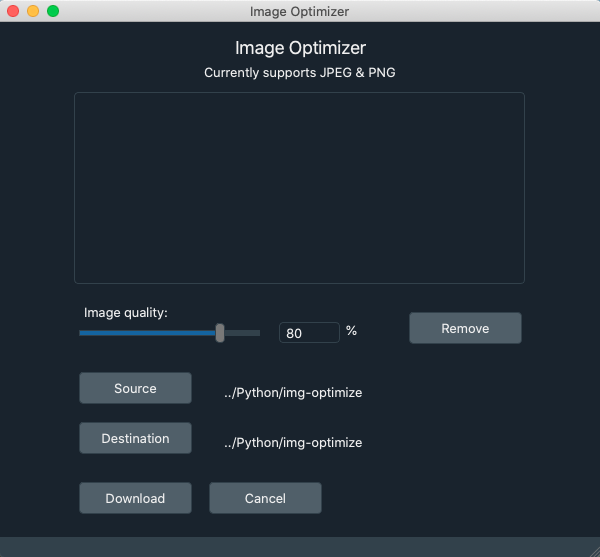
Operating the application
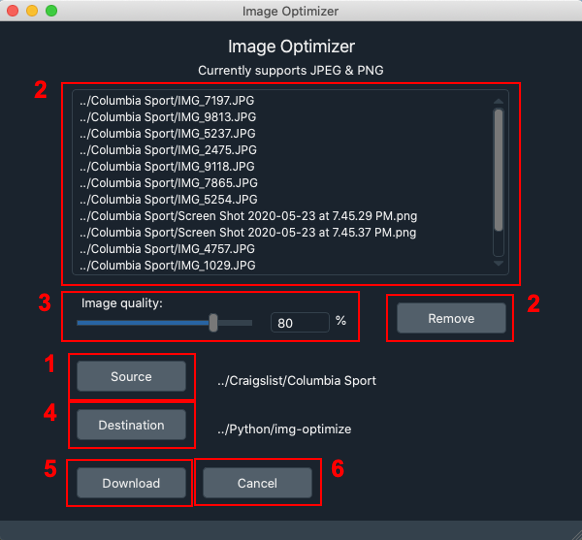
There are several notable features - view figure below for visual aid:
- Sourcing your images.
- If you click “Source”, you are given the option to either upload one or more image files (JPEG or PNG) or selecting a folder containing your images.
If you select an image folder, only JPEG and PNG images will be uploaded.
- Working with images.
Valid images will populate the viewport. You are able to remove images from this viewport by selecting an image (or more) and clicking “Remove”
- Setting image quality percentage.
You can set the image quality percentage by either moving the slider under the “Image quality:” label, or manually entering the image quality value between 1 and 100.
- Setting destination path.
Click “Destination” and select a folder to store your images.
- Downloading your images.
Click “Download” when you are ready to download your images.
- Exiting the application.
Simply click “Cancel” to exit the application.
Support
If you find any bug or would like to propose a new feature, please use the issues tracker. I’ll be happy to help!


Download files
Download the file for your platform. If you're not sure which to choose, learn more about installing packages.
Source Distribution
Built Distribution
Filter files by name, interpreter, ABI, and platform.
If you're not sure about the file name format, learn more about wheel file names.
Copy a direct link to the current filters
File details
Details for the file img-optimize-0.1.1.tar.gz.
File metadata
- Download URL: img-optimize-0.1.1.tar.gz
- Upload date:
- Size: 4.5 kB
- Tags: Source
- Uploaded using Trusted Publishing? No
- Uploaded via: twine/3.1.1 pkginfo/1.5.0.1 requests/2.22.0 setuptools/45.1.0 requests-toolbelt/0.9.1 tqdm/4.36.1 CPython/3.7.4
File hashes
| Algorithm | Hash digest | |
|---|---|---|
| SHA256 |
3e0a6750589bb6610d8c294889ba617b284a340f23ca9f9bc7e8f68275855925
|
|
| MD5 |
30cd87a5c8efda44992f6d4ffdd85a1d
|
|
| BLAKE2b-256 |
46a5ed034b300216aaf4c57761b33250f667296680da03b1082e5aba0eb0497c
|
File details
Details for the file img_optimize-0.1.1-py3-none-any.whl.
File metadata
- Download URL: img_optimize-0.1.1-py3-none-any.whl
- Upload date:
- Size: 5.6 kB
- Tags: Python 3
- Uploaded using Trusted Publishing? No
- Uploaded via: twine/3.1.1 pkginfo/1.5.0.1 requests/2.22.0 setuptools/45.1.0 requests-toolbelt/0.9.1 tqdm/4.36.1 CPython/3.7.4
File hashes
| Algorithm | Hash digest | |
|---|---|---|
| SHA256 |
5bcea998dbacfd1ad2519b1fd099529f5d37aa17119b050a700f05ddb4336553
|
|
| MD5 |
e24ebb7174cb49569a68971c038ec61d
|
|
| BLAKE2b-256 |
403324fed6e254df07532e743c0c110f9621a44d5211912f4c1670803517b6fe
|






