
Create memes with imgflip easily!
Installation
To install, do
# Linux/macOS
python3 -m pip install -U imgflip.py

# Windows
py -3 -m pip install -U imgflip.py
Examples
CLI
py -3 -m imgflip -u USERNAME -p PASSWORD -tname "drake hotline bling" -top "interacting with raw imgflip api" -bot "using imgflip.py"
# use python3 on Linux/macOS
Result:
meme created!
You can find it at: https://imgflip.com/i/5gmxqp
Image link: https://i.imgflip.com/5gmxqp.jpg
Code
Sync
import imgflip
import requests

imgflip_client = imgflip.Imgflip(username="username", password="password", session=requests.Session()) # create an Imgflip instance

templates = imgflip_client.popular_memes(limit=10) # get popular meme templates from imgflip

meme = imgflip_client.make_meme(
    template = templates["Drake Hotline Bling"],
    top_text = "interacting with raw imgflip api",
    bottom_text = "using imgflip.py"
) # create a meme

print(meme.url) # print the meme image url
Async
import imgflip
import aiohttp
import asyncio

async def main():
    async with aiohttp.ClientSession() as session:
        imgflip_client = imgflip.Imgflip(username="username", password="password", session=session) # create an Imgflip instance

        templates = await imgflip_client.popular_memes(limit=10) # get popular meme templates from imgflip

        meme = await imgflip_client.make_meme(
            template = templates["Drake Hotline Bling"],
            top_text = "interacting with raw imgflip api",
            bottom_text = "using imgflip.py"
        ) # create a meme

        print(meme.url) # print the meme image url

asyncio.run(main())
Result:
https://i.imgflip.com/5f7zzm.jpg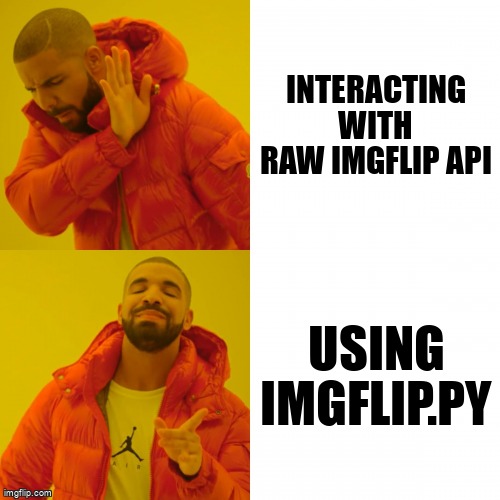
For documentation, go here
Changes in v1.0
Fixed docstrings
Added documentation
Added a command line interface
1 maintainer

Release files for imgflip.py 1.0
For a detailed explanation of source distributions (sdists) and built distributions (wheels), please see the package formats documentation.
Source distribution (sdist)
| File | Size | Uploaded | |
|---|---|---|---|
| imgflip.py-1.0.tar.gz | 8.4 kB | Details |
Built distribution (wheel)
| File | Interpreter | ABI | Platform | Reset |
|---|---|---|---|---|
| imgflip.py-1.0-py3-none-any.whl | Python 3 | none | any | Details |
Total release size: 17.2 kB
Release files / imgflip.py-1.0.tar.gz
| Download URL | imgflip.py-1.0.tar.gz |
|---|---|
| Size | 8.4 kB |
| Tags | Source |
|
SHA-256 checksum How to use checksums |
6ea8755e97e3b93db5f11a4c28915d6e73126e8d41711612315b7559653da990
|
|
BLAKE2b-256 checksum How to use checksums |
3580443b406b15b2bdd7916b9e5b327aef5df2f190a63a4601b11c1bfdbcff2a
|
| Upload date | |
|
Uploaded using Trusted Publishing? What is trusted publishing? |
No |
| Uploaded via |
twine/3.4.1 importlib_metadata/4.6.0 pkginfo/1.7.0 requests/2.25.1 requests-toolbelt/0.9.1 tqdm/4.61.1 CPython/3.9.6
|
Release files / imgflip.py-1.0-py3-none-any.whl
| Download URL | imgflip.py-1.0-py3-none-any.whl |
|---|---|
| Size | 8.8 kB |
| Tags | Python 3 |
|
SHA-256 checksum How to use checksums |
51a8e1b2bf87c23c3fefee1185d36002380ae447d6c6d7551a6cb81b5195f89a
|
|
BLAKE2b-256 checksum How to use checksums |
5b578950cabd688d3f5b5bf502f027b829f69e53beb81ea3b35f765349d04de3
|
| Upload date | |
|
Uploaded using Trusted Publishing? What is trusted publishing? |
No |
| Uploaded via |
twine/3.4.1 importlib_metadata/4.6.0 pkginfo/1.7.0 requests/2.25.1 requests-toolbelt/0.9.1 tqdm/4.61.1 CPython/3.9.6
|














