
Create memes using imgflip easily!

Project description
Create memes with imgflip easily!
Installation
To install, do
# Linux/macOS
python3 -m pip install -U imgflip.py

# Windows
py -3 -m pip install -U imgflip.py
Examples
CLI
py -3 -m imgflip -u USERNAME -p PASSWORD -tname "drake hotline bling" -top "interacting with raw imgflip api" -bot "using imgflip.py"
# use python3 on Linux/macOS
Result:
meme created!
You can find it at: https://imgflip.com/i/5gmxqp
Image link: https://i.imgflip.com/5gmxqp.jpg
Code
Sync
import imgflip
import requests

imgflip_client = imgflip.Imgflip(username="username", password="password", session=requests.Session()) # create an Imgflip instance

templates = imgflip_client.popular_memes(limit=10) # get popular meme templates from imgflip

meme = imgflip_client.make_meme(
    template = templates["Drake Hotline Bling"],
    top_text = "interacting with raw imgflip api",
    bottom_text = "using imgflip.py"
) # create a meme

print(meme.url) # print the meme image url
Async
import imgflip
import aiohttp
import asyncio

async def main():
    async with aiohttp.ClientSession() as session:
        imgflip_client = imgflip.Imgflip(username="username", password="password", session=session) # create an Imgflip instance

        templates = await imgflip_client.popular_memes(limit=10) # get popular meme templates from imgflip

        meme = await imgflip_client.make_meme(
            template = templates["Drake Hotline Bling"],
            top_text = "interacting with raw imgflip api",
            bottom_text = "using imgflip.py"
        ) # create a meme

        print(meme.url) # print the meme image url

asyncio.run(main())
Result:
https://i.imgflip.com/5f7zzm.jpg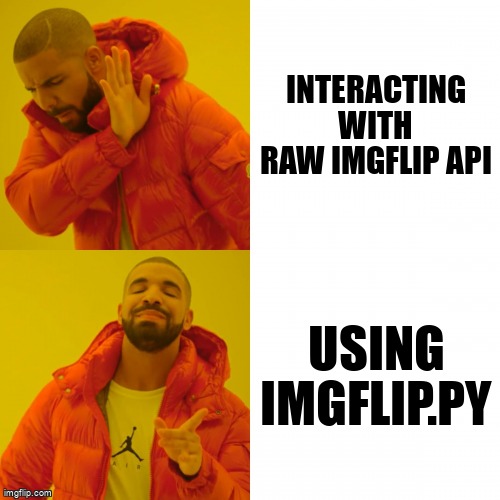
For documentation, go here
Changes in v1.0
Fixed docstrings
Added documentation
Added a command line interface
Release history Release notifications | RSS feed


Download files
Download the file for your platform. If you're not sure which to choose, learn more about installing packages.
Source Distribution
imgflip.py-1.0.tar.gz
(8.4 kB
view details)
Built Distribution
Filter files by name, interpreter, ABI, and platform.
If you're not sure about the file name format, learn more about wheel file names.
Copy a direct link to the current filters
File details
Details for the file imgflip.py-1.0.tar.gz.
File metadata
- Download URL: imgflip.py-1.0.tar.gz
- Upload date:
- Size: 8.4 kB
- Tags: Source
- Uploaded using Trusted Publishing? No
- Uploaded via: twine/3.4.1 importlib_metadata/4.6.0 pkginfo/1.7.0 requests/2.25.1 requests-toolbelt/0.9.1 tqdm/4.61.1 CPython/3.9.6
File hashes
| Algorithm | Hash digest | |
|---|---|---|
| SHA256 |
6ea8755e97e3b93db5f11a4c28915d6e73126e8d41711612315b7559653da990
|
|
| MD5 |
51010c01e4a35322e1ae5b70882ed1cd
|
|
| BLAKE2b-256 |
3580443b406b15b2bdd7916b9e5b327aef5df2f190a63a4601b11c1bfdbcff2a
|
File details
Details for the file imgflip.py-1.0-py3-none-any.whl.
File metadata
- Download URL: imgflip.py-1.0-py3-none-any.whl
- Upload date:
- Size: 8.8 kB
- Tags: Python 3
- Uploaded using Trusted Publishing? No
- Uploaded via: twine/3.4.1 importlib_metadata/4.6.0 pkginfo/1.7.0 requests/2.25.1 requests-toolbelt/0.9.1 tqdm/4.61.1 CPython/3.9.6
File hashes
| Algorithm | Hash digest | |
|---|---|---|
| SHA256 |
51a8e1b2bf87c23c3fefee1185d36002380ae447d6c6d7551a6cb81b5195f89a
|
|
| MD5 |
ccc82bb3a47016fa472df0166990f4f4
|
|
| BLAKE2b-256 |
5b578950cabd688d3f5b5bf502f027b829f69e53beb81ea3b35f765349d04de3
|






