
imgp



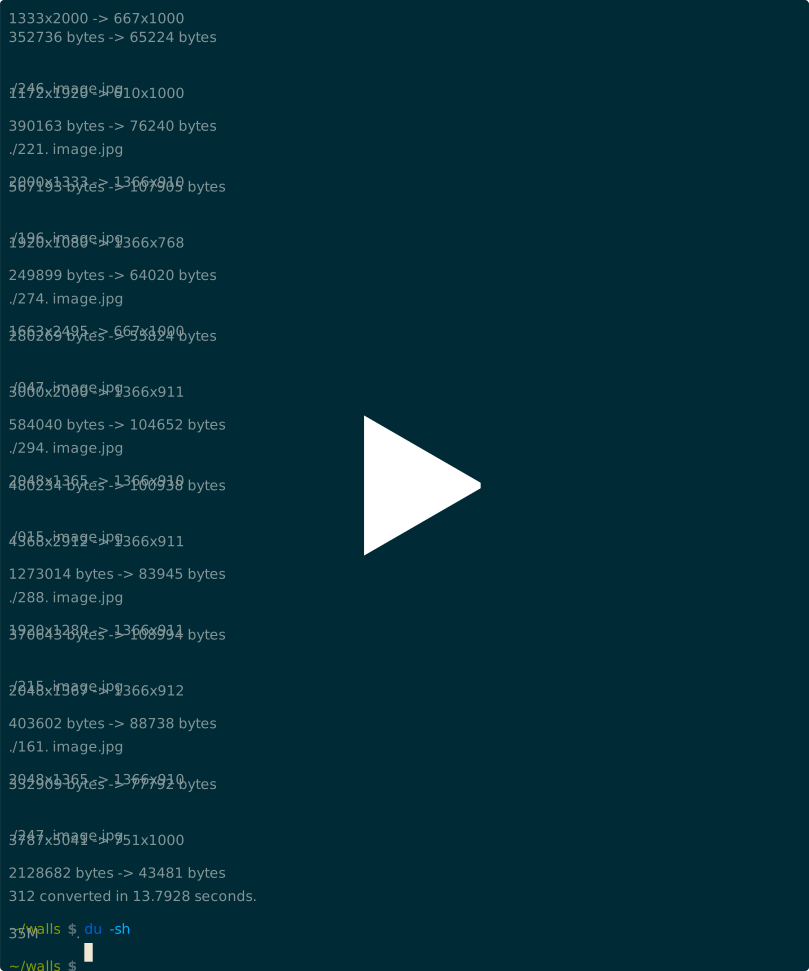
Watch imgp resize a directory of images in lightning speed!
imgp is a command line image resizer and rotator for JPEG and PNG images. It can resize (or thumbnail) and rotate thousands of images in a go, at lightning speed, while saving significantly on storage.
Powered by multiprocessing, SIMD parallelism (thanks to the Pillow-SIMD library), an intelligent adaptive algorithm, recursive operations, shell completion scripts, EXIF preservation (and more), imgp is a very flexible utility with well-documented easy to use options.
imgp intends to be a stronger replacement of the Nautilus Image Converter extension, not tied to any file manager and way faster. On desktop environments (like Xfce or LxQt) which do not integrate Nautilus, imgp will save your day. File manager nnn provides a script to batch resize images with imgp.
Table of Contents
Features
- resize by percentage or resolution or megapixel target
- rotate clockwise by specified angle
- adaptive resize considering orientation
- brute force to a resolution
- optimize images to save more space
- limit processing by minimum image size
- convert PNG to JPEG
- erase exif metadata
- specify output JPEG image quality
- force smaller to larger resize
- process directories recursively
- overwrite source image option
- completion scripts for bash, fish, zsh
- minimal dependencies
Adaptive mode
- If the specified and image orientations are same [(H >= V and h > v) or (H < V and h < v)], the image is resized with the longer specified side as reference.
- In case of cross orientation [(H >= V and h <= v) or (H < V and h >= v)], the image is resized with the shorter specified side as reference. Same as non-adaptive.
For example, if an image has a resolution of 2048x1365 and is being resized to 1366x768:
- In regular mode (default), output image resolution will be 1152x768
- In adaptive mode, output image resolution will be 1366x910
Performance
imgp could resize 8823 images (approx. 4.5GB in size) of mixed resolutions (high to regular) stored in a USB 2.0 external hard disk at an adaptive resolution of 1366x1000 in around 8 minutes. The resulting size was 897MB (approx. 20%).
imgp uses Python PIL/Pillow library. Nautilus Image Converter calls the convert utility from ImageMagick. For a comparative benchmark, head here.
Installation
Dependencies
imgp requires Python 3.10 or later.
To install PIL library on Ubuntu, run:
sudo apt-get install python3-pil
or, using pip3:
sudo pip3 install pillow
pillow can be replaced by pillow-simd on SIMD processors.
From a package manager
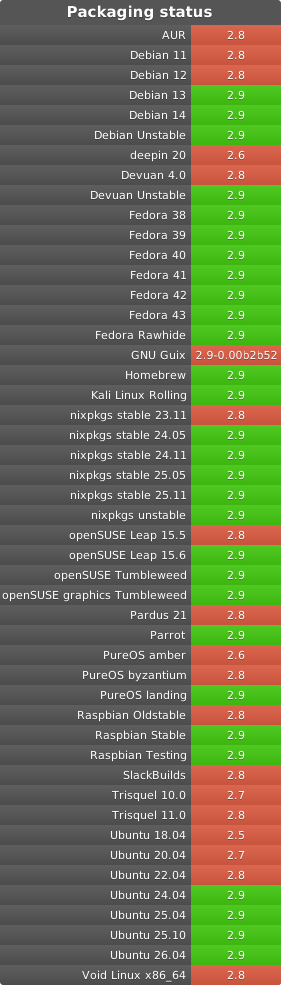
Install imgp from your package manager. If the version available is dated try an alternative installation method.
Packaging status (expand)
● Homebrew TAP (brew install jarun/imgp/imgp)
● PyPI (pip3 install imgp)
● Source Mage (cast imgp)
Release packages
Packages for Arch Linux, CentOS, Debian, Fedora, openSUSE Leap and Ubuntu are available with the latest stable release.
From source
If you have git installed, clone this repository. Otherwise download the latest stable release or development version (risky).
Install to default location (/usr/local):
sudo make install
To remove, run:
sudo make uninstall
PREFIX is supported, in case you want to install to a different location.
Running standalone
imgp is a standalone utility. From the containing directory, run:
./imgp
Shell completion
Shell completion scripts for Bash, Fish and Zsh can be found in respective subdirectories of auto-completion/. Please refer to your shell's manual for installation instructions.
Usage
cmdline options
usage: imgp [-h] [-x res] [-o deg] [-a] [-c] [-e] [-f] [-H] [-i] [-k] [-m] [-M res]
            [-n] [-N] [-O] [-P] [-q N] [-r] [-s byte] [-w] [-d] [-v] [PATH ...]

Resize, rotate JPEG and PNG images.

positional arguments:
  PATH                  source file or dir [default: current dir]

optional arguments:
  -h, --help            show this help message and exit
  -x res, --res res     output resolution in HxV or percentage ("%" suffix) or megapixel ("MP" suffix)
  -o deg, --rotate deg  rotate clockwise by angle (in degrees)
  -a, --adapt           adapt to resolution by orientation [default: off]
  -c, --convert         convert PNG to JPG format [default: off]
  -e, --eraseexif       erase exif metadata [default: off]
  -f, --force           force to exact specified resolution [default: off]
  -H, --hidden          include hidden (dot) files [default: off]
  -i, --includeimgp     re-process _IMGP files. * RISKY: refer to docs
  -k, --keep            skip (honors -c or --pr) images matching specified
                        H or V or --res=100 [default: off]
  -m, --mute            operate silently [default: informative]
  -M res, --minres res  min resolution in HxV or percentage of --res to resize
  -n, --enlarge         enlarge smaller images [default: off]
  -N, --nearest         use nearest neighbour interpolation for PNG [default: antialias]
  -O, --optimize        optimize the output images [default: off]
  -P, --progressive     save JPEG images as progressive [default: off]
  -q N, --quality N     quality factor (N=1-95, JPEG only) [default: 75]
  -r, --recurse         process non-symbolic dirs recursively [default: off]
  -s byte, --size byte  minimum size to process an image [default: 1024]
  -w, --overwrite       overwrite source images [default: off]
  -d, --debug           enable debug logs [default: off]
  -v, --version         show program's version number and exit
Operational notes
- Multiple files and directories can be specified as source. If
PATHis omitted, the current directory is processed. - Output image names are appended with _IMGP if
--overwriteoption is not used. By default _IMGP files are not processed. Doing so may lead to potential race conditions when--overwriteoption is used. - PNG files with lower target hres/vres are not converted (even if
--convertis used). Runimgp --convert (*.png)separately to convert those. - Resize and rotate are lossy operations. For additional reductions in size try
--optimizeand--eraseexifoptions. - Option
--optimizeis slower, the encoder makes an extra pass over the image in order to select optimal encoder settings. - Progressive JPEG images are saved as progressive.
Examples
-
Convert some images and directories:
$ imgp -x 1366x768 ~/ ~/Pictures/image3.png ~/Downloads/ /home/testuser/image1.png 3840x2160 -> 1365x768 11104999 bytes -> 1486426 bytes /home/testuser/image2.jpg 2048x1365 -> 1152x768 224642 bytes -> 31421 bytes /home/testuser/Pictures/image3.png 1920x1080 -> 1365x768 2811155 bytes -> 1657474 bytes /home/testuser/Downloads/image4 2048x1365 -> 1152x768 224642 bytes -> 31421 bytes -
Scale an image by 75% and overwrite the source image:
$ imgp -x 75 -w ~/image.jpg /home/testuser/image.jpg 1366x767 -> 1025x575 120968 bytes -> 45040 bytes -
Ensure all images in folder
testphotos/(contains 4 images) are 12MP at maximum:$ imgp --res 12MP -w testphotos/ testphotos/20250111_193949_ILCE-7M3.jpg 6000x4000 -> 4243x2828 8355840 bytes -> 3545149 bytes -
Rotate an image clockwise by 90 degrees:
$ imgp -o 90 ~/image.jpg 120968 bytes -> 72038 bytes -
Adapt the images in the current directory to 1366x1000 resolution. Visit all directories recursively, overwrite source images, ignore images with matching hres or vres but convert PNG images to JPEG.
$ imgp -x 1366x1000 -wrack -
Set hres=800 and adapt vres maintaining the ratio.
$ imgp -x 800x0 Source omitted. Processing current directory... ./image1.jpg 1366x911 -> 800x534 69022 bytes -> 35123 bytes ./image2.jpg 1050x1400 -> 800x1067 458092 bytes -> 78089 bytes -
Process images greater than 50KiB only:
$ imgp -wrackx 1366x1000 -s 51200 -
Generate a 64px adaptive thumbnail of the last modified file in the current dir:
#!/usr/bin/env sh

thumb64 ()
{
    pop=$(ls -1t | head -1)
    imgp -acx 64x64 "$pop"
}
Troubleshooting
-
To lift the pixel limit (e.g. error
'PIL.Image.DecompressionBombError' when resizing large image) for trusted input files, uncomment the following line in the source code:# Image.MAX_IMAGE_PIXELS = None
Developers
- Copyright © 2016-2026 Arun Prakash Jana
- Ananya Jana
2 maintainers


Metadata
2 maintainers
Release files for imgp 3.0
For a detailed explanation of source distributions (sdists) and built distributions (wheels), please see the package formats documentation.
Source distribution (sdist)
| File | Size | Uploaded | Provenance | Actions |
|---|---|---|---|---|
| imgp-3.0.tar.gz | 26.8 kB | Without provenance | Details for imgp-3.0.tar.gz |
Built distribution (wheel)
| File | Interpreter | ABI | Platform | Actions Reset |
|---|---|---|---|---|
| imgp-3.0-py3-none-any.whl | Python 3 | none | any | Details for imgp-3.0-py3-none-any.whl |
Total release size: 51.8 kB
Release files / imgp-3.0.tar.gz
| Download URL | imgp-3.0.tar.gz |
|---|---|
| Size | 26.8 kB |
| Tags | Source |
|
SHA-256 checksum How to use checksums |
dfceb85dc6352ac47c3cdcb1ff4b5f76eed42e6cab9c213cc44017fa4dcc4681
|
|
BLAKE2b-256 checksum How to use checksums |
81051e67fb8e47b5facbf64643acc68110a3ca01b7c2f8b50883c9cc86804d46
|
| Upload date | |
|
Uploaded using Trusted Publishing? What is trusted publishing? |
No |
| Uploaded via |
twine/7.0.0 CPython/3.12.3
|
Release files / imgp-3.0-py3-none-any.whl
| Download URL | imgp-3.0-py3-none-any.whl |
|---|---|
| Size | 25.1 kB |
| Tags | Python 3 |
|
SHA-256 checksum How to use checksums |
d30315da3a2d8ff26c7b8d9bfa4d457989ed9f265e85c47382d1d0118791a0dd
|
|
BLAKE2b-256 checksum How to use checksums |
c8f4440b2ae73d055b587a277e0c162b8e171f16e2f64139cfa0f7ef6e7f0b33
|
| Upload date | |
|
Uploaded using Trusted Publishing? What is trusted publishing? |
No |
| Uploaded via |
twine/7.0.0 CPython/3.12.3
|
Security for imgp 3.0
Provenance
Provenance describes where a file came from. On PyPI, provenance is shared via attestations, which provide a verifiable record of the build or publishing details. View details, limitations and caveats.
No provenance found
None of the files in this release were uploaded with provenance metadata.
A note on package security
PyPI is a repository for distributing packages, not a service for auditing them. While third-party security researchers and our staff do their best to detect and remove malicious packages, PyPI cannot guarantee the quality, security or suitability of any given package.
To learn more about protecting yourself from malicious actors, visit our package security documentation.














