
🧼 imgstrip
Share the picture. Keep everything else to yourself.
Photos quietly carry your location, your camera, the time you took them, and sometimes more.
imgstrip removes all of it, then checks its own work before it saves anything.
Quick start · How it works · Everyday use · Web app · Good to know
Why imgstrip?
Most metadata removers delete the tags they recognize and copy the rest of the file untouched. Anything they don't recognize survives.
imgstrip works the other way around. It reads only the pixels and builds a brand-new file from them. By default nothing from the old file is copied over, so there is nothing left to leak. (The opt-in JPEG options --jpeg-lossless, --jpeg-canonical and --scrub-dct keep some of the picture's compressed data; see "Good to know" below.)
$ imgstrip --check holiday.jpg
FOUND    holiday.jpg (JPEG 640x480): 4 item(s)
           [metadata] EXIF: make=NIKON, model=COOLPIX P6000, date=2008:10:22 16:28:39
           [metadata] GPS location: 43.467448, 11.885127
           [hidden]   Embedded EXIF thumbnail: 6702 bytes
           [metadata] XMP: 4000 bytes

$ imgstrip holiday.jpg
cleaned  holiday.jpg -> holiday.clean.jpg
           removed: EXIF, GPS location, Embedded EXIF thumbnail, XMP

$ imgstrip --check holiday.clean.jpg
clean    holiday.clean.jpg (JPEG 640x480)
Your original file is never touched. The clean copy is saved next to it.
🚀 Quick start
You need Python 3.10 or newer.
pip install imgstrip
Prefer to keep it out of your main Python setup? pipx install imgstrip works too.
Then try it:
imgstrip photo.jpg          # writes photo.clean.jpg
imgstrip-web                # or use the point-and-click web app
Want to be sure the install works? Run imgstrip --self-test. It builds 21 booby-trapped test images, cleans them in every mode, and has independent image readers confirm the results.
Install from source instead
git clone https://github.com/lloydsato/imgstrip.git
cd imgstrip
pip install .
🔍 How it works
flowchart LR
    A[Your photo] --> B[Decode to raw pixels]
    B --> C[Write a brand-new file]
    C --> D{Check 1: is every part of the new file accounted for?}
    D -->|yes| E{Check 2: do the pixels still match?}
    D -->|no| X[Stop. Nothing is saved]
    E -->|yes| F[Clean copy saved]
    E -->|no| X
If either check fails, nothing is written. Failing safe is the whole point.
(If you're reading this on PyPI and the diagram shows as plain text, the GitHub page renders it.)
🛠 Everyday use
| I want to... | Run |
|---|---|
| See what a photo gives away, without changing it | imgstrip --check photo.jpg |
| Clean one photo | imgstrip photo.jpg |
| Clean a whole folder, including subfolders | imgstrip -r my-photos/ -o clean-photos/ |
| Replace the originals with clean versions | imgstrip -i photo.jpg |
| Give outputs random names (file names can leak dates) | imgstrip --random-name photo.jpg |
| Clean a JPEG with no quality loss at all | imgstrip --jpeg-lossless photo.jpg |
| Convert while cleaning | imgstrip --format png photo.jpg |
| Preview what would happen, write nothing | imgstrip -n photo.jpg |
Run imgstrip --help to see every option.
Going further
| Switch | What it does |
|---|---|
--deep |
Also scans the pixels for signs of hidden data (LSB steganography). |
--scrub-lsb |
Randomizes the least-significant bit of every pixel value, which destroys hidden LSB messages. The change is invisible (at most 1/255). |
--jpeg-canonical |
JPEG only. Rebuilds the compressed data in one canonical form so nothing can hide in table layouts, padding or markers. The picture stays pixel-identical. |
--scrub-dct |
JPEG only. Also destroys steganography stored in the parity of the JPEG's DCT coefficients (JSteg, F5, steghide, J-UNIWARD...); payloads kept in higher bits are not covered. This costs picture quality, so the report says how much. Off unless you ask. |
--scrub-prnu |
Disrupts your camera's sensor fingerprint, a pattern in the pixels themselves that can link a photo to a specific camera. Moves parts of the picture by a few pixels. |
--icc sanitize |
Keeps the exact colors using a rebuilt, anonymous color profile. |
--c2pa |
Signs each clean image with a Content Credential, so you can show it was sanitized without being altered. Needs the optional extra: pip install 'imgstrip[c2pa]'. |
🖥 Web app
imgstrip-web
Drop photos onto the window and each one shows what it gives away. Click Clean, then download the results one by one, as a ZIP, or save them straight to a folder.
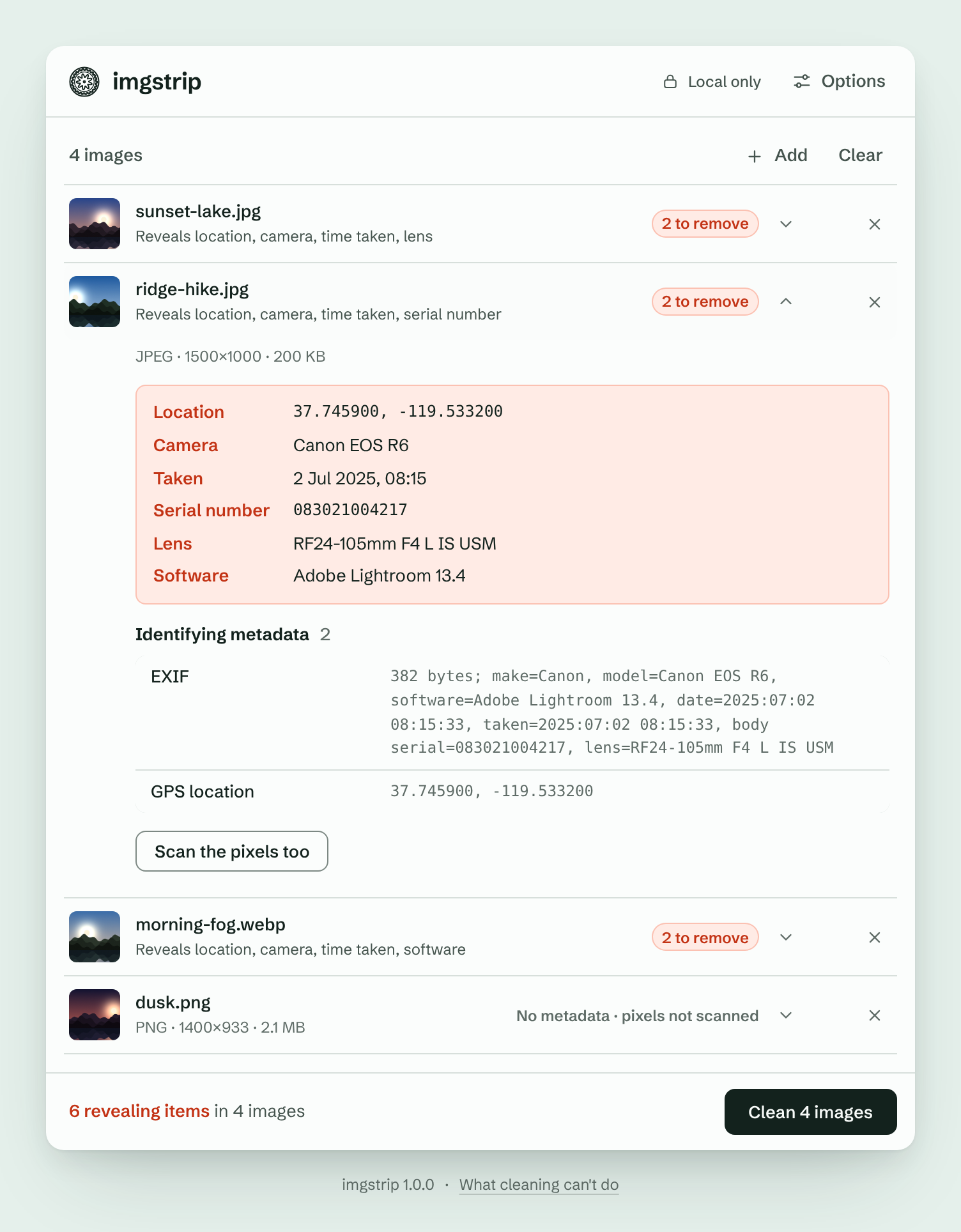
Open Options for the same switches as the command line: Deep scan, Keep JPEG data bit-exact, Scrub least-significant bits, Disrupt camera fingerprint, Sign with Content Credentials, plus the output format, quality and colour profile.
Options that do not apply to the images you added are greyed out, and ones that cannot be done for them are greyed out with a yellow warning triangle and the reason.
- Runs only on your computer (
127.0.0.1) and works offline. - Your originals are never written to disk, and nothing is uploaded anywhere.
- On a shared computer, start it with
imgstrip-web --no-browserand open the printed link yourself.
📁 What it handles
| Formats | |
|---|---|
| Everyday photos | JPEG, PNG, WebP, GIF (animated too), HEIC/HEIF (iPhone), AVIF |
| Also supported | TIFF, BMP, and ICO, PSD, TGA, QOI, JPEG 2000 and other less common formats (these come out as PNG) |
| Not supported | Camera RAW files (DNG, CR2, NEF, ARW...). Export to JPEG, PNG or TIFF first. Vector formats (SVG, PDF, EPS) are also unsupported. |
Removed: EXIF, GPS, XMP, IPTC, comments, camera serial numbers, embedded thumbnails, depth maps, color profiles that name your device, data tacked on after the image, and colors hidden under transparent pixels.
⚠️ Good to know
No tool can do everything, and it's better to know the limits up front.
- What's in the picture stays. Faces, street signs, reflections and landmarks can reveal more than any tag.
- Your camera's sensor fingerprint stays unless you use
--scrub-prnu. Even then, nobody can prove it's gone, and the scrub is not reliable against anyone who holds another photo of the same scene (a thumbnail, a second shot, the original document). Its strength was measured in simulation, not on real cameras, and it costs about 20 dB PSNR against the original; text can shift by several pixels. - File names can leak dates (
IMG_20240517_133700.jpg). Use--random-name(the web app has a Random file names switch). --checkis a structural check, not proof. It lists what a file's container holds. It does not look inside compressed picture data, so it cannot see data hidden in JPEG image data or in the pixels (use--deepfor the pixel tests).- A clean scan isn't proof. "Not detected" means the tests found nothing, not that nothing is hidden.
- Invisible watermarks built to survive re-saving (such as SynthID) live in the picture itself and may survive.
- JPEGs are re-encoded (quality 95) by default. Use
--jpeg-losslessto avoid any quality loss. That mode keeps the compressed picture data exactly as it was, so it doesn't clear steganography hidden in the image data itself, and it is meant for pictures you trust, not as a fix for a file the default mode refused. It does drop tables nothing uses and refuses a file that carries bytes no decoder reads. Re-encoding doesn't reliably clear it either: hiding tools that change zero coefficients mostly survive.--scrub-dctis built for that and destroys payloads read from the DCT coefficients, at a cost of roughly 33 to 39 dB of picture quality against the original. It never claims that nothing is hidden. See how it works. -iis not a secure erase. Old copies can linger in backups, cloud sync history and SSD wear-leveling.- Very grainy JPEGs may be refused by the default mode because the re-encoded copy would drift too far from the original, and imgstrip would rather refuse than save something it couldn't verify. Use
--jpeg-canonicalfor those (same pixels, rebuilt in one canonical form).
📚 Learn more
The full technical reference covers every option, the exact list of what gets removed, how the sensor-fingerprint scrub was measured, optional Content Credentials (C2PA) signing for journalists, and how the project is tested:
🧪 Development
pip install -e '.[test]'
pytest
📄 License
imgstrip is free software, released under the BSD 3-Clause License.
Versions up to 1.2.0 were released under the GNU Affero General Public License v3.0 or later; 1.2.1 and later are BSD-3-Clause.
Questions, bug reports and odd files that break it are welcome in the issue tracker.
1 maintainer

Metadata
1 maintainer
Release files for imgstrip 1.2.2
For a detailed explanation of source distributions (sdists) and built distributions (wheels), please see the package formats documentation.
Source distribution (sdist)
| File | Size | Uploaded | Provenance | |
|---|---|---|---|---|
| imgstrip-1.2.2.tar.gz | 425.2 kB | With provenance | Details |
Built distribution (wheel)
| File | Interpreter | ABI | Platform | Reset |
|---|---|---|---|---|
| imgstrip-1.2.2-py3-none-any.whl | Python 3 | none | any | Details |
Total release size: 720.1 kB
Release files / imgstrip-1.2.2.tar.gz
| Download URL | imgstrip-1.2.2.tar.gz |
|---|---|
| Size | 425.2 kB |
| Tags | Source |
|
SHA-256 checksum How to use checksums |
ae642f00650608ea7fed1a5def647c185eb327d0a7fa4be62a774cab2f022acf
|
|
BLAKE2b-256 checksum How to use checksums |
5306b4c4aa2bffd068bb53974972ca893dc1045fc92ebe2acf4a75a28e2c3318
|
| Upload date | |
|
Uploaded using Trusted Publishing? What is trusted publishing? |
Yes |
| Uploaded via |
twine/7.0.0 CPython/3.13.14
|
Provenance
Provenance describes where a file came from. On PyPI, provenance is shared via attestations, which provide a verifiable record of the build or publishing details. View details, limitations and caveats.


PyPI Publish Attestation
PyPI verified that this artifact, at this checksum, originated from the publisher listed below.
Signed by GitHub Actions, verified by PyPI on Oct 19, 2026.
Transparency logRelease files / imgstrip-1.2.2-py3-none-any.whl
| Download URL | imgstrip-1.2.2-py3-none-any.whl |
|---|---|
| Size | 294.9 kB |
| Tags | Python 3 |
|
SHA-256 checksum How to use checksums |
592041e73d45b53749d9da6fb0363b35f14d51bc2da141a76de4addf5648030c
|
|
BLAKE2b-256 checksum How to use checksums |
1f75c8f9426e3b995c93431483839d30e41f1e771f0d3401cb5ee1e2273331cd
|
| Upload date | |
|
Uploaded using Trusted Publishing? What is trusted publishing? |
Yes |
| Uploaded via |
twine/7.0.0 CPython/3.13.14
|
Provenance
Provenance describes where a file came from. On PyPI, provenance is shared via attestations, which provide a verifiable record of the build or publishing details. View details, limitations and caveats.
PyPI Publish Attestation
PyPI verified that this artifact, at this checksum, originated from the publisher listed below.
Signed by GitHub Actions, verified by PyPI on Oct 19, 2026.
Transparency logSecurity for imgstrip 1.2.2
Provenance
Provenance describes where a file came from. On PyPI, provenance is shared via attestations, which provide a verifiable record of the build or publishing details. View details, limitations and caveats.
Full provenance
All 2 files in this release have been uploaded with provenance metadata.
Attestation for imgstrip-1.2.2.tar.gz
PyPI Publish Attestation
PyPI verified that this artifact, at this checksum, originated from the publisher listed below.
Signed by GitHub Actions, verified by PyPI on Oct 19, 2026.
Transparency logA note on package security
PyPI is a repository for distributing packages, not a service for auditing them. While third-party security researchers and our staff do their best to detect and remove malicious packages, PyPI cannot guarantee the quality, security or suitability of any given package.














