
This release is a pre-release and may not be stable for production use.
Immich Memories







Watch your memories again, in films you can make your own.
Immich Memories turns the photos and videos in your Immich library into MP4 films with titles and music. Pick a month, a year, a trip, an album or a person. Review the proposed cut, swap what you don't like, then render. A quiet month makes a short film rather than 3 minutes of filler.
It runs on a plain NAS with no GPU or text reader. Basic uses small local picture classifiers; GPU adds descriptions and extra checks, and Full adds a text reader to refine the cut.
Quick start · Documentation · Install guides · Demo
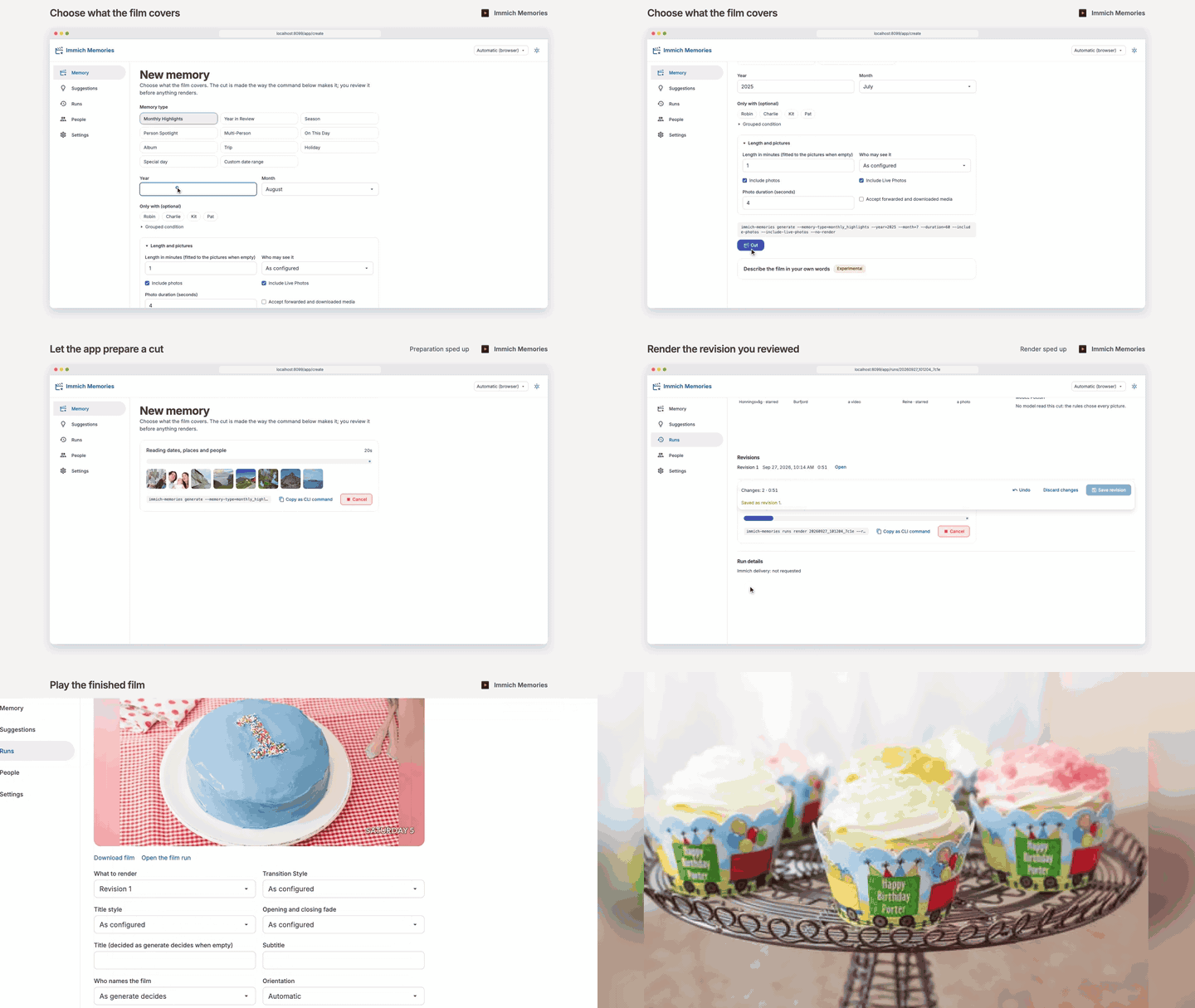
▶ Play the demo with music · Watch a finished trip film · Wikimedia Commons photographs under CC0 or CC BY, credited here · Documentation
Make your first film
Docker Compose is the recommended install. Start with Basic if you are unsure. Every tier makes a complete film, and you can change tiers later.
| Tier | What it adds | What it needs | Install |
|---|---|---|---|
| Basic | Dates, favourites, people, places and small picture classifiers guide the cut; up to 1080p. | 2 CPU cores and 4 GiB RAM for the app, in addition to Immich. | Follow the steps below. |
| GPU | Picture descriptions, document/sensitive-content checks and a family-viewing pre-screen. | NVIDIA services with the Container Toolkit, or native Apple Silicon. Allow 8 GiB for the Compose app plus its model services. | Select GPU in Quick start, or use native Mac. |
| Full | A text reader refines the cut, writes the film's summary and names special days. | The GPU setup plus an enabled reader with a 32k context window. | Select Full in Quick start. |
You need an existing Immich server, Docker Compose v2 and about 25 GB of app data plus 0.35 GB per 1,000 pictures and videos in your library, plus images and finished films. Immich v2 and v3 both work; the deployment matrix records tested versions. GPU services can run on another machine. For a NAS container manager, use its platform guide.
-
Download the two Basic files into a new folder:
mkdir -p immich-memories && cd immich-memories
VERSION=1.0.0-rc.9
curl -fLO "https://github.com/sam-dumont/immich-memories/releases/download/v${VERSION}/docker-compose.yml"
curl -fLO "https://github.com/sam-dumont/immich-memories/releases/download/v${VERSION}/example.env"
cp example.env .env
example.envpins the app image to the same release. KeepTIER=basic. -
Edit
.envwith your Immich address, API key and timezone:IMMICH_URL=http://192.168.1.10:2283 IMMICH_API_KEY=your-api-key TZ=Etc/UTC
In Immich, create the key under Account Settings → API Keys with the ten read permissions. Use an Immich address the container can reach;
localhostmeans the container itself.To open the app from another computer on your LAN, also set these in
.env:IMMICH_MEMORIES_AUTH_USERNAME=admin IMMICH_MEMORIES_AUTH_PASSWORD=replace-with-your-own-long-password UI_BIND_ADDRESS=0.0.0.0
Choose a password of at least 12 characters. This is the Immich Memories app login. LAN access uses HTTP; HTTPS setup is separate. Otherwise, keep the default localhost binding.
-
Prepare the output folder and start the app. On Linux:
mkdir -p output
sudo chown 1000:1000 output
chmod 600 .env
docker compose up -d
The app writes films as UID/GID 1000. For a Synology bind mount, use the DSM folder permissions instead of
chown. -
Open the app at
http://localhost:8080, orhttp://your-server-address:8080for LAN access and sign in with the app login above. On Memory, click Download models and wait for the card to disappear. If no card or error appears, the required files are ready.Make your first film from an album of 20–50 photos and short videos: choose Album, set the length to 0.5 minutes, then Cut, review and Render. Leave upload off and use Download film to keep the MP4. A full month can take hours on a NAS; a small album limits the first preparation.
For a failed step, use Installation help. Once the first film works, After install covers home, people, language, backups and automation.
What you can do
- Photos and videos in one film. Stills get animated, videos give their best few seconds, and a Live Photo plays as motion when its clip lasts 2.5 s and actually moves. Favourites and named people win close calls. Every shot says why it's in the cut, and the pool shows everything that was left out.
- Change the cut before rendering. Remove a shot, trim a video, swap a picture or pull one in from the pool, then render that revision. "Never use" is a lasting decision, separate from dropping a shot from one film.
- Titles and music out of the box. A film is titled by what it is and when ("Summer 2025", "Kit's birthday · 2026") and gets a bundled track. Maps and generated music are optional extras with their own setup.
- Automate it later. A daily timer picks one memory worth making (a trip, a birthday, last month) and can upload it to Immich, with its title and story summary as the description, or keep it on disk. Make a few films by hand first.
- Ask in your own words. "our cat through the years" can become a film. Highly experimental: tuned on one real library, so preview before you trust it.
- Add a GPU or a model when you want. Basic makes complete films on a CPU. A GPU adds captions and extra picture checks, Full adds a text reader on top. A hardware encoder only speeds up rendering.
How it chooses explains the selection rules. Improve a film covers length, missing people and shot changes. What doesn't work yet is in the issue tracker.
Access and privacy
The app talks to Immich with a scoped API key and never modifies your originals. Uploading a film is opt-in. Model downloads, optional model servers, maps, notifications and workers each have their own data flow, and a local URL alone doesn't prove nothing leaves. Privacy lists every recipient and how to check the Basic tier is offline.
Turn on authentication before you open it to your LAN. Authentication is disabled by default. Native installs and the shipped Compose file listen on localhost only; change the port mapping and anyone who can reach it can read your library through it. Operate and configure covers login, NAS/Kubernetes setup, backups and storage. Keep one UI replica. Report vulnerabilities as SECURITY.md describes.
This is an independent companion to Immich, not made or endorsed by the Immich team.
People and calendars
Families, relationships and calendars differ a lot, and this doesn't cover them all. If yours is missing, say so. Calendar limits and contributing household examples show where help is useful.
Development
Claude and Codex write most of the code; I set the direction and test films on a real library.
make dev installs the development tools and make ci runs the checks.
CONTRIBUTING.md describes the process;
DISCLAIMER.md describes its limits.
License
MIT, see LICENSE.
1 maintainer

Metadata
1 maintainer
Release files for immich-memories 1.0.0rc10
For a detailed explanation of source distributions (sdists) and built distributions (wheels), please see the package formats documentation.
Source distribution (sdist)
| File | Size | Uploaded | Provenance | |
|---|---|---|---|---|
| immich_memories-1.0.0rc10.tar.gz | 72.1 MB | With provenance | Details |
Built distribution (wheel)
| File | Interpreter | ABI | Platform | Reset |
|---|---|---|---|---|
| immich_memories-1.0.0rc10-py3-none-any.whl | Python 3 | none | any | Details |
Total release size: 83.1 MB
Release files / immich_memories-1.0.0rc10.tar.gz
| Download URL | immich_memories-1.0.0rc10.tar.gz |
|---|---|
| Size | 72.1 MB |
| Tags | Source |
|
SHA-256 checksum How to use checksums |
e8eab051d1a03ab9db661c924be17425148cf524285bdfc8b25519e1c2872fe3
|
|
BLAKE2b-256 checksum How to use checksums |
7dca6a5473b8e67230bbb84d8196ffd8173bca6a20ca5625017c40e2d50a3228
|
| Upload date | |
|
Uploaded using Trusted Publishing? What is trusted publishing? |
Yes |
| Uploaded via |
twine/7.0.0 CPython/3.13.14
|
Provenance
Provenance describes where a file came from. On PyPI, provenance is shared via attestations, which provide a verifiable record of the build or publishing details. View details, limitations and caveats.


PyPI Publish Attestation
PyPI verified that this artifact, at this checksum, originated from the publisher listed below.
Signed by GitHub Actions, verified by PyPI on Oct 14, 2026.
Transparency logRelease files / immich_memories-1.0.0rc10-py3-none-any.whl
| Download URL | immich_memories-1.0.0rc10-py3-none-any.whl |
|---|---|
| Size | 10.9 MB |
| Tags | Python 3 |
|
SHA-256 checksum How to use checksums |
e6c7235ad5eec1ae4d700979b8d083592960fdad28cbf4a67dfe194ede6841f1
|
|
BLAKE2b-256 checksum How to use checksums |
270fd1c2e48baa938925f98e6d3560297406439b88bfcc2d347c12785d9d3150
|
| Upload date | |
|
Uploaded using Trusted Publishing? What is trusted publishing? |
Yes |
| Uploaded via |
twine/7.0.0 CPython/3.13.14
|
Provenance
Provenance describes where a file came from. On PyPI, provenance is shared via attestations, which provide a verifiable record of the build or publishing details. View details, limitations and caveats.
PyPI Publish Attestation
PyPI verified that this artifact, at this checksum, originated from the publisher listed below.
Signed by GitHub Actions, verified by PyPI on Oct 14, 2026.
Transparency logSecurity for immich-memories 1.0.0rc10
Provenance
Provenance describes where a file came from. On PyPI, provenance is shared via attestations, which provide a verifiable record of the build or publishing details. View details, limitations and caveats.
Full provenance
All 2 files in this release have been uploaded with provenance metadata.
Attestation for immich_memories-1.0.0rc10.tar.gz
PyPI Publish Attestation
PyPI verified that this artifact, at this checksum, originated from the publisher listed below.
Signed by GitHub Actions, verified by PyPI on Oct 14, 2026.
Transparency logA note on package security
PyPI is a repository for distributing packages, not a service for auditing them. While third-party security researchers and our staff do their best to detect and remove malicious packages, PyPI cannot guarantee the quality, security or suitability of any given package.














