
Immutable logging for Python: SHA-256 hash-chain integrity, with optional immudb backend.
Verified details
These details have been verified by PyPIProject links
GitHub Statistics
Maintainers

Project description
immutable-logging for Python
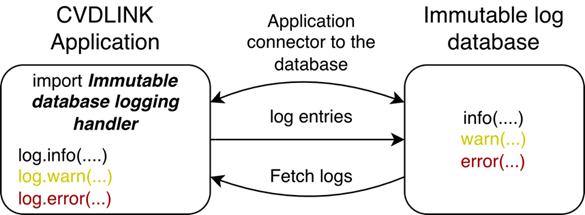
This project demonstrates a production-ready, immutable logging system in Python. It can be used in two ways: as a standalone library (rotating file logs with a tamper-evident SHA-256 hash chain) or with immudb (every log written to a cryptographically verifiable, append-only database, with an optional independent auditor).
Installation
Install the base package (hash-chain integrity, stdlib only):
pip install git+https://github.com/rytisss/immutable-logging
To also use the immudb handler, install with the immudb extra:
pip install 'immutable_logging[immudb] @ git+https://github.com/rytisss/immutable-logging'
Install from a local clone
If you already have the source checked out, install from the project root:
git clone https://github.com/rytisss/immutable-logging
cd immutable-logging
pip install .
With the immudb extra:
pip install '.[immudb]'
For development, use an editable install so code changes take effect without reinstalling:
pip install -e '.[immudb]'
After install, the public API is:
from immutable_logging import (
    IntegrityHandler,                # SHA-256 hash chain to a .integrity sidecar
    IntegrityRotatingFileHandler,    # rotating file handler with built-in chain
    SingleLineFormatter,             # escapes newlines so one record == one log line
    ImmuDBHandler,                   # immudb backend (needs [immudb] extra)
    verify_log_integrity,            # programmatic verification
    VerifyResult,                    # result dataclass with .passed and .summary
)
Pick the right file handler:
- No rotation — use
IntegrityHandleralongside your ownFileHandler(seeexamples/minimal_usage.py). - With rotation — use
IntegrityRotatingFileHandleron its own; it writes the log and the.integritysidecar together and rotates both in lockstep so each rotated pair (app.log.N+app.log.N.integrity) verifies independently (seeexamples/basic_usage.pyand the stress demo atexamples/rotation_usage.py).
Always pair
IntegrityHandlerwithSingleLineFormatter(applied to both the integrity handler and the file handler). The verifier reads the log file one line per entry, so a multi-line record — like an exception traceback — would otherwise break the chain.SingleLineFormatterescapes\n/\r/\\so each record stays on one line.
A CLI is also installed:
verify-logs path/to/app.log
Two ways to use it
| Mode | What you get | What you need |
|---|---|---|
| A · Standalone | Rotating file logs + SHA-256 hash chain in a .integrity sidecar. Tamper-evident and independently verifiable. |
Just Python. No database, no Docker. |
| B · With immudb | Mode A plus every log written to immudb (append-only, cryptographically verifiable). | Mode A + an immudb container. |
| B+ · With auditor | Mode B plus an independent process that periodically verifies immudb's cryptographic state. | Mode B + an auditor container. |
The same python examples/basic_usage.py works for all three — the immudb handler falls back gracefully when no database is reachable, so you can start in Mode A and add immudb later without touching code.
Features
Always on (Mode A and up):
- Native Python logging levels (
DEBUG,INFO,WARNING,ERROR,CRITICAL). - Exception and traceback capture.
- Rotating file logs.
- SHA-256 hash chain written to a
.integritysidecar — modifications, deletions, and insertions are detected. - CLI tool and startup check for log integrity verification.
With immudb (Mode B and up):
- Every log entry written to immudb in append-only, cryptographically verifiable form.
- Thread-safe and non-blocking — uses a queue and background worker.
- Graceful fallback if immudb is unreachable; logging resumes automatically when it returns.
- Optional independent auditor (Mode B+) that periodically verifies immudb's state and exposes Prometheus metrics.
Default ports (all in the 3000–3999 range):
| Port | Used by | Notes |
|---|---|---|
3322 |
immudb gRPC | App and auditor talk to immudb here. |
3080 |
immudb web console | Mapped from the container's internal 8080. |
3477 |
Auditor /metrics |
Prometheus endpoint. |
Mode A — Standalone (no database)
The simplest way to use it: file logs with a tamper-evident hash chain. No Docker, no database.
Run
python examples/basic_usage.py
You'll get two files: cvdlink.log and cvdlink.log.integrity.
For the absolute simplest setup — no rotation, no immudb — see examples/minimal_usage.py.
What gets written
cvdlink.log (rotating, human-readable):
2026-03-31 11:11:08,615 [DEBUG] CVDLINK test logger (basic_usage.py:50): Debug details for developers
2026-03-31 11:11:08,616 [INFO] CVDLINK test logger (basic_usage.py:51): Service started
2026-03-31 11:11:08,616 [WARNING] CVDLINK test logger (basic_usage.py:52): Memory usage near threshold
2026-03-31 11:11:08,616 [ERROR] CVDLINK test logger (basic_usage.py:53): Database connection timeout
2026-03-31 11:11:08,616 [CRITICAL] CVDLINK test logger (basic_usage.py:54): System failure
cvdlink.log.integrity (hash chain, machine-readable):
1|sha256=a3f2b8c1...|prev=0000000000000000000000000000000000000000000000000000000000000000
2|sha256=7e1d4af2...|prev=a3f2b8c1...
Each entry's hash covers its full content (timestamp, level, logger, file, line, message) plus the previous hash — similar to how Git links commits. Modify, delete, or insert a single line in cvdlink.log and the chain breaks at that point.
Verifying the chain
Run the CLI verifier:
verify-logs cvdlink.log
Clean output:
OK: 3 entries verified
Tampered output:
FAILED: 2 tampered, 1 missing
  Tampered lines: 3, 6
  Missing lines:  7
The exit code is 0 on pass, 1 on FAILED, and 2 if the log file is missing — usable directly in CI / cron / startup checks.
For programmatic use, call verify_log_integrity() and inspect the VerifyResult fields (passed, summary, tampered_lines, missing_lines). A runnable end-to-end demo is at examples/verify_usage.py.
Missing sidecar:
No previous integrity file found
The application also runs this check automatically at startup and reports the result through the logger:
2026-04-09 10:00:00,000 [INFO] CVDLINK test logger: Log integrity check passed.
What standalone mode does and doesn't give you
A hash chain on disk is enough to detect tampering — anyone with the log file and the verifier script can confirm whether it has been modified. It is not enough to prevent tampering by an attacker who can also rewrite the .integrity sidecar in place. For that, write to immudb (Mode B) so the chain is replicated to a separate, append-only store, or ship the integrity file off-box.
Mode B — With immudb
immudb stores every log entry in an append-only, cryptographically verifiable database. Even an operator with disk access cannot rewrite history without breaking the cryptographic chain — and a separate auditor (Mode B+) will notice.
Prerequisites
- Docker.
- Mode A already working — the immudb handler is layered on top of the file + hash-chain handler.
Run immudb
Create a shared Docker network so the auditor (added in Mode B+) can reach immudb by name, then start immudb with the gRPC and web console ports exposed:
docker network create immudb-net
docker run -d --network immudb-net --name immudb \
  -p 3322:3322 -p 3080:8080 \
  codenotary/immudb:latest
3322— gRPC, used by the app and the auditor.3080— web console (mapped from the container's internal8080).
Run the application
Same command as in Mode A:
python examples/basic_usage.py
The app now writes each log entry to immudb in addition to the file + integrity sidecar.
Inspecting log entries
Logs are stored as key-value pairs in immudb — keys like log:<timestamp>:<LEVEL>, values are the JSON-encoded log record. The web console at http://localhost:3080 is useful for admin tasks and infrastructure metrics, but it doesn't browse K/V data, so to see actual entries use immuclient:
docker run --rm --network immudb-net \
  -e IMMUCLIENT_IMMUDB_ADDRESS=immudb \
  -e IMMUCLIENT_USERNAME=immudb \
  -e IMMUCLIENT_PASSWORD=immudb \
  codenotary/immuclient scan log:

Each entry has a transaction id (tx), the key, and the JSON-encoded log record as the value. Use safeget <key> instead of scan to retrieve a single entry along with its cryptographic inclusion proof. The demo script also dumps the latest entries at the end of its run via immu_handler.scan_logs(limit=6).
Graceful fallback
The immudb handler doesn't fail loudly if immudb is unreachable:
- A warning is printed:
immudb connection failed: <reason>. Falling back to file-only logging. - Logs continue to file (
cvdlink.log), integrity sidecar, and console. - A background thread retries the connection every 30 seconds.
- When immudb becomes available, logging resumes to immudb automatically.
This means you can promote a deployment from Mode A to Mode B by starting an immudb container — no app restart required.
Mode B+ — Tampering detection with the immudb Auditor
immudb's writes are tamper-evident, but only if someone checks. The immudb Auditor is a separate immuclient audit-mode process that periodically asks immudb for its current cryptographic state, compares it to the previous state, and verifies the Merkle proof linking them. If anyone — including a privileged operator — rewrites history in immudb's storage, the proof breaks and the auditor flags it.
Architecture
The auditor runs in its own container, separate from immudb and from the application. That isolation is the point — if the immudb host (or its operator) is compromised, an auditor running elsewhere still notices and complains. All three components share the same Docker network (immudb-net).
flowchart TB
App["Python application<br/>(examples/basic_usage.py + ImmuDBHandler)"]
subgraph immudbBox["🐳 immudb container"]
DB["immudb engine<br/>gRPC :3322 · web console :3080"]
end
subgraph auditorBox["🐳 auditor container"]
Aud["audit loop<br/>(immuclient audit-mode)"]
Met["/metrics :3477<br/>(Prometheus)"]
end
Hook["external webhook (optional)"]
App -- "append log (SafeSet)" --> DB
Aud -- "fetch & verify state" --> DB
Aud --- Met
Aud -. "POST on tamper" .-> Hook
classDef container fill:#0d1117,stroke:#30363d,color:#c9d1d9
class immudbBox,auditorBox container
Container images:
codenotary/immudb:latestandcodenotary/immuclient:latest. The Python application can run on the host or in its own container; the auditor only needs network reach to immudb.
The auditor never writes to immudb — it only reads currentState and runs the Merkle consistency check between the previous and current root.
Setup
Pre-req: Mode B (immudb already running on immudb-net). Then start the auditor on the same network:
docker run -d --network immudb-net --name auditor \
  -p 3477:3477 \
  -e IMMUCLIENT_IMMUDB_ADDRESS=immudb \
  -e IMMUCLIENT_IMMUDB_PORT=3322 \
  -e IMMUCLIENT_AUDIT_USERNAME=immudb \
  -e IMMUCLIENT_AUDIT_PASSWORD=immudb \
  -e IMMUCLIENT_AUDIT_MONITORING_HOST=0.0.0.0 \
  -e IMMUCLIENT_AUDIT_MONITORING_PORT=3477 \
  codenotary/immuclient:latest audit-mode
Watch it work:
docker logs -f auditor
curl -s http://localhost:3477/metrics | grep immuclient_audit_
Auditor in action
The auditor performs an audit every minute (configurable via IMMUCLIENT_AUDIT_INTERVAL). It skips empty databases (audit canceled: database is empty) until something has been written. The first audit that actually runs just records the current state — there's nothing to compare against. From the next audit onward it asks immudb for a Merkle consistency proof between the previous root and the current root; that's the real tamper check, and it's what flags any rewrite of history.

immuclientd INFO: auditor monitoring HTTP server starting on 0.0.0.0:3477 ...
immuclientd WARNING: audit #1 canceled: database is empty on server ... @ immudb:3322
immuclientd INFO: audit #4 finished in 145.55ms @ 2026-05-05T16:30:52Z
immuclientd INFO: audit #5 result:
 db: defaultdb, consistent: true previous state: 3f4dd9e794177ac49a922e5854b317e784b26b29833b8490f78f0cb2f60132f9 at tx: 1
  current state:           3f4dd9e794177ac49a922e5854b317e784b26b29833b8490f78f0cb2f60132f9 at tx: 1
Key metrics
The auditor exposes Prometheus metrics on :3477/metrics. The four to watch:
| Metric | Meaning |
|---|---|
immuclient_audit_result_per_server |
1 = verified, 0 = tampered. Alert on == 0. |
immuclient_audit_run_at_per_server |
Unix timestamp of the last audit. Alert if it stops advancing — the auditor is dead. |
immuclient_audit_curr_root_per_server |
Current Merkle root index (transaction id). |
immuclient_audit_prev_root_per_server |
Merkle root from the previous audit. |
immuclient_audit_result_per_server{server_address="immudb:3322",server_id="..."} 1
immuclient_audit_run_at_per_server{server_address="immudb:3322",server_id="..."} 1.7779987125e+09
immuclient_audit_curr_root_per_server{server_address="immudb:3322",server_id="..."} 1
immuclient_audit_prev_root_per_server{server_address="immudb:3322",server_id="..."} 1
Production hardening
- Run multiple auditors in different zones — one auditor can itself be compromised; independent attestation needs independent observers.
- Set
IMMUCLIENT_AUDIT_NOTIFICATION_URLto a webhook you actually monitor. Without it, a tamper alert just sits in container logs. - Use a read-only audit user instead of the default
immudbadmin credentials. - Alert on
immuclient_audit_result_per_server == 0and onimmuclient_audit_run_at_per_servergoing stale — both failure modes matter.
Reference: immudb auditor docs.
How it works (under the hood)
- Log messages are generated using Python's standard
loggingmodule. - Each record is serialized with metadata: timestamp, logger name, file and line, function name, log level.
- The integrity handler appends the record to
cvdlink.logand writes its SHA-256 hash — chained to the previous hash — intocvdlink.log.integrity. - In Mode B, the immudb handler also writes the same record to immudb via
SafeSet, which returns a cryptographic inclusion proof. - In Mode B+, the auditor periodically asks immudb for its
currentStateand verifies a Merkle consistency proof between the previous and current root.
Running tests
The test suite uses only the standard library (unittest) and mocks the immudb client, so no running immudb instance is required:
python -m pytest tests/ -v
Benefits
- Auditability — every event can be independently verified.
- Traceability — complete history of changes is preserved.
- Compliance — suitable for systems with strict data-integrity requirements.
- Flexibility — start in Mode A, promote to Mode B / B+ without code changes.
Acknowledgement
This research was supported by the CVDLINK project (EU Horizon grant agreement N°101137278)

Project details
Verified details
These details have been verified by PyPIProject links
GitHub Statistics
Maintainers
Release history Release notifications | RSS feed


Download files
Download the file for your platform. If you're not sure which to choose, learn more about installing packages.
Source Distribution
Built Distribution
Filter files by name, interpreter, ABI, and platform.
If you're not sure about the file name format, learn more about wheel file names.
Copy a direct link to the current filters
File details
Details for the file immutable_logging-0.1.0.tar.gz.
File metadata
- Download URL: immutable_logging-0.1.0.tar.gz
- Upload date:
- Size: 65.8 kB
- Tags: Source
- Uploaded using Trusted Publishing? Yes
- Uploaded via: twine/6.1.0 CPython/3.13.12
File hashes
| Algorithm | Hash digest | |
|---|---|---|
| SHA256 |
042b9e1a9daa63d3fcbb674dc3afc36db1b8a16d369f913d060e7e52f194d431
|
|
| MD5 |
692f2895e6f753b7a21c831fa6d67249
|
|
| BLAKE2b-256 |
6a446d286352241d325e25ac11987cc45b648fc983b551bb5ab5d55f89db0831
|
Provenance
The following attestation bundles were made for immutable_logging-0.1.0.tar.gz:
Publisher:
release.yml on rytisss/immutable-logging
-
Statement:
-
Statement type:
https://in-toto.io/Statement/v1 -
Predicate type:
https://docs.pypi.org/attestations/publish/v1 -
Subject name:
immutable_logging-0.1.0.tar.gz -
Subject digest:
042b9e1a9daa63d3fcbb674dc3afc36db1b8a16d369f913d060e7e52f194d431 - Sigstore transparency entry: 1579697407
- Sigstore integration time:
-
Permalink:
rytisss/immutable-logging@85e7a1f5c2b3d19a68e91bc1004c515044c15223 -
Branch / Tag:
refs/tags/v0.1.2 - Owner: https://github.com/rytisss
-
Access:
private
-
Token Issuer:
https://token.actions.githubusercontent.com -
Runner Environment:
github-hosted -
Publication workflow:
release.yml@85e7a1f5c2b3d19a68e91bc1004c515044c15223 -
Trigger Event:
push
-
Statement type:
File details
Details for the file immutable_logging-0.1.0-py3-none-any.whl.
File metadata
- Download URL: immutable_logging-0.1.0-py3-none-any.whl
- Upload date:
- Size: 40.5 kB
- Tags: Python 3
- Uploaded using Trusted Publishing? Yes
- Uploaded via: twine/6.1.0 CPython/3.13.12
File hashes
| Algorithm | Hash digest | |
|---|---|---|
| SHA256 |
aea7471e981ab358cfe62b7ecf1a1ae4a2c08f29d3c6f5c2aefd201bbf5c6abd
|
|
| MD5 |
720da976f3bcf84b33bb4ea7946e12ad
|
|
| BLAKE2b-256 |
40fd7b3362a198b577428247dd2f4a3f340fdc0d73dafe313bc7482ce7f7962d
|
Provenance
The following attestation bundles were made for immutable_logging-0.1.0-py3-none-any.whl:
Publisher:
release.yml on rytisss/immutable-logging
-
Statement:
-
Statement type:
https://in-toto.io/Statement/v1 -
Predicate type:
https://docs.pypi.org/attestations/publish/v1 -
Subject name:
immutable_logging-0.1.0-py3-none-any.whl -
Subject digest:
aea7471e981ab358cfe62b7ecf1a1ae4a2c08f29d3c6f5c2aefd201bbf5c6abd - Sigstore transparency entry: 1579697628
- Sigstore integration time:
-
Permalink:
rytisss/immutable-logging@85e7a1f5c2b3d19a68e91bc1004c515044c15223 -
Branch / Tag:
refs/tags/v0.1.2 - Owner: https://github.com/rytisss
-
Access:
private
-
Token Issuer:
https://token.actions.githubusercontent.com -
Runner Environment:
github-hosted -
Publication workflow:
release.yml@85e7a1f5c2b3d19a68e91bc1004c515044c15223 -
Trigger Event:
push
-
Statement type:






