
IMoTE: Interactive Model Tree Explorer




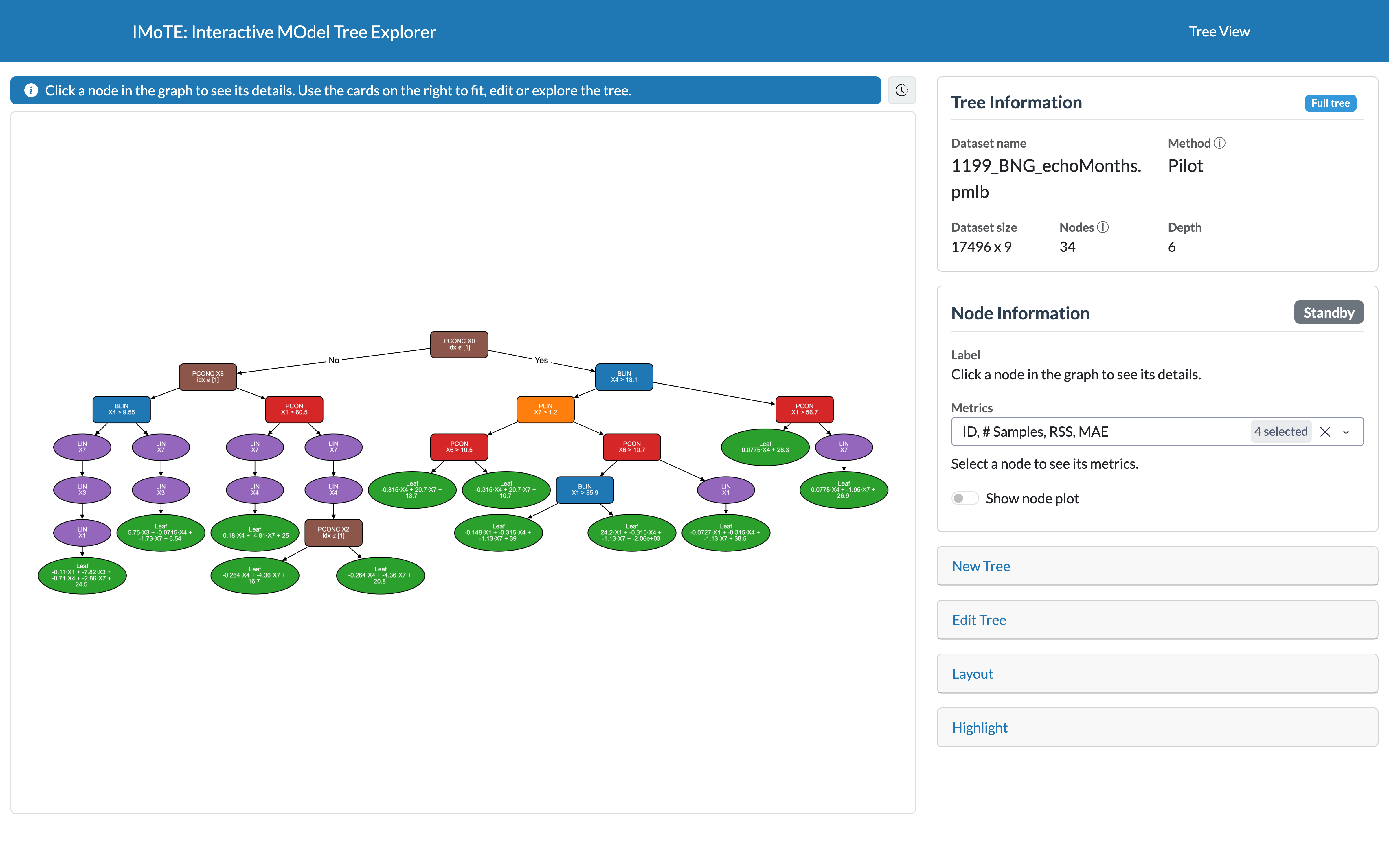
IMoTE is an interactive application to fit, visualise and explore linear model trees for regression on tabular data. It shows a fitted tree as an interactive graph, lets you look at the linear model and the data behind every node, and traces a single data point through the tree to explain its prediction.
Why IMoTE?
A linear model tree combines the rule based structure of a decision tree with linear models in its leaves. That usually makes it more accurate than a classic regression tree of the same depth. In practice, these trees are often hard to read from code or a text dump. IMoTE makes them easy to explore, explain and present.
Features
Fit or load a tree
- Fit PILOT [1] or M5 [2] trees on built-in PMLB datasets or on your own CSV file.
- Save the tree you are looking as an SVG image or to load it again later.
- Load trees fitted with other tools through an adapter. An adapter for trees from the R package partykit is included as an example.
Edit and explore the tree
- Pan, zoom and click through the tree as an interactive graph.
- Collapse and expand branches, collapse the whole tree to a given level, show a single branch as a subtree, or prune the tree (PILOT only).
- Switch between normal, minimal and tiny nodes or color nodes by the feature they use.
- Show the data flow: edge width or node size scale with the number of training samples that pass through them.
Inspect nodes and predictions
- Click a node to see its type, split and metrics (number of samples, RSS, MAE, ...).
- See the plot of any node: the data and the fit of a split, or the prediction plot of a leaf that shows how each feature contributes to its predictions.
- Turn on Show all node plots to replace every node of the graph by its plot.
- Highlight the path of a data point through the tree, with its prediction.
Installation
IMoTE needs Python 3.10 or newer.
pip install imote
Start the application with:
imote
Then open the address shown in the terminal (by default http://127.0.0.1:8050). The app starts with an example PILOT tree. Click a node to inspect it, or open the New Tree card on the right to fit a tree on another dataset.
IMoTE stores saved trees, uploaded datasets and generated plots in ~/.imote. Set the IMOTE_HOME environment
variable to use another folder.
Documentation
The full documentation is at https://stan-uantwerp.github.io/IMoTE/, it includes:
- the User Guide, with a page for every part of the interface,
- the Gallery, with screenshots of what IMoTE can show,
- a guide on how to write your own adapter for another type of linear model tree,
- an API reference of the tree and node classes used for visualisation.
Development
git clone https://github.com/STAN-UAntwerp/IMoTE
cd IMoTE
pip install -e ".[dev]"   # IMoTE in editable mode, plus pytest, build and twine
python -m imote.app       # start the app in Dash debug mode, it reloads on code changes
To work on the documentation: pip install -e ".[docs]", then mkdocs serve.
Questions and ideas are welcome in Discussions, bugs can be reported as an issue.
References
[1] Raymaekers, J., Rousseeuw, P. J., Verdonck, T., & Yao, R. (2024). Fast linear model trees by PILOT. Machine Learning, 113(9), 6561-6610. https://doi.org/10.1007/s10994-024-06590-3 (implementation: fast-model-trees)
[2] Quinlan, J. R. (1992). Learning with continuous classes. In 5th Australian Joint Conference on Artificial Intelligence (Vol. 92, pp. 343-348). (implementation: m5py)
1 maintainer

Metadata
1 maintainer
Release files for IMoTE 0.1.1
For a detailed explanation of source distributions (sdists) and built distributions (wheels), please see the package formats documentation.
Source distribution (sdist)
| File | Size | Uploaded | |
|---|---|---|---|
| imote-0.1.1.tar.gz | 1.9 MB | Details |
Built distribution (wheel)
| File | Interpreter | ABI | Platform | Reset |
|---|---|---|---|---|
| imote-0.1.1-py3-none-any.whl | Python 3 | none | any | Details |
Total release size: 3.9 MB
Release files / imote-0.1.1.tar.gz
| Download URL | imote-0.1.1.tar.gz |
|---|---|
| Size | 1.9 MB |
| Tags | Source |
|
SHA-256 checksum How to use checksums |
5926021b84e62707ac8ded7ffab5f0fb5c8f4a40b8de953e263cfa1d9ca9d7dc
|
|
BLAKE2b-256 checksum How to use checksums |
3ca3328baf363f8a34129bda5858a6691faf3d1c2082e39d2a079dac9ec07c11
|
| Upload date | |
|
Uploaded using Trusted Publishing? What is trusted publishing? |
No |
| Uploaded via |
twine/7.0.0 CPython/3.12.3
|
Release files / imote-0.1.1-py3-none-any.whl
| Download URL | imote-0.1.1-py3-none-any.whl |
|---|---|
| Size | 2.0 MB |
| Tags | Python 3 |
|
SHA-256 checksum How to use checksums |
5902813618a1fa90a54026c1f49143c18357f7827f4ac24948a4ab4b70611508
|
|
BLAKE2b-256 checksum How to use checksums |
d289eae0231f40c3e8f27fcf8d718e13f832769368f909c6f152488ee7968851
|
| Upload date | |
|
Uploaded using Trusted Publishing? What is trusted publishing? |
No |
| Uploaded via |
twine/7.0.0 CPython/3.12.3
|














