
IMaging PREprocessing And Normalization for Diagnostic Interoperability
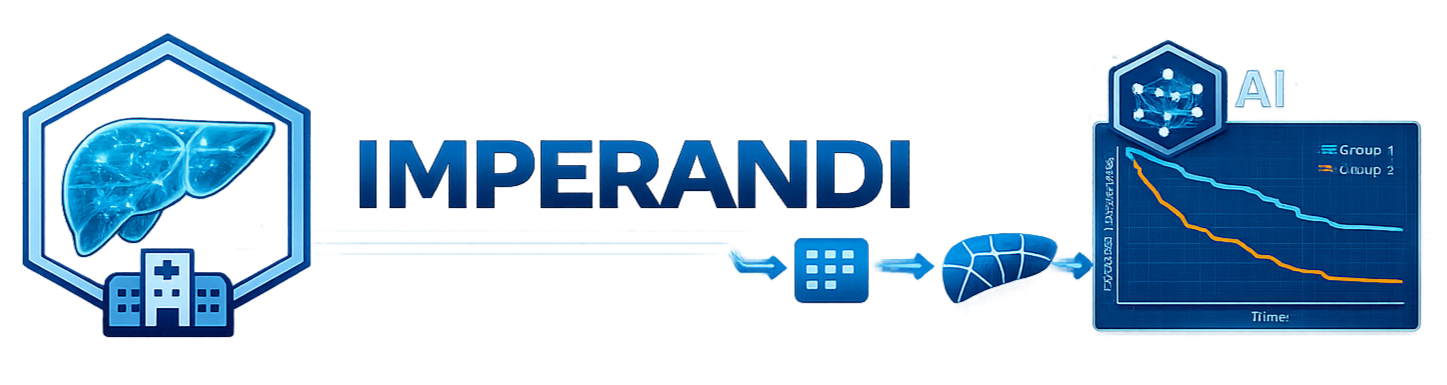






IMPERANDI is a Python framework and CLI for transforming heterogeneous DICOM collections into analysis-ready CT and MR imaging cohorts. It standardizes identifiers, curates imaging series and volume-level metadata, converts selected volumes to NIfTI, and supports downstream segmentation, contrast-phase identification, radiomics extraction, and quality control within a coherent, reproducible pipeline.
Disclaimers
Research use only
IMPERANDI is research software and is not a medical device. Outputs are not intended for clinical diagnosis or treatment decisions without independent validation.
DICOM privacy
IMPERANDI should not be assumed to de-identify input DICOM data. Users are responsible for appropriate anonymization and data-governance procedures before processing or sharing data.
Funding
This work performed under the RHU OPERANDI project was supported in part by the French National Research Agency (Agence Nationale de la Recherche, ANR) as its 3rd PIA, integrated to France 2030 plan under reference ANR-21-RHUS-0012.
Why IMPERANDI matters
- Reduces manual data wrangling by turning raw DICOM trees into structured cohort tables.
- Improves reproducibility with explicit CSV outputs at every stage and deterministic ID logic.
- Improves reliability on real hospital exports with archive support, failure tracking, and resumable workflows.
- Keeps adoption practical in secure environments with a lightweight Python-first toolchain.
Current framework functionalities
1) Ingest and harmonize imaging metadata (parse + clean = ingest)
- Scans DICOM files from folders, globbed roots, and nested archives (
.zip,.tar,.tar.gz,.tgz). - Extracts selected DICOM header tags into a raw metadata table (
dicom_index.csv). - Builds stable patient/study/series identifiers from tags, folder structure, or hybrid fallback rules.
- Applies manifest-driven hooks for patient-key standardization and derived columns.
- Cleans and curates cohorts by filtering modality/noise patterns, localizers, non-target anatomy, non-axial acquisitions, and implausible scan geometry.
- Aggregates slices into robust volume-level records and computes exam/acquisition ordering.
Impact: turns fragmented acquisition data into a consistent cohort backbone that downstream models and analytics can trust.
2) Convert DICOM volumes to NIfTI (convert)
- Converts curated DICOM volume rows to NIfTI in parallel using
dicom2nifti. - Preserves source-to-output traceability in a CSV (
nifti_pathper row). - Handles archive-backed DICOM paths transparently via on-demand materialization.
- Writes explicit conversion error tables without aborting the whole run.
Impact: creates a standardized imaging representation for model training, segmentation, and feature extraction at scale.
3) Configurable segmentation (segment)
- Runs configurable task pipelines (default backend: TotalSegmentator).
- Dispatches CT and MRI volumes to separate manifest-defined TotalSegmentator model lists.
- Adds optional post-processing (mask merge, closing, hole filling, largest connected component).
- Uses multiprocessing with timeout controls and produces warning/error tracking CSVs.
Impact: converts CT and MR volumes into ready-to-use anatomical/tumor masks with operational safeguards for large cohort processing.
4) Contrast phase curation (phase)
- Resolves an ordered YAML-defined fallback chain across explicit ontology, metadata rules, and TotalSegmentator prediction.
- Restricts the bundled TotalSegmentator phase predictor to CT by default.
- Appends canonical
phaseprovenance andtotalseg_*prediction fields when model inference is needed. - Captures per-row failures into dedicated error outputs.
Impact: enables phase-aware stratification and analysis without manual review of every study.
5) Radiomics feature extraction (radiomics)
- Extracts PyRadiomics features for organ and tumor regions from CT/MRI + masks.
- Includes a organ-minus-tumor extraction path for cleaner parenchyma characterization.
- Supports optional cohort filtering controls and error-aware output generation.
- Supports PyRadiomics parameterization from either
--pyradiomics_settings /path/to/Params.yamlor manifestradiomicssettings.
Impact: accelerates feature exctraction for prognostic and response modeling pipelines.
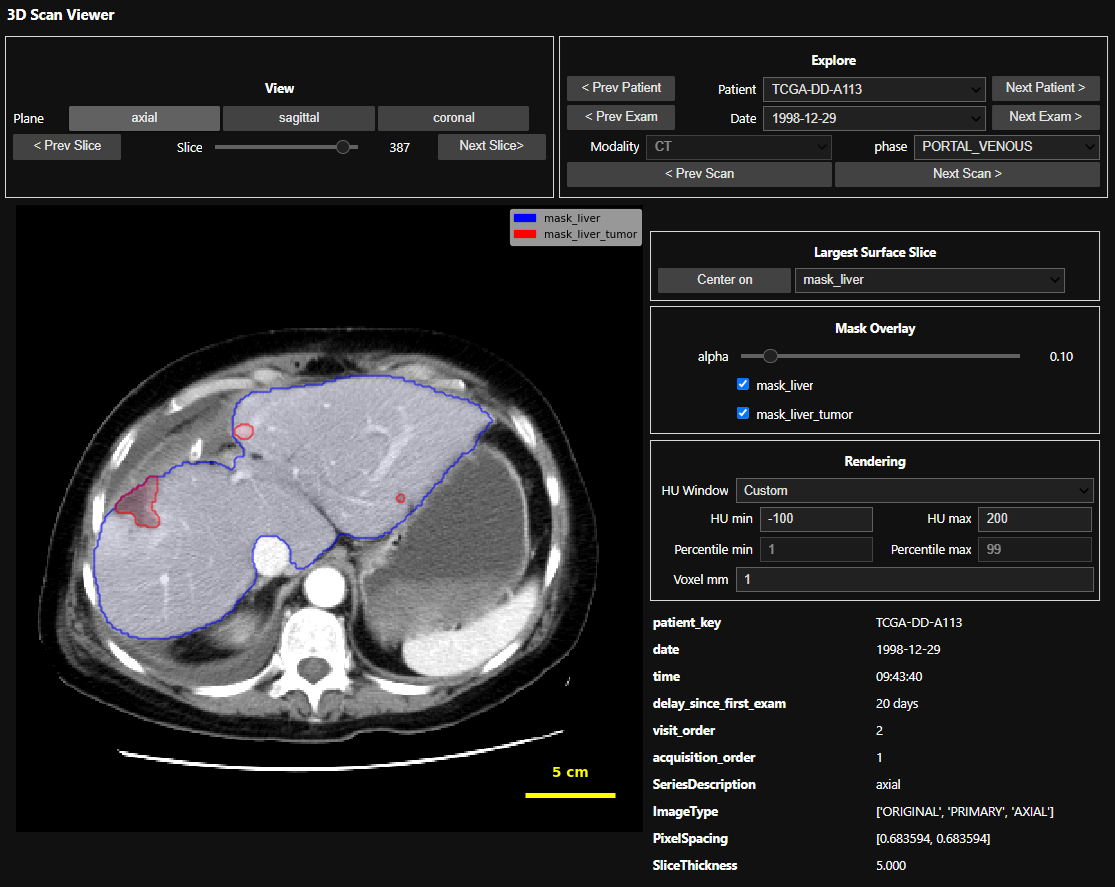
6) Interactive quality control viewer (Jupyter)
- Provides a 3D CT/MRI + mask viewer for cohort navigation and quick visual QA.
- Uses HU windows for CT and percentile windows (1st–99th by default) for MRI.
- Supports patient/date/modality/phase exploration, mask overlays, window presets, and keyboard navigation.
Impact: shortens the feedback loop between pipeline outputs and clinical/imaging validation.
CLI overview
IMPERANDI ships a single CLI with these subcommands:
parse: scan DICOMs and build metadata index tables.clean: filter and normalize parsed metadata.ingest: runparsethenclean.convert: convert indexed DICOM volumes to NIfTI.segment: run configurable segmentation on NIfTI volumes (requires TotalSegmentator, install with.[segment]).phase: resolve canonical contrast phase; a TotalSegmentator fallback requires.[segment].radiomics: extract radiomics features from NIfTI volumes and masks (requires a separate PyRadiomics installation; see below).
Get help:
imperandi --help
imperandi parse --help
imperandi clean --help
imperandi ingest --help
imperandi convert --help
imperandi segment --help
imperandi phase --help
imperandi radiomics --help
Install
Base install:
python -m pip install -e .
Segmentation dependencies:
python -m pip install -e ".[segment]"
Radiomics dependencies (requires Git):
PyRadiomics is installed separately from Git to keep IMPERANDI's package metadata
compatible with PyPI. This extra step also applies to [all] and [all-dev].
python -m pip install "pyradiomics @ git+https://github.com/AIM-Harvard/pyradiomics.git@master"
Notebook and web quality-control viewers:
python -m pip install -e ".[viewer]"
Development and test tooling:
python -m pip install -e ".[dev]"
Enable tracked git hooks (recommended):
git config core.hooksPath .githooks
With hooks enabled, git push strips output/execution state from changed *.ipynb files, stages those changes, and stops once so you can commit the cleaned notebooks.
Install all runtime features:
python -m pip install -e ".[all]"
python -m pip install "pyradiomics @ git+https://github.com/AIM-Harvard/pyradiomics.git@master"
Install all runtime features, development tools, and slow-test dependencies:
python -m pip install -e ".[all-dev]"
python -m pip install "pyradiomics @ git+https://github.com/AIM-Harvard/pyradiomics.git@master"
Optional Jupyter kernel setup:
python -m ipykernel install --user --name imperandi310 --display-name "IMPERANDI (Python 3.10)"
Quickstart
Run ingest (parse + clean):
imperandi ingest \
  --root_path /path/to/dicom \
  --output_dir /path/to/output \
  --manifest generic
Convert to NIfTI:
imperandi convert \
  --csv_path /path/to/output/dicom_index_clean.csv \
  --output_dir /path/to/nifti_root \
  --csv_path_out /path/to/output/nifti_index.csv
Run segmentation:
imperandi segment \
  --csv_path /path/to/output/nifti_index.csv \
  --csv_path_out /path/to/output/nifti_index_segmented.csv
Curate contrast phase:
imperandi phase \
  --csv_path /path/to/output/nifti_index_segmented.csv \
  --csv_path_out /path/to/output/nifti_index_phased.csv \
  --manifest generic
Extract radiomics:
imperandi radiomics \
  --csv_path /path/to/output/nifti_index_phased.csv \
  --csv_path_out /path/to/output/nifti_index_radiomics.csv
Extract radiomics with explicit PyRadiomics YAML settings:
imperandi radiomics \
  --csv_path /path/to/output/nifti_index_phased.csv \
  --pyradiomics_settings /path/to/Params.yaml \
  --csv_path_out /path/to/output/nifti_index_radiomics.csv
Use manifest-defined radiomics settings:
imperandi radiomics \
  --csv_path /path/to/output/nifti_index_phased.csv \
  --manifest generic \
  --csv_path_out /path/to/output/nifti_index_radiomics.csv
If both --manifest and --pyradiomics_settings are provided, IMPERANDI warns and
prefers manifest radiomics settings when that section exists.
Core outputs
parse:dicom_index.csv(resolved IDs and selected DICOM tags)- optional
dicom_tags_snapshot.ndjson(full recursive tags on a sampled subset, via--snapshot_tags)
clean:- cleaned cohort table (default
<input>_clean.csv)
- cleaned cohort table (default
convert:- NIfTI-enriched cohort table (
nifti_index.csvby default) - conversion failures (
conv_errors.csvby default)
- NIfTI-enriched cohort table (
segment,phase,radiomics:- enriched cohort table + command-specific error CSV
Configuration
IMPERANDI configuration is done through YAML dataset manifests and optional hooks. Manifests hold the declarative settings, while hooks provide Python-based customization when a static file is not enough.
Generic manifests shipped with the package live in:
src/imperandi/builtin_datasets_config/manifests/*.yaml
Their built-in hooks live in:
src/imperandi/builtin_datasets_config/hooks/
Repository-specific OPERANDI configuration lives in dataset_configs/ and
is intentionally not included in installed packages. Load it only by its
explicit YAML path, for example
--manifest ./dataset_configs/manifests/operandi.yaml.
You can pass a built-in manifest name (such as generic) or a custom manifest
path. The usual customization flow is to copy a built-in YAML file, edit
id_extraction, id_standardization, derived_columns,
phase_curation, segmentation, and radiomics, then run with
--manifest ./site-a.yaml. JSON manifests are not accepted.
phase_curation.strategies is an ordered fallback chain. It can contain an
explicit site ontology, IMPERANDI's metadata rules, TotalSegmentator phase
prediction, or any combination. The canonical result is written to phase,
with its provenance in phase_source, phase_confidence, and phase_reason.
Hooks are normal Python callables referenced by manifest keys
hook_module and function: id_standardization hook rewrites
patient_key, while derived_columns hook can add fields based on an existing column.
For configuring radiomic extraction, manifest key radiomics can directly contain a PyRadiomics-style
settings object (same structure as Params.yaml content).
Official PyRadiomics parameter guide:
PyRadiomics customization docs.
For configuring segmentation, define CT and/or MR task lists under
segmentation.modalities. CT uses TotalSegmentator tasks such as total, while
MR uses the corresponding _mr models such as total_mr. Logical output names
can stay consistent across modalities in the cohort CSV.
Official TotalSegmentator task guide:
TotalSegmentator subtasks guide.
Full IMPERANDI configuration guide: Documentation.
Performance and reliability notes
- Parallel execution controls are available for heavy stages (
parse,convert,segment). - Long-running stages (
parse,convert,segment,phase,radiomics) use a unified checkpoint interface:--checkpoint_every_rows,--checkpoint_every_sec,--no_resume,--strict_resume. - Resume is enabled by default; pass
--no_resumeto disable it. parsereads tags from defaults (DEFAULT_DICOM_TAGS) plus--tags; use--snapshot_tagsfor full recursive tag snapshots on sampled data.parseauto-detects archive-heavy inputs from a deterministic root sample (--archive_detect_sample_size) and can switch to archive-aware mode at runtime when needed.- Archive workflows are bounded by depth and include path-safety protections.
- Most commands support
--dry-runfor pipeline planning and CI smoke checks.
Testing
Fast tests are organized under tests/unit and run in normal CI:
python -m pytest -m "not slow"
Dataset-backed tests run the complete ingest, convert, segment, phase, and radiomics workflow on small IRCAD and TCGA-LIHC cohorts. Downloaded inputs and generated outputs stay outside version control:
python -m pip install -e '.[all-dev]'
python -m pip install "pyradiomics @ git+https://github.com/AIM-Harvard/pyradiomics.git@master"
python tests/slow/ircad/download.py
python tests/slow/tcga_lihc/download.py
python -m pytest tests/slow -m slow
Each dataset can also run independently:
bash tests/slow/ircad/pipeline.sh
bash tests/slow/tcga_lihc/pipeline.sh
See tests/slow/README.md for layout, environment
overrides, and dataset-specific instructions.
Use Case on IRCAD Dataset
Download the dataset (~800MB):
wget https://cloud.ircad.fr/index.php/s/JN3z7EynBiwYyjy/download -O ircad.zip
Unzip the archive:
unzip ircad.zip -d ircad_dicom
After extraction, your structure should look similar to:
ircad_dicom/
└── 3Dircadb1/
    ├── 3Dircadb1.1/
    │   ├── PATIENT_DICOM.zip/
    │   ├── MASKS_DICOM.zip/
    │   └── ...
Install package:
conda create -n imperandi310 python=3.10
conda activate imperandi310
pip install -e .[all]
python -m pip install "pyradiomics @ git+https://github.com/AIM-Harvard/pyradiomics.git@master"
Execute pipeline:
imperandi ingest "ircad_dicom/3Dircadb1/**/PATIENT_DICOM*" . --snapshot_tags
imperandi convert dicom_index_clean.csv ircad_nifti/
imperandi segment nifti_index.csv
imperandi phase nifti_index.csv
imperandi radiomics nifti_index.csv
Inspect results with dashboards:
- explore images & segmentations with the interactive viewer
- inspect DICOM tags
- basic radiomics statistics
1 maintainer

Download files
Download the file for your platform. If you're not sure which to choose, learn more about installing packages.
Source Distribution
Built Distribution
Filter files by name, interpreter, ABI, and platform.
If you're not sure about the file name format, learn more about wheel file names.
Copy a direct link to the current filters
File details
Details for the file imperandi-0.1.0.tar.gz.
File metadata
- Download URL: imperandi-0.1.0.tar.gz
- Upload date:
- Size: 1.3 MB
- Tags: Source
- Uploaded using Trusted Publishing? Yes
- Uploaded via:
twine/7.0.0 CPython/3.13.14
File hashes
| Algorithm | Hash digest | |
|---|---|---|
| SHA256 |
60bd5ae44d655bb8a358621e043a29afe6ef2bf4226537cd42e297506dfd2183
|
|
| MD5 |
ce78edc043e0c98458c507045d1c3fde
|
|
| BLAKE2b-256 |
c78d2192397f8fd1e4bd1dd8e28c8bb8d8e4e5a4c32b1b7a830b88bb6d3c9f5b
|
Provenance
The following attestation bundles were made for imperandi-0.1.0.tar.gz:
Publisher:
release.yml on dmandache/IMPERANDI
-
Statement:
-
Statement type:
https://in-toto.io/Statement/v1 -
Predicate type:
https://docs.pypi.org/attestations/publish/v1 -
Subject name:
imperandi-0.1.0.tar.gz -
Subject digest:
60bd5ae44d655bb8a358621e043a29afe6ef2bf4226537cd42e297506dfd2183 - Sigstore transparency entry: 2793246988
- Sigstore integration time:
-
Permalink:
dmandache/IMPERANDI@2bc2c4aa23e0c9e6b5f7ecd8f6148f29b268d6e4 -
Branch / Tag:
refs/tags/v0.1.0 - Owner: https://github.com/dmandache
-
Access:
public
-
Token Issuer:
https://token.actions.githubusercontent.com -
Runner Environment:
github-hosted -
Publication workflow:
release.yml@2bc2c4aa23e0c9e6b5f7ecd8f6148f29b268d6e4 -
Trigger Event:
push
-
Statement type:
File details
Details for the file imperandi-0.1.0-py3-none-any.whl.
File metadata
- Download URL: imperandi-0.1.0-py3-none-any.whl
- Upload date:
- Size: 177.9 kB
- Tags: Python 3
- Uploaded using Trusted Publishing? Yes
- Uploaded via:
twine/7.0.0 CPython/3.13.14
File hashes
| Algorithm | Hash digest | |
|---|---|---|
| SHA256 |
cd622fc34989f59f82015fc2dbe29604e4fec8d3a0b6420bec9e8a01d44f9e92
|
|
| MD5 |
7cfd147be7d0c73a310405b9b063d2b0
|
|
| BLAKE2b-256 |
d6120e1be32802e1cba2ab5e1bf159ce4559f03613b3a242b0742830e0ca5e85
|
Provenance
The following attestation bundles were made for imperandi-0.1.0-py3-none-any.whl:
Publisher:
release.yml on dmandache/IMPERANDI
-
Statement:
-
Statement type:
https://in-toto.io/Statement/v1 -
Predicate type:
https://docs.pypi.org/attestations/publish/v1 -
Subject name:
imperandi-0.1.0-py3-none-any.whl -
Subject digest:
cd622fc34989f59f82015fc2dbe29604e4fec8d3a0b6420bec9e8a01d44f9e92 - Sigstore transparency entry: 2793247048
- Sigstore integration time:
-
Permalink:
dmandache/IMPERANDI@2bc2c4aa23e0c9e6b5f7ecd8f6148f29b268d6e4 -
Branch / Tag:
refs/tags/v0.1.0 - Owner: https://github.com/dmandache
-
Access:
public
-
Token Issuer:
https://token.actions.githubusercontent.com -
Runner Environment:
github-hosted -
Publication workflow:
release.yml@2bc2c4aa23e0c9e6b5f7ecd8f6148f29b268d6e4 -
Trigger Event:
push
-
Statement type:













