
CLI time tracking software indented for use with JIRA

Project description








This is some time/task tracking software. It can talk (barely) to/at JIRA and Freshdesk. 🐑 PLEASELIKEANDSUBSCRIBE
Requirements
python 3.6
Installation
Install from pypi with pip. Like sudo python3 -m pip install impetuous or python3 -m pip install --user impetuous or something.
Clone the source code and install with python3 -m pip install --user -e .[jira,freshdesk]. If you want. You don’t have to. I’m not the police.
CLI Usage
The data is stored in a sqlite3 database at ~/.local/share/impetuous/data.sqlite. This can be overridden by setting IM_DB.
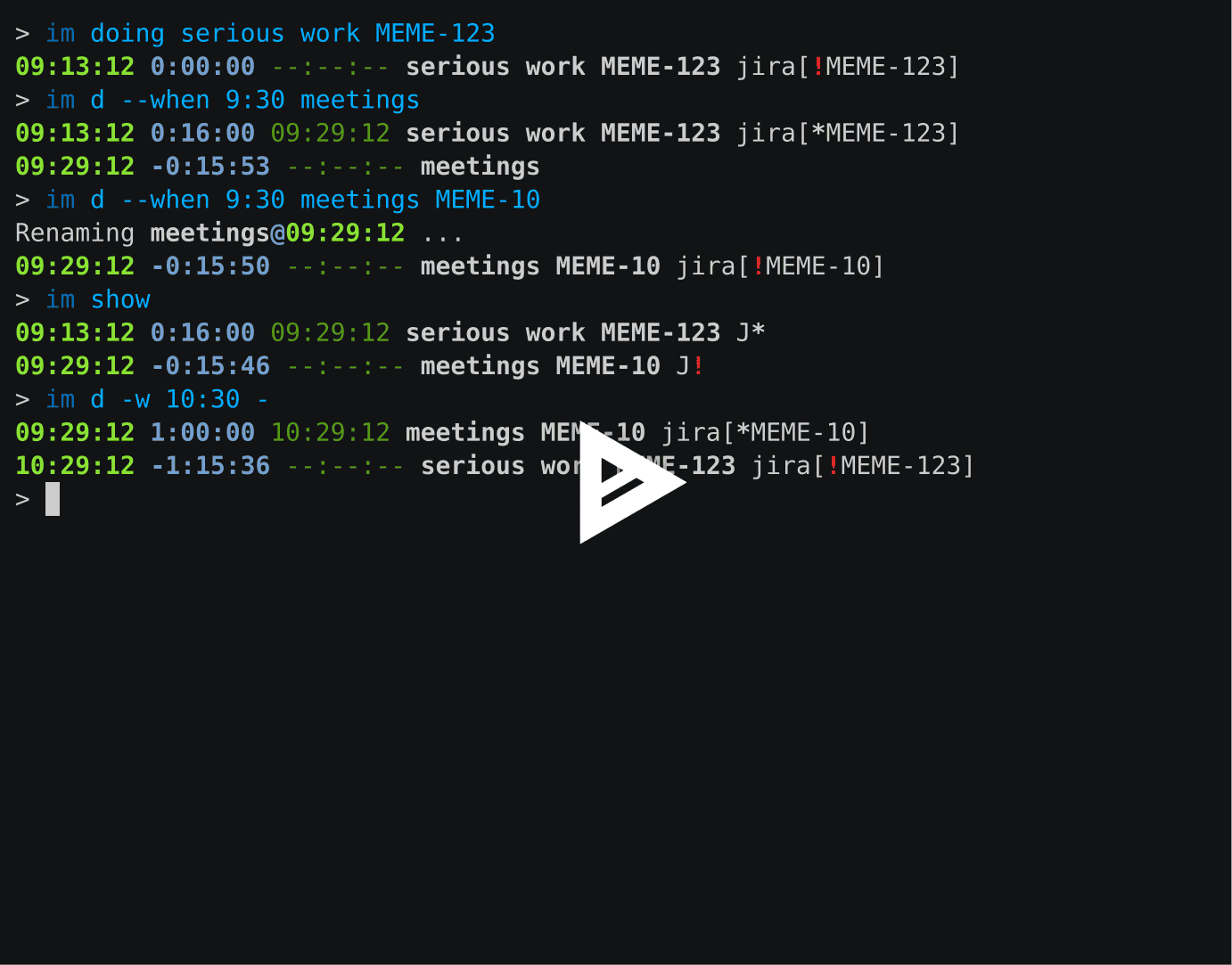
To start doing something, run im doing something. Once you’re not doing anything anymore, run it again but doing tell it what you’re doing; im doing. If you start doing something and you’re already doing a thing, it’ll try to stop the thing you’re doing before starting the new one. You can use -w to specify the date and/or time you’re starting the thing.
im show will list time entries. It uses --since and --until to filter on entries to show. By default, that range is today. Sometimes it’s nice to look at yesterday, so you can pass -y or --yesterday for that. You can provide -y multiple times to keep going back. These time range options should be given after im and before the action (such as doing or show).
--yesterday works by moving back the dates (given and default) for --since and --until and --when for im doing.
Many actions can do dry runs with --dry-run.
When all else fails, use im edit to open a YAML representation of your time entries in EDITOR. Like im show, this only shows entries filtered by --yesterday, --since, and --until.
im post will post your time entries to an external service you have configured. The responses are saved in the database, so impetuous will remember the result and won’t double-post if you run im post again.
Examples
Here’s a thing.
Configuration and JIRA and Freshdesk
Edit the configuration by running im config-edit, which just opens the configuration file in ~/.config/impetuous/config.ini in EDITOR. This is an example config.ini:
[jira]
api = jira
server = https://funkymonkey.atlassian.net
basic_auth = admin:hunter2
pattern = ((?:FOO-\d+)|(?:BAR-\d+))

[freshdesk]
api = freshdesk
server = https://funkymonkey.freshdesk.com
api_key = xxxxxxxxxxxxxxxxxxxx
pattern = freshdesk (\d+)
name = sheepdesk
abbr = 🐑
Each section defines an external service for logging time against. The
api determines how we can talk to it. You can add multiple sections and
call them whatever you want.
By default, the name and abbreviated name are taken from the section name, but you can set them as shown in the “freshdesk” section above.
Encoding Config Passwords
You can use im encode to get impetuous to encode your passwords in the configuration file. Then it decodes them when it uses them. It supports a few different encodings. You can encode it multiple times. I don’t know why you want to use this. But it’s there now.
Development
Versioning
This project does not follow semantic versioning yet as it doesn’t have anything considered to have a public API. The version numbers are entirely arbitrary and meaningless, just like everything else in life.
Tests
Oh man, I don’t know. Just run python3 -m pytest and hope for the best I suppose.
Internationalization / Localization
Maybe?
python3 setup.py extract_messagespython3 setup.py update_catalog -l frModify the translation file ending in
.po… if you wantpython3 setup.py compile_catalogRun with
LANGUAGE=fr
You actually only need to do step 4 and 5 to run the program with localization if you don’t want to make modifications.
Release history Release notifications | RSS feed


Download files
Download the file for your platform. If you're not sure which to choose, learn more about installing packages.
Source Distributions
Built Distribution
Filter files by name, interpreter, ABI, and platform.
If you're not sure about the file name format, learn more about wheel file names.
Copy a direct link to the current filters
File details
Details for the file impetuous-1.0.4-py3-none-any.whl.
File metadata
- Download URL: impetuous-1.0.4-py3-none-any.whl
- Upload date:
- Size: 45.6 kB
- Tags: Python 3
- Uploaded using Trusted Publishing? No
- Uploaded via: twine/1.9.1 pkginfo/1.4.2 requests/2.18.4 setuptools/40.0.0 requests-toolbelt/0.8.0 tqdm/4.19.6 CPython/3.6.6
File hashes
| Algorithm | Hash digest | |
|---|---|---|
| SHA256 |
909b7e862eeb0f28244f4c34bdd25d600a70d95d868ecc351f30af42cc45a3fa
|
|
| MD5 |
2f5973194394f9923c0067ac9381684c
|
|
| BLAKE2b-256 |
3a9631bee994fedb5b3cc42051fdf6b2d823ffc37439ce31216fc95edd5cb25f
|






