
importlens-mcp


Stop feeding your coding agent the whole repo. Feed it the files that actually matter.
importlens-mcp is a tiny MCP server that reads your Python project's import graph and hands your agent only the slice of code relevant to what it's working on — the file that defines a symbol, the files that use it, and the files it depends on. No embeddings, no vector DB, no re-reading the tree on every question.
npx-style one-liner for python: uvx importlens-mcp
Why: on a big repo, agents burn tokens (and get confused) re-reading files that have nothing to do with the task. importlens-mcp answers "which files matter for
UserService?" in one call, using nothing but Python's ownast.
Install
# with uv (recommended)
uvx importlens-mcp            # run straight from PyPI, no install

# or pip
pip install importlens-mcp
Add it to your agent. For(what I use) Claude Code:
claude mcp add importlens-mcp -- uvx importlens-mcp
For any MCP client, point it at the importlens-mcp command (stdio transport). It indexes the current working directory by default, or set IMPORTLENS_ROOT.
What your agent gets
Four tools, all returning plain readable text:
| tool | what it does |
|---|---|
project_map |
one-glance summary: files, modules, symbols, line count |
relevant_files(symbol) |
the files that define a symbol + its dependents + its dependencies |
file_context(path) |
one file's source plus the paths of its local imports |
reindex |
rebuild after you change files on disk |
Example
Ask your agent "how does CodeIndex fit together?" and under the hood it calls:
relevant_files("CodeIndex")
# Relevant files for `CodeIndex`

## Defined in
- src/importlens_mcp/graph.py

## Used by (dependents)
- src/importlens_mcp/__main__.py
- src/importlens_mcp/server.py

## Depends on (local imports)
- (none)
Three files instead of thirty. That's the whole idea.
Quick look without an agent
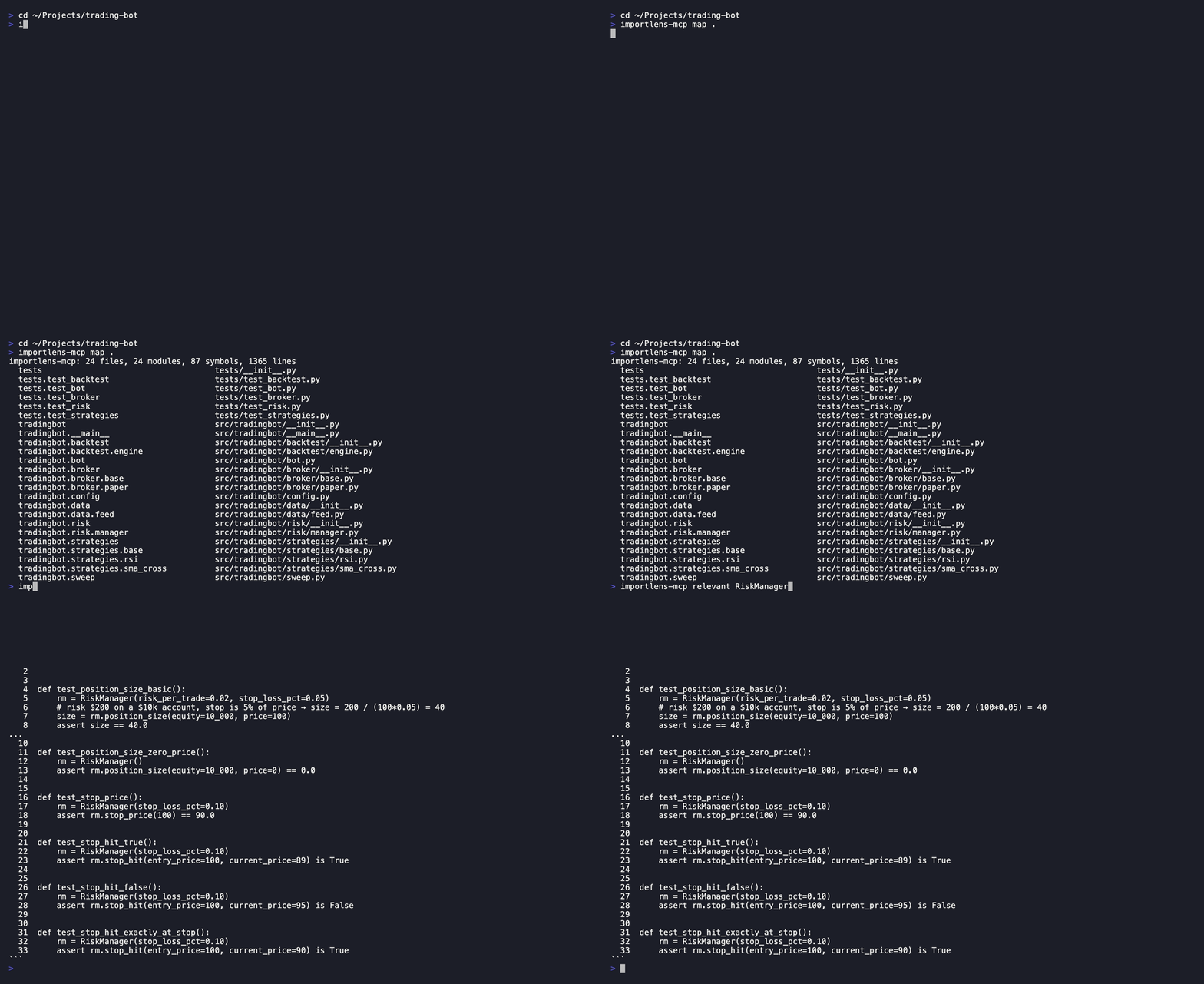
importlens-mcp map .
importlens-mcp: 4 files, 4 modules, 10 symbols, 371 lines
  importlens_mcp           src/importlens_mcp/__init__.py
  importlens_mcp.graph     src/importlens_mcp/graph.py
  importlens_mcp.server    src/importlens_mcp/server.py
  ...
How it works
- Walk the repo, skipping the usual noise (
.venv,node_modules,__pycache__, …). - Parse each
.pyfile with the standard-libraryastmodule — top-level functions/classes become symbols,importstatements become edges. - Build two maps:
symbol -> files that define itandmodule -> files that import it. - Answer queries by walking those maps. No network, no model calls, runs in milliseconds.
Import resolution is best-effort and handles src/ layouts and relative imports. It won't catch dynamic imports or runtime magic — and that's a fine tradeoff for a v0.
Benchmark
Three strategies compared on two real repos. Token estimate: len(source) // 4.
- all files — every source
.pyfile (worst-case baseline) - grep baseline — files whose text contains the symbol name, plus their direct local imports (what an agent actually does: grep for the name, read those files and their deps)
- importlens — only the files
relevant_files()returns: defining file + local imports + dependents
| repo | symbol | all files | grep baseline | importlens | % saved vs grep |
|---|---|---|---|---|---|
| trading-bot | RiskManager |
8,187 | 7,884 | 5,255 | +33% |
| trading-bot | TradingBot |
8,187 | 7,884 | 4,794 | +39% |
| trading-bot | BacktestEngine |
8,187 | 7,884 | 4,625 | +41% |
| httpx | DigestAuth |
71,089 | 53,965 | 36,062 | +33% |
| httpx | Timeout |
71,089 | 61,102 | 42,838 | +30% |
| httpx | MultipartStream |
71,089 | 9,436 | 18,487 | −96% |
| httpx | Client |
71,089 | 65,077 | 58,993 | +9% |
| httpx | Request |
71,089 | 66,452 | 66,357 | +0% |
Where importlens wins: symbols with a clear dependency boundary (DigestAuth, Timeout, RiskManager) — it prunes noise that grep can't. Where it doesn't: Client and Request are imported by almost every file, so both strategies converge on most of the codebase. MultipartStream is the inverse case: importlens tracks dependents (files that import it), pulling in the large _client.py; grep, which only matches the literal name, is cheaper here.
Rerun with python benchmarks/bench.py (httpx needs git clone --depth=1 https://github.com/encode/httpx /tmp/httpx first).
Roadmap
- call-graph edges (who calls this function), not just imports
- respect
.gitignore - method-level symbols, not just top-level
-
tree-sitterbackend for speed on huge repos
Contributing
It's ~370 lines of plain Python. Read it, break it, send a PR. Good first issues are labeled.
License
MIT
1 maintainer

Metadata
1 maintainer
Release files for importlens-mcp 0.1.1
For a detailed explanation of source distributions (sdists) and built distributions (wheels), please see the package formats documentation.
Source distribution (sdist)
| File | Size | Uploaded | Provenance | Actions |
|---|---|---|---|---|
| importlens_mcp-0.1.1.tar.gz | 135.6 kB | Without provenance | Details for importlens_mcp-0.1.1.tar.gz |
Built distribution (wheel)
| File | Interpreter | ABI | Platform | Actions Reset |
|---|---|---|---|---|
| importlens_mcp-0.1.1-py3-none-any.whl | Python 3 | none | any | Details for importlens_mcp-0.1.1-py3-none-any.whl |
Total release size: 145.7 kB
Release files / importlens_mcp-0.1.1.tar.gz
| Download URL | importlens_mcp-0.1.1.tar.gz |
|---|---|
| Size | 135.6 kB |
| Tags | Source |
|
SHA-256 checksum How to use checksums |
61c24f928d26d80101b76074b7cae47ad3da324cfd0fcfb23288a6a561329008
|
|
BLAKE2b-256 checksum How to use checksums |
9b7b85bad19b63f9753fa89546d634d3df1b231b998f3b3f2b92aca078a5e675
|
| Upload date | |
|
Uploaded using Trusted Publishing? What is trusted publishing? |
No |
| Uploaded via |
twine/7.0.0 CPython/3.13.13
|
Release files / importlens_mcp-0.1.1-py3-none-any.whl
| Download URL | importlens_mcp-0.1.1-py3-none-any.whl |
|---|---|
| Size | 10.1 kB |
| Tags | Python 3 |
|
SHA-256 checksum How to use checksums |
e68f638b3e8eb1ee9df89b30b48dae27916a5fc785628652695eb214e86c7c5f
|
|
BLAKE2b-256 checksum How to use checksums |
6d31bf254dd65853789a50182d7222d710fcec8802be5baf2d600a4814152432
|
| Upload date | |
|
Uploaded using Trusted Publishing? What is trusted publishing? |
No |
| Uploaded via |
twine/7.0.0 CPython/3.13.13
|
Security for importlens-mcp 0.1.1
Provenance
Provenance describes where a file came from. On PyPI, provenance is shared via attestations, which provide a verifiable record of the build or publishing details. View details, limitations and caveats.
No provenance found
None of the files in this release were uploaded with provenance metadata.
A note on package security
PyPI is a repository for distributing packages, not a service for auditing them. While third-party security researchers and our staff do their best to detect and remove malicious packages, PyPI cannot guarantee the quality, security or suitability of any given package.
To learn more about protecting yourself from malicious actors, visit our package security documentation.














