
Stamp your developer environment on any machine — snapshot, restore, diff, encrypt.

Project description
🔏 Imprint v3
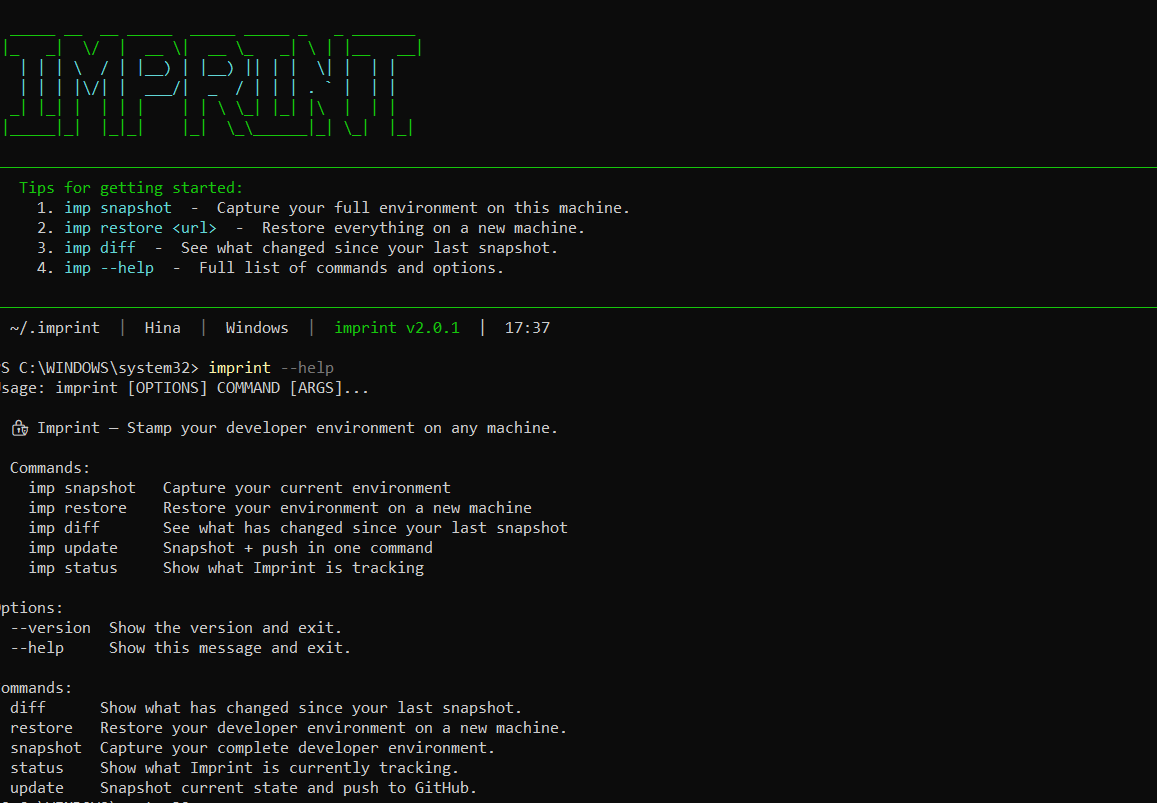
Stamp your developer environment on any machine.
Imprint is a premium CLI tool that snapshots your entire machine's developer setup — dotfiles, VS Code extensions, Neovim plugins, tmux config, global packages, shell settings — and restores it perfectly on a new machine in seconds. Now with named profiles, AES-256-GCM encryption, and multi-format export.
✨ What's New in v3
- 🧑💻 Named Profiles —
work,home,laptop— switch withimp profile use - 🔐 AES-256-GCM Encryption — encrypt dotfiles before pushing to GitHub
- 📤 Multi-Format Export — JSON, YAML, Markdown, or shell script
- 🔭 6 New Collectors — Neovim, Cursor IDE, tmux, SSH config, Cargo, uv
- 🩺 Doctor & Diagnostics —
imp doctorvalidates your entire setup - 📜 Snapshot History — browse past snapshots with
imp history - 🔄 Compare Snapshots — diff two snapshots with
imp compare - 👁️ Watch Mode — auto-snapshot on file changes
- 🎨 Nord Theme — premium UI with branded dashboard
🚀 Quick Start
1. Installation
pip install imprint-cli

# With encryption support
pip install imprint-cli[crypto]

# With watch mode
pip install imprint-cli[watch]

# Everything
pip install imprint-cli[full]
2. First-Run Setup
imp init
3. Capture Your World
imp snapshot
4. Move to a New Machine
imp restore https://github.com/your-username/my-imprint-config.git
🛠️ All Commands
| Command | Action |
|---|---|
imp |
Interactive dashboard with machine info |
imp init |
First-run setup wizard |
imp snapshot |
Capture full environment and push |
imp restore [url] |
Restore from local or GitHub source |
imp restore [url] --dry-run |
Preview what would be restored |
imp diff |
See what changed since last snapshot |
imp update |
Quick snapshot + push |
imp status |
Overview of tracked configuration |
imp doctor |
Health check & diagnostics |
imp history |
Browse past snapshots |
imp export --fmt md |
Export as Markdown report |
imp profile list |
List named profiles |
imp profile use work |
Switch to a named profile |
imp compare latest previous |
Diff two snapshots |
imp encrypt --init |
Generate encryption key |
imp watch |
Auto-snapshot on file changes |
🔍 What Gets Captured?
| Category | Details |
|---|---|
| Dotfiles | .zshrc, .bashrc, .gitconfig, .vimrc, and more |
| VS Code | Complete extension manifest + settings.json |
| Neovim | lazy.nvim / packer plugins, init.lua |
| Cursor IDE | Extensions list |
| tmux | Config, prefix key, TPM plugins |
| Packages | pip, npm, apt/brew/winget, cargo, uv |
| Shell | Oh My Zsh theme, plugins, aliases, functions |
| SSH Config | Host aliases only (never keys or passwords) |
| Scripts | Everything in ~/bin |
| System | Python, Node.js, Git versions, OS info |
🔏 Security First
Imprint is designed to be secure by default. It never captures sensitive files. The .imprintignore system automatically blocks:
- 🔑 SSH Keys (
.ssh/id_*,*.pem,*.key) - 🎫 Tokens & Secrets (
*.token,*secret*,*api_key*) - 🌐 Environment files (
.env,.env.*) - ☁️ Cloud credentials (
.aws/credentials,.gcloud/,.kube/) - 📜 Shell history (
.bash_history,.zsh_history) - 🔒 GPG keys (
.gnupg/)
All subprocess calls use list arguments (no shell=True) to prevent shell injection.
📦 Publishing
imprint-cli uses GitHub Actions with a PYPI_API_TOKEN secret for automated publishing:
# Tag a release on main (after merging PR)
git tag v3.0.0
git push origin main --tags
# GitHub Actions automatically builds and publishes to PyPI
Setup: Add your PyPI API token as a repository secret named
PYPI_API_TOKENin Settings → Secrets → Actions.
🤝 Contributing
See CONTRIBUTING.md for development setup, git workflow, and how to add new collectors.
📜 Code of Conduct
See CODE_OF_CONDUCT.md.
📄 License
MIT © Venkatesh-6921


Download files
Download the file for your platform. If you're not sure which to choose, learn more about installing packages.
Source Distribution
Built Distribution
Filter files by name, interpreter, ABI, and platform.
If you're not sure about the file name format, learn more about wheel file names.
Copy a direct link to the current filters
File details
Details for the file imprint_cli-3.0.0.tar.gz.
File metadata
- Download URL: imprint_cli-3.0.0.tar.gz
- Upload date:
- Size: 126.4 kB
- Tags: Source
- Uploaded using Trusted Publishing? No
- Uploaded via: twine/6.1.0 CPython/3.13.12
File hashes
| Algorithm | Hash digest | |
|---|---|---|
| SHA256 |
47f1fa541d71924a14334ef80e2eafb1d5135483334b057bdf0d5d16630d5728
|
|
| MD5 |
e16175f356e1d6b511c0064e10cd013f
|
|
| BLAKE2b-256 |
d2dd8123513b2af1eb36741cf413b8bdf55a86ff0238e3dfcc9d6a332f65260f
|
File details
Details for the file imprint_cli-3.0.0-py3-none-any.whl.
File metadata
- Download URL: imprint_cli-3.0.0-py3-none-any.whl
- Upload date:
- Size: 39.8 kB
- Tags: Python 3
- Uploaded using Trusted Publishing? No
- Uploaded via: twine/6.1.0 CPython/3.13.12
File hashes
| Algorithm | Hash digest | |
|---|---|---|
| SHA256 |
b5ef6ce5bb7219149ef07bb026762fa0db0c6a38f42fa41616b321f8d178966a
|
|
| MD5 |
3f80891268cce5318958aa038c3df857
|
|
| BLAKE2b-256 |
f969146efdcef7c197ba4a505b03271aad89b35c33f5851cec9c27b08fed48e0
|






