
Imprinted


Hide up to 32 bytes in a picture, invisibly, and read them back from the file or from a phone photo of a print or screen.
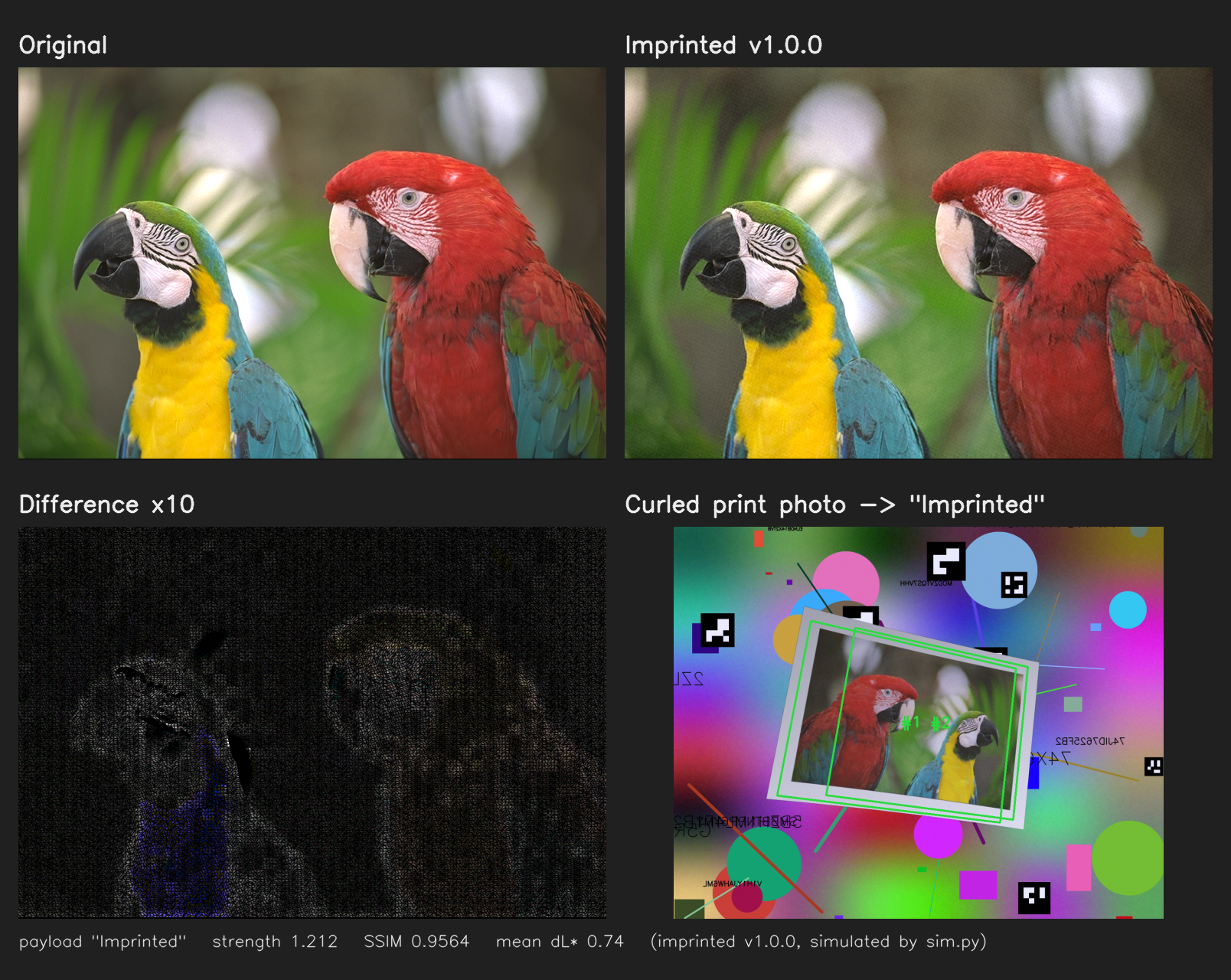
- Invisible: same size, no border or markers (SSIM ≥ 0.955, mean ΔL* ≤ 1).
- Camera-robust: reads from a photo at an angle, in odd light, printed in grayscale, mirrored, curled, cropped or with clutter around it.
- Pixels only: survives screenshots and metadata stripping.
The payload is plain bytes checked by CRC-32, not encrypted or signed. Typical uses: provenance tags, case IDs, leak forensics, linking a print to its record.
Status: research prototype. Results below are simulated; confirm on your printer and phone.
Install
pip install imprinted
Python 3.10+. Installs the library only. For the web UI, simulator and tests, clone the repo:
git clone https://github.com/VocanicZ/Imprinted.git && cd Imprinted
python3 -m venv .venv && .venv/bin/pip install -r requirements.txt
Usage
import imprinted

imprinted.encode("photo.png", "hello", "photo_imprinted.png")                 # save as PNG
imprinted.encode("photo_imprinted.png", "world", "again.png", mode="append")  # now reads "hello world"
imprinted.decode("phone_shot.jpg")   # -> "hello", or None
imprinted.detect("phone_shot.jpg")   # -> True if it holds an Imprinted pattern
| function | does |
|---|---|
encode(image, payload, out=None, *, mode="override", print_width_cm=15.0, strength=None) |
Encodes a path, PIL image or RGB array; returns the PIL image and saves it to out. print_width_cm is the printed width. strength=None picks the strongest invisible setting. An already-Imprinted picture is re-encoded on its own grid: mode="override" replaces its text, "append" adds to it, None skips the check. Raises ValueError if the picture can't carry the payload. |
decode(image, raw=False, check=True) |
Returns the payload as str (bytes with raw=True) or None. Pictures made with 0.7.x need check=False. |
detect(image) |
True if the picture holds an Imprinted pattern, without reading it. |
imprinted.core is the full codec: stats, every payload in a photo, and make_ladder (a printable strength-test page).
Web UI (encode, decode, strength ladder; works from a phone on the same network):
.venv/bin/uvicorn web:app --host 0.0.0.0 --port 8765 # open http://<this-pc-ip>:8765
How it works
The codec (imprinted/core.py) only changes lightness (L* in CIE Lab), so colour shifts and grayscale printing don't matter.
- Data cells: the picture is split into cells of 4×4 sub-blocks (about 0.8 mm printed). Each cell carries one bit as a ±1 pattern, quantized (QIM) so busy texture costs a small nudge, not a lost bit.
- Error correction: payload + CRC-32, rate-½ LDPC, in a tile repeated over the whole picture, so any large enough piece decodes.
- Hidden sync: four faint cosines locked to the cell grid show as sharp spectral lines, so the decoder finds the grid at any turn, scale, mirror or perspective. It tracks the grid probe by probe, ignoring locks off the lattice, fits perspective and curl, then reads the cells.
- Sync cells: a fixed pseudo-random quarter of the cells hold known bits. Repetitive textures (halftones, windows, fabric) can fake the grid but not these bits, so
detect()answers in seconds with no false alarms. - Strength: a perceptual mask sets how much each pixel may change. The encoder picks the strongest setting within the visibility budget.
Performance
sim.py --acceptance (v1.0.0, 15 cm print, 5 trials, default strength). All rows pass.
| image | δ | SSIM | mean ΔL* | file, turned, mirrored | 60% crop | print easy | gray | hard | curled |
|---|---|---|---|---|---|---|---|---|---|
| kodim23 (smooth) | 1.21 | 0.956 | 0.74 | ✓ | 5/5 | 5/5 | 5/5 | 5/5 | 5/5 |
| kodim05 (busy) | 0.83 | 0.976 | 0.99 | ✓ | 5/5 | 5/5 | 4/5 | – | – |
| kodim08 (busy, periodic) | 0.92 | 0.979 | 0.99 | ✓ | 5/5 | 5/5 | 5/5 | – | – |
hard: tilt up to ~40°, 0.6 camera px per printed px, JPEG 75.
Speed (v1.0.0, CPU seconds on one core, scripts/speed_bench.py --cpu):
| task | 768×512 | 3000×2000 |
|---|---|---|
| encode | 1.2–1.3 s | 21–24 s |
already-Imprinted check (in encode) |
7.0 s | 2.6–3.2 s |
| decode file | 2.4–2.9 s | 2.5–3.0 s |
Decoding a simulated phone photo of a 15 cm print takes 4.7–5.6 s. detect says yes in 0.7–1.6 s and no in 2.8–7.0 s, with no false alarms on 66 pictures without a pattern (scripts/detect_bench.py, scripts/small_bench.py).
Development
scripts/ci-local.sh                      # test suite (the gate; there is no GitHub CI)
rtdd run --base origin/main              # only the tests covering your change (rtdd)
nice .venv/bin/python sim.py --acceptance   # acceptance table, exits 0 only on PASS
.venv/bin/python scripts/readme_image.py    # regenerate versus.png
Keep OMP_NUM_THREADS / OPENBLAS_NUM_THREADS at 4 or lower and run sims under nice. imprint.py, utils/, test.py and PROTOTYPE.md are the earlier visible-marker prototype, kept for reference.
Contributing. Branch from main and use conventional commits (feat:, fix:, …) with closes #N. Codec changes need a passing sim.py --acceptance. If the encoder's output changes, regenerate versus.png. Bug reports: include the image, code, payload, and how the photo was taken.
Versioning (x.y.z, __version__ in imprinted/__init__.py):
- x, major: pictures from an older major version no longer decode. Every release within one major version decodes pictures from any other release of it.
- y, minor: new features; same-major pictures still decode.
- z, patch: fixes and small changes.
Check that the previous release's pictures still decode (scripts/compare_versions.py) before bumping y or z. main is the newest major version. Each older major version lives on a branch named after its last release (0.7.1; after 2.0.0 also 1.y.z).
Releasing: update the README and versus.png, bump __version__, push main, then run scripts/publish.sh. It stops if the README or figure is unchanged since the last release (--force overrides), publishes to PyPI, tags, creates the GitHub release, and keeps the previous major version on its branch.
License
MIT. Test images in testdata/ are from the Kodak Lossless True Color Image Suite.
1 maintainer

Metadata
1 maintainer
Release files for imprinted 1.0.0
For a detailed explanation of source distributions (sdists) and built distributions (wheels), please see the package formats documentation.
Source distribution (sdist)
| File | Size | Uploaded | Provenance | Actions |
|---|---|---|---|---|
| imprinted-1.0.0.tar.gz | 47.3 kB | Without provenance | Details for imprinted-1.0.0.tar.gz |
Built distribution (wheel)
| File | Interpreter | ABI | Platform | Actions Reset |
|---|---|---|---|---|
| imprinted-1.0.0-py3-none-any.whl | Python 3 | none | any | Details for imprinted-1.0.0-py3-none-any.whl |
Total release size: 92.1 kB
Release files / imprinted-1.0.0.tar.gz
| Download URL | imprinted-1.0.0.tar.gz |
|---|---|
| Size | 47.3 kB |
| Tags | Source |
|
SHA-256 checksum How to use checksums |
425f9f4667ce2d8fde297c63afb9ee7a92cad1e42ef7600782231efb805480a9
|
|
BLAKE2b-256 checksum How to use checksums |
a2f642fa5ed639a7b89d19ffe500da85b0b32279293e5baa358ac9e310de5213
|
| Upload date | |
|
Uploaded using Trusted Publishing? What is trusted publishing? |
No |
| Uploaded via |
twine/7.0.0 CPython/3.12.3
|
Release files / imprinted-1.0.0-py3-none-any.whl
| Download URL | imprinted-1.0.0-py3-none-any.whl |
|---|---|
| Size | 44.8 kB |
| Tags | Python 3 |
|
SHA-256 checksum How to use checksums |
e6c7fe6f5d941a7170fb00a1243e81e54776327295d94625760a30f2671bfdb3
|
|
BLAKE2b-256 checksum How to use checksums |
1a9f2a719bd2368b554e5aee1f28304e1d7632690ac213bc1e569fa5e6c49f1e
|
| Upload date | |
|
Uploaded using Trusted Publishing? What is trusted publishing? |
No |
| Uploaded via |
twine/7.0.0 CPython/3.12.3
|
Security for imprinted 1.0.0
Provenance
Provenance describes where a file came from. On PyPI, provenance is shared via attestations, which provide a verifiable record of the build or publishing details. View details, limitations and caveats.
No provenance found
None of the files in this release were uploaded with provenance metadata.
A note on package security
PyPI is a repository for distributing packages, not a service for auditing them. While third-party security researchers and our staff do their best to detect and remove malicious packages, PyPI cannot guarantee the quality, security or suitability of any given package.
To learn more about protecting yourself from malicious actors, visit our package security documentation.














