
NP1.0 Neuropixels probe configuration and IMRO/Kilosort file generator with GUI

Project description
IMRO Neuropixels Generator
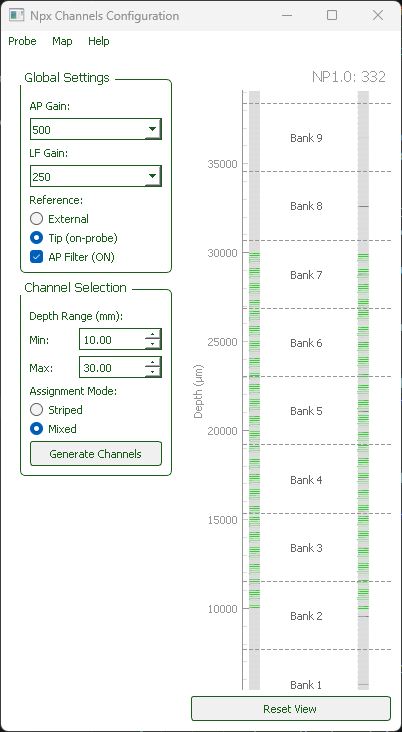
Neuropixels probe channel configuration tool. Create IMRO files for SpikeGLX/OpenEphys and export probe configurations for Kilosort.
Problem: The OpenEphys Neuropixels Plugin can load SpikeGLX IMRO files but provides no tool to create them.
Solution: IMRO Generator lets you configure which electrodes to record from based on depth coverage, then export as IMRO files or Kilosort probe dictionaries.
Installation
New to probe configuration? Start here:
- Install:
pip install -e .(requires Python 3.8+) - Launch:
imro-gui - Quick guide: See
QUICKSTART.md
The GUI lets you:
- Choose your recording depth range (0–44.16 mm)
- Select assignment mode (Striped or Mixed) for uniform electrode distribution
- Configure gains, filters, and reference type
- Save IMRO files for OpenEphys/SpikeGLX
- Load and modify existing IMRO configurations
For Developers
Integrating into your software? See:
DEVELOPERS.md— Architecture, setup, extendingdocs/imro_algorithm.md— Algorithm specificationdocs/imro_dev_guide_A_overview.md— Detailed architecturetests/— Test suite with examples
System Requirements
- Python: 3.8 or later
- GUI dependencies: PyQt5, pyqtgraph (installed automatically)
- Data processing: NumPy (installed automatically)
Installation
# From PyPI (once published)
pip install imro-neuropixels

# From TestPyPI
pip install -i https://test.pypi.org/simple/ \
    --extra-index-url https://pypi.org/simple/ imro-neuropixels

# From source (editable, for development)
git clone https://github.com/vitalylerner/imro-neuropixels.git
cd imro-neuropixels
pip install -e ".[dev]"
Example use
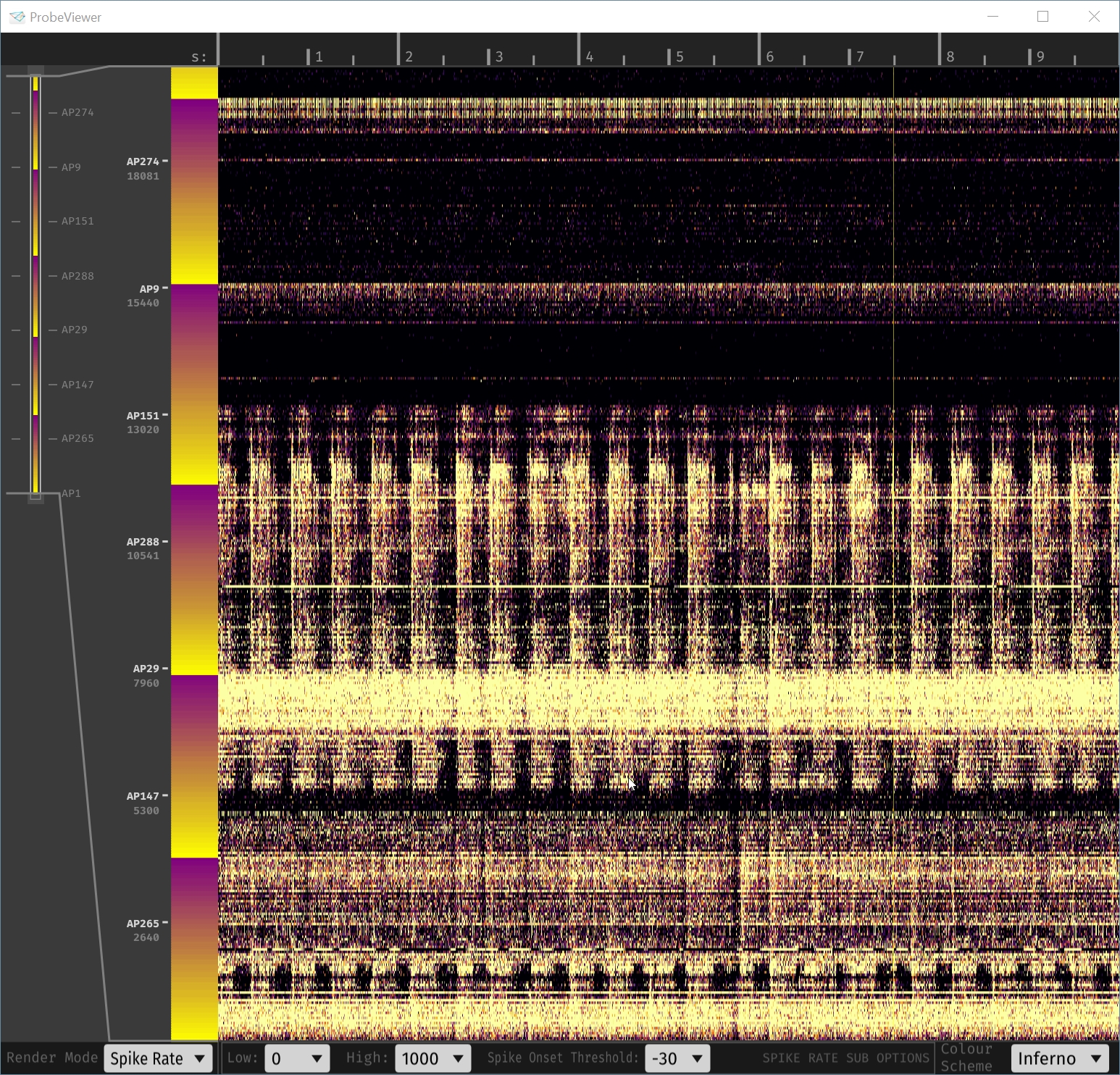
Mapping 2cm from the tip up
example file 20mm.imro in action, as seen in OpenEphys Probe Viewer, when flashes of light (2Hz) are shown to a fixating subject, while Neuropixels1.0-NHP is inserted in a visual area.
Picking an active region for recording
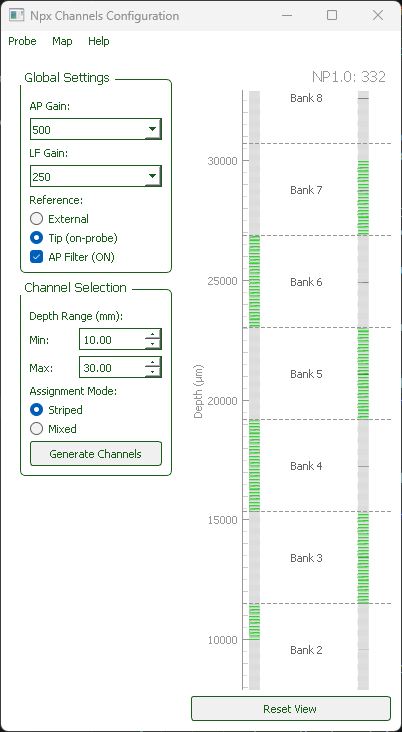
Set boundaries 10mm to 30mm
Map -> Save as IMRO
Map -> Save kilosort probe
Helpful Resources
- OpenEphys Neuropixels Plugin — GUI for recording with Neuropixels probes, loads IMRO files
- SpikeGLX IMRO Format — Complete IMRO specification and format documentation
- Kilosort Probe Dictionary — Format for probe configurations in Kilosort4
- Neuropixels Probe 1.0 NHP — Official probe specifications
Release history Release notifications | RSS feed

Download files
Download the file for your platform. If you're not sure which to choose, learn more about installing packages.
Source Distribution
Built Distribution
Filter files by name, interpreter, ABI, and platform.
If you're not sure about the file name format, learn more about wheel file names.
Copy a direct link to the current filters
File details
Details for the file imro_neuropixels-0.1.0.tar.gz.
File metadata
- Download URL: imro_neuropixels-0.1.0.tar.gz
- Upload date:
- Size: 60.1 kB
- Tags: Source
- Uploaded using Trusted Publishing? No
- Uploaded via: twine/6.2.0 CPython/3.13.5
File hashes
| Algorithm | Hash digest | |
|---|---|---|
| SHA256 |
947fb06d856a1bbc0834777e6274581072fb8971a4cc5d37e69c44b5f55280f2
|
|
| MD5 |
70ad4bd4c1c2dcf122c27e5bd846dfeb
|
|
| BLAKE2b-256 |
6da3b7cbf1f4515654b4cde0425ba5237631f67bf558be1fd41099712eb07eb1
|
File details
Details for the file imro_neuropixels-0.1.0-py3-none-any.whl.
File metadata
- Download URL: imro_neuropixels-0.1.0-py3-none-any.whl
- Upload date:
- Size: 56.0 kB
- Tags: Python 3
- Uploaded using Trusted Publishing? No
- Uploaded via: twine/6.2.0 CPython/3.13.5
File hashes
| Algorithm | Hash digest | |
|---|---|---|
| SHA256 |
3d0b088676dfd793afb14bd921d69750817617aa8ad2ccd91e6841569eb38977
|
|
| MD5 |
fa624e78b75dc06ee6c29c36472d0f2b
|
|
| BLAKE2b-256 |
6c119142e707fd854567f8ff717882df21a5e130554f3ef353a95b6705290f40
|






