
Indifferent




indifferent analyzes two strings, computes the difference between the two, and prints the results in a variety of formats. It is indifferent to formatting and separators, focusing on the actual content of the strings.
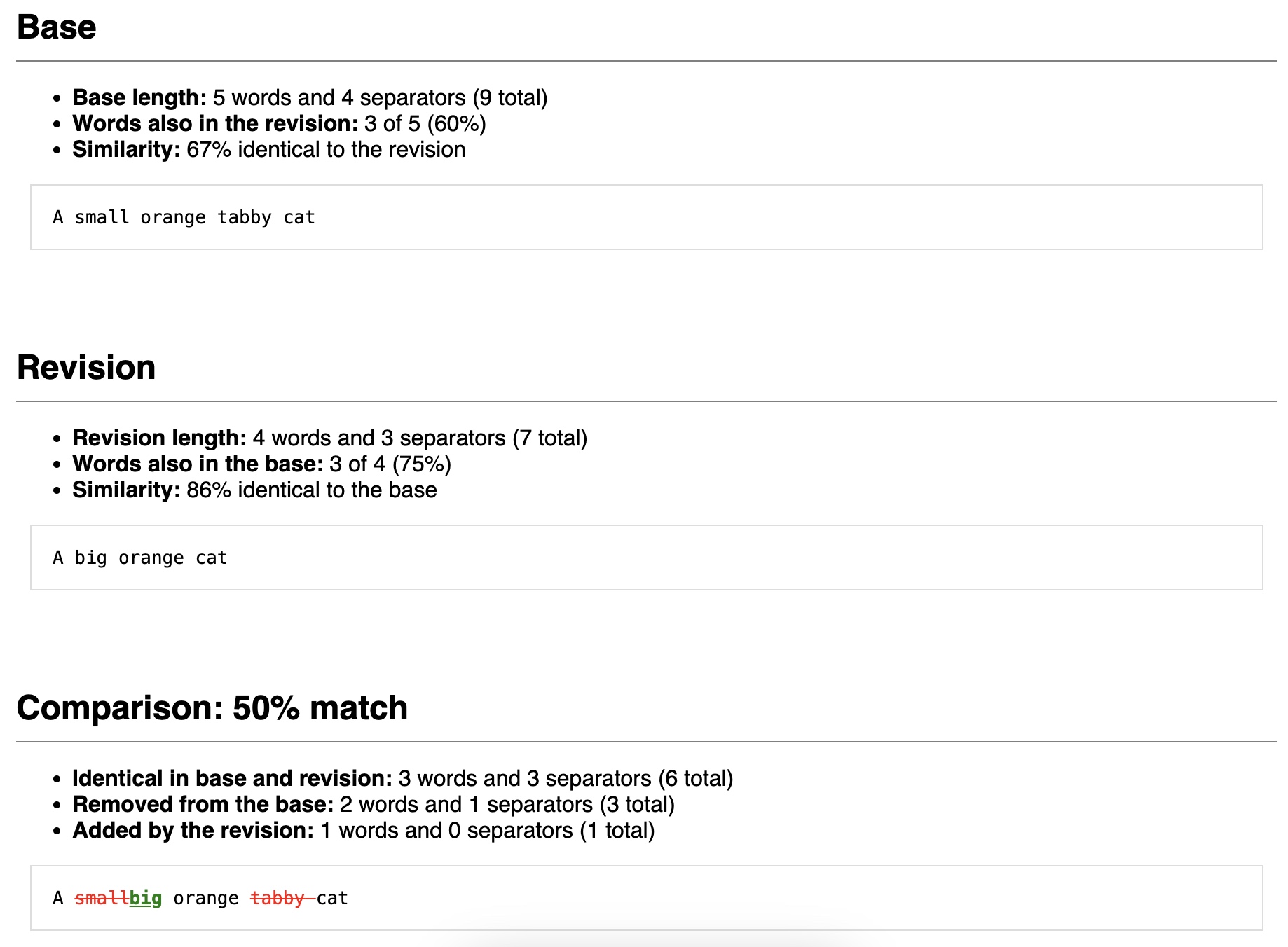
It can produce results in a variety of forms, from raw unprocessed results to formatted HTML.
How it works
Differences are calculated without getting too clever. indifferent splits the "base" and "revision" string into words and separators, and then walks through the "base" looking for matches in "revision". Once a match is found, it backfills the preceding unmatched "base" and "revision" words and separators, and then keeps looking for the next match.
The ordering of words matters, so these strings would match on A, tabby, and cat:
base = "A tabby cat"
revision = "A big orange tabby cat"
These would only only match on A and cat:
base = "A tabby cat"
revision = "A big cat that is an orange tabby"
Using indifferent
Install indifferent from PyPI:
python -m pip install indifferent
Use the compare function to generate differences:
from indifferent import compare

result = compare(
    base="A tabby cat",
    revision="A big orange tabby cat",
    base_name="A name for the base text, displayed in output", # optional
    revision_name="A name for the revision text, displayed in output", # optional
    results="stats" # optional, see below for alternate output formats
)
Output formats
indifferent can provide results in a few different formats, depending upon what you want to do with them.
Headless modes
Default results
By default (or with the argument results="stats"), indifferent returns a dict with stats about the base and revision, and the results of the comparison. This is useful, for example, if you need to compare a base text against a number of reference texts and find the one that is most similar.
from indifferent import compare

indifferent.compare(
    base = "A small orange tabby cat",
    revision = "A big orange cat",
)
returns:
{
    "inputs": {
        "base": {"length": {"content": 5, "total": 9}},
        "revision": {"length": {"content": 4, "total": 7}},
    },
    "results": {
        "added": {"length": {"content": 1, "total": 1}},
        "matched": {
            "base_preserved": {"content": 0.6, "total": 0.6666666666666666},
            "length": {"content": 3, "total": 6},
            "revision_matched": {"content": 0.75, "total": 0.8571428571428571},
        },
        "removed": {"length": {"content": 2, "total": 3}},
    },
    "score": {"content": 0.5, "total": 0.6},
}
In the default results content refers to words and total refers to words plus separators (whitespace, punctuation, etc.).
inputscontains stats about the length of the two strings.resultscontains stats about the comparisonaddedmeans words and separators that exist in the revision but not the base.matchedmeans words and separators in commonbase_preservedmeans the percentage of words and separators from the base that matchlengthmeans the number of matching words and separators foundrevision_matchedmeans the percentage of words and separators from the revision that match
removedmeans words and separators that exist in the base but not the revision.
scorecontains stats about the match.
To compare the meaning of two strings, inspect ["score"]["content"]. To deterimine whether two strings match, inspect ["score"]["total].
Raw results
You can also get completely unanalyzed results. This would be useful if you want to handle the analysis on your own.
from indifferent import compare

compare(
    base = "A small orange tabby cat",
    revision = "A big orange cat",
    results="raw",
)
returns:
[{'base': 0, 'content': True, 'revision': 0, 'value': 'A'},
 {'base': 1, 'content': False, 'revision': 1, 'value': ' '},
 {'base': 2, 'content': True, 'revision': None, 'value': 'small'},
 {'base': None, 'content': True, 'revision': 2, 'value': 'big'},
 {'base': 3, 'content': False, 'revision': 3, 'value': ' '},
 {'base': 4, 'content': True, 'revision': 4, 'value': 'orange'},
 {'base': 5, 'content': False, 'revision': 5, 'value': ' '},
 {'base': 6, 'content': True, 'revision': None, 'value': 'tabby'},
 {'base': 7, 'content': False, 'revision': None, 'value': ' '},
 {'base': 8, 'content': True, 'revision': 6, 'value': 'cat'}]
The result is a list of all elements of both base and revision, and is analyzed to calculate the stats.
baseis the index ofvaluein the base textcontentisTrueif the item is a word,Falseif the item is a separatorrevisionis the index ofvaluein the revision textvalueis the actual value of the item.
Formatted modes
Formatted stats
indifferent can also return stats in human-readable format as label:value pairs. This is a good option if you want to build your own reports.
from indifferent import compare

indifferent.compare(
    base = "A small orange tabby cat",
    revision = "A big orange cat",
    results="formatted_stats",
)
returns:
{
    "base": [
        {"label": "Base length", "value": "5 words and 4 separators (9 total)"},
        {"label": "Words also in the revision", "value": "3 of 5 (60%)"},
        {"label": "Similarity", "value": "67% identical to the revision"},
    ],
    "matched": [
        {
            "label": "Identical in base and revision",
            "value": "3 words and 3 separators (6 total)",
        },
        {
            "label": "Removed from the base",
            "value": "2 words and 1 separators (3 total)",
        },
        {
            "label": "Added by the revision",
            "value": "1 words and 0 separators (1 total)",
        },
    ],
    "revision": [
        {"label": "Revision length", "value": "4 words and 3 separators (7 total)"},
        {"label": "Words also in the base", "value": "3 of 4 (75%)"},
        {"label": "Similarity", "value": "86% identical to the base"},
    ],
    "summary": "50% match",
}
BBCode formatted results
indifferent can produce a summary in BBCode format. This is a useful, parseable intermediate state if you need to produce a more polished document.
from indifferent import compare

compare(
    base = "A small orange tabby cat",
    revision = "A big orange cat",
    results="bbcode",
)
returns:
{
    "analysis": {
        "base": "[b]Base length:[/b]\n"
                "5 words and 4 separators (9 total)\n"
                "\n"
                "[b]Words also in the revision:[/b]\n"
                "3 of 5 (60%)\n"
                "\n"
                "[b]Similarity:[/b]\n"
                "67% identical to the revision",
        "matched": "[b]Identical in base and revision:[/b]\n"
                "3 words and 3 separators (6 total)\n"
                "\n"
                "[b]Removed from the base:[/b]\n"
                "2 words and 1 separators (3 total)\n"
                "\n"
                "[b]Added by the revision:[/b]\n"
                "1 words and 0 separators (1 total)",
        "revision": "[b]Revision length:[/b]\n"
                "4 words and 3 separators (7 total)\n"
                "\n"
                "[b]Words also in the base:[/b]\n"
                "3 of 4 (75%)\n"
                "\n"
                "[b]Similarity:[/b]\n"
                "86% identical to the base",
    },
    "matched": "A [s red]small[/s red][u green]big[/u green] orange [s "
    "red]tabby[/s red][s red] [/s red]cat",
    "summary": "50% match",
}
The result includes a formatted version of the base, matched, and revision stats from result="formatted_stats" in analysis, and the summary from result="formatted_stats".
It also produces a formatted string called matched that marks removed items in red strikethrough, and added items in green underline.
Presentation modes
Table for terminal output
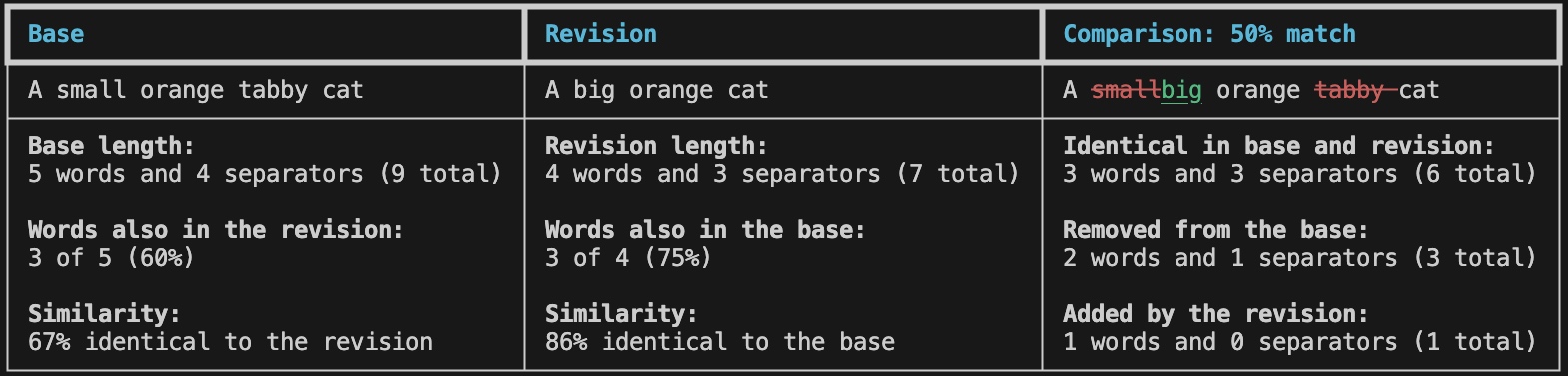
If you are working in the terminal, indifferent can produce nicely-formatted tables using Rich.
from indifferent import compare

compare(
    base = "A small orange tabby cat",
    revision = "A big orange cat",
    results="table",
)
returns:
Unrendered table
You can also produce an unrendered Rich table, which allows you to do further post-processing on it.
from indifferent import compare

compare(
    base = "A small orange tabby cat",
    revision = "A big orange cat",
    results="raw_table",
)
returns a rich.table.Table object.
Unthemed HTML snippet
indifferent can produce HTML in a variety of ways. The default HTML response is dict containing an unstyled snippet of HTML to which you can apply your own styles, and the corresponding CSS which you can use... or ignore.
from indifferent import compare

compare(
    base = "A small orange tabby cat",
    revision = "A big orange cat",
    results="html",
)
returns:
<!-- Comparison generated by Indifferent: https://github.com/brianwarner/indifferent -->
<div class="indifferent">
    <h2 class="title">Base<br /><span class="vs">vs.</span><br />Revision</h2>
    <h3 class="subtitle">50% match</h3>
    <div class="nav-links">
        <table>
            <tr>
                <td><a href="#indifferent.base">Base</a></td>
                <td><a href="#indifferent.revision">Revision</a></td>
                <td class="last"><a href="#indifferent.match">Comparison</a></td>
            </tr>
        </table>
    </div>
    <div class="section base">
        <a id="indifferent.base"></a>
        <h3>Base</h3>
        <div class="summary">
            <ul>
                <li><strong>Base length:</strong> 5 words and 4 separators (9 total)</li>
                <li><strong>Words also in the revision:</strong> 3 of 5 (60%)</li>
                <li><strong>Similarity:</strong> 67% identical to the revision</li>
            </ul>
        </div>
        <div class="detail">
            A small orange tabby cat
        </div>
    </div>
    <div class="section revision">
        <a id="indifferent.revision"></a>
        <h3>Revision</h3>
        <div class="summary">
            <ul>
                <li><strong>Revision length:</strong> 4 words and 3 separators (7 total)</li>
                <li><strong>Words also in the base:</strong> 3 of 4 (75%)</li>
                <li><strong>Similarity:</strong> 86% identical to the base</li>
            </ul>
        </div>
        <div class="detail">
            A big orange cat
        </div>
    </div>
    <div class="section match">
        <a id="indifferent.match"></a>
        <h3>Comparison: 50% match</h3>
        <div class="summary">
            <ul>
                <li><strong>Identical in base and revision:</strong> 3 words and 3 separators (6 total)</li>
                <li><strong>Removed from the base:</strong> 2 words and 1 separators (3 total)</li>
                <li><strong>Added by the revision:</strong> 1 words and 0 separators (1 total)</li>
        </div>
        <div class="detail">
            A <span class="deleted">small</span><span class="added">big</span> orange <span class="deleted">tabby</span><span class="deleted"> </span>cat
        </div>
    </div>
</div>
HTML snippet with inline CSS
You can also produce the same snippet with inline CSS. It returns a dict with the HTML and the corresponding CSS.
from indifferent import compare

compare(
    base = "A small orange tabby cat",
    revision = "A big orange cat",
    results="html_inline",
)
returns:
<!-- Comparison generated by Indifferent: https://github.com/brianwarner/indifferent -->
<div class="indifferent" style="max-width: 900px; min-width: 800px; margin: 0 auto; background-color: #FFF; padding: 30px 20px;">
    <h2 style="text-align: center;" class="title">Base<br /><span class="vs" style="font-size: 70%; color: #333;">vs.</span><br />Revision</h2>
    <h3 style="border-bottom: none; text-align: center; color: #555;" class="subtitle">50% match</h3>
    <div class="nav-links" style="">
        <table style="margin: 40px auto 0px;">
            <tr>
                <td style="border-right: 1px #888 solid;"><a href="#indifferent.base" style="color: #333; padding: 5px 10px; text-decoration: none;">Base</a></td>
                <td style="border-right: 1px #888 solid;"><a href="#indifferent.revision" style="color: #333; padding: 5px 10px; text-decoration: none;">Revision</a></td>
                <td style="border-right: 0px;" class="last"><a href="#indifferent.match" style="color: #333; padding: 5px 10px; text-decoration: none;">Comparison</a></td>
            </tr>
        </table>
    </div>
    <div class="section base" style="padding: 20px 0px;">
        <a id="indifferent.base"></a>
        <h3 style="padding-bottom: 10px; margin: 20px 0px 0px; border-bottom: 1px solid grey;">Base</h3>
        <div class="summary" style="">
            <ul>
                <li><strong>Base length:</strong> 5 words and 4 separators (9 total)</li>
                <li><strong>Words also in the revision:</strong> 3 of 5 (60%)</li>
                <li><strong>Similarity:</strong> 67% identical to the revision</li>
            </ul>
        </div>
        <div class="detail" style="margin: 10px; padding: 15px; border: 1px solid #DDD; font-family: monospace;">
            A small orange tabby cat
        </div>
    </div>
    <div class="section revision" style="padding: 20px 0px;">
        <a id="indifferent.revision"></a>
        <h3 style="padding-bottom: 10px; margin: 20px 0px 0px; border-bottom: 1px solid grey;">Revision</h3>
        <div class="summary" style="">
            <ul>
                <li><strong>Revision length:</strong> 4 words and 3 separators (7 total)</li>
                <li><strong>Words also in the base:</strong> 3 of 4 (75%)</li>
                <li><strong>Similarity:</strong> 86% identical to the base</li>
            </ul>
        </div>
        <div class="detail" style="margin: 10px; padding: 15px; border: 1px solid #DDD; font-family: monospace;">
            A big orange cat
        </div>
    </div>
    <div class="section match" style="padding: 20px 0px;">
        <a id="indifferent.match"></a>
        <h3 style="padding-bottom: 10px; margin: 20px 0px 0px; border-bottom: 1px solid grey;">Comparison: 50% match</h3>
        <div class="summary" style="">
            <ul>
                <li><strong>Identical in base and revision:</strong> 3 words and 3 separators (6 total)</li>
                <li><strong>Removed from the base:</strong> 2 words and 1 separators (3 total)</li>
                <li><strong>Added by the revision:</strong> 1 words and 0 separators (1 total)</li>
        </div>
        <div class="detail" style="margin: 10px; padding: 15px; border: 1px solid #DDD; font-family: monospace;">
            A <span class="deleted" style="color: red; text-decoration: line-through;">small</span><span class="added" style="color: green; text-decoration: underline; font-weight: bold;">big</span> orange <span class="deleted" style="color: red; text-decoration: line-through;">tabby</span><span class="deleted" style="color: red; text-decoration: line-through;"> </span>cat
        </div>
    </div>
</div>
Unstyled HTML page
indifferent can also produce complete HTML pages. By default, it returns a dict containing the html and CSS, with a link to a filesheet named indifferent.css. It is up to you to get them into the same directory.
from indifferent import compare

compare(
    base = "A small orange tabby cat",
    revision = "A big orange cat",
    results="html_page",
)
returns:
<!doctype html>
<html lang="en-US">
<head>
<meta charset="utf-8" />
<title>Comparison of Base and Revision</title>
<link rel="stylesheet" href="indifferent.css">
</head>
<body class="page">
<!-- Comparison generated by Indifferent: https://github.com/brianwarner/indifferent -->
<div class="indifferent">
    <h1 class="title">Base<br /><span class="vs">vs.</span><br />Revision</h1>
    <h2 class="subtitle">50% match</h2>
    <div class="nav-links">
        <table>
            <tr>
                <td><a href="#indifferent.base">Base</a></td>
                <td><a href="#indifferent.revision">Revision</a></td>
                <td class="last"><a href="#indifferent.match">Comparison</a></td>
            </tr>
        </table>
    </div>
    <div class="section base">
        <a id="indifferent.base"></a>
        <h2>Base</h2>
        <div class="summary">
            <ul>
                <li><strong>Base length:</strong> 5 words and 4 separators (9 total)</li>
                <li><strong>Words also in the revision:</strong> 3 of 5 (60%)</li>
                <li><strong>Similarity:</strong> 67% identical to the revision</li>
            </ul>
        </div>
        <div class="detail">
            A small orange tabby cat
        </div>
    </div>
    <div class="section revision">
        <a id="indifferent.revision"></a>
        <h2>Revision</h2>
        <div class="summary">
            <ul>
                <li><strong>Revision length:</strong> 4 words and 3 separators (7 total)</li>
                <li><strong>Words also in the base:</strong> 3 of 4 (75%)</li>
                <li><strong>Similarity:</strong> 86% identical to the base</li>
            </ul>
        </div>
        <div class="detail">
            A big orange cat
        </div>
    </div>
    <div class="section match">
        <a id="indifferent.match"></a>
        <h2>Comparison: 50% match</h2>
        <div class="summary">
            <ul>
                <li><strong>Identical in base and revision:</strong> 3 words and 3 separators (6 total)</li>
                <li><strong>Removed from the base:</strong> 2 words and 1 separators (3 total)</li>
                <li><strong>Added by the revision:</strong> 1 words and 0 separators (1 total)</li>
        </div>
        <div class="detail">
            A <span class="deleted">small</span><span class="added">big</span> orange <span class="deleted">tabby</span><span class="deleted"> </span>cat
        </div>
    </div>
</div>
</body>
</html>
Styled HTML page
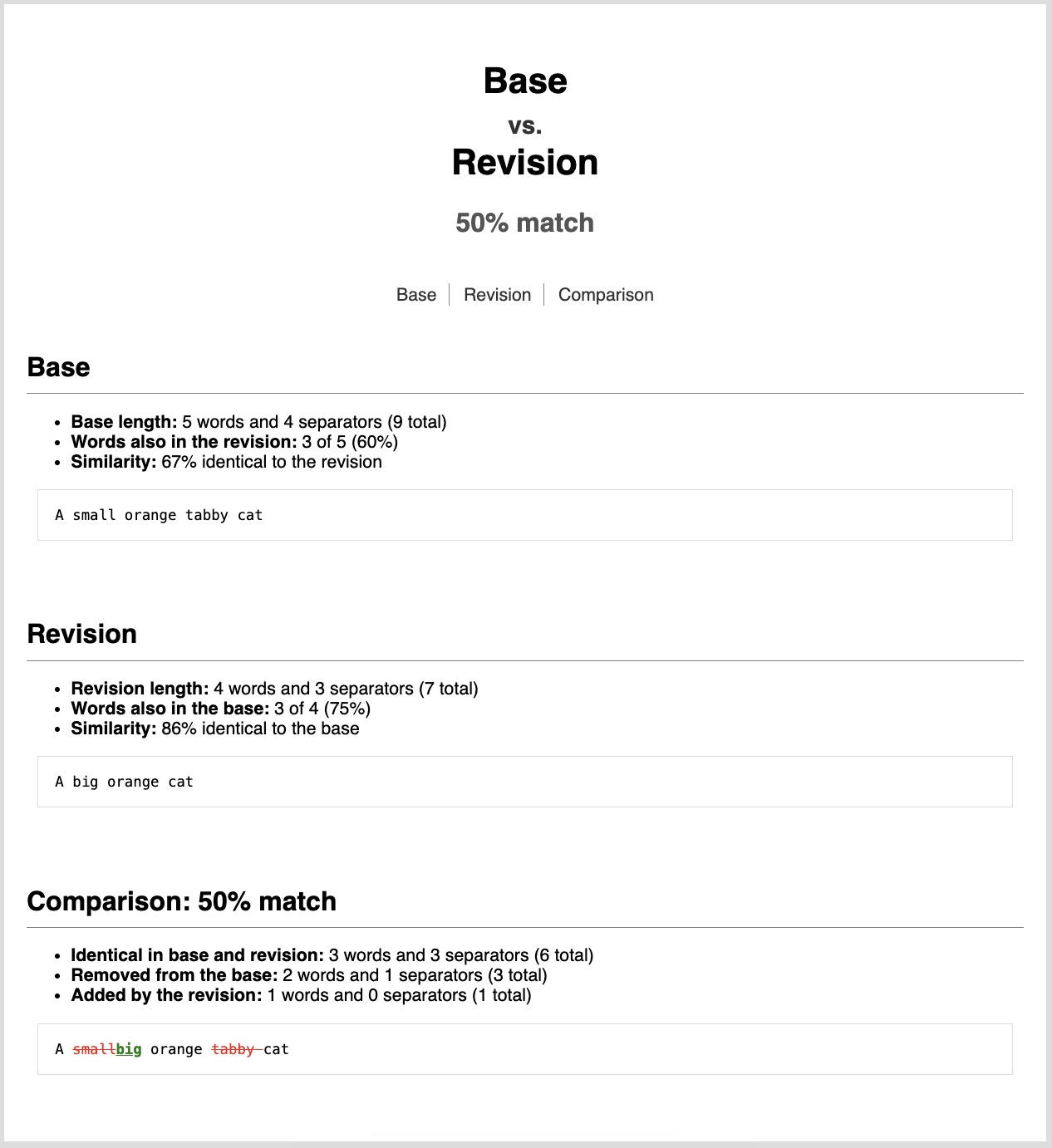
indifferent also has the ability to produce styled HTML pages. CSS can either be internal (in the head) or inline (embedded directly in the HTML).
from indifferent import compare

with open("page.html", "w", encoding="utf-8") as htmlfile:
    htmlfile.write(
        compare(
            base = "A small orange tabby cat",
            revision = "A big orange cat",
            results="html_page_internal",
        )["html"]
    )
or
from indifferent import compare

with open("page.html", "w", encoding="utf-8") as htmlfile:
    htmlfile.write(
        compare(
            base = "A small orange tabby cat",
            revision = "A big orange cat",
            results="html_page_inline",
        )["html"]
    )
returns a file called page.html that looks like this:
Contributions
Contributions are welcome!
- Clone the source code
- Install the project locally:
python3 -m pip install -r requirements-dev.txt -e ".[dev]" - Make your changes
- Create or update the manually written tests (
tests/test_*.py) - Regenerate the permutation tests by running
tests/create_permutation_tests.py - Test with
pytest
Please create or update tests whenever you make changes.
License
indifferent is released under the MIT license.
1 maintainer

Metadata
1 maintainer
Release files for indifferent 1.0.2
For a detailed explanation of source distributions (sdists) and built distributions (wheels), please see the package formats documentation.
Source distribution (sdist)
| File | Size | Uploaded | Provenance | Actions |
|---|---|---|---|---|
| indifferent-1.0.2.tar.gz | 8.7 MB | With provenance | Details for indifferent-1.0.2.tar.gz |
Built distribution (wheel)
| File | Interpreter | ABI | Platform | Actions Reset |
|---|---|---|---|---|
| indifferent-1.0.2-py3-none-any.whl | Python 3 | none | any | Details for indifferent-1.0.2-py3-none-any.whl |
Total release size: 8.7 MB
Release files / indifferent-1.0.2.tar.gz
| Download URL | indifferent-1.0.2.tar.gz |
|---|---|
| Size | 8.7 MB |
| Tags | Source |
|
SHA-256 checksum How to use checksums |
de08b4be3d54e93750ebda7254cf6d99421fe541b6675efd56455701a173a92d
|
|
BLAKE2b-256 checksum How to use checksums |
abd89f7bbb367401a160181b99e747cad5ba8362e08b03d3a9de7374a687288f
|
| Upload date | |
|
Uploaded using Trusted Publishing? What is trusted publishing? |
Yes |
| Uploaded via |
twine/5.1.1 CPython/3.12.7
|
Provenance
Provenance describes where a file came from. On PyPI, provenance is shared via attestations, which provide a verifiable record of the build or publishing details. View details, limitations and caveats.


PyPI Publish Attestation
PyPI verified that this artifact, at this checksum, originated from the publisher listed below.
Signed by GitHub Actions, verified by PyPI on Nov 24, 2024.
Transparency logRelease files / indifferent-1.0.2-py3-none-any.whl
| Download URL | indifferent-1.0.2-py3-none-any.whl |
|---|---|
| Size | 15.2 kB |
| Tags | Python 3 |
|
SHA-256 checksum How to use checksums |
452c1d25b88f7ea9b0a3ebbd46d6a9dabdb986a79834226bbc07869510b8da4b
|
|
BLAKE2b-256 checksum How to use checksums |
85e342c9e67bacd2b010847421a5f5a59b6320ada08f8be759e9e91aa4e33383
|
| Upload date | |
|
Uploaded using Trusted Publishing? What is trusted publishing? |
Yes |
| Uploaded via |
twine/5.1.1 CPython/3.12.7
|
Provenance
Provenance describes where a file came from. On PyPI, provenance is shared via attestations, which provide a verifiable record of the build or publishing details. View details, limitations and caveats.
PyPI Publish Attestation
PyPI verified that this artifact, at this checksum, originated from the publisher listed below.
Signed by GitHub Actions, verified by PyPI on Nov 24, 2024.
Transparency logSecurity for indifferent 1.0.2
Provenance
Provenance describes where a file came from. On PyPI, provenance is shared via attestations, which provide a verifiable record of the build or publishing details. View details, limitations and caveats.
Full provenance
All 2 files in this release have been uploaded with provenance metadata.
Attestation for indifferent-1.0.2.tar.gz
PyPI Publish Attestation
PyPI verified that this artifact, at this checksum, originated from the publisher listed below.
Signed by GitHub Actions, verified by PyPI on Nov 24, 2024.
Transparency logA note on package security
PyPI is a repository for distributing packages, not a service for auditing them. While third-party security researchers and our staff do their best to detect and remove malicious packages, PyPI cannot guarantee the quality, security or suitability of any given package.
To learn more about protecting yourself from malicious actors, visit our package security documentation.














