
indipyserver
Server for the INDI protocol, written in Python
This package provides an IPyServer class used to serve the INDI protocol on a port.
INDI - Instrument Neutral Distributed Interface.
See https://en.wikipedia.org/wiki/Instrument_Neutral_Distributed_Interface
indipyserver can be installed from Pypi:
https://pypi.org/project/indipyserver/
Drivers controlling instrumentation can be written using the indipydriver package. This server takes such drivers, and opens a port to which an INDI client can connect.
You would create a script something like:
import asyncio
from indipyserver import IPyServer
import ... your own modules creating driver1, driver2 ...

server = IPyServer(driver1, driver2, host="localhost", port=7624, maxconnections=5)
asyncio.run(server.asyncrun())
A connected client can then control all the drivers. The above illustrates multiple drivers can be served.
Note, the default host 'localhost' will only allow client connections from the localhost. If you want the port to allow external connections use a host name of '0.0.0.0'.
Any INDI client can be used to connect to this port, an associated client 'indipyterm' is available.
The server can be shutdown using CTRL-C or by calling the server.shutdown() method.
Third party drivers
IPyServer can also run third party INDI drivers created with other languages or tools, using an add_exdriver method to include executable drivers.
For example, using drivers available from indilib:
import asyncio
from indipyserver import IPyServer

server = IPyServer(host="localhost", port=7624, maxconnections=5)

server.add_exdriver("indi_simulator_telescope")
server.add_exdriver("indi_simulator_ccd")
asyncio.run(server.asyncrun())
Please note: The author has no relationship with indilib, these indipyserver and indipydriver packages are independently developed implementations. However they were developed with reference to the INDI version 1.7 specification, and are intended to interwork with other implementations that also meets that spec.
Networked instruments
IPyServer also has an add_remote method which can be used to add connections to remote servers, creating a tree network of servers:
import asyncio
from indipyserver import IPyServer
import ... your own modules creating DriverA, DriverB ...

server = IPyServer(DriverA, DriverB, host="localhost", port=7624, maxconnections=5)

server.add_remote(host="nameofserverB", port=7624, blob_enable=True)
server.add_remote(host="nameofserverC", port=7624, blob_enable=True)

asyncio.run(server.asyncrun())
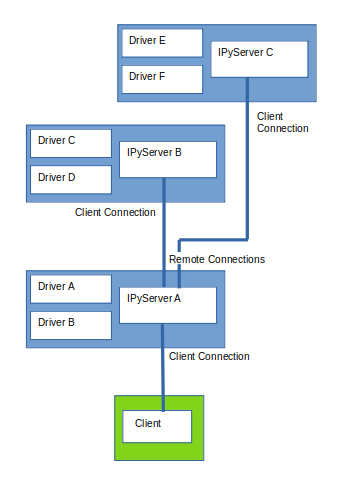
With such a layout, the client can control all the instruments.
Drivers made with indipydriver, third party executable drivers and remote connections can all be served together.
Further documentation can be found at:
https://indipyserver.readthedocs.io/en/latest/index.html
Associated packages by the same author are:
indipydriver
Package with classes used to create INDI drivers.
https://github.com/bernie-skipole/indipydriver
https://pypi.org/project/indipydriver
https://indipydriver.readthedocs.io
indipyweb
Web server and INDI client, connects to an INDI serving port, and serves client pages for connected browsers.
https://github.com/bernie-skipole/indipyweb
https://pypi.org/project/indipyweb
indipyterm
A terminal INDI client.
1 maintainer

Metadata
1 maintainer
Release files for indipyserver 0.0.5
For a detailed explanation of source distributions (sdists) and built distributions (wheels), please see the package formats documentation.
Source distribution (sdist)
| File | Size | Uploaded | Provenance | |
|---|---|---|---|---|
| indipyserver-0.0.5.tar.gz | 14.7 kB | Without provenance | Details |
Built distribution (wheel)
| File | Interpreter | ABI | Platform | Reset |
|---|---|---|---|---|
| indipyserver-0.0.5-py3-none-any.whl | Python 3 | none | any | Details |
Total release size: 31.4 kB
Release files / indipyserver-0.0.5.tar.gz
| Download URL | indipyserver-0.0.5.tar.gz |
|---|---|
| Size | 14.7 kB |
| Tags | Source |
|
SHA-256 checksum How to use checksums |
eef86d469674b4ecca80e86b46ae7115d517181ebafa3d420d831202cd5397fb
|
|
BLAKE2b-256 checksum How to use checksums |
6ce88e7708af257d7760dbcf81627dd57c029bd67093be6f8a6043ca6ba879b2
|
| Upload date | |
|
Uploaded using Trusted Publishing? What is trusted publishing? |
No |
| Uploaded via |
python-requests/2.25.1
|
Release files / indipyserver-0.0.5-py3-none-any.whl
| Download URL | indipyserver-0.0.5-py3-none-any.whl |
|---|---|
| Size | 16.7 kB |
| Tags | Python 3 |
|
SHA-256 checksum How to use checksums |
b766b1a2ac7a0a73f6224f33ae995f6df1c6e560899e04a99901d6f65b29a8ad
|
|
BLAKE2b-256 checksum How to use checksums |
5be24099a08a58a420a8f3c6ea6366e36f791913d8a49137ecefb7ec99784c3b
|
| Upload date | |
|
Uploaded using Trusted Publishing? What is trusted publishing? |
No |
| Uploaded via |
python-requests/2.25.1
|
Security for indipyserver 0.0.5
Provenance
Provenance describes where a file came from. On PyPI, provenance is shared via attestations, which provide a verifiable record of the build or publishing details. View details, limitations and caveats.
No provenance found
None of the files in this release were uploaded with provenance metadata.
A note on package security
PyPI is a repository for distributing packages, not a service for auditing them. While third-party security researchers and our staff do their best to detect and remove malicious packages, PyPI cannot guarantee the quality, security or suitability of any given package.














