
Web server to communicate to an INDI service.

Project description
indipyweb
Web server, providing browser client connections to an INDI service.
This does not include the INDI server, this is an INDI client.
INDI defines a protocol for the remote control of instruments.
INDI - Instrument Neutral Distributed Interface.
See https://en.wikipedia.org/wiki/Instrument_Neutral_Distributed_Interface
The INDI protocol defines the format of the data sent, such as light, number, text, switch or BLOB (Binary Large Object). The client is general purpose, taking the format of switches, numbers etc., from the protocol.
indipyweb can be installed from Pypi with:
pip install indipyweb
The Pypi site being:
https://pypi.org/project/indipyweb
Or if you use uv, it can be loaded and run with:
uvx indipyweb
If installed into a virtual environment, it can be run with:
indipyweb [options]
or with
python -m indipyweb [options]
This will create a database file holding user information in the working directory, and will run a web server on localhost:8000. Connect with a browser, and initially use the default created user, with username admin and password password! - note the exclamation mark.
This server will attempt to connect to an INDI service on localhost:7624, and the user browser should be able to view and set devices, vectors and member values.
The package help is:
usage: indipyweb [options]

Web server to communicate to an INDI service.

options:
  -h, --help                   show this help message and exit
  --port PORT                  Listening port of the web server.
  --host HOST                  Hostname/IP of the web server.
  --dbfolder DBFOLDER          Folder where the database will be set.
  --securecookie SECURECOOKIE  Set True to enforce https only for cookies.
  --version                    show program's version number and exit

The host and port set here have priority over values set in the database.
If not given, and not set in the database, 'localhost:8000' is used.
If it does not already exist, a database file will be created in the
given db folder, if not set the current working directory will be used.
The securecookie is 'False' by default, set it to the string 'True'
to ensure remote login can only happen over https.
You should start by connecting with a browser, on localhost:8000 unless you have changed the port with the above command line options.
On startup, if an INDI service is not running, or not present on localhost:7624 you will see failed connection attemps in the initial web page and no devices will be available. You can still login to add users and create initial settings, including setting the host and port where the INDI service can be found. These values will be saved in the database file and read on future startups.
As the web service by default listens on 'localhost' only a browser running on the same machine will be able to connect. Set the host to '0.0.0.0' to listen on all interfaces.
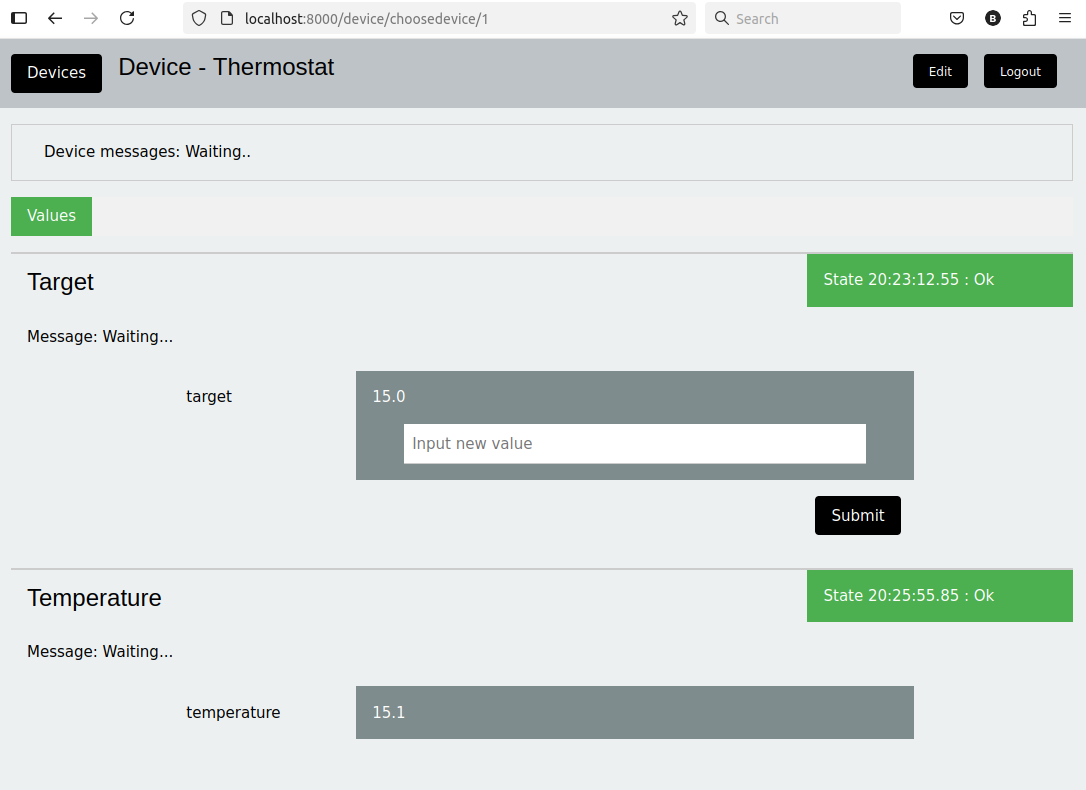
A typical session would look like:
Security
The database file holds hashes of user passwords, if obtained by an attacker, the original passwords would be difficult to obtain, however a brute force dictionary attack is possible, so complex passwords, not used elsewhere, should be encouraged. The site requires passwords with at least 8 characters and one special character. Usernames and long names are held in the database in clear text.
It is envisioned this server will be used on local LAN's rather than on the internet. If it is used on a more open system, then it should be served behind a reverse proxy which provides certificates/https. Setting the command line argument 'securecookie' to 'True' enforces cookies will only be sent by browsers over https, unless the connection is to 'localhost'. This is set to False as default so initial development and home usage without a reverse proxy is easy.
This package is free and open source, developed by a single user, with many third party dependencies, security is therefore not tested at a professional level and this should not be used for any critical systems.
This web service should work with any INDI service, however associated packages by the same author are:
indipyserver
https://github.com/bernie-skipole/indipyserver
https://pypi.org/project/indipyserver/
https://indipyserver.readthedocs.io
indipydriver
https://github.com/bernie-skipole/indipydriver
https://pypi.org/project/indipydriver
https://indipydriver.readthedocs.io
indipyterm
Release history Release notifications | RSS feed


Download files
Download the file for your platform. If you're not sure which to choose, learn more about installing packages.
Source Distribution
Built Distribution
Filter files by name, interpreter, ABI, and platform.
If you're not sure about the file name format, learn more about wheel file names.
Copy a direct link to the current filters
File details
Details for the file indipyweb-0.0.6.tar.gz.
File metadata
- Download URL: indipyweb-0.0.6.tar.gz
- Upload date:
- Size: 56.9 kB
- Tags: Source
- Uploaded using Trusted Publishing? No
- Uploaded via: python-requests/2.28.2
File hashes
| Algorithm | Hash digest | |
|---|---|---|
| SHA256 |
c558c22db6fd951d49490b84d173497f66cb9135087a16d344901f6e87ef1576
|
|
| MD5 |
709720c7a99dfa66adbd177fc1a333f1
|
|
| BLAKE2b-256 |
a37f0f1ccd28e0ac5281bbecc1662f838bc5dc9209d1dc9f31600a077e305ea7
|
File details
Details for the file indipyweb-0.0.6-py3-none-any.whl.
File metadata
- Download URL: indipyweb-0.0.6-py3-none-any.whl
- Upload date:
- Size: 75.1 kB
- Tags: Python 3
- Uploaded using Trusted Publishing? No
- Uploaded via: python-requests/2.28.2
File hashes
| Algorithm | Hash digest | |
|---|---|---|
| SHA256 |
9050f90a2fa3d596acb277e9799b6d9889ae6c3debe34a71147147549c055bd6
|
|
| MD5 |
1ccc6d007eb9012a0f136b562b8a4f9e
|
|
| BLAKE2b-256 |
bf6046b21939cab38ebce1e617cde6fbce170bc4668deb6d5a0ac44c8acb3830
|






