
INDI Web Manager
INDI Web Manager is a simple Web Application to manage INDI Server.
It supports multiple driver profiles along with optional custom remote drivers. It can be used to start INDI server locally, and also to connect or chain to remote INDI servers.
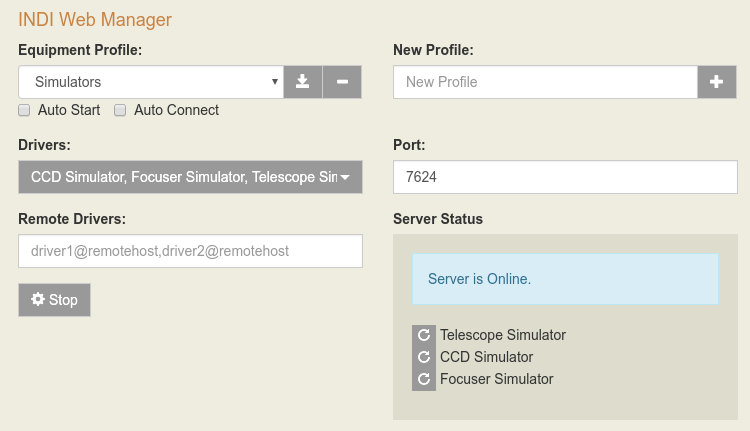
The Web Application is based on FastAPI micro-framework. It has a built-in webserver and by default listens on port 8624.
Installation
Before installing the indiweb package, make sure the INDI library is installed on the target system.
You can install the indiweb Python package using pip:
$ pip install indiweb
You may want to install it system-wide, only in your user account or even into a virtual environment (if you are a developer).
If you want to install it system-wide, you will have to invoke pip with superuser rights:
$ sudo pip install indiweb
Usage
After installing the indiweb package, the command indi-web will be available in your system PATH.
You can obtain help about the indi-web command by invoking:
$ indi-web -h
The INDI Web Manager runs as a standalone web server. It can be started manually by invoking:
$ indi-web -v
Then using your favorite web browser, go to http://localhost:8624 if the INDI Web Manager is running locally. If the INDI Web Manager is installed on a remote system, simply replace localhost with the hostname or IP address of the remote system.
Auto Start
If you selected any profile as Auto Start then the INDI server shall be automatically started when the service is executed at start up.
Auto Connect
Similary to Auto Start, Auto Connect would connect all the drivers after the server is up and running.
Start vs. Connect
What is the difference between starting a driver and connecting a driver?
- Start: The INDI server executes the driver. The driver starts up and provide a list of properties. It does not establish connection with the physical device.
- Connect: Establish connection to the physical device.
Systemd configuration
The provided file indiwebmanager.service is an example systemd service file
that can be used to run indi-web at startup as pi user. If your username is different
please edit the file and change the username first.
Indiwebmanager must be installed system-wide:
sudo pip install indiweb
Copy your preferred service file to /etc/systemd/system:
sudo cp indiwebmanager.service /etc/systemd/system/
sudo chmod 644 /etc/systemd/system/indiwebmanager.service
Now configure systemd to load the service file during boot:
sudo systemctl daemon-reload
sudo systemctl enable indiwebmanager.service
Finally, reboot the system for your changes to take effect:
sudo reboot
After startup, check the status of the INDI Web Manager service:
sudo systemctl status indiwebmanager.service
If all appears OK, you can start using the Web Application using any browser.
Profiles
The Web Application provides a default profile to run simulator drivers. To use a new profile, add the profile name and then click the plus button. Next, select which drivers to run under this particular profile. After selecting the drivers, click the Save icon to save all your changes. To enable automatic startup of INDI server for a particular profile when the device boots up or when invoked manually via the systemctl command, check the Auto Start checkbox.
API Documentation
INDI Web Manager now uses FastAPI, which automatically generates interactive API documentation.
To access the API documentation, navigate to the /docs endpoint (Swagger UI) or the /redoc endpoint (ReDoc) in your web browser after starting the application.
For example, if the INDI Web Manager is running locally on port 8624, you can access the documentation at:
http://localhost:8624/docs or http://localhost:8624/redoc
The /docs and /redoc pages provide user-friendly interfaces to explore the available API endpoints, their parameters, and expected responses. You can also directly interact with the API from the /docs page to test the endpoints.

Development
Create and use a virtual environment to avoid installing into system Python:
python3 -m venv .venv
.venv/bin/pip install -e ".[dev]"
Then run indiweb:
.venv/bin/python -m indiweb.main
Run tests (use the venv):
.venv/bin/pytest tests/ -v
Unit and API tests run by default. Integration tests (in tests/test_integration.py) require indiserver and simulator drivers; they are skipped if not installed. To run only unit/API tests:
.venv/bin/pytest tests/ -m "not integration" -v
To run integration tests (with INDI installed):
.venv/bin/pytest tests/ -m integration -v
Run all Python versions via tox:
.venv/bin/tox run -e py39,py310,py311,py312
With coverage (local):
.venv/bin/pytest tests/ -m "not integration" --cov=indiweb --cov-report=term-missing --cov-report=html
With coverage (Docker, recommended so htmlcov/ is owned by you):
./scripts/docker-test.sh
Or manually: DOCKER_UID=$(id -u) DOCKER_GID=$(id -g) docker compose run --rm test
Coverage is printed in the terminal and an HTML report is written to htmlcov/. Open htmlcov/index.html in a browser to view it.
Or activate the venv first: source .venv/bin/activate, then run pytest, tox, etc.
Authors
Jasem Mutlaq (mutlaqja@ikarustech.com)
Juan Menendez (juanmb@gmail.com)


Download files
Download the file for your platform. If you're not sure which to choose, learn more about installing packages.
Source Distribution
Built Distribution
Filter files by name, interpreter, ABI, and platform.
If you're not sure about the file name format, learn more about wheel file names.
Copy a direct link to the current filters
File details
Details for the file indiweb-1.1.0.tar.gz.
File metadata
- Download URL: indiweb-1.1.0.tar.gz
- Upload date:
- Size: 435.2 kB
- Tags: Source
- Uploaded using Trusted Publishing? No
- Uploaded via:
twine/6.1.0 CPython/3.13.12
File hashes
| Algorithm | Hash digest | |
|---|---|---|
| SHA256 |
8e1a5d362774ffb4f21b2b01458ba3d865fdbf889b65f7757e2174feae6d0591
|
|
| MD5 |
ea6b2ea096cc306e3ae09347596c7b00
|
|
| BLAKE2b-256 |
6fb312584223e21b0b1d10cf2a1cf5abf13e98efeb41fc3a38e6affc3679a2d8
|
File details
Details for the file indiweb-1.1.0-py3-none-any.whl.
File metadata
- Download URL: indiweb-1.1.0-py3-none-any.whl
- Upload date:
- Size: 440.4 kB
- Tags: Python 3
- Uploaded using Trusted Publishing? No
- Uploaded via:
twine/6.1.0 CPython/3.13.12
File hashes
| Algorithm | Hash digest | |
|---|---|---|
| SHA256 |
403fd70a0f14575f14905cbd966ad25fe88a2a21ab4941b8c7a10c69c32cd96d
|
|
| MD5 |
436691de15ca773bd3c9a6869d42f365
|
|
| BLAKE2b-256 |
179ba8e2b32d6bd6023e3441074e5b8455379c6c572b004a818c57f51bcfc401
|














