
Indox Retrieval Augmentation

Project description
inDox







Official Website • Documentation • Discord
NEW: Subscribe to our mailing list for updates and news!
Indox Retrieval Augmentation is an innovative application designed to streamline information extraction from a wide range of document types, including text files, PDF, HTML, Markdown, and LaTeX. Whether structured or unstructured, Indox provides users with a powerful toolset to efficiently extract relevant data.
Indox Retrieval Augmentation is an innovative application designed to streamline information extraction from a wide range of document types, including text files, PDF, HTML, Markdown, and LaTeX. Whether structured or unstructured, Indox provides users with a powerful toolset to efficiently extract relevant data. One of its key features is the ability to intelligently cluster primary chunks to form more robust groupings, enhancing the quality and relevance of the extracted information. With a focus on adaptability and user-centric design, Indox aims to deliver future-ready functionality with more features planned for upcoming releases. Join us in exploring how Indox can revolutionize your document processing workflow, bringing clarity and organization to your data retrieval needs.
Roadmap
| 🤖 Model Support | Implemented | Description |
|---|---|---|
| Ollama (e.g. Llama3) | ✅ | Local Embedding and LLM Models powered by Ollama |
| HuggingFace | ✅ | Local Embedding and LLM Models powered by HuggingFace |
| Mistral | ✅ | Embedding and LLM Models by Cohere |
| Google (e.g. Gemini) | ✅ | Embedding and Generation Models by Google |
| OpenAI (e.g. GPT4) | ✅ | Embedding and Generation Models by OpenAI |
| Supported Model Via Indox Api | Implemented | Description | | ----------------------------- | ----------- | ------------------------------------------------ | --- | | OpenAi | ✅ | Embedding and LLm OpenAi Model From Indox Api | | Mistral | ✅ | Embedding and LLm Mistral Model From Indox Api | | Anthropic | ❌ | Embedding and LLm Anthropic Model From Indox Api | |
| 📁 Loader and Splitter | Implemented | Description |
|---|---|---|
| Simple PDF | ✅ | Import PDF |
| UnstructuredIO | ✅ | Import Data through Unstructured |
| Clustered Load And Split | ✅ | Load pdf and texts. add a extra clustering layer |
| ✨ RAG Features | Implemented | Description |
|---|---|---|
| Hybrid Search | ❌ | Semantic Search combined with Keyword Search |
| Semantic Caching | ✅ | Results saved and retrieved based on semantic meaning |
| Clustered Prompt | ✅ | Retrieve smaller chunks and do clustering and summarization |
| Agentic Rag | ✅ | Generate more reliabale answer, rank context and web search if needed |
| Advanced Querying | ❌ | Task Delegation Based on LLM Evaluation |
| Reranking | ✅ | Rerank results based on context for improved results |
| Customizable Metadata | ❌ | Free control over Metadata |
| 🆒 Cool Bonus | Implemented | Description |
|---|---|---|
| Docker Support | ❌ | Indox is deployable via Docker |
| Customizable Frontend | ❌ | Indox's frontend is fully-customizable via the frontend |
Examples
| ☑️ Examples | Run in Colab |
|---|---|
| Indox Api (OpenAi) |  |
| Mistral (Using Unstructured) | |
| OpenAi (Using Clustered Split) | |
| HuggingFace Models(Mistral) | |
| Ollama | |
| Evaluate with IndoxJudge | |
Indox Workflow
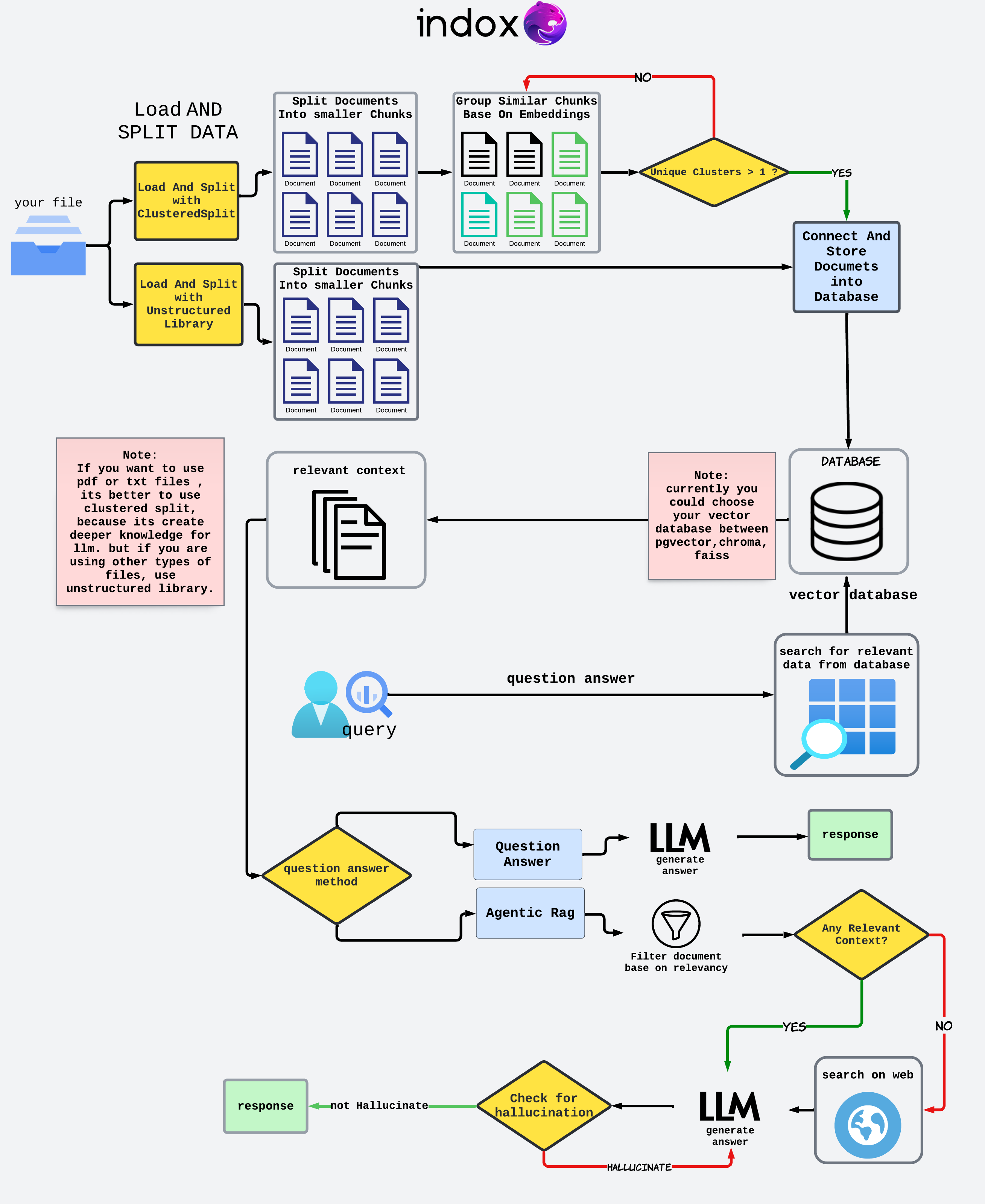
Getting Started
The following command will install the latest stable inDox
pip iIndoxQuery
Setting Up the Python Environment
If you are running this project in your local IDE, please create a Python environment to ensure all dependencies are correctly managed. You can follow the steps below to set up a virtual environment named indox:
Windows
- Create the virtual environment:
python -IndoxQuery
- Activate the virtual environment:
``IndoxQuery\Scripts\activate
### macOS/Linux

1. **Create the virtual environment:**

   ```bash
   python3 -IndoxQuery
- Activate the virtual environment:
IndoxQuery/bin/activate
Install Dependencies
Once the virtual environment is activated, install the required dependencies by running:
pip install -r requirements.txt
Preparing Your Data
- Define the File Path: Specify the path to your text or PDF file.
- Load LLM And Embedding Models: Initialize your embedding modeIndoxQuery's selection of pre-trained models.
Quick Start
Install the Required Packages
pip iIndoxQuery
pip install openai
pip install chromadb
Setting Up the Python Environment
If you are running this project in your local IDE, please create a Python environment to ensure all dependencies are correctly managed. You can follow the steps below to set up a virtual environment IndoxQuery`:
Windows
- Create the virtual environment:
python -IndoxQuery
- Activate the virtual environment:
`IndoxQuery_judge\Scripts\activate
### macOS/Linux

1. **Create the virtual environment:**
   ```bash
   python3 -IndoxQuery
2. **Activate the virtual environment:**
    ```bash
   IndoxQuery/bin/activate
Install Dependencies
Once the virtual environment is activated, install the required dependencies by running:
pip install -r requirements.txt
Load Environment Variables
To start, you need to load your API keys from the environment.
import os
from dotenv import load_dotenv

load_dotenv()

OPENAI_API_KEY = os.environ['OPENAI_API_KEY']
IndoxQuery Package
Import the necessary classes frIndoxQuery package.
Importing LLM and Embedding Models
InitIndoxQuery
Create an instance of IndoxRetrievalAugmentation.
openai_qa = OpenAiQA(api_key=OPENAI_API_KEY,model="gpt-3.5-turbo-0125")
openai_embeddings = OpenAiEmbedding(model="text-embedding-3-small",openai_api_key=OPENAI_API_KEY)
file_path = "sample.txt"
In this section, we take advantage of the unstructured library to load
documents and split them into chunks by title. This method helps in
organizing the document into manageable sections for further
processing.
loader_splitter = UnstructuredLoadAndSplit(file_path=file_path)
docs = loader_splitter.load_and_chunk()
Starting processing...
End Chunking process.
Storing document chunks in a vector store is crucial for enabling efficient retrieval and search operations. By converting text data into vector representations and storing them in a vector store, you can perform rapid similarity searches and other vector-based operations.
db = ChromaVectorStore(collection_name="sample",embedding=embed_oIndoxQuery.connect_to_vectorstoIndoxQuery.store_in_vectorstore(docs)
2024-05-14 15:33:04,916 - INFO - Anonymized telemetry enabled. See                     https://docs.trychroma.com/telemetry for more information.
2024-05-14 15:33:12,587 - INFO - HTTP Request: POST https://api.openai.com/v1/embeddings "HTTP/1.1 200 OK"
2024-05-14 15:33:13,574 - INFO - Document added successfully to the vector store.

Connection established successfully.

<Indox.vectorstore.ChromaVectorStore at 0x28cf9369af0>
Quering
query = "how cinderella reach her happy ending?"
retriIndoxQuery.QuestionAnswer(vector_database=db,llm=openai_qa,top_k=5)
retriever.invoke(query)
2024-05-14 15:34:55,380 - INFO - HTTP Request: POST https://api.openai.com/v1/embeddings "HTTP/1.1 200 OK"
2024-05-14 15:35:01,917 - INFO - HTTP Request: POST https://api.openai.com/v1/chat/completions "HTTP/1.1 200 OK"
'Cinderella reached her happy ending by enduring mistreatment from her step-family, finding solace and help from the hazel tree and the little white bird, attending the royal festival where the prince recognized her as the true bride, and ultimately fitting into the golden shoe that proved her identity. This led to her marrying the prince and living happily ever after.'
retriever.context
["from the hazel-bush. Cinderella thanked him, went to her mother's\n\ngrave and planted the branch on it, and wept so much that the tears\n\nfell down on it and watered it. And it grew and became a handsome\n\ntree. Thrice a day cinderella went and sat beneath it, and wept and\n\nprayed, and a little white bird always came on the tree, and if\n\ncinderella expressed a wish, the bird threw down to her what she\n\nhad wished for.\n\nIt happened, however, that the king gave orders for a festival",
 'worked till she was weary she had no bed to go to, but had to sleep\n\nby the hearth in the cinders. And as on that account she always\n\nlooked dusty and dirty, they called her cinderella.\n\nIt happened that the father was once going to the fair, and he\n\nasked his two step-daughters what he should bring back for them.\n\nBeautiful dresses, said one, pearls and jewels, said the second.\n\nAnd you, cinderella, said he, what will you have. Father',
 'face he recognized the beautiful maiden who had danced with\n\nhim and cried, that is the true bride. The step-mother and\n\nthe two sisters were horrified and became pale with rage, he,\n\nhowever, took cinderella on his horse and rode away with her. As\n\nthey passed by the hazel-tree, the two white doves cried -\n\nturn and peep, turn and peep,\n\nno blood is in the shoe,\n\nthe shoe is not too small for her,\n\nthe true bride rides with you,\n\nand when they had cried that, the two came flying down and',
 "to send her up to him, but the mother answered, oh, no, she is\n\nmuch too dirty, she cannot show herself. But he absolutely\n\ninsisted on it, and cinderella had to be called. She first\n\nwashed her hands and face clean, and then went and bowed down\n\nbefore the king's son, who gave her the golden shoe. Then she\n\nseated herself on a stool, drew her foot out of the heavy\n\nwooden shoe, and put it into the slipper, which fitted like a\n\nglove. And when she rose up and the king's son looked at her",
 'slippers embroidered with silk and silver. She put on the dress\n\nwith all speed, and went to the wedding. Her step-sisters and the\n\nstep-mother however did not know her, and thought she must be a\n\nforeign princess, for she looked so beautiful in the golden dress.\n\nThey never once thought of cinderella, and believed that she was\n\nsitting at home in the dirt, picking lentils out of the ashes. The\n\nprince approached her, took her by the hand and danced with her.']
Release history Release notifications | RSS feed


Download files
Download the file for your platform. If you're not sure which to choose, learn more about installing packages.
Source Distribution
Built Distribution
Filter files by name, interpreter, ABI, and platform.
If you're not sure about the file name format, learn more about wheel file names.
Copy a direct link to the current filters
File details
Details for the file indoxarcg-0.0.1.tar.gz.
File metadata
- Download URL: indoxarcg-0.0.1.tar.gz
- Upload date:
- Size: 145.6 kB
- Tags: Source
- Uploaded using Trusted Publishing? No
- Uploaded via: twine/5.1.1 CPython/3.12.4
File hashes
| Algorithm | Hash digest | |
|---|---|---|
| SHA256 |
e83d719c46f58e36f4b508932ad8f9727ce741445953cbfd801924d94ebd4352
|
|
| MD5 |
4d498d9f5e1f970d84169878afb952eb
|
|
| BLAKE2b-256 |
448bb4342e7a2fb8f0f3a37dbdb8886b5af54468df30a67a156ccd0c4396e0b0
|
File details
Details for the file indoxArcg-0.0.1-py3-none-any.whl.
File metadata
- Download URL: indoxArcg-0.0.1-py3-none-any.whl
- Upload date:
- Size: 209.0 kB
- Tags: Python 3
- Uploaded using Trusted Publishing? No
- Uploaded via: twine/5.1.1 CPython/3.12.4
File hashes
| Algorithm | Hash digest | |
|---|---|---|
| SHA256 |
ccf1c57b3195514918c4829db7f87b79dc59ce2467e55828ada81c8ac63af1e2
|
|
| MD5 |
84dad567e4db63cb7c0e26b4674d6701
|
|
| BLAKE2b-256 |
a465e6a2d0c6b6792efabaf0598e943ed41aeff77aa305da37f9bb5770a687b9
|






