
Infant Brain 3D Visualizer and Processing
A Python desktop application for visualizing infant brain surfaces from 1 to 72 months (at 3-month intervalls), scalp and EEG electrode positions, and brain tractography, LORETA scores, connectome, effective connectivity, in a shared 3D view. The viewer supports age-specific infant templates and can optionally compute and display effective connectivity from EEG recordings.
Features
- Interactive 3D visualization of cortical surfaces and tractography.
- Infant scalp and skull geometry with EEG electrode locations.
- Age/template selection for infant head geometry.
- Overlay of electrodes and tractography for spatial inspection.
- Optional effective-connectivity analysis using Granger causality or transfer entropy from EEG data.
- Loading of local atlas and surface files from the repository.
- It can perform quality check and pre-processing of .edf files
- Canonical views as axial, sagittal, coronal and automatic saving of the scene.
Instructions
- Most of the commands are as radio button on top. The Loreta and effective connectivity analysis expect to load a .edf file
- The view settings and saving options are in the menu at the bottom of the GUI.
Alternatively, most of the commands can be called by command line scripts which are indepdent from the GUI program:
Quality check: saves _quality.txt (and/or .json) next to the input or in -o
python edf_quality_cli.py rec.edf -o reports/ --format both --fail-on-warn
Preprocessing from a config file
python edf_preprocess_cli.py --write-default-config > preproc.json
python edf_preprocess_cli.py data/*.edf -c preproc.json -o out/ --overwrite
python edf_preprocess_cli.py rec.edf -c preproc.json --set lowpass=45 --set resample=true --set resample_hz=125
Connectomes, saved as CSV
python edf_granger_cli.py rec.edf -o out/ --lag 5 --edge-list
python edf_transfer_entropy_cli.py rec.edf -o out/ --bins 4 --lag 1
Loreta given different surfaces
python edf_loreta_cli.py rec.edf --age 12 -o out/
python edf_loreta_cli.py data/*.edf --age 6 --surface inflated --screenshot --overwrite
python edf_loreta_cli.py rec.edf --age 12 --no-surface # tables and JSON only
Screenshots
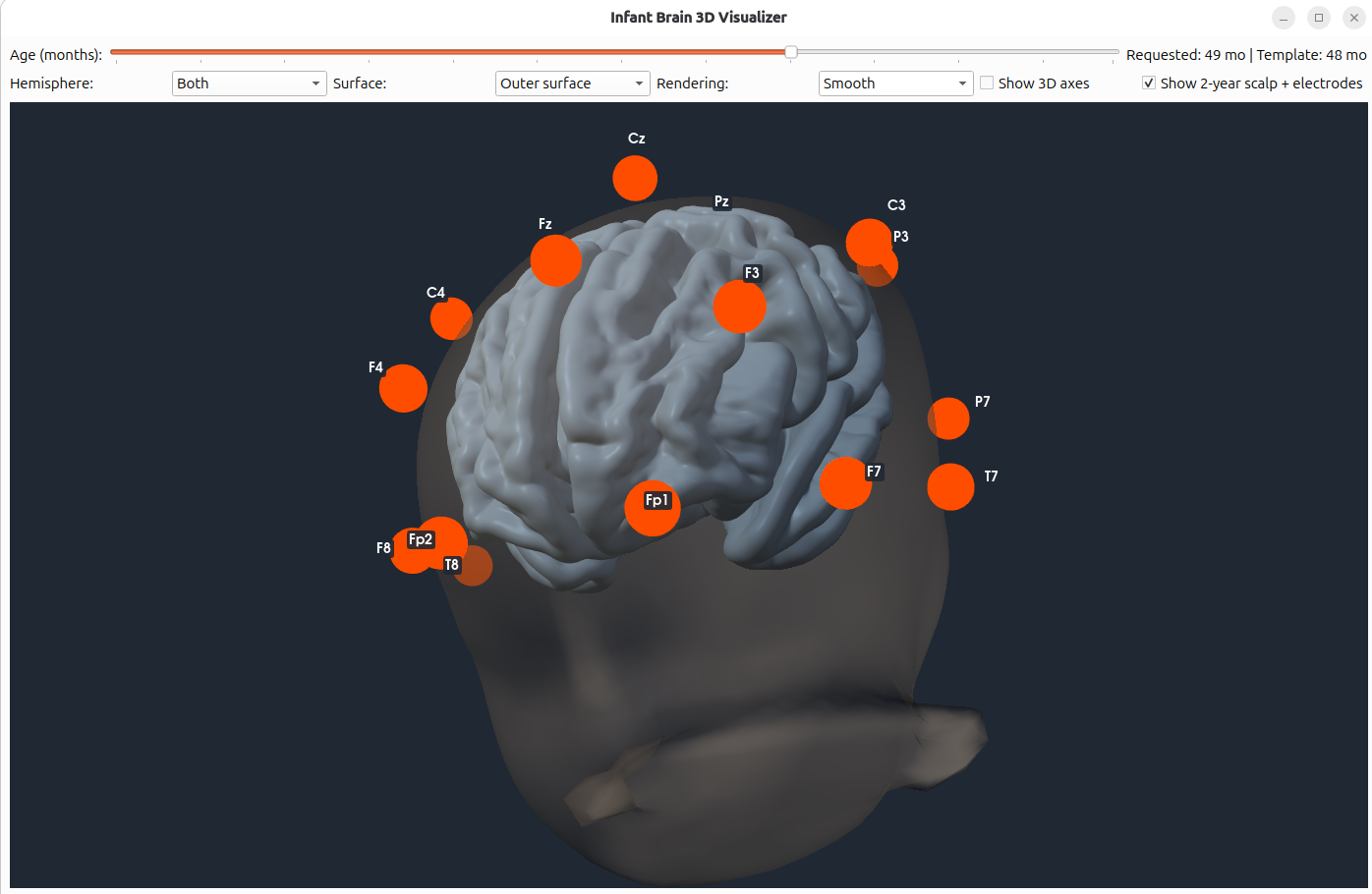
EEG electrode locations
The scalp and EEG electrode positions are shown in 3D.
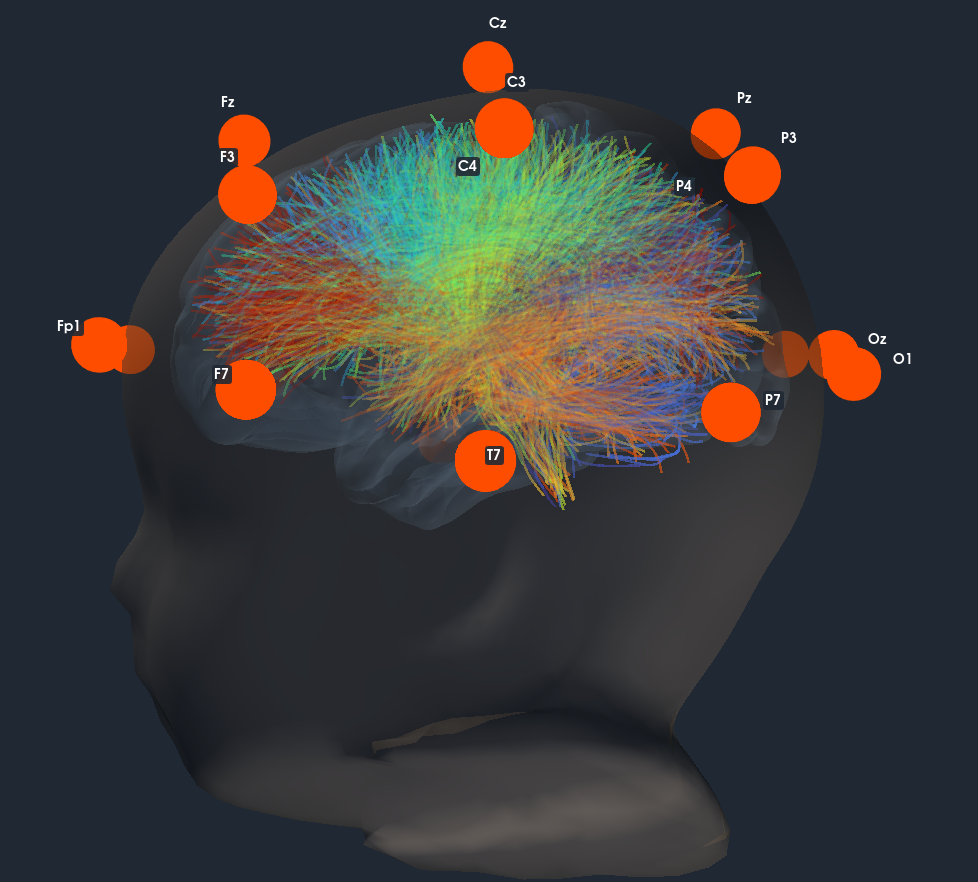
Brain tractography and electrode overlay
Example screenshot showing the brain tractography together with the EEG electrode overlay.
Repository files
-
infant_brain_viewer.py— main interactive 3D viewer and application entry point. -
effconn.py— standalone effective-connectivity implementation (optional alternative to installingeffconnpy). -
requirements.txt— Python dependencies for the viewer. -
generate_cortex.py— prepares/generates the cortical surface files used by the viewer. -
fetch_tract_atlas.py— fetches the tractography atlas used for the tract overlay. -
bundle_animation.py— it animates the tracts with a travelling light pulse -
edf_quality.py— it performs a series of quality checks on a.edffile and provide a report -
edf_preprocess.py— it performs a series of preprocessing on a given.edffile and it saves it as another.edffile -
atlas.json— atlas manifest/configuration used by the viewer. -
tract_atlases/— directory for tractography atlas data. -
data/— directory for cortex surfaces. -
mne_templates/— directory for skull and EEG electrodes templates. -
edf_quality_cli.py— cli version of the quality checks -
edf_preprocess.py— cli version of the series of preprocessing -
edf_granger_cli.py— cli version of effective connectivity computation for Granger causality -
edf_transfer_entropy_cli.py— cli version of effective connectivity computation for Transfer entropy
The cortical surfaces should be prepared with generate_cortex.py, and the tractography atlas should be retrieved with fetch_tract_atlas.py before launching the viewer. The scalp, skull, and electrode/montage template data are downloaded automatically by the viewer the first time when needed and cached locally.
Requirements
- Python 3.10 or newer is recommended.
- A desktop environment capable of running Qt and rendering VTK/PyVista 3D scenes.
- Python packages listed in
requirements.txt.
Installation
pip install infant-brain-viewer
OR
Clone the repository and enter its directory:
git clone https://github.com/alecrimi/infantconnect.git
cd infantconnect
Create and activate a virtual environment (recommended):
python -m venv .venv
source .venv/bin/activate
On Windows, activate it with:
.venv\Scripts\Activate.ps1
Install the dependencies:
python -m pip install --upgrade pip
python -m pip install -r requirements.txt
Prepare the data
Run the preparation scripts from the repository root:
python generate_cortex.py
python fetch_tract_atlas.py
These scripts prepare the cortical surfaces and fetch the tractography atlas, respectively. Check their console output for any download or preparation errors. Make sure the resulting files are placed where the viewer expects them, and that atlas.json and tract_atlases/ are present.
The viewer downloads the required infant scalp, skull, and electrode/montage template data on demand. An internet connection is needed the first time each template is requested. Downloaded template files are cached locally for later runs.
Run the viewer
From the repository root, run:
python infant_brain_viewer.py
Run the command from the repository root after completing the preparation steps above.
Use the viewer controls to toggle the scalp/electrodes, cortical surfaces, and tractography layers. Available controls and displayed options may depend on the atlas and surface files that have been prepared.
Effective connectivity
The viewer can compute and display effective connectivity from an EEG recording using Granger causality, transfer entropy and other methods.
There are two ways to provide the implementation:
-
Install
effconnpyfrom piwheels:python -m pip install effconnpy
The installed package must expose
compute_effective_connectivityfrom theeffconnmodule, as expected by the viewer. -
Use the standalone implementation included in this repository as
effconn.py. Keepeffconn.pyalongside the main viewer script so thatfrom effconn import compute_effective_connectivitycan resolve locally. If you choose this option, you generally do not need to install a separate package providing the same module.
To run the analysis, load an EEG recording through the viewer and enable the effective-connectivity control. The available methods are Granger causality and transfer entropy. The recording's channel names need to correspond to the electrode labels supported by the selected montage/template for the electrode positions to be fitted correctly.
Data and attribution
The project integrates three publicly available neuroimaging resources:
-
NABA800FC tractography atlas — a cross-population white-matter tractography atlas for neonates and adults. The dataset is distributed under the Creative Commons Attribution 4.0 International (CC BY 4.0) licence.
-
MNE infant head/skull surface templates — infant head and skull surface templates used for EEG electrode visualisation and anatomical modelling.
-
4D UNC Neonatal and Infant Cortical Surface Atlases — age-specific neonatal and infant cortical surfaces, provided in VTK format for 3D brain visualisation.
Use EEG data from Openneuro to test.
Troubleshooting
- Missing surface or atlas files: run
generate_cortex.pyandfetch_tract_atlas.pyfrom the repository root and check their output. - Missing Python module: activate the intended environment and reinstall dependencies with
python -m pip install -r requirements.txt. - Qt/VTK display problems: run the viewer in a desktop session with working graphics support; headless environments may not support the interactive window.
- Effective-connectivity import error: ensure either the repository's
effconn.pyis alongside the viewer or the compatibleeffconnpypackage is installed. - Electrodes do not align with the recording: check the EEG channel names and the montage/template selected in the viewer.
Citation
If you use this software in research, please cite this repository 10.5281/zenodo.23506486
Licence
Copyright 2026 Alessandro Crimi
Licensed under the Apache License, Version 2.0 (the "License"); you may not use this file except in compliance with the License. You may obtain a copy of the License at
https://www.apache.org/licenses/LICENSE-2.0
Unless required by applicable law or agreed to in writing, software
distributed under the License is distributed on an "AS IS" BASIS,
WITHOUT WARRANTIES OR CONDITIONS OF ANY KIND, either express or implied.
See the License for the specific language governing permissions and
limitations under the License.
If you intend to release your own code under a permissive licence such as MIT, add the corresponding LICENSE file and confirm that this is compatible with all code you authored and redistributed. The licence for this repository does not automatically relicense external datasets or assets.
1 maintainer

Metadata
1 maintainer
Release files for infant-brain-viewer 0.1.4
For a detailed explanation of source distributions (sdists) and built distributions (wheels), please see the package formats documentation.
Source distribution (sdist)
| File | Size | Uploaded | Provenance | Actions |
|---|---|---|---|---|
| infant_brain_viewer-0.1.4.tar.gz | 22.0 MB | Without provenance | Details for infant_brain_viewer-0.1.4.tar.gz |
Built distribution (wheel)
| File | Interpreter | ABI | Platform | Actions Reset |
|---|---|---|---|---|
| infant_brain_viewer-0.1.4-py3-none-any.whl | Python 3 | none | any | Details for infant_brain_viewer-0.1.4-py3-none-any.whl |
Total release size: 43.9 MB
Release files / infant_brain_viewer-0.1.4.tar.gz
| Download URL | infant_brain_viewer-0.1.4.tar.gz |
|---|---|
| Size | 22.0 MB |
| Tags | Source |
|
SHA-256 checksum How to use checksums |
809d268660a55b80a14013f38eb44bb70656857d007c76bdd0a3e7e023b91c8f
|
|
BLAKE2b-256 checksum How to use checksums |
da5c48dc8ee7a83577f1e33743486a10b87dbe3393f188e58db94d202bf65e21
|
| Upload date | |
|
Uploaded using Trusted Publishing? What is trusted publishing? |
No |
| Uploaded via |
twine/7.0.0 CPython/3.13.12
|
Release files / infant_brain_viewer-0.1.4-py3-none-any.whl
| Download URL | infant_brain_viewer-0.1.4-py3-none-any.whl |
|---|---|
| Size | 21.9 MB |
| Tags | Python 3 |
|
SHA-256 checksum How to use checksums |
fe5b50fa01059fb231d51a7d059b6b34270429706464c7234d3f51bfe62c306e
|
|
BLAKE2b-256 checksum How to use checksums |
f9b974a81c93c8d9c257331d9045e0f2eddfd3e3d01b8e3d20b7e51e94fe6ef2
|
| Upload date | |
|
Uploaded using Trusted Publishing? What is trusted publishing? |
No |
| Uploaded via |
twine/7.0.0 CPython/3.13.12
|
Security for infant-brain-viewer 0.1.4
Provenance
Provenance describes where a file came from. On PyPI, provenance is shared via attestations, which provide a verifiable record of the build or publishing details. View details, limitations and caveats.
No provenance found
None of the files in this release were uploaded with provenance metadata.
A note on package security
PyPI is a repository for distributing packages, not a service for auditing them. While third-party security researchers and our staff do their best to detect and remove malicious packages, PyPI cannot guarantee the quality, security or suitability of any given package.
To learn more about protecting yourself from malicious actors, visit our package security documentation.














