
Library for interfacing with Infineon PA_CO2 and DPS sensors

Project description
infineon_paco2_dps_lib
infineon_paco2_dps_lib is a Python library for interfacing with Infineon's PA_CO2 and DPS sensors. This library provides a simple and convenient way to read temperature, pressure, and CO2 concentration data from these sensors.
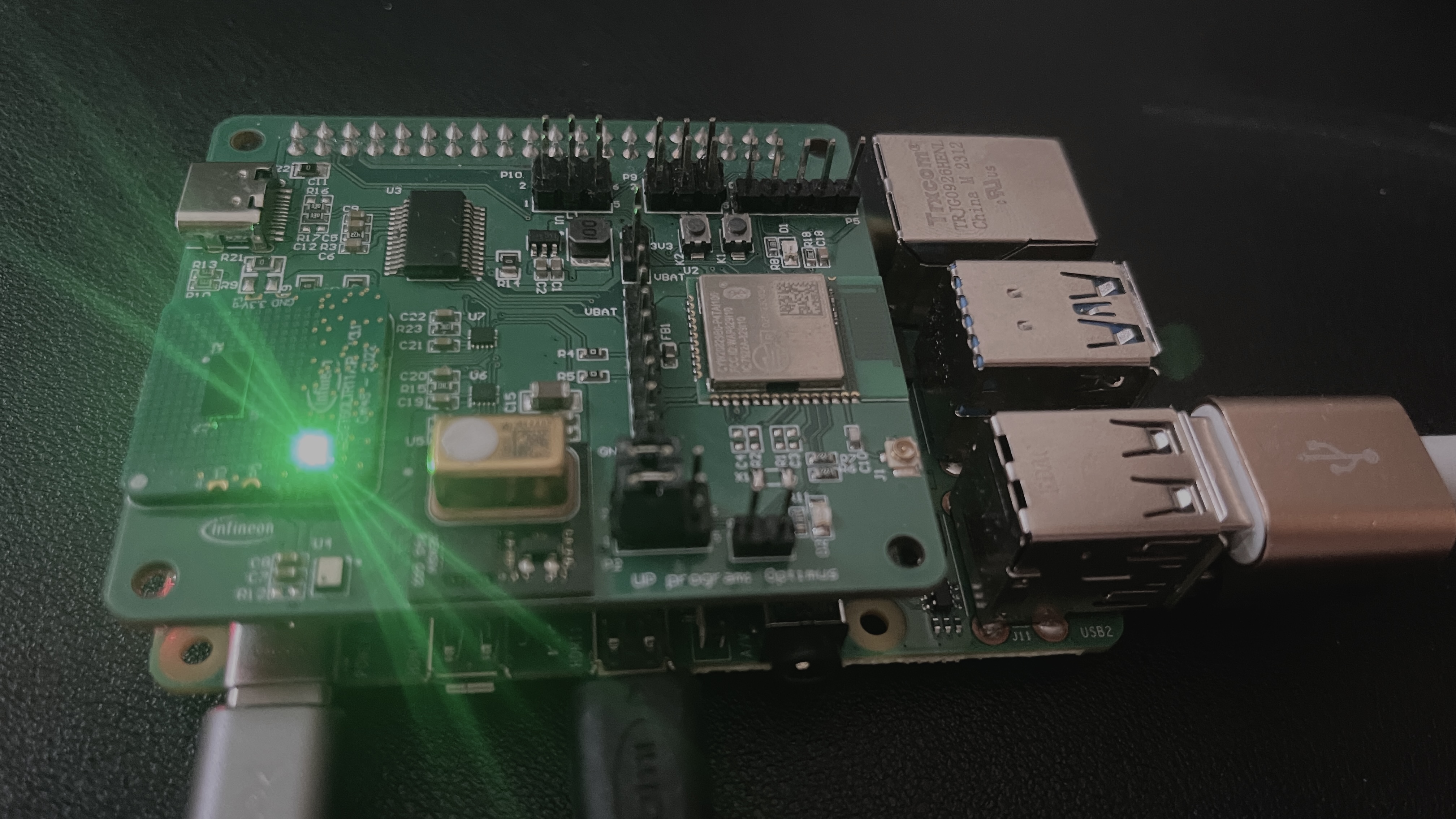
This image is a PCB board for this project, which can work on a Raspberry Pi. This board, called the "Infineon Powenko Board," can be purchased at www.ifroglab.com.
Table of Contents
Installation
To install the library, you can use pip. If the package is published on PyPI, you can install it directly from there:
pip install infineon_paco2_dps_lib
If you are installing it from a local source, navigate to the directory containing setup.py and run:
pip install .
Usage
Reading Temperature and Pressure from DPS310
The DPS class allows you to interface with the Infineon DPS310 pressure sensor. Here is an example of how to use it to read temperature and pressure data:
from infineon_paco2_dps_lib import dps

def main():
    # Initialize the dps sensor
    dps = dps()

    # Read temperature
    temperature = dps.read_temperature()
    print(f"Temperature: {temperature:.2f} °C")

    # Read pressure
    pressure = dps.read_pressure()
    print(f"Pressure: {pressure:.2f} Pa")

if __name__ == "__main__":
    main()
Measuring CO2 with PA_CO2
The paco2 class allows you to interface with the Infineon PA_CO2 sensor. Here is an example of how to use it to measure CO2 concentration:
from infineon_paco2_dps_lib import paco2

def main():
    # Initialize the pa_co2 sensor
    sensor = paco2()

    # Measure CO2 concentration
    co2_concentration = sensor.measure_co2()
    print(f"CO2 Concentration: {co2_concentration:.2f} ppm")

if __name__ == "__main__":
    main()
API Reference
dps Class
The dps class provides methods to interface with the Infineon DPS310 pressure sensor. This class supports reading temperature and pressure data.
Initialization
dps = dps()
This initializes the DPS sensor by setting up the I2C bus and configuring the sensor.
Methods
-
read_temperature(): Reads and returns the temperature in degrees Celsius.temperature = dps.read_temperature()
-
read_pressure(): Reads and returns the pressure in Pascals.pressure = dps.read_pressure()
paco2 Class
The paco2 class provides methods to interface with the Infineon PA_CO2 sensor. This class supports measuring CO2 concentration.
Initialization
co2_sensor = paco2()
This initializes the PA_CO2 sensor by setting up the I2C bus and configuring the sensor.
Methods
-
measure_co2(): Triggers a CO2 measurement and returns the CO2 concentration in parts per million (ppm).co2_ppm = co2_sensor.measure_co2()
Contributing
Contributions to the infineon_paco2_dps_lib library are welcome! If you find a bug, have a feature request, or want to contribute code, please open an issue or a pull request on the GitHub repository.
Steps to Contribute
- Fork the repository on GitHub.
- Clone your fork to your local machine.
- Create a new branch for your feature or bugfix.
- Make your changes and commit them with clear and concise messages.
- Push your changes to your fork on GitHub.
- Open a pull request to the main repository, describing your changes in detail.
Please ensure your code adheres to the following guidelines:
- Follow the existing coding style.
- Write clear and concise commit messages.
- Add comments and documentation as necessary.
- Ensure your code is well-tested.
License
This library is licensed under the MIT License. See the LICENSE file for more information.
Author
Powen Ko
- Email: powenkoads@gmail.com
Note: I am seeking a programming job in the US. If you have any opportunities, please contact me at the above email.
Detailed Library Overview
The infineon_paco2_dps_lib library is designed to facilitate easy interaction with Infineon’s PA_CO2 and DPS sensors using the I2C protocol. The library abstracts the complexity involved in sensor communication, providing straightforward methods to retrieve sensor data.
DPS Sensor
The DPS310 is a high-precision pressure sensor capable of measuring temperature and pressure. It is commonly used in applications such as weather stations, altimeters, and other environmental monitoring systems. The dps class in this library provides methods to initialize the sensor, configure its settings, and read data.
Temperature and Pressure Measurement
The DPS310 sensor uses advanced calibration algorithms to ensure accurate readings. The read_temperature method retrieves the temperature by reading raw sensor data, scaling it, and applying calibration coefficients. Similarly, the read_pressure method processes raw pressure data to provide precise measurements.
PA_CO2 Sensor
The PA_CO2 sensor measures CO2 concentration in the environment. It is useful in applications such as indoor air quality monitoring, HVAC systems, and industrial safety.
CO2 Measurement
The measure_co2 method triggers the sensor to perform a CO2 concentration measurement. It reads raw data from the sensor, processes it, and returns the CO2 level in parts per million (ppm). This method ensures reliable and accurate CO2 monitoring for various applications.
Why Choose infineon_paco2_dps_lib?
- Ease of Use: The library provides a high-level interface for sensor communication, making it easy to integrate into your projects.
- Reliability: Built with robust error handling and initialization routines, the library ensures reliable sensor operation.
- Community Support: With open-source availability, the library benefits from community contributions and improvements.
Future Work
Future versions of the infineon_paco2_dps_lib library aim to include additional features such as:
- Support for more sensors and extended functionalities.
- Enhanced calibration routines for improved accuracy.
- Real-time data streaming capabilities.
- Integration with cloud services for remote monitoring.
By continuously improving and expanding the library, we aim to meet the evolving needs of developers and engineers working with Infineon sensors.
Get Involved
Join our growing community of developers and contribute to the future of sensor interfacing. Your feedback, contributions, and support are invaluable in making infineon_paco2_dps_lib a comprehensive solution for Infineon sensor integration.
Thank you for choosing infineon_paco2_dps_lib. We look forward to your contributions and feedback.
Release history Release notifications | RSS feed


Download files
Download the file for your platform. If you're not sure which to choose, learn more about installing packages.
Source Distribution
Built Distribution
Filter files by name, interpreter, ABI, and platform.
If you're not sure about the file name format, learn more about wheel file names.
Copy a direct link to the current filters
File details
Details for the file infineon_paco2_dps_lib-0.1.7.tar.gz.
File metadata
- Download URL: infineon_paco2_dps_lib-0.1.7.tar.gz
- Upload date:
- Size: 19.0 kB
- Tags: Source
- Uploaded using Trusted Publishing? No
- Uploaded via: twine/5.1.1 CPython/3.11.2
File hashes
| Algorithm | Hash digest | |
|---|---|---|
| SHA256 |
f7dd1022e737d147702ac03a80e489ca6bc999fae47daf3b3dc0960507ef6b04
|
|
| MD5 |
b3a9d1ddfc595338332de3222e9349c1
|
|
| BLAKE2b-256 |
8d731c15ea7fc193ed4611cc7dde35015135fb9ff47b03f268a1de2feba6807d
|
File details
Details for the file infineon_paco2_dps_lib-0.1.7-py3-none-any.whl.
File metadata
- Download URL: infineon_paco2_dps_lib-0.1.7-py3-none-any.whl
- Upload date:
- Size: 21.2 kB
- Tags: Python 3
- Uploaded using Trusted Publishing? No
- Uploaded via: twine/5.1.1 CPython/3.11.2
File hashes
| Algorithm | Hash digest | |
|---|---|---|
| SHA256 |
105e05b5eaf631149d008d4e520c0d4441f54c42d57424ca5b4d01b2a5a9ab41
|
|
| MD5 |
e8d4b91a66d9a6c0b715f28c4d693170
|
|
| BLAKE2b-256 |
55c7c7716fce250f6556ea02798c1800ae7542667b163b25220264be0475abdd
|






