
Infinidev
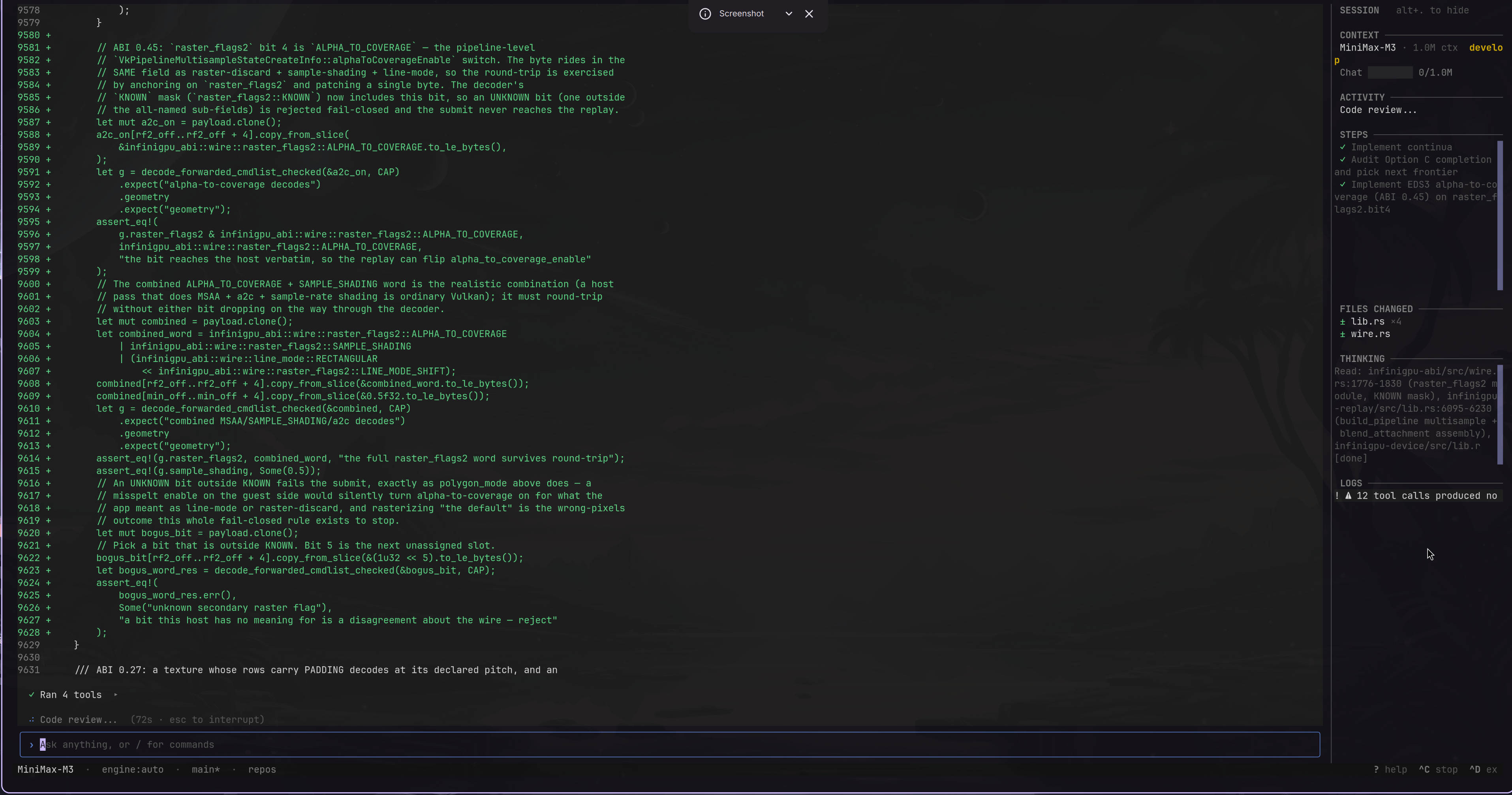
A terminal-based AI programming assistant for modern coding models. It runs an autonomous agent loop that can read, write, and edit code, execute commands, manage git, search the web, and maintain a persistent knowledge base — all from your terminal.
The primary target is a single configured SOTA reasoning or coding model with a long context window, including models around 1M tokens where the provider supports them. LiteLLM keeps the backend provider-agnostic; local open-weight models through Ollama remain a supported compatibility path.
Features
- Plan-execute-summarize loop — the agent keeps context relevant through step summaries, evidence pointers, and on-demand recall instead of filling even a large window indiscriminately.
- Full-featured TUI — tabbed interface with chat, file explorer, syntax-highlighted editor, sidebar with live progress, and autocomplete for commands.
- Live file change diffs — collapsible widgets showing colorized unified diffs with line numbers for every file the agent modifies, updated in real time during task execution.
- Context window tracking — dual progress bars showing Chat Usage (your input + session history) and Task Usage (actual prompt tokens from the LLM), with automatic budget warnings when context runs low.
- Settings editor — modal settings browser with section grouping, inline editing, and save/cancel buttons. Accessible via
/settings. - Persistent knowledge base — the agent records what it learns about your project (classes, patterns, APIs) and recalls it across steps and future sessions.
- Dual tool-calling modes — auto-detects whether the LLM supports native function calling or falls back to JSON-in-text parsing.
- 30+ built-in tools — file operations, git, shell, web search/fetch, knowledge management with semantic dedup.
- Project-local state — settings, DB, and logs live in
.infinidev/inside your project directory. - Model management — list, switch, and interactively pick Ollama models from the TUI.
- Documentation management — browse and manage cached library documentation.
Requirements
- Python 3.11+
- A LiteLLM-compatible model provider
- Ollama when using a local open-weight model
- uv (recommended) or pip
Quickstart
# Clone and install
git clone https://github.com/Infinibay/infinidev.git
cd infinidev
uv sync

# Local-model option: make sure Ollama is running with a model
ollama pull qwen3-coder:30b

# Launch
uv run infinidev
Or install system-wide:
./install.sh
infinidev
Usage
TUI Mode (default)
uv run infinidev
The TUI has three panels:
- Left — File explorer (toggle with
Ctrl+E) - Center — Tabbed area with Chat + file editor tabs
- Right — Sidebar showing plan progress, active tools, and logs
Classic Mode
uv run infinidev --classic
Text-only mode for minimal terminals or piping.
Commands
| Command | Description |
|---|---|
/help |
Show all commands and keybindings |
/models |
Show current model configuration |
/models list |
List available Ollama models |
/models set <name> |
Change the active model |
/models manage |
Interactive model picker |
/settings |
Show or edit settings configuration |
/settings browse |
Open settings editor modal |
/findings |
Browse all knowledge base findings |
/knowledge |
Browse project context knowledge |
/documentation |
Browse cached library documentation |
/docs |
Browse cached library documentation (alias) |
/clear |
Clear chat history and panels |
/exit |
Quit |
Keybindings
| Key | Action |
|---|---|
Ctrl+S |
Save current file |
Ctrl+F |
Find in current file |
Ctrl+Shift+F |
Search across project |
Ctrl+E |
Toggle file explorer |
Ctrl+W |
Close active file tab |
F2 / F3 / F4 |
Focus: Chat / Explorer / Sidebar |
File Editor
The built-in editor tracks unsaved changes with a visual indicator (●) on the tab and in the file explorer (highlighted in yellow). Closing a modified file prompts a Save/Discard/Cancel dialog.
Image Viewer
Opening an image file (PNG, JPG, GIF, BMP, WebP, etc.) from the explorer renders it directly in the terminal using Unicode half-block characters (▀). Each character cell represents 2 vertical pixels with 24-bit color.
Controls when viewing an image:
| Key | Action |
|---|---|
+ / - |
Zoom in / out |
0 |
Reset zoom to 100% |
F |
Fit image to viewport |
The info bar shows filename, dimensions, format, file size, current zoom level, and the active rendering backend (numpy or cuda).
GPU-accelerated rendering
By default, images are processed with NumPy on CPU. If you have an NVIDIA GPU, you can enable CUDA acceleration for faster rendering of large images:
# Install with CUDA support
uv sync --extra cuda

# Or add cupy manually
uv pip install cupy-cuda12x
The backend is auto-detected at startup — no configuration needed. The info bar in the image viewer shows [cuda] or [numpy] so you know which one is active.
Project Search
Ctrl+Shift+F opens a project-wide search modal with:
- Real-time results with highlighted matches
- Preview pane with context (2 lines before/after)
- Skip junk toggle (on by default) — excludes
node_modules,.git,__pycache__,.venv, binary files, lock files, and other common non-source files - Click a result to open the file at the matching line
Configuration
Settings are stored in .infinidev/settings.json in your project directory. They can also be set via environment variables with the INFINIDEV_ prefix.
| Setting | Default | Description |
|---|---|---|
LLM_MODEL |
ollama_chat/qwen3-coder:30b |
LiteLLM model identifier |
LLM_BASE_URL |
http://localhost:11434 |
Ollama / LLM API base URL |
LOOP_MAX_ITERATIONS |
50 |
Max planning iterations per task |
LOOP_MAX_TOTAL_TOOL_CALLS |
200 |
Global tool call limit per task |
LOOP_HISTORY_WINDOW |
0 |
Summaries to keep (0 = all) |
COMMAND_OUTPUT_CAPTURE_ENABLED |
false |
Opt in to private, bounded capture of command streams that exceed the normal truncation limit. See docs/COMMAND_OUTPUT_CAPTURE.md. |
COMMAND_OUTPUT_AUTO_NOTES_ENABLED |
false |
Independently create traceable closure notes for captured-output handles. |
COMMAND_OUTPUT_NOTE_COMPACTION_ENABLED |
false |
Independently compact newly created closure notes without replacing their sources. |
FORGEJO_API_URL |
"" |
Forgejo API URL |
FORGEJO_OWNER |
"" |
Forgejo owner |
INFINIDEV_MNN_MODEL_PATH |
unset | Override for the MNN model path. Only needed to point at a custom location; leave unset to use the auto-managed default under ~/.infinidev/models/. |
Optional: MNN-accelerated embeddings
ContextRank, finding dedup, and symbol search all rely on the same
all-MiniLM-L6-v2 embedding model. By default this runs through
ChromaDB's bundled ONNX Runtime on CPU, which costs ~115 ms per query
on consumer hardware. For sessions backed by a remote LLM provider, that
latency is visible on every pivot of the loop.
Routing the same model through MNN (Alibaba's inference runtime) cuts this to ~11 ms per query — roughly 10× faster — while producing bit-compatible vectors (cosine 1.0000 against the ONNX baseline), so embeddings already stored in the DB remain valid without re-indexing.
Enable
uv sync --extra mnn     # or: pip install 'infinidev[mnn]'
uv run infinidev
That's it. On the first session after installing the extra, infinidev
detects the MNN runtime, converts ChromaDB's cached ONNX model to MNN
format (one-time, ~30 s, logged on stderr), caches it under
~/.infinidev/models/minilm.mnn, and switches to the faster path for
every subsequent session. If the extra isn't installed, nothing changes
— infinidev keeps using the ChromaDB default embedder.
The scripts/convert_minilm_to_mnn.py script is still available for
pre-warming (useful in CI images or read-only deployments where the
first-run conversion is inconvenient), but it's not required.
Notes
- CPU only today. The MNN pip wheel does not ship with the Vulkan backend compiled in, so inference runs on CPU regardless of the requested backend. CPU alone is already the ~10× speedup documented above; GPU would be additional.
- Hardened kernels. MNN's wheel ships with an executable-stack ELF
flag that Arch/CachyOS/Ubuntu hardened kernels reject. The embedder
auto-patches the affected
.sofiles on first use; no manual step needed. - Same model, same vectors. The embedder produces the same 384-dim output as before. Stored finding, symbol, and context embeddings remain correct — no migration required.
Architecture
src/infinidev/
  cli/          # TUI (Textual) and classic CLI entry points
  engine/       # Plan-execute-summarize loop engine
  agents/       # Agent role definitions and tool binding
  tools/        # 30+ tools: file, git, shell, web, knowledge, documentation
  config/       # Settings, LLM params, model capability probing
  db/           # SQLite with FTS5, findings, artifacts, conversations
  prompts/      # System prompts, tech-specific guidelines
The core loop:
- Plan — LLM produces 2-3 initial steps
- Execute — one step at a time, calling tools as needed
- Summarize and archive — the step conclusion stays on the plan while raw tool evidence moves into searchable working memory
- Repeat — the next prompt is rebuilt from the plan, durable summaries, and recalled evidence when needed
This keeps context focused, attributable, and recoverable. A long context window provides headroom; it does not make every old tool result equally relevant.
Knowledge Base
The agent maintains a persistent knowledge base of findings across sessions. It automatically records:
- Project structure, key classes, and public APIs
- Patterns, conventions, and dependencies
- Research results and bug findings
- Things you ask it to remember
Findings are auto-injected into the prompt at the start of each task, so the agent starts every session already knowing your project.
Browse the knowledge base anytime with /findings or /knowledge.
Development
# Run tests
uv run pytest tests/

# Run a specific test
uv run pytest tests/test_tui.py::test_space_inserts_space_character -v
Prompt changes must follow docs/PROMPTING.md. The current
specification-elaboration design is documented in
docs/SPEC_ELABORATION.md.
License
Infinidev is distributed under the MIT License. Copyright (c) 2026 Infinibay LLC
andres@infinibay.net. See LICENSE.md.
1 maintainer

Download files
Download the file for your platform. If you're not sure which to choose, learn more about installing packages.
Source Distribution
Built Distribution
Filter files by name, interpreter, ABI, and platform.
If you're not sure about the file name format, learn more about wheel file names.
Copy a direct link to the current filters
File details
Details for the file infinidev-0.14.3.tar.gz.
File metadata
- Download URL: infinidev-0.14.3.tar.gz
- Upload date:
- Size: 34.4 MB
- Tags: Source
- Uploaded using Trusted Publishing? No
- Uploaded via: uv/0.11.7 {"installer":{"name":"uv","version":"0.11.7","subcommand":["publish"]},"python":null,"implementation":{"name":null,"version":null},"distro":{"name":"CachyOS Linux","version":null,"id":null,"libc":null},"system":{"name":null,"release":null},"cpu":null,"openssl_version":null,"setuptools_version":null,"rustc_version":null,"ci":null}
File hashes
| Algorithm | Hash digest | |
|---|---|---|
| SHA256 |
5fe59e649509cc41219314ba3924b312af85432817ab0e93ec17d3f4cc12c208
|
|
| MD5 |
88ed4295dd44334c874d2113c28d909f
|
|
| BLAKE2b-256 |
aac35526fcee15a4d46cf92b3f788172fe35b415b8f43c8163bd3d8085b15d27
|
File details
Details for the file infinidev-0.14.3-py3-none-any.whl.
File metadata
- Download URL: infinidev-0.14.3-py3-none-any.whl
- Upload date:
- Size: 34.7 MB
- Tags: Python 3
- Uploaded using Trusted Publishing? No
- Uploaded via: uv/0.11.7 {"installer":{"name":"uv","version":"0.11.7","subcommand":["publish"]},"python":null,"implementation":{"name":null,"version":null},"distro":{"name":"CachyOS Linux","version":null,"id":null,"libc":null},"system":{"name":null,"release":null},"cpu":null,"openssl_version":null,"setuptools_version":null,"rustc_version":null,"ci":null}
File hashes
| Algorithm | Hash digest | |
|---|---|---|
| SHA256 |
9807d3d5ec4a313b7c0432d02f9a49511f9cef74e1483c08eee55bfc9ddd6612
|
|
| MD5 |
4c133af0e4c29ada327c2bebf75776ac
|
|
| BLAKE2b-256 |
49a016bcf5ac59bf297a5402db57a22e32ad69f8d2ca37853563e1a9a02f450e
|







