
infotr
A traceroute tool that also displays IP information.
This tool has only been tested on Linux.
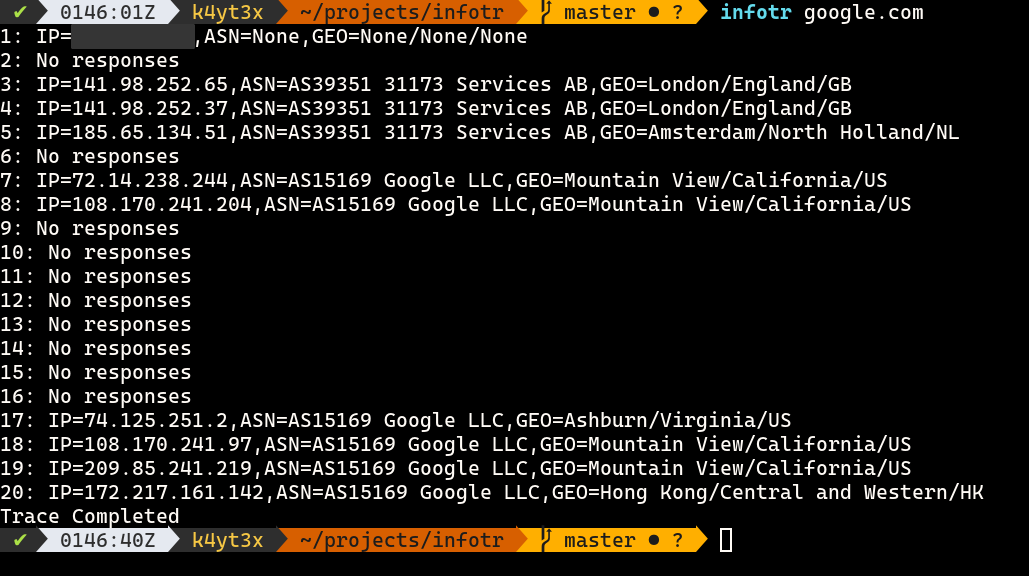
Quick Start
First, install this tool from PyPI.
pip install --user -U infotr
Since Scapy needs to open raw sockets, this tool requires Python to have the CAP_NET_RAW capability to run. You can also run this tool as root. Run the following commands to set/unset the CAP_NET_RAW capability for the Python binary. Remember to unset the capability when you're done.
# set the capability
sudo setcap cap_net_raw=+eip /usr/bin/python3.9

# remove the capability
sudo setcap cap_net_raw=-eip /usr/bin/python3.9
Finally, launch this tool via the infotr command.
infotr 1.1.1.1
Full Usages
You can also see the help messages with the -h/--help switch.
usage: infotr [-h] [-m MAX] [-t TIMEOUT] host

positional arguments:
  host                  destination hostname

optional arguments:
  -h, --help            show this help message and exit
  -m MAX, --max MAX     maximum number of hops (default: 30)
  -t TIMEOUT, --timeout TIMEOUT
                        ICMP timeout in seconds (default: 2)
1 maintainer

Metadata
1 maintainer
Release files for infotr 1.0.0
For a detailed explanation of source distributions (sdists) and built distributions (wheels), please see the package formats documentation.
Source distribution (sdist)
| File | Size | Uploaded | Provenance | |
|---|---|---|---|---|
| infotr-1.0.0.tar.gz | 15.4 kB | Without provenance | Details |
Built distribution (wheel)
| File | Interpreter | ABI | Platform | Reset |
|---|---|---|---|---|
| infotr-1.0.0-py3-none-any.whl | Python 3 | none | any | Details |
Total release size: 31.2 kB
Release files / infotr-1.0.0.tar.gz
| Download URL | infotr-1.0.0.tar.gz |
|---|---|
| Size | 15.4 kB |
| Tags | Source |
|
SHA-256 checksum How to use checksums |
f87eb48bbe5eb245dd0d4ee4e4e23f409656d4398e2c1e20e3d878dedacc8810
|
|
BLAKE2b-256 checksum How to use checksums |
47ce1c65a9202354d1cd344123cce7611af97d83703437c1e1c63cac454ac8bb
|
| Upload date | |
|
Uploaded using Trusted Publishing? What is trusted publishing? |
No |
| Uploaded via |
twine/3.4.1 importlib_metadata/4.0.1 pkginfo/1.7.0 requests/2.25.1 requests-toolbelt/0.9.1 tqdm/4.61.0 CPython/3.9.5
|
Release files / infotr-1.0.0-py3-none-any.whl
| Download URL | infotr-1.0.0-py3-none-any.whl |
|---|---|
| Size | 15.8 kB |
| Tags | Python 3 |
|
SHA-256 checksum How to use checksums |
e551f3b6e64f2ffa695d9dec5ed1e52ec5f86c6ce542eadfdf1c808388c2e595
|
|
BLAKE2b-256 checksum How to use checksums |
d06c67579decd81367eb3c23c8b563ba8e43a5789f9048ab8a18a8ababcdb2a2
|
| Upload date | |
|
Uploaded using Trusted Publishing? What is trusted publishing? |
No |
| Uploaded via |
twine/3.4.1 importlib_metadata/4.0.1 pkginfo/1.7.0 requests/2.25.1 requests-toolbelt/0.9.1 tqdm/4.61.0 CPython/3.9.5
|
Security for infotr 1.0.0
Provenance
Provenance describes where a file came from. On PyPI, provenance is shared via attestations, which provide a verifiable record of the build or publishing details. View details, limitations and caveats.
No provenance found
None of the files in this release were uploaded with provenance metadata.
A note on package security
PyPI is a repository for distributing packages, not a service for auditing them. While third-party security researchers and our staff do their best to detect and remove malicious packages, PyPI cannot guarantee the quality, security or suitability of any given package.













