
🧞 InfraGenie
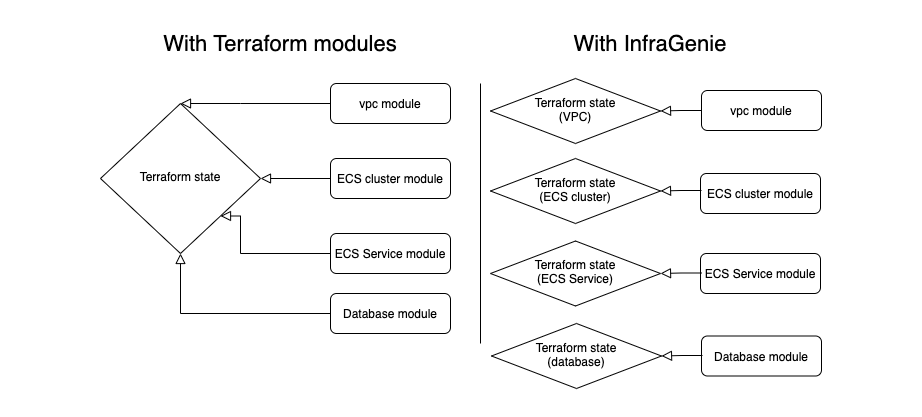
InfraGenie is allows you to split out your infrastructure project into separate independent pieces, each with its own terraform state. This is done using a pattern similar to dependency injection in programming languages, but under the hood it uses terraform data blocks.
Why this pattern?
There are several reasons why you would want to adopt this pattern:
- Flexibility in customising your infrastructure. We know that for a single project the infrastructure might change from one environment to another. For example if you are using an Elasticsearch service in production you might use a self-hosted version in dev to save costs. InfraGenie makes this process very easy
- Split your terraform state. By splitting your state accross several modules you can run several applies in parallel. It makes the terraform refresh faster. It also makes your applies safer since if some apply goes haywire it will only affect the resources in the current module.
What about Terraform modules?
Terraform modules can allow you to acheive some flexibiliy buy you still share state across the entire project. It is more difficult to make part of a module optional. The count syntax and similar foreach declarative statements in terraform can be confusing if you are not used to the declarative style it uses.
How it works
To use infragenie you simply create a file called genie.hcl in the root of your project and use it to define your pipeline.
# genie.hcl


# unified variables for use in all pipelines
variables {
  project_name = "myproj123"
  environment = "dev"
  region = "us-east-1"
}

# resource injections definition
inject {
  main_vpc = {
    source = vpc.aws_vpc.vpc # source can come from any of the pipeline steps
  }
}

pipeline {
  steps = [
    {
      name = "vpc"
      description = "creates a vpc and 2 subnets"
      source = "./vpc"
    },
    {
      name = "ecs"
      description = "creates an ecs cluster and SG"
      source = "./ecs"
    },

  ]
}
Now with this genie file you can use the vpc in any of your modules as a data definition:
# ecs/main.tf

resource "aws_security_group" "ecs_service_sg" {
  # using global variables
  name_prefix = "${var.project_name}-${var.environment}"
  # using vpc from other module as data block
  vpc_id      = data.aws_vpc.main_vpc.id
}
Quickstart
You can install InfraGenie CLI via pip
pip install infragenie
Usage
You can use the examples to try out infragenie:
Clone the repository:
git clone https://github.com/diggerhq/infragenie
cd infragenie/examples/ecs_fargate
export your AWS keys:
export AWS_ACCESS_KEY_ID=<Access Key>
export AWS_SECRET_ACCESS_KEY=<Secret>
Use igm to apply the example:
igm apply
take note of the generated .infragenie directory along with all the generated data. After exploration you can destroy the resources with:
igm destroy
Contributing
Pull requests are welcome. For major changes, please open an issue first to discuss what you would like to change.
Please start the project if you think other people will also find it useful.
License
1 maintainer

Metadata
1 maintainer
Release files for infragenie 0.1.5
For a detailed explanation of source distributions (sdists) and built distributions (wheels), please see the package formats documentation.
Source distribution (sdist)
| File | Size | Uploaded | Provenance | |
|---|---|---|---|---|
| infragenie-0.1.5.tar.gz | 5.3 kB | Without provenance | Details |
Built distribution (wheel)
| File | Interpreter | ABI | Platform | Reset |
|---|---|---|---|---|
| infragenie-0.1.5-py3-none-any.whl | Python 3 | none | any | Details |
Total release size: 10.9 kB
Release files / infragenie-0.1.5.tar.gz
| Download URL | infragenie-0.1.5.tar.gz |
|---|---|
| Size | 5.3 kB |
| Tags | Source |
|
SHA-256 checksum How to use checksums |
5f910799139efe2eff96ef55185dcf00c09ff0f8945c24a3a46d05070a2c05a7
|
|
BLAKE2b-256 checksum How to use checksums |
895fa20e896cb826db0e3503312f48e538ea504cabaa69e1bd53d97b287a71e5
|
| Upload date | |
|
Uploaded using Trusted Publishing? What is trusted publishing? |
No |
| Uploaded via |
twine/3.4.2 importlib_metadata/3.7.2 pkginfo/1.7.0 requests/2.24.0 requests-toolbelt/0.9.1 tqdm/4.61.1 CPython/3.9.5
|
Release files / infragenie-0.1.5-py3-none-any.whl
| Download URL | infragenie-0.1.5-py3-none-any.whl |
|---|---|
| Size | 5.6 kB |
| Tags | Python 3 |
|
SHA-256 checksum How to use checksums |
e7187228ff5935d02cd50b36201a70057771148f47cdc4417cf33c38a6392cac
|
|
BLAKE2b-256 checksum How to use checksums |
b53b7ffbd25b635de7a2b77f6735af765c3885d5a5ecd61d73c62e4fc8c33874
|
| Upload date | |
|
Uploaded using Trusted Publishing? What is trusted publishing? |
No |
| Uploaded via |
twine/3.4.2 importlib_metadata/3.7.2 pkginfo/1.7.0 requests/2.24.0 requests-toolbelt/0.9.1 tqdm/4.61.1 CPython/3.9.5
|
Security for infragenie 0.1.5
Provenance
Provenance describes where a file came from. On PyPI, provenance is shared via attestations, which provide a verifiable record of the build or publishing details. View details, limitations and caveats.
No provenance found
None of the files in this release were uploaded with provenance metadata.
A note on package security
PyPI is a repository for distributing packages, not a service for auditing them. While third-party security researchers and our staff do their best to detect and remove malicious packages, PyPI cannot guarantee the quality, security or suitability of any given package.
To learn more about protecting yourself from malicious actors, visit our package security documentation.













