
Python SDK for the Infrared City API

Project description

Infrared Python SDK
Python SDK for the Infrared City simulation platform. Run urban microclimate analyses — wind, solar, thermal comfort — from a few lines of code.
📚 SDK Documentation · 🧪 Notebooks + agent skills · 🌐 infrared.city · 📊 Knowledge base



Need ready-to-run examples? Jupyter notebooks for all 8 analyses, agent skills for Claude Code / Cursor / Codex / Copilot / Windsurf, and runnable Python recipes live at Infrared-city/infrared-skills.
Features:
- 8 analysis types: wind speed, pedestrian wind comfort, daylight availability, direct sun hours, sky view factors, solar radiation, thermal comfort (UTCI), thermal comfort statistics
- Area API for multi-tile polygon analysis with automatic tiling, blending, and clipping
- Buildings API for 3D building data retrieval
- Vegetation API for tree data retrieval
- Ground Materials API for surface material layers
- Weather data integration
- Webhook support for async job notifications
- Fully typed (PEP 561)
Table of Contents
- Infrared Python SDK
Installation
pip install infrared-sdk
Or with uv:
uv add infrared-sdk
Requirements: Python 3.9+ (3.11+ recommended). The lower 3.9/3.10 floor exists so the SDK installs inside embedded Python environments — Rhino 8 (3.9), Houdini 19 (3.9), Maya 2024 (3.10), QGIS LTS (3.9). Dependencies (requests, pydantic, validators, numpy) are installed automatically; on 3.9 the resolver caps requests<2.33 and numpy<2.1 to keep cp39 wheels available.
After installation the infrared console script is available on your PATH. Running it (or python -m infrared_sdk) prints a version banner — useful for confirming the install and active version:
infrared
# or
python -m infrared_sdk
Banner output is suppressed automatically in non-TTY environments (CI, piped output) and when NO_COLOR=1 or INFRARED_QUIET=1 is set.
Quick Start
from infrared_sdk import InfraredClient
from infrared_sdk.analyses.types import WindModelRequest, AnalysesName

polygon = {
    "type": "Polygon",
    "coordinates": [[
        [11.570, 48.195], [11.580, 48.195],
        [11.580, 48.201], [11.570, 48.201],
        [11.570, 48.195],
    ]],
}

# api_key and base_url fall back to INFRARED_API_KEY / INFRARED_BASE_URL env vars
with InfraredClient() as client:
    # 1. Fetch buildings for the area
    area = client.buildings.get_area(polygon)

    # 2. Run a wind analysis over the polygon
    result = client.run_area_and_wait(
        WindModelRequest(
            analysis_type=AnalysesName.wind_speed,
            wind_speed=15,
            wind_direction=180,
        ),
        polygon,
        buildings=area.buildings,
    )

    # 3. Result contains a merged grid covering the polygon
    print(f"Grid shape: {result.grid_shape}")
API key: To use the SDK you need an Infrared API key. Visit infrared.city to sign up or contact the Infrared team.
Recommended Reading Path
If you are new to the SDK, read in this order:
- Examples — runnable demos in the public Infrared-city/infrared-skills repo.
- Output Reference — what each analysis produces, in what units, and how to read the numbers.
- Analysis Types — pick the analysis you need and copy the snippet.
- Area API → How tiling works — only if your polygon is larger than ~512 m on a side; otherwise tiling is automatic and you can skip it.
Examples
Runnable demos live in the public Infrared-city/infrared-skills repo under cookbook/scripts/, ordered by learning path:
demo_wind_analysis.py— quickstart: single wind analysis with Plotly heatmapdemo_vienna.py— all 8 analyses over one polygon, multi-panel visualizationdemo_utci_analysis.py— end-to-end UTCI thermal comfort with buildings, weather, vegetation, and ground materialsdemo_vegetation_ground.py— fetch-once-reuse pattern across multiple analysis runsdemo_fetch_layers.py— fetch buildings, vegetation, and ground materials and plot the layers (no analysis)demo_tiling.py— educational walkthrough of the tiling internalsdemo_advanced_usage.py— low-level primitives, custom polling, BYO weather data, persist/resume schedulesareas_demo_async/— async area analysis with webhook notifications
Output Reference
Every analysis returns an AreaResult with a 2-D merged_grid (numpy array, ~1 m per cell) covering the polygon. Cells outside the polygon are NaN. The table below lists what each cell value means.
| Analysis | Cell unit | Typical range | Physical meaning |
|---|---|---|---|
| Wind Speed | m/s | 0–20 | Steady-state wind magnitude near pedestrian level for one (speed, direction) pair |
| Pedestrian Wind Comfort | comfort class (int 0–4) | Lawson criteria | Categorical comfort/safety class per chosen criterion (e.g. Lawson LDDC: A/B/C/D/E from sit-long to unsafe) |
| Daylight Availability | hours | 0–100 | Hours of usable daylight at the cell over the chosen TimePeriod |
| Direct Sun Hours | hours | 0–(period length) | Cumulative hours of direct sun over the chosen TimePeriod |
| Sky View Factors | percent | 0–100 | Portion of the sky hemisphere visible from the cell (100 = fully open, 0 = fully obstructed) |
| Solar Radiation | kWh/m² | 0–~hundreds | Cumulative solar irradiance on the ground over the TimePeriod |
| Thermal Comfort (UTCI) | °C (UTCI equivalent) | Range based on weather data provided | Felt temperature combining air temperature, mean radiant temperature, humidity, and wind |
| Thermal Comfort Statistics | hours | 0–(period length) | Hours per cell in the chosen band: thermal_comfort, heat_stress, or cold_stress. Derive % time as cell_hours / window_total_hours. |
Plot with
min_legend/max_legendwhen present. For Direct Sun Hours and Daylight Availability, the bulk of the grid sits near the maximum, so deriving the colour range from the data alone produces washed-out plots. Ifresult.min_legend/result.max_legendisNone(the API may omit them), fall back tonp.nanmin(result.merged_grid)/np.nanmax(result.merged_grid)— auto-scaling on the raw range usually gives the same washed-out output, so this fallback is a stopgap until the API populates the bounds. See AreaResult.
Configuration
| Environment Variable | Description | Default |
|---|---|---|
INFRARED_API_KEY |
Your Infrared API key | — |
INFRARED_BASE_URL |
API base URL | https://api.infrared.city/v2 |
INFRARED_BIG_PAYLOADS_ENABLED |
Kill switch for the auto-switching $ref envelope path. Set to false to force every POST to take the inline path. |
true |
INFRARED_BIG_PAYLOADS_THRESHOLD_BYTES |
Strict greater-than threshold (raw json.dumps bytes) above which large POST bodies are zipped, uploaded to S3, and replaced with a {"$ref": ...} envelope. |
5242880 (5 MiB) |
The API key and base URL can also be passed directly to the constructor (the big-payload env vars don't have constructor equivalents — they're tuning knobs read at call time):
# Explicit — pass credentials directly
client = InfraredClient(api_key="your-key", base_url="https://api.infrared.city/v2")

# Env vars — set INFRARED_API_KEY (and optionally INFRARED_BASE_URL), then:
client = InfraredClient()
InfraredClient supports the context manager protocol (with statement) for automatic cleanup of HTTP sessions. You can also call client.close() manually.
Geometry Format
All analysis payloads accept a geometries parameter — a dict mapping building identifiers (strings) to DotBim mesh objects:
geometries = {
    "building-001": {
        "mesh_id": 0,
        "coordinates": [x1, y1, z1, x2, y2, z2, ...],  # flat [x, y, z, ...] array in meters
        "indices": [0, 1, 2, 3, 4, 5, ...]              # triangle index array (optional)
    },
    "building-002": {
        "mesh_id": 1,
        "coordinates": [x1, y1, z1, x2, y2, z2, ...],
        "indices": [0, 1, 2, ...]
    },
}
Each mesh entry follows the special DotBim format:
| Field | Type | Description |
|---|---|---|
mesh_id |
int |
Numeric mesh identifier |
coordinates |
list[float] |
Flat [x, y, z, ...] vertex array. Coordinates are in meters, relative to the polygon bounding-box south-west corner (see DotBim coordinate system) |
indices |
list[int] or None |
Triangle index array (3 indices per face). Optional |
You can load geometries from a file or pass the buildings dict returned by the Buildings API:
# Option A: Load from a file
import json
with open("scene.json") as f:
    geometries = json.load(f)

# Option B: Use buildings from the area API
area = client.buildings.get_area(polygon)
geometries = area.buildings  # dict already in the right format
When using run_area_and_wait(), pass buildings separately via the buildings parameter rather than setting geometries on the payload. The SDK handles per-tile coordinate transforms and building assignment automatically.
Optional vegetation and ground_materials can also be fetched and passed to run_area_and_wait(). See Vegetation & Ground Materials for details.
Buildings
DotBim coordinate system
Building coordinates use a local meter-space system: x-axis points east, y-axis points north, z is height.
get_area(polygon) fetches buildings from multiple tiles, deduplicates them, and transforms all coordinates so the origin is the polygon bounding-box SW corner -- all buildings share one frame regardless of which tile they came from.
When you pass buildings to run_area_and_wait(), the SDK automatically transforms them from the polygon-bbox-SW frame to each tile's local frame. See Building coordinate transforms in the Area API section for the full explanation.
Check dotbimpy for more information on the dotbim file format.
Building retrieval
Fetch 3D building data for a polygon with automatic deduplication across tiles:
area = client.buildings.get_area(polygon)
print(area.total_buildings)
print(area.buildings)  # dict[str, DotBimMesh]
Time Period
Solar, thermal, and wind-comfort analyses require a TimePeriod to define the time window for the simulation. The time period also determines which weather data points are included when filtering from a weather file.
from infrared_sdk.models import TimePeriod

tp = TimePeriod(
    start_month=6, start_day=1, start_hour=9,
    end_month=8, end_day=31, end_hour=17,
)
| Field | Type | Range | Description |
|---|---|---|---|
start_month |
int |
1-12 | Start month |
start_day |
int |
1-31 | Start day |
start_hour |
int |
0-23 | Start hour |
end_month |
int |
1-12 | End month |
end_day |
int |
1-31 | End day |
end_hour |
int |
0-23 | End hour |
All 6 fields are required.
day values are validated against the calendar month: April 31, February 30, June 31, September 31, and November 31 raise ValidationError. February 29 is accepted because TimePeriod carries no year context — refusing it would block all valid leap-year windows. The window must also move forward (end > start); year-wrap windows like Nov→Feb are not supported, split them into two periods if you need that behaviour.
How TimePeriod affects weather data
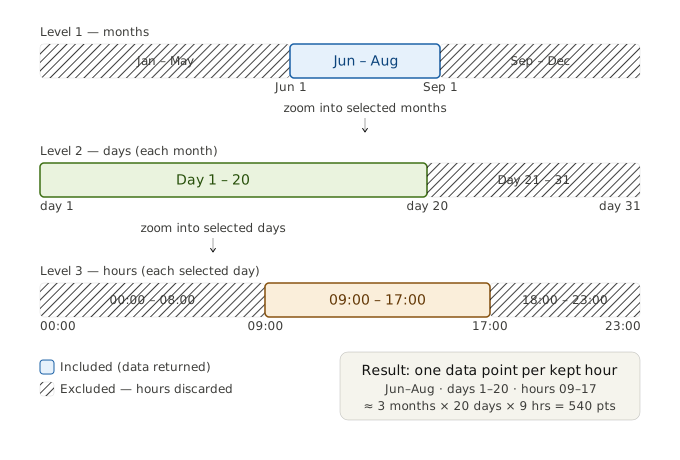
TimePeriod defines a recurring time window applied across every year in your weather file. It works as a three-level cascade filter:
- Months — only data from
start_monththroughend_monthis considered. - Days — within each of those months, only days from
start_daythroughend_dayare kept. - Hours — within each of those days, only hours from
start_hourthroughend_hourare kept. Every hourly data point that does not fall inside all three windows is discarded. The diagram below illustrates howTimePeriod(start_month=6, start_day=1, start_hour=9, end_month=8, end_day=20, end_hour=17)filters the data:
Result: ~3 months x 20 days x 9 hours = 540 hourly data points per year in the weather file.
Which analyses need a TimePeriod
| Analysis | TimePeriod | Weather Data |
|---|---|---|
| Wind Speed | No | No |
| Sky View Factors | No | No |
| Daylight Availability | Yes | No |
| Direct Sun Hours | Yes | No |
| Solar Radiation | Yes | Yes (radiation arrays) |
| Thermal Comfort (UTCI) | Yes | Yes (temperature, radiation, humidity, wind) |
| Thermal Comfort Statistics | Yes | Yes (same as UTCI) |
| Pedestrian Wind Comfort | Yes (for weather filtering) | Yes (wind speed/direction arrays) |
Weather Data
Search for nearby weather stations and filter data by time range:
from infrared_sdk.models import TimePeriod

# Find weather stations near a location (radius in km)
locations = client.weather.get_weather_file_from_location(
    lat=48.1983, lon=11.575, radius=50
)
# Returns a list of station dicts:
# [
#     {
#         "uuid": "eb91892c-fbe3-4743-ade5-c22cfb5913e1",
#         "fileName": "DEU_BY_Munich-Theresienwiese.108650_TMYx",
#         "location_data": {
#             "city": "Munich-Theresienwiese", "state": "BY", "country": "DEU",
#             "latitude": 48.1632, "longitude": 11.5429, "elevation": 520.0,
#             "time_zone": 1.0, "station_id": "108650", "source": "SRC-TMYx",
#             "type": "Location",
#         },
#     },
#     ...
# ]

# Use the station's uuid to filter weather data by time range. The
# `identifier` parameter on filter_weather_data is the station uuid.
weather_data = client.weather.filter_weather_data(
    identifier=locations[0]["uuid"],
    time_period=TimePeriod(
        start_month=6, start_day=1, start_hour=9,
        end_month=8, end_day=31, end_hour=17,
    ),
)
# Returns a list[WeatherDataPoint], one per matching hour:
# [
#     WeatherDataPoint(dryBulbTemperature=22.3, windSpeed=3.2, windDirection=180.0,
#                      diffuseHorizontalRadiation=120.0, directNormalRadiation=450.0, ...),
#     WeatherDataPoint(dryBulbTemperature=23.1, windSpeed=4.1, windDirection=195.0, ...),
#     ...
# ]
Extracting fields for analysis payloads
Use extract_weather_fields to convert WeatherDataPoint lists into the flat arrays that analysis payloads expect. Field names are passed in camelCase (matching WeatherDataPoint attributes); the returned dict uses snake_case keys:
from infrared_sdk.models import extract_weather_fields

wind_fields = extract_weather_fields(weather_data, ["windSpeed", "windDirection"])
# Returns: {"wind_speed": [3.2, 4.1, ...], "wind_direction": [180, 195, ...]}
Important: Pass the same
TimePeriodto bothfilter_weather_data()and the analysis payload. This guarantees the weather arrays are perfectly aligned with the simulation time window.
Analyses that require weather data (Solar Radiation, UTCI, TCS, PWC) use the from_weatherfile_payload() class method, which extracts the required weather arrays from the data points and constructs the full request automatically.
Analysis Types
All analysis types follow the same pattern: construct a request, call client.run_area_and_wait() with a polygon and buildings, get an AreaResult.
The AreaResult contains a merged_grid (numpy array), min_legend / max_legend for color scale bounds, and metadata about succeeded/failed tiles. See AreaResult for the full schema.
Warning: Always use
min_legend/max_legendfrom the result as your heatmap'szmin/zmax. Computing the range from the grid data alone produces washed-out plots for analyses like Direct Sun Hours and Daylight Availability, where most cell values cluster near the maximum.
Wind Speed
Simulates the steady-state wind field around buildings for a single inflow condition. Output cells are wind magnitude in m/s near pedestrian height.
| Parameter | Type | Range | Description |
|---|---|---|---|
wind_speed |
int |
1-100 | Inflow wind speed (m/s) |
wind_direction |
int |
0-360 | Inflow direction (degrees, meteorological convention: 0 = wind from north) |
from infrared_sdk.analyses.types import WindModelRequest, AnalysesName

payload = WindModelRequest(
    analysis_type=AnalysesName.wind_speed,
    wind_speed=15,
    wind_direction=180,
)
result = client.run_area_and_wait(payload, polygon, buildings=area.buildings)
Pedestrian Wind Comfort (PWC)
Wind comfort classification using standard criteria. Requires wind speed and direction arrays from weather data.
| Parameter | Type | Description |
|---|---|---|
criteria |
PwcCriteria |
Classification standard (see below) |
wind_speed |
list[float] |
Wind speed time series from weather data |
wind_direction |
list[float] |
Wind direction time series from weather data |
Available criteria: vdi_387, lawson_1970, lawson_2001, lawson_lddc, davenport, nen_8100_comfort, nen_8100_safety
This example uses a single-month window. Until the underlying weather/sun-context model supports multi-month runs in one request, split longer periods into separate
TimePeriods and run them sequentially.
from infrared_sdk.analyses.types import PwcModelRequest, PwcCriteria, AnalysesName
from infrared_sdk.models import TimePeriod, extract_weather_fields

weather_data = client.weather.filter_weather_data(
    identifier="your-weather-file-id",
    time_period=TimePeriod(
        start_month=6, start_day=1, start_hour=9,
        end_month=6, end_day=30, end_hour=17,
    ),
)
wind_fields = extract_weather_fields(weather_data, ["windSpeed", "windDirection"])

payload = PwcModelRequest(
    analysis_type=AnalysesName.pedestrian_wind_comfort,
    criteria=PwcCriteria.lawson_2001,
    **wind_fields,
)
result = client.run_area_and_wait(payload, polygon, buildings=area.buildings)
Daylight Availability
Simulates daylight availability at a location over a time period.
| Parameter | Type | Range | Description |
|---|---|---|---|
latitude |
float |
-90 to 90 | Location latitude |
longitude |
float |
-180 to 180 | Location longitude |
time_period |
TimePeriod |
— | Analysis time window |
from infrared_sdk.analyses.types import SolarModelRequest, AnalysesName
from infrared_sdk.models import TimePeriod

payload = SolarModelRequest(
    analysis_type=AnalysesName.daylight_availability,
    latitude=48.1983,
    longitude=11.575,
    time_period=TimePeriod(
        start_month=6, start_day=1, start_hour=9,
        end_month=6, end_day=30, end_hour=17,
    ),
)
result = client.run_area_and_wait(payload, polygon, buildings=area.buildings)
Direct Sun Hours
Simulates direct sun hours. Same parameters as Daylight Availability.
payload = SolarModelRequest(
    analysis_type=AnalysesName.direct_sun_hours,
    latitude=48.1983,
    longitude=11.575,
    time_period=TimePeriod(
        start_month=6, start_day=1, start_hour=9,
        end_month=6, end_day=30, end_hour=17,
    ),
)
result = client.run_area_and_wait(payload, polygon, buildings=area.buildings)
Sky View Factors (SVF)
Calculates sky view factors. Geometry-only — no time period or weather data needed.
| Parameter | Type | Range | Description |
|---|---|---|---|
latitude |
float |
-90 to 90 | Optional. Tile-centroid latitude used by the vegetation validator. SVF inference itself does not read it. |
longitude |
float |
-180 to 180 | Optional. Tile-centroid longitude used by the vegetation validator. SVF inference itself does not read it. |
from infrared_sdk.analyses.types import SvfModelRequest, AnalysesName

payload = SvfModelRequest(
    analysis_type=AnalysesName.sky_view_factors,
    latitude=48.1983,    # optional — only needed if you inject vegetation
    longitude=11.575,    # optional — only needed if you inject vegetation
)
result = client.run_area_and_wait(payload, polygon, buildings=area.buildings)
Solar Radiation
Simulates solar radiation. Requires weather data arrays for diffuse horizontal and direct normal radiation.
Important: Pass the same
TimePeriodto bothfilter_weather_data()and the analysis payload. This guarantees the weather arrays are perfectly aligned with the simulation time window otherwise the model can't process the information. If you bring your own weather data the length of the fields should be equal to the one generated with ourfilter_weather_data.
This example uses a single-month window. Until the underlying weather/sun-context model supports multi-month runs in one request, split longer periods into separate
TimePeriods and run them sequentially.
from infrared_sdk.analyses.types import (
    SolarRadiationModelRequest, BaseAnalysisPayload, AnalysesName,
)
from infrared_sdk.models import TimePeriod, Location

tp = TimePeriod(
    start_month=6, start_day=1, start_hour=9,
    end_month=6, end_day=30, end_hour=17,
)

weather_data = client.weather.filter_weather_data(
    identifier="your-weather-file-id",
    time_period=tp,
)

payload = SolarRadiationModelRequest.from_weatherfile_payload(
    payload=BaseAnalysisPayload(
        analysis_type=AnalysesName.solar_radiation,
    ),
    location=Location(latitude=48.1983, longitude=11.575),
    time_period=tp,
    weather_data=weather_data,
)
result = client.run_area_and_wait(payload, polygon, buildings=area.buildings)
Thermal Comfort Index (UTCI)
Important: Pass the same
TimePeriodto bothfilter_weather_data()and the analysis payload. This guarantees the weather arrays are perfectly aligned with the simulation time window otherwise the model can't process the information. If you bring your own weather data the length of the fields should be equal to the one generated with ourfilter_weather_data.
This example uses a single-month window. Until the underlying weather/sun-context model supports multi-month runs in one request, split longer periods into separate
TimePeriods and run them sequentially.
Calculates the Universal Thermal Climate Index. Requires filtered weather data.
from infrared_sdk.analyses.types import UtciModelRequest, UtciModelBaseRequest, AnalysesName
from infrared_sdk.models import TimePeriod, Location

tp = TimePeriod(
    start_month=6, start_day=1, start_hour=9,
    end_month=6, end_day=30, end_hour=17,
)

weather_data = client.weather.filter_weather_data(
    identifier="your-weather-file-id",
    time_period=tp,
)

payload = UtciModelRequest.from_weatherfile_payload(
    payload=UtciModelBaseRequest(
        analysis_type=AnalysesName.thermal_comfort_index,
    ),
    location=Location(latitude=48.1983, longitude=11.575),
    time_period=tp,
    weather_data=weather_data,
)
result = client.run_area_and_wait(payload, polygon, buildings=area.buildings)
Thermal Comfort Statistics (TCS)
Important: Pass the same
TimePeriodto bothfilter_weather_data()and the analysis payload. This guarantees the weather arrays are perfectly aligned with the simulation time window otherwise the model can't process the information. If you bring your own weather data the length of the fields should be equal to the one generated with ourfilter_weather_data.
This example uses a single-month window. Until the underlying weather/sun-context model supports multi-month runs in one request, split longer periods into separate
TimePeriods and run them sequentially.
Aggregated thermal comfort over a time period. Three subtypes: thermal_comfort, heat_stress, cold_stress.
from infrared_sdk.analyses.types import TcsModelBaseRequest, TcsModelRequest, TcsSubtype, AnalysesName
from infrared_sdk.models import TimePeriod, Location

tp = TimePeriod(
    start_month=6, start_day=1, start_hour=9,
    end_month=6, end_day=30, end_hour=17,
)

weather_data = client.weather.filter_weather_data(
    identifier="your-weather-file-id",
    time_period=tp,
)

payload = TcsModelRequest.from_weatherfile_payload(
    payload=TcsModelBaseRequest(
        analysis_type=AnalysesName.thermal_comfort_statistics,
        subtype=TcsSubtype.heat_stress,
    ),
    location=Location(latitude=48.1983, longitude=11.575),
    time_period=tp,
    weather_data=weather_data,
)
result = client.run_area_and_wait(payload, polygon, buildings=area.buildings)
Analysis Names Reference
| Enum Value | API Name |
|---|---|
AnalysesName.wind_speed |
wind-speed |
AnalysesName.pedestrian_wind_comfort |
pedestrian-wind-comfort |
AnalysesName.daylight_availability |
daylight-availability |
AnalysesName.direct_sun_hours |
direct-sun-hours |
AnalysesName.sky_view_factors |
sky-view-factors |
AnalysesName.solar_radiation |
solar-radiation |
AnalysesName.thermal_comfort_index |
thermal-comfort-index |
AnalysesName.thermal_comfort_statistics |
thermal-comfort-statistics |
Vegetation & Ground Materials
The SDK can fetch vegetation (trees) and ground material layers (asphalt, grass, water, etc.) for a polygon. Fetch them explicitly and pass to run_area_and_wait():
# Fetch vegetation (trees from OSM)
area_veg = client.vegetation.get_area(polygon)
print(f"{area_veg.total_trees} trees found")

# Fetch ground materials (from Mapbox)
area_gm = client.ground_materials.get_area(polygon)
print(f"{area_gm.total_features} features found")

# Pass to run_area_and_wait
result = client.run_area_and_wait(
    payload, polygon,
    buildings=area.buildings,
    vegetation=area_veg.features,
    ground_materials=area_gm.layers,
)
Fetch once and reuse across multiple analysis runs over the same polygon to avoid redundant API calls — see demo_vegetation_ground.py.
Converting GeoJSON trees to meshes
VegetationServiceClient also exposes convert_to_mesh, which calls POST /convert/geojson-to-mesh and returns a list of DotBim mesh dicts:
from infrared_sdk.vegetation.service import VegetationServiceClient

with VegetationServiceClient(api_key=api_key, base_url=base_url, logger=logger) as client:
    meshes = client.convert_to_mesh(feature_collection)
For dense feature sets the response payload can exceed the API Gateway limit. The service handles this automatically — the payload is uploaded to S3 and the response contains a {"$ref": "..."} envelope. The SDK fetches and unpacks it transparently, so convert_to_mesh always returns the full mesh list regardless of size.
Layer parameter behaviour
The buildings, vegetation, and ground_materials parameters on run_area() / run_area_and_wait() are opt-in: nothing is auto-fetched.
| Value | Behavior |
|---|---|
None (default) or {} |
Skip — no data of this type is injected into the simulation |
{...} (non-empty) |
Use the provided data |
If you need vegetation or ground materials in a simulation, fetch them with the dedicated sub-clients (client.vegetation.get_area(), client.ground_materials.get_area()) and pass the result. Wind / SVF analyses generally don't need them; thermal and solar analyses produce more realistic results when they are included.
Format
| Field | Format | Coordinate frame |
|---|---|---|
buildings |
DotBim meshes (coordinates flat XYZ list, indices face triplets) |
polygon-bbox-SW meters; SDK transforms to tile-SW per tile |
vegetation |
GeoJSON Feature dict keyed by OSM id; each Feature has geometry.coordinates = [lon, lat] and OSM tree properties |
lon/lat — the inference layer handles projection and any geometry conversion |
ground_materials |
Dict of GeoJSON FeatureCollection keyed by material name (asphalt, concrete, vegetation, water, soil) — not UUIDs |
lon/lat — projected server-side |
Ground materials keys must be material names, not UUIDs. UUID-shaped keys (e.g.
{"d7a9f2d3-...": FC}) raiseValueErrorin SDK ≥ 0.4.7. Unrecognised names (typos, wrong case) emitUserWarning— they reach the server as-is and produce emissivity 0.97 (wrong UTCI) if the server does not recognise them. Always usearea_gm.layersdirectly; its keys are already correct.
Note (vegetation): until 2026-04 the SDK converted vegetation GeoJSON into DotBim meshes via
convert_geojson_to_mesh()before injection. That conversion (and the polygon-bbox-SW transform) has moved to the inference layer —AreaVegetation.featuresand thevegetationpayload field now carry GeoJSON Point Features.
Tip — large ground material sets: with the default
INFRARED_BIG_PAYLOADS_ENABLED=truethe SDK transparently switches large POST bodies (raw JSON > 5 MiB) onto an S3$refenvelope, so dense ground material layers no longer hit request size limits at the gateway. The historical workaround — passground_materials={}or pre-filter whenarea_gm.total_features > 5000— is therefore no longer required forrun_area_and_wait. It still has value when you want maximum control (skipping injection entirely, or trimming features your simulation doesn't need); the envelope path is automatic but not free, since each call adds one presign + one S3 PUT round-trip.
Area API
For multi-tile analyses over large polygons, the area API handles tiling, building assignment, and result merging automatically.
Cost preview
Before running an area analysis, preview how many tiles it will require. Always pass analysis_type so the preview uses the correct tile grid for the analysis you intend to run:
# Solar / daylight / thermal-comfort analyses (512 m grid, edge-to-edge)
preview = client.preview_area(polygon, analysis_type="solar-radiation")

# Wind analyses (256 m grid, 50% overlap)
preview = client.preview_area(polygon, analysis_type="wind-speed")

print(f"Tiles: {preview.tile_count}")
print(f"Estimated time: {preview.estimated_time_s}s")
print(f"Estimated cost: {preview.estimated_cost_tokens} tokens")
[!IMPORTANT] The default
analysis_type=Nonereturns the wind-grid (256 m) tile count for backwards compatibility. Solar / daylight / thermal-comfort analyses run on a 512 m grid (~4× fewer tiles per area), so omittinganalysis_typefor those workflows over-counts tiles by ~4× and under-estimates cost. Always pass the analysis you intend to run.
The returned estimated_time_s and estimated_cost_tokens are per analysis at the chosen grid. For a multi-analysis workflow on the same grid family, multiply by the number of analyses.
| Field | Type | Description |
|---|---|---|
tile_count |
int |
Non-empty tiles for analysis_type's grid |
estimated_time_s |
float |
Per-analysis wall-clock time (tile_count*10) |
estimated_cost_tokens |
int |
Per-analysis token cost (tile_count*10) |
Wire-format analysis names accepted (kebab-case): "wind-speed", "pedestrian-wind-comfort", "solar-radiation", "direct-sun-hours", "daylight-availability", "sky-view-factors", "thermal-comfort-index", "thermal-comfort-statistics".
Basic usage
from infrared_sdk import InfraredClient
from infrared_sdk.analyses.types import WindModelRequest, AnalysesName

polygon = {
    "type": "Polygon",
    "coordinates": [[
        [13.4050, 52.5200],
        [13.4110, 52.5200],
        [13.4110, 52.5254],
        [13.4050, 52.5254],
        [13.4050, 52.5200],
    ]],
}

with InfraredClient() as client:
    # Fetch buildings once
    area = client.buildings.get_area(polygon)

    # Run analysis — buildings are reused
    wind_result = client.run_area_and_wait(
        WindModelRequest(
            analysis_type=AnalysesName.wind_speed,
            wind_speed=10, wind_direction=180,
        ),
        polygon,
        buildings=area.buildings,
    )

    print(wind_result.grid_shape)      # e.g. (768, 1024)
    print(wind_result.succeeded_jobs)  # number of tiles that completed
Multi-analysis runs
Run several analysis types over the same polygon in a single parallel batch by passing a list of payloads. All tile submissions across all analysis types are pooled into one shared thread pool, so tiles from different analysis types can be in flight simultaneously:
results = client.run_area_and_wait(
    [wind_payload, svf_payload, solar_payload],
    polygon,
    buildings=area.buildings,
)

# Results are returned as a list in the same order as the input payloads
wind_result = results[0]
svf_result  = results[1]
solar_result = results[2]
The same applies to parameter sweeps of one analysis type — passing a list of payloads with different config (e.g. 8 wind directions) submits all 8 × tile_count jobs through a single shared 20-worker pool rather than running 8 sequential per-direction batches.
Concurrency at scale
- Per-call cap: the SDK caps in-flight submissions at
max_workers(default 20) regardless of how many payloads × tiles you pass. Sorun_area_and_wait([8 payloads], polygon)with 24 tiles per payload still uses 20 concurrent submissions, not 192. Themax_workersargument tunes this per call. - Multi-user / multi-process: each
InfraredClientinstance has its own pool. To go above 20 simultaneous submissions, instantiate multiple clients in separate threads or processes — the API is designed to handle parallel callers. - Cold start: the first request in a session typically takes 2–5× longer than subsequent ones (Lambda cold start). Benchmark numbers from warm runs are not representative of first-call latency.
- Backend limits: the API enforces an account-level concurrency ceiling on simulation execution. Contact support if you regularly need to exceed ~100 simultaneous tile jobs.
Webhooks with multi-payload batches
When webhook_url is set on a multi-payload run, your endpoint will receive up to payloads × tiles events in a tight time window — much denser than per-payload sequential submission. Make sure your endpoint can handle the burst (queue ingestion / batch DB writes recommended).
Polygon requirements
- GeoJSON Polygon format:
{"type": "Polygon", "coordinates": [[[lon, lat], ...]]} - Coordinate order:
[longitude, latitude](GeoJSON standard) - Single ring, closed, at least 3 unique vertices, no self-intersections
- Max ~100 non-empty tiles (override with
max_tiles_override)
How tiling works
TL;DR — most users can skip this section. Polygons that fit inside one ~512 m tile run in a single API call with no tiling logic involved. The SDK auto-tiles bigger polygons; the rest of this section explains the internals if you need to debug a tiled run, tune
max_workers, or bring your own buildings.
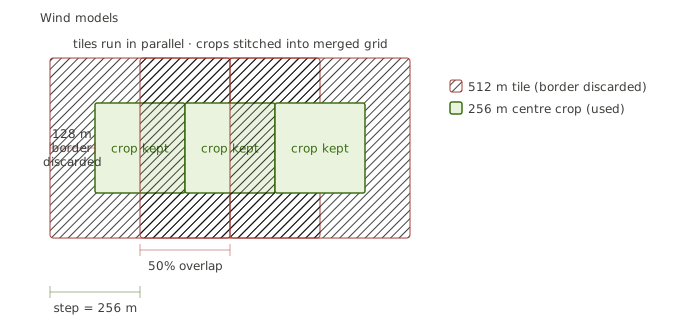
The Infrared API simulates a fixed 512x512m tile at a time. To analyse a polygon larger than one tile, the SDK splits it into a grid of overlapping tiles, runs each one in parallel, then crops and stitches the results into a single merged grid.
Tile geometry
Every tile has three key dimensions:
| Parameter | Description |
|---|---|
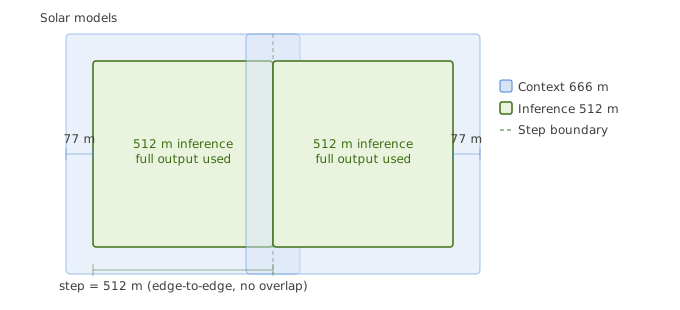
| Inference size (512m) | The area actually simulated by the API. Always 512x512m, producing a 512x512 cell grid (1m per cell). |
| Context size | The area used to select which buildings are sent with the tile. May be larger than the inference size so buildings outside the tile that cast shadows or affect wind can be included. |
| Step size | The distance between adjacent tile centres. Controls how much tiles overlap. |
These parameters differ between wind and solar model groups:
| Config | Inference | Context | Step | Overlap | Crop |
|---|---|---|---|---|---|
Wind (wind-speed, pedestrian-wind-comfort) |
512m | 512m | 256m | 50% (256m) | Centre 256x256 cells |
| Solar (all other types) | 512m | 768m | 512m | None (edge-to-edge) | Full 512x512 cells |
Why the difference? Wind effects propagate laterally — a building's wind shadow extends far downwind. Dense 50% overlap with centre-cropping ensures each point in the merged grid comes from the most accurate central region of a tile. Solar/daylight analyses need long shadows from distant buildings (hence the wider 768m context, adding 128m on each side) but the output itself doesn't benefit from overlap, so tiles are placed edge-to-edge.
Merging
After all tiles complete, the SDK extracts a centre crop from each tile's 512x512 result:
- Wind: crops the inner 256x256 cells (discards the 128-cell border on each side), then places each crop at its grid position. Adjacent crops meet exactly — no blending needed because each point was computed from the tile where it's most central.
- Solar: uses the full 512x512 result (no crop), placed edge-to-edge.
Cells outside the input polygon are set to NaN via cell-level point-in-polygon clipping.
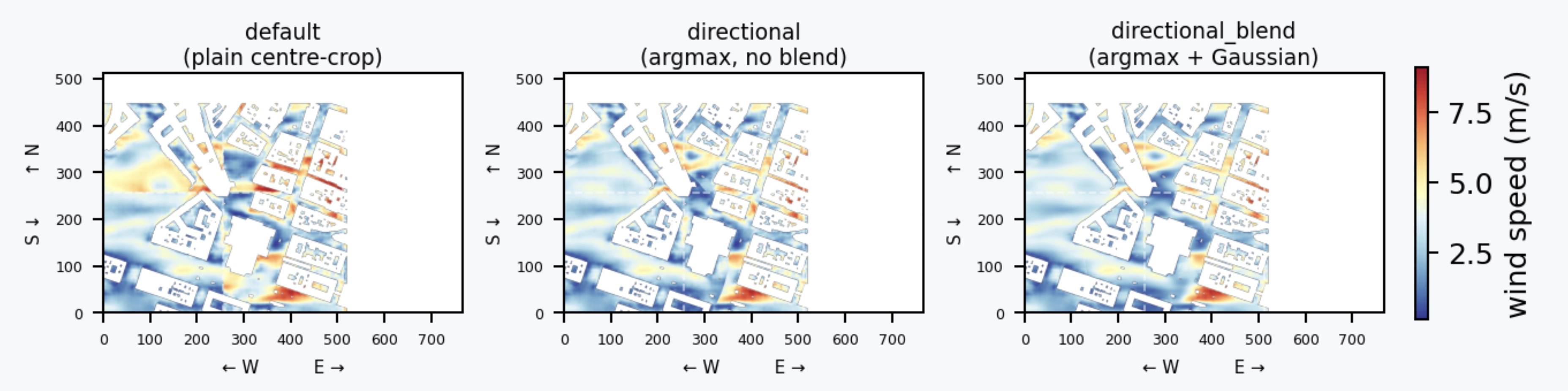
Optional: directional merge strategies (wind-speed only)
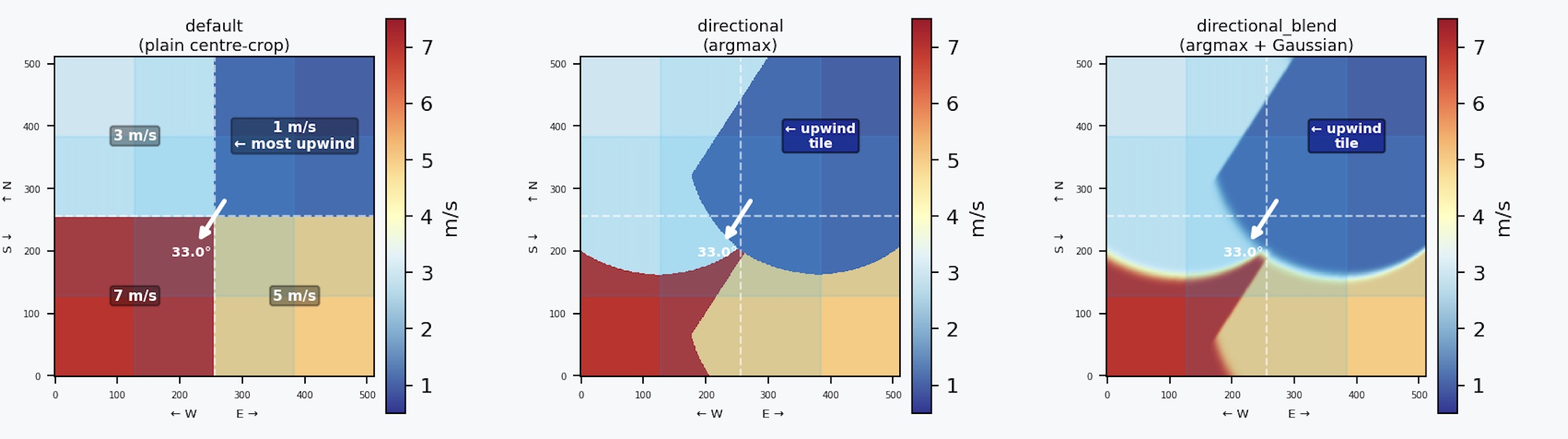
By default merge_area_jobs uses the plain centre-crop merge described above (strategy="default"). For wind-speed analyses two directional strategies are available:
| Strategy | Description |
|---|---|
"default" |
Plain centre-crop (no direction needed). |
"directional" |
Directional argmax without blending. Each cell is won by the tile with the most upwind geometry context. Useful to inspect the winner map or when blending is undesirable. Requires wind_direction_deg. |
"directional_blend" |
S12a full smart-blend — argmax + upstream-biased Gaussian. Produces visually smoother results across tile seams. Requires wind_direction_deg. |
# Argmax only — winner map, no smoothing
result = client.merge_area_jobs(
    schedule,
    strategy="directional",
    wind_direction_deg=270.0,   # meteorological: wind FROM west
)

# Full smart-blend — argmax + upstream-biased Gaussian
result = client.merge_area_jobs(
    schedule,
    strategy="directional_blend",
    wind_direction_deg=270.0,
)
Wind-speed only. Do not use
"directional"or"directional_blend"forpedestrian-wind-comfortor any multi-direction analysis — both algorithms assume a single wind vector. Omittingwind_direction_degwith either strategy raisesValueError. If you callmerge_tilesdirectly (rather thanmerge_area_jobs), you must also passconfigexplicitly —merge_area_jobshandles this automatically.
The intuition: in the overlap zone between two tiles, the tile that was upwind during simulation saw that area with full context behind it — so its numbers are more trustworthy. Both strategies pick the upwind tile's values in the overlap ("directional" does this with a hard switch; "directional_blend" uses a smooth weight that fades gradually). The result is that seam artefacts shrink to near-zero without any post-processing. This is especially useful when running extra tiles for higher coverage, custom non-uniform grids, or targeted re-sampling of a specific zone.
Building coordinate transforms
This is the most important piece to understand when working with the area API:
client.buildings.get_area(polygon)fetches buildings from multiple tiles, deduplicates them, and transforms all coordinates into the polygon bounding-box SW frame -- the south-west corner of the polygon's bounding box is origin(0, 0), x points east, y points north, values in meters.
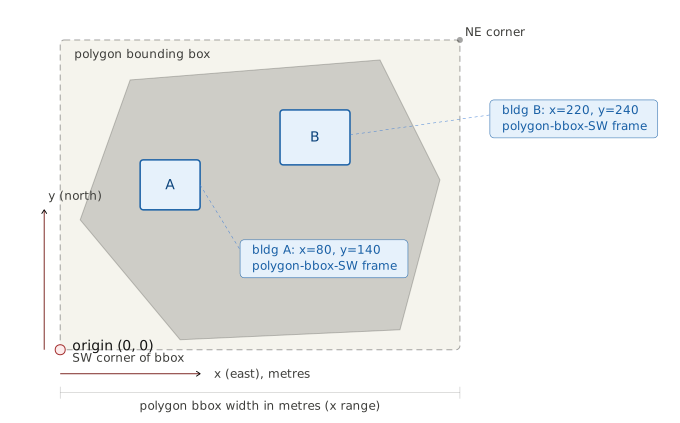
- When you pass
buildingstorun_area_and_wait(), the SDK must assign each building to the tile(s) it overlaps. For each tile, the SDK:- Computes the tile's inference SW offset relative to the polygon bbox SW (based on the tile's row/col and the step size)
- Expands the tile's bounding box by the context margin (0m for wind, 128m for solar) — this expanded area is only used to select which buildings to include
- Tests each building's bounding box against this expanded context area
- Deep-copies the building and subtracts the inference tile's SW offset from its coordinates, converting from polygon-bbox-SW frame to tile-SW frame
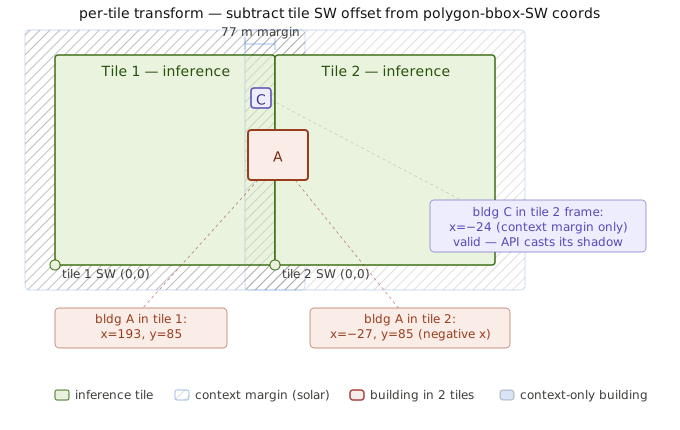
Important: Building coordinates are always relative to the inference square (512x512m), not the context square. The context box is only used for selection — to decide which buildings are close enough to affect the simulation. The coordinate transform itself uses the inference tile's SW corner as the origin. This means buildings caught by the solar context margin (the extra 128m) will have negative coordinates (they sit outside the 0-512m inference range), which is correct — the API needs to know where they are relative to the simulation tile to compute their shadow or wind effect.
This means the same building can appear in multiple adjacent tiles (with different coordinates in each), which is correct — the API expects buildings in the tile's local coordinate frame.
If you provide your own buildings to run_area_and_wait(), they must be in the polygon-bbox-SW frame. The SDK handles the per-tile transform automatically. Buildings returned by client.buildings.get_area() are already in this frame.
Other details
- Parallelism: Up to 20 concurrent API calls per run (configurable via
max_workers) - Retry: 2 retries with exponential backoff + jitter for HTTP 429/5xx
- Single-tile bypass: If the polygon fits in one tile, tiling overhead is skipped
- Projection: Local tangent plane approximation, accurate for city-scale polygons (<50 km span)
AreaResult
| Field | Type | Description |
|---|---|---|
merged_grid |
numpy.ndarray |
Merged, clipped grid (NaN outside polygon) |
polygon |
dict |
The source GeoJSON polygon |
analysis_type |
str |
Which analysis type was run |
grid_shape |
tuple[int, int] |
(rows, cols) of merged grid |
failed_jobs |
list[str] |
Job IDs that failed |
skipped_jobs |
list[str] |
Job IDs that were skipped (download error, etc.) |
total_jobs |
int |
Total number of jobs submitted |
succeeded_jobs |
int |
Number of jobs that succeeded |
min_legend |
float or None |
Minimum legend value across all tile results, or None if the server didn't supply bounds; fall back to np.nanmin(merged_grid) |
max_legend |
float or None |
Maximum legend value across all tile results, or None if the server didn't supply bounds; fall back to np.nanmax(merged_grid) |
bounds |
tuple[float, float, float, float] or None |
Geographic extent of merged_grid as (min_lng, min_lat, max_lng, max_lat). Padded NE past polygon.bounds to the next step_m boundary when the polygon side is not an integer multiple of step_m. Use this (not polygon.bounds) to place the bitmap in a map viewer — otherwise you get an SW-anchored squash. None when no grid was produced (empty schedule). |
failed_tiles |
list[TileFailure] |
Per-tile failure records. Each entry is TileFailure(tile_id, row, col, error, phase) where phase is a TileFailurePhase StrEnum: submit / compute / download / skipped. First-seen phase wins (priority submit > compute > download > skipped); same tile_id never appears twice. Use this to identify which tile_ids produced no usable output without reverse-mapping failed_jobs → tile_id. Defaults to []. Available since v0.4.9. |
Warning: When rendering heatmaps, use
min_legend/max_legendaszmin/zmaxwhen the API supplies them. Deriving the range from the grid data alone produces washed-out plots for analyses like Direct Sun Hours and Daylight Availability, where most cell values cluster near the maximum. If the bounds areNone, fall back tonp.nanmin(merged_grid)/np.nanmax(merged_grid)— this is a stopgap until the API populates them.import numpy as np import plotly.graph_objects as go zmin = result.min_legend if result.min_legend is not None else np.nanmin(result.merged_grid) zmax = result.max_legend if result.max_legend is not None else np.nanmax(result.merged_grid) go.Heatmap( z=result.merged_grid, zmin=zmin, zmax=zmax, )
Serialize for JSON: result.to_dict() (converts the numpy grid to nested lists with NaN replaced by None).
Image Generation
Generate a PNG image from analysis results:
result = client.run_area_and_wait(payload, polygon, buildings=area.buildings)
grid = result.merged_grid.tolist()

img_bytes = client.weather.gen_grid_image(
    grid=grid,
    analysis_type="wind-speed",  # optional: improves color mapping
)

with open("output.png", "wb") as f:
    f.write(img_bytes)
gen_grid_image also accepts optional criteria and subtype parameters for PWC and TCS analyses.
Async Jobs & Webhooks
The SDK supports two execution styles for analyses: synchronous polling — run_area_and_wait() blocks until results are ready — and asynchronous submission — run_area() returns immediately with an AreaSchedule, the API processes jobs in the background, and your service is notified through webhooks (or by manual polling). Pick the style that matches how your code waits for the result.
Prefer async + webhooks when:
- Long-running, large-area runs where blocking a process for minutes is impractical.
- Headless / serverless / batch jobs where there is no caller to keep open.
- Multi-analysis or parameter-sweep batches that submit many tiles at once.
- Multi-user or fan-out backends where many polygons are scheduled concurrently and a single webhook stream consolidates completions.
Prefer synchronous polling (run_area_and_wait) when:
- Notebooks or interactive scripts where the result is consumed inline.
- Small polygons or single-tile runs that complete in seconds.
- Local development and debugging — no public webhook endpoint required.
- Environments without a routable webhook URL (corporate networks, ad-hoc machines).
Single-tile primitives
For direct control over a single job — custom polling, replaying jobs from your own queue, or wiring webhooks at the analysis level — use the low-level primitives client.analyses.execute() and client.jobs.*. Most users should reach for run_area() / run_area_and_wait() instead; these primitives exist for advanced workflows.
from infrared_sdk import InfraredClient, WEBHOOK_EVENT_SUCCEEDED, WEBHOOK_EVENT_FAILED
from infrared_sdk.analyses.jobs import JobStatus

with InfraredClient() as client:
    # 1. Submit (returns immediately)
    job = client.analyses.execute(
        payload=payload,
        webhook_url="https://your-server.com/webhooks",
        webhook_events=[WEBHOOK_EVENT_SUCCEEDED, WEBHOOK_EVENT_FAILED],
    )
    print(job.job_id, job.status)  # e.g. "abc-123", JobStatus.pending

    # 2a. Either poll manually...
    snapshot = client.jobs.get_status(job.job_id)
    if snapshot.status == JobStatus.succeeded:
        download = client.jobs.download_results(job.job_id)

    # 2b. ...or block on a convenience wrapper (returns when terminal)
    completed = client.jobs.wait_for_completion(job.job_id, timeout=300)

    # 2c. ...or skip polling entirely and react to the webhook delivery instead.

    # 3. Download results once the job has Succeeded
    download = client.jobs.download_results(completed.job_id)
JobStatus is a string enum returned by client.jobs.get_status() and exposed on the Job dataclass. The five values are:
| Field | Type | Description |
|---|---|---|
pending |
str |
Job has been accepted by the API and is queued for execution. |
running |
str |
Job is currently being processed by the inference backend. |
succeeded |
str |
Terminal — results are ready to download via client.jobs.download_results(). |
failed |
str |
Terminal — the job did not produce a result; inspect job.error for details. |
unknown |
str |
Status string was not recognised (forward-compat fallback). Treat as non-terminal. |
Async area runs with run_area
client.run_area() is the async counterpart to run_area_and_wait(). It performs the same tiling, building assignment, and submission, but returns an AreaSchedule describing the in-flight jobs without blocking on completion.
from infrared_sdk import InfraredClient, WEBHOOK_EVENT_SUCCEEDED, WEBHOOK_EVENT_FAILED

with InfraredClient() as client:
    area = client.buildings.get_area(polygon)

    schedule = client.run_area(
        payload,
        polygon,
        buildings=area.buildings,
        webhook_url="https://your-server.com/webhooks",
        webhook_events=[WEBHOOK_EVENT_SUCCEEDED, WEBHOOK_EVENT_FAILED],
    )

    print(f"Submitted {len(schedule.jobs)} tile jobs ({len(schedule.failed_submissions)} submission errors)")

    # ... your webhook receiver records each job.succeeded / job.failed event ...

    # Once all jobs are terminal, download and merge into a single AreaResult
    result = client.merge_area_jobs(schedule)
The async area workflow is demonstrated end-to-end in the areas_demo_async/ recipe, which wires a Flask receiver, SQLite-backed job persistence, and a visualization step.
AreaSchedule schema:
| Field | Type | Description |
|---|---|---|
jobs |
dict[str, str] |
Mapping of tile_id to the submitted job_id. |
polygon |
dict |
The source GeoJSON polygon (used by merge_area_jobs to clip). |
analysis_type |
str |
Which analysis type was submitted. |
failed_submissions |
tuple[str, ...] |
Tile IDs whose submission HTTP call failed; passed to retry_from=. |
webhook_url |
str or None |
Webhook URL the schedule was submitted with (preserved for retries). |
webhook_events |
tuple[str, ...] or None |
Webhook events the schedule subscribed to. |
run_area accepts a list of payloads (multi-analysis or parameter sweeps) and returns list[AreaSchedule] — one per payload — sharing a single thread pool. See Webhooks with multi-payload batches above for the burst-rate caveat that applies when these schedules deliver events to the same endpoint.
Persistence and retry. AreaSchedule.to_dict() and AreaSchedule.from_dict() round-trip JSON-safely, so a schedule can be persisted (database, file, queue message) between submission and merge. To retry only the tiles whose submission failed, pass the original schedule back via retry_from=: client.run_area(payload, polygon, retry_from=prior_schedule) resubmits just prior_schedule.failed_submissions and prior_schedule.merge(retry_schedule) produces a single combined schedule.
Manual polling. When a webhook endpoint is not available, client.check_area_state(schedule) queries every job status in parallel and returns an AreaState (counts of pending/running/succeeded/failed and an is_complete flag) suitable for a polling loop.
Submission retries. Tile submissions retry HTTP 429 / 5xx with exponential backoff and jitter (max_retries=2); see the note under Area API → Other details.
run_area_and_wait also accepts webhook_url=. Passing webhook_url= (and optionally webhook_events=) to run_area_and_wait() does not change its blocking behaviour — the call still returns the merged AreaResult locally — but it also asks the API to deliver per-job lifecycle events to your endpoint. Use this when you want the convenience of a synchronous result inside a script while still streaming job-level signals into a backend (queue, database, monitoring).
Webhooks
Webhook endpoints are the back-channel the API uses to signal job lifecycle changes. Endpoints are registered once per environment via client.webhooks.*; per-job subscriptions are attached at submit time using webhook_url= / webhook_events=.
from infrared_sdk import InfraredClient
from infrared_sdk import WEBHOOK_EVENT_SUCCEEDED, WEBHOOK_EVENT_FAILED

with InfraredClient() as client:
    # Register an endpoint
    endpoint = client.webhooks.register(
        url="https://your-server.com/webhooks",
        type="production",
    )
    print(f"Endpoint ID: {endpoint.id}")

    # List all registered endpoints
    endpoints = client.webhooks.list()

    # Delete an endpoint when no longer needed
    client.webhooks.delete(endpoint.id)
The type argument selects the server-side environment (and signing-secret pair) that an endpoint is bound to: "production" for production traffic, "development" for development / staging traffic. The SDK forwards type to the API verbatim; it does not change client behaviour.
The signing secret for a registered endpoint is available in your account dashboard at https://app.infrared.city after registration. Treat the secret like an API key: store it server-side and pass it directly to verify_signature().
Webhook events. When you submit a job, pass the events you want delivered as the raw event-name strings on the wire:
job.running— job has started processing.job.succeeded— job completed successfully (results available viaclient.jobs.download_results).job.failed— job failed (the event payload includes the error reason).
In Python code, prefer the SDK constants WEBHOOK_EVENT_RUNNING, WEBHOOK_EVENT_SUCCEEDED, WEBHOOK_EVENT_FAILED (re-exported from infrared_sdk) instead of typing the strings.
Delivery is best-effort. The API may retry deliveries on transient failures, so the same event can arrive more than once. Webhook consumers must therefore be idempotent — apply forward-only state transitions (e.g. pending → running → succeeded/failed) and ignore events that would move a job backwards. The async demo's SQLite handler shows the pattern.
Signature verification. Every delivery is signed with the Standard Webhooks v1 HMAC-SHA256 scheme. The webhook-id, webhook-timestamp, and webhook-signature headers carry the message id, signing timestamp, and HMAC respectively. tolerance (default 300 s) bounds how old a timestamp may be before the call is rejected as a replay. Always verify against the raw request body bytes — verifying against parsed JSON or a re-encoded string changes byte-level whitespace and breaks the HMAC. This is the most common cause of webhook verification failures. verify_signature() accepts secrets with the whsec_ prefix as stored in the dashboard; the prefix is stripped internally before HMAC computation.
from infrared_sdk import WebhooksServiceClient

is_valid = WebhooksServiceClient.verify_signature(
    payload_body=request_body,    # raw bytes from the HTTP request body
    headers=request_headers,
    secret="whsec_...",            # signing secret from the dashboard
    tolerance=300,                 # seconds — replay-attack window
)
Pre-flight Diagnostics
At low sun angles, building shadows can extend beyond the per-tile geometry buffer and silently lose context near tile edges. The pre-flight check (estimate_sun_context_loss) flags those configurations before you run.
Error Handling
Payload validation: The SDK validates all payloads at construction time using Pydantic. Invalid inputs raise ValidationError immediately:
from pydantic import ValidationError

try:
    payload = WindModelRequest(
        analysis_type=AnalysesName.wind_speed,
        wind_speed=200,  # exceeds max of 100
        wind_direction=180,
    )
except ValidationError as e:
    print(e)  # field validation errors
HTTP errors: The SDK automatically retries HTTP 429 (rate-limited) and 5xx (server error) responses with exponential backoff and jitter. Non-retryable errors (401, 403) raise immediately.
Job-level errors: All job exceptions inherit from InfraredJobError:
| Exception | When |
|---|---|
JobSubmitError |
Job submission failed |
JobPollError |
Error while polling status |
JobFailedError |
Job completed with failed status |
JobTimeoutError |
Polling timed out |
ResultsDownloadError |
Failed to download results |
Area-level errors: raised by the area orchestration path (run_area_and_wait, merge_area_jobs, buildings.get_area). They do not inherit from InfraredJobError — catch them separately:
| Exception | When |
|---|---|
AreaRunError |
Every job in the run failed (server error, download permanently failed, or per-tile grid rejected). Carries failed_jobs, skipped_jobs, total_jobs. |
AreaTimeoutError |
run_area_and_wait exceeded its area_timeout. Carries the live area_state snapshot so callers can decide whether to keep polling. |
TiledRunError |
client.buildings.get_area(...) (or other tiled fetchers) had every tile fail after retries. Carries failed_tiles. Partial failures don't raise — inspect area.failed_tiles on the returned AreaBuildings instead. |
from infrared_sdk import AreaRunError  # importable from the top-level package

try:
    result = client.run_area_and_wait(payload, polygon, buildings=area.buildings)
except AreaRunError as exc:
    # Every job failed — log per-job state and either retry or fail loudly.
    print(f"All {exc.total_jobs} jobs failed: {exc.failed_jobs}, skipped: {exc.skipped_jobs}")
    raise
Big-payload errors: when a POST body exceeds INFRARED_BIG_PAYLOADS_THRESHOLD_BYTES (default 5 MiB), the SDK transparently zips the payload, uploads it to S3 via a presigned URL, and POSTs a {"$ref": ...} envelope at the original endpoint. The same envelope shape can also appear on the response side: when a 2xx server response body exceeds 5 MiB it arrives as {"$ref": "<https-url>"} and the SDK fetches the get-url, unzips the single JSON entry, and surfaces the unwrapped payload through the normal response.json() / response.text / response.content accessors — caller code does not change. Failures in any of those steps surface as the typed exceptions below — distinct from the per-service *ServiceError classes because they signal infrastructure failures (presign, S3 PUT, ref fetch) rather than domain-level API errors:
| Exception | When |
|---|---|
BigPayloadError |
Common base. Catch this to handle every big-payload infrastructure error in one block. |
BigPayloadPresignError |
Gateway refused the presign call (network failure, timeout, non-2xx, body not JSON, missing upload-url / get-url). Carries status_code + response_body. |
BigPayloadUploadError |
S3 PUT failed (SignatureDoesNotMatch from a byte-count / Content-Type drift, transient 5xx exhausted, or transport error after retries). Carries status_code + response_body. |
BigPayloadFetchError |
Final envelope POST returned a structured REF_* error other than REF_EXPIRED (REF_INVALID_ENVELOPE, REF_NOT_FOUND, REF_TOO_LARGE, REF_CONTENT_TYPE_REJECTED, REF_FETCH_TIMEOUT, REF_DECODE_FAILED), OR the response-side unwrap of a 2xx {"$ref": ...} failed (REF_EXPIRED, REF_NOT_FOUND, REF_TOO_LARGE, REF_CONTENT_TYPE_REJECTED, REF_FETCH_TIMEOUT, REF_DECODE_FAILED — see the "Response envelope (consumer side)" subsection below for the per-code mapping). Dispatch on .code. |
RefExpiredRetryExhausted |
BigPayloadFetchError subclass. Raised after the bounded REF_EXPIRED retry budget (2 retries) has been consumed without success. Always carries code == "REF_EXPIRED". |
from infrared_sdk import BigPayloadError, BigPayloadFetchError, RefExpiredRetryExhausted

try:
    area_gm = client.ground_materials.get_area(large_polygon)
except RefExpiredRetryExhausted:
    # Presigned GET URL expired before the consumer could fetch it,
    # twice in a row. Retry the call.
    ...
except BigPayloadFetchError as exc:
    # Dispatch on the structured REF_* code rather than parsing the message.
    if exc.code == "REF_TOO_LARGE":
        # Pre-filter or aggregate features before retrying.
        ...
    else:
        raise
except BigPayloadError:
    # Presign or S3 PUT failed — infrastructure issue.
    raise
Response envelope (consumer side). From v0.4.9 onward the SDK also unwraps {"$ref": ...} envelopes that appear on 2xx responses. The flow is symmetric to the request side and fully transparent: every successful response from a service that uses the big-payload path (buildings, layers, vegetation, ground_materials) is funneled through a single _finalize step that detects the envelope, fetches the get-url, validates and unzips it, and rewrites the Response in place. VegetationServiceClient.convert_to_mesh also handles a response-side $ref via its own inline _resolve_ref path (separate from _finalize, same BigPayloadFetchError REF_* codes). The caller keeps using response.json() / BuildingsResponse.from_response(response.json()) without any conditional handling:
# Buildings is the first server emitting response envelopes (any
# 2xx whose serialized body exceeds 5 MiB). Below or above threshold,
# the call site is identical — the unwrap is transparent.
area = client.buildings.get_area(large_polygon)  # AreaBuildings, not {"$ref": ...}
The detection and decode contract is locked:
-
Detection — a 2xx body is treated as a response envelope iff it is exactly
{"$ref": "<https-url>"}(single top-level key, non-emptyhttps://URL string). Extra keys, a non-string$ref,http://, or any other shape is pass-through and the body is delivered to the caller untouched. Non-2xx responses are never unwrapped — error envelopes continue through the existingBigPayloadFetchErrorclassification path. -
Discrimination order — on a 2xx response, the SDK checks the top-level
$refshape first. If it does not match, the existing inline shape is delivered unchanged. -
Errors — every failure raises
BigPayloadFetchErrorwith one of the six structuredREF_*codes (closed set; no barerequests.HTTPErroror low-level transport exception escapes the unwrap path):BigPayloadFetchError.codeWhen REF_EXPIREDGet-url returned 401/403 (presigned-URL SigV4 signature expired). Also raised by the request-side envelope POST path when the gateway TTL elapses mid-call. REF_NOT_FOUNDGet-url returned 404 and the catch-all bucket for every other non-2xx (3xx, 400, 410, 416, 429, 5xx). REF_TOO_LARGE250 MiB cap tripped at any of three layers — Content-Length/Content-Rangepre-check, streamed-byte counter, orZipInfo.file_sizepre-decompress.REF_CONTENT_TYPE_REJECTEDGet-url response Content-Typeis notapplication/zip(parameters tolerated, case-insensitive).REF_FETCH_TIMEOUTrequests.Timeouton either fetch, OR any non-timeoutrequests.RequestExceptionmid-fetch (ConnectionError,SSLError,ChunkedEncodingError, …).REF_DECODE_FAILEDZip malformed, decompress failure, non-UTF-8 inner bytes, or inner bytes that are not valid JSON. -
Size cap —
MAX_RESPONSE_ENVELOPE_BYTES = 250 MiB, enforced at all three layers above. The compressed-byte gate is intentionally identical to the decompressed-byte cap so we fail fast before reading multi-GiB of S3 object. -
allow_redirects=False— both theRange: bytes=0-0preflight and the full GET setallow_redirects=False. Presigned-URL SigV4 binds the request to the original host, so a 3xx response cannot be safely followed; the SDK treats any redirect as aREF_NOT_FOUNDrather than chasing it. -
Idempotence —
_resolve_response_envelopeis safe to call multiple times on the sameResponse. The second call sees a non-envelope body and returns unmodified.
Privacy: presigned URLs are bearer credentials. The SDK redacts them from log lines and never includes them in exception messages — see
_redact_presigned_urlinsrc/infrared_sdk/_internal/big_payloads/core.py. The response-side unwrap additionally suppresses the exception cause chain (raise … from None) on transport failures so the presigned URL cannot leak via__cause__/__context__walkers (Sentry, traceback dumps, structlogexc_info). If you wrap the SDK in custom logging, do not stringify presigned URLs.
Cookbook and examples
Notebooks, agent skills (Claude Code / Cursor / Codex / Copilot / Windsurf), and runnable Python recipes live in Infrared-city/infrared-skills — start at cookbook/notebooks/. Each notebook is self-contained and ordered as a learning path:
| Notebook | Topic |
|---|---|
00_quickstart.ipynb |
Install, env, instantiate the client, run one analysis end-to-end |
01_buildings.ipynb |
client.buildings.get_area, DotBim mesh format, building heights |
02_vegetation_and_ground.ipynb |
client.vegetation, client.ground_materials, layer formats |
03_weather_and_time_periods.ipynb |
Weather file lookup, filter_weather_data, TimePeriod semantics |
04_tiling_and_area_api.ipynb |
preview_area, rectangular vs. irregular polygons, tile geometry, AreaResult |
05_analysis_types_tour.ipynb |
All 8 analysis types with payload patterns and outputs |
06_image_rendering.ipynb |
gen_grid_image, orientation, colormap caveats |
07_async_and_webhooks.ipynb |
run_area, check_area_state, merge_area_jobs, webhooks |
08_wind_merge_strategies.ipynb |
Wind-speed merge strategies (default / directional / directional_blend), seam-zone inspection |
09_error_handling_and_tuning.ipynb |
estimate_sun_context_loss pre-flight, big-payload $ref envelope errors, Retry-After, tuning |
License
Apache-2.0. Full text: https://www.apache.org/licenses/LICENSE-2.0.


Download files
Download the file for your platform. If you're not sure which to choose, learn more about installing packages.
Source Distribution
Built Distribution
Filter files by name, interpreter, ABI, and platform.
If you're not sure about the file name format, learn more about wheel file names.
Copy a direct link to the current filters
File details
Details for the file infrared_sdk-0.4.9.tar.gz.
File metadata
- Download URL: infrared_sdk-0.4.9.tar.gz
- Upload date:
- Size: 2.5 MB
- Tags: Source
- Uploaded using Trusted Publishing? Yes
- Uploaded via: twine/6.1.0 CPython/3.13.12
File hashes
| Algorithm | Hash digest | |
|---|---|---|
| SHA256 |
a10dfe46b29b129b9ac448e940132b089d96bb367effd9b365af864124345cd2
|
|
| MD5 |
956abef82ac855836a6b493c48f06310
|
|
| BLAKE2b-256 |
00c85496061dea96291827f5cb87635e2dd62e715c57b6b22cb724c3fba23ffc
|
Provenance
The following attestation bundles were made for infrared_sdk-0.4.9.tar.gz:
Publisher:
pypi-publish.yml on Infrared-city/infrared-api-sdk
-
Statement:
-
Statement type:
https://in-toto.io/Statement/v1 -
Predicate type:
https://docs.pypi.org/attestations/publish/v1 -
Subject name:
infrared_sdk-0.4.9.tar.gz -
Subject digest:
a10dfe46b29b129b9ac448e940132b089d96bb367effd9b365af864124345cd2 - Sigstore transparency entry: 1643976247
- Sigstore integration time:
-
Permalink:
Infrared-city/infrared-api-sdk@62149645f9a0a6cbdc0fdfc952b8058bf445acbe -
Branch / Tag:
refs/tags/v0.4.9 - Owner: https://github.com/Infrared-city
-
Access:
internal
-
Token Issuer:
https://token.actions.githubusercontent.com -
Runner Environment:
github-hosted -
Publication workflow:
pypi-publish.yml@62149645f9a0a6cbdc0fdfc952b8058bf445acbe -
Trigger Event:
release
-
Statement type:
File details
Details for the file infrared_sdk-0.4.9-py3-none-any.whl.
File metadata
- Download URL: infrared_sdk-0.4.9-py3-none-any.whl
- Upload date:
- Size: 158.9 kB
- Tags: Python 3
- Uploaded using Trusted Publishing? Yes
- Uploaded via: twine/6.1.0 CPython/3.13.12
File hashes
| Algorithm | Hash digest | |
|---|---|---|
| SHA256 |
c3f60666dc54130697b05d1904d0e9dda4892e4430d29a70ba80419632ef4fc5
|
|
| MD5 |
0c5acb2642d6c46313e92daae4b4bb49
|
|
| BLAKE2b-256 |
6fec29ae094b5957d6bdd6dd292b3ed8b700cd4bf00366d82859be4815e315a8
|
Provenance
The following attestation bundles were made for infrared_sdk-0.4.9-py3-none-any.whl:
Publisher:
pypi-publish.yml on Infrared-city/infrared-api-sdk
-
Statement:
-
Statement type:
https://in-toto.io/Statement/v1 -
Predicate type:
https://docs.pypi.org/attestations/publish/v1 -
Subject name:
infrared_sdk-0.4.9-py3-none-any.whl -
Subject digest:
c3f60666dc54130697b05d1904d0e9dda4892e4430d29a70ba80419632ef4fc5 - Sigstore transparency entry: 1643976300
- Sigstore integration time:
-
Permalink:
Infrared-city/infrared-api-sdk@62149645f9a0a6cbdc0fdfc952b8058bf445acbe -
Branch / Tag:
refs/tags/v0.4.9 - Owner: https://github.com/Infrared-city
-
Access:
internal
-
Token Issuer:
https://token.actions.githubusercontent.com -
Runner Environment:
github-hosted -
Publication workflow:
pypi-publish.yml@62149645f9a0a6cbdc0fdfc952b8058bf445acbe -
Trigger Event:
release
-
Statement type:






