
ingest-anything: from data to vector database effortlessly

Project description
ingest-anything
From data to vector database effortlessly


ingest-anything is a python package aimed at providing a smooth solution to ingest non-PDF files into vector databases, given that most ingestion pipelines are focused on PDF/markdown files. Leveraging chonkie, PdfItDown, and LlamaIndex integrations for vector databases and data loaders, ingest-anything gives you a fully-automated pipeline for document ingestion within few lines of code!
Find out more about ingest-anything on the Documentation website! (still under construction)
Workflow+
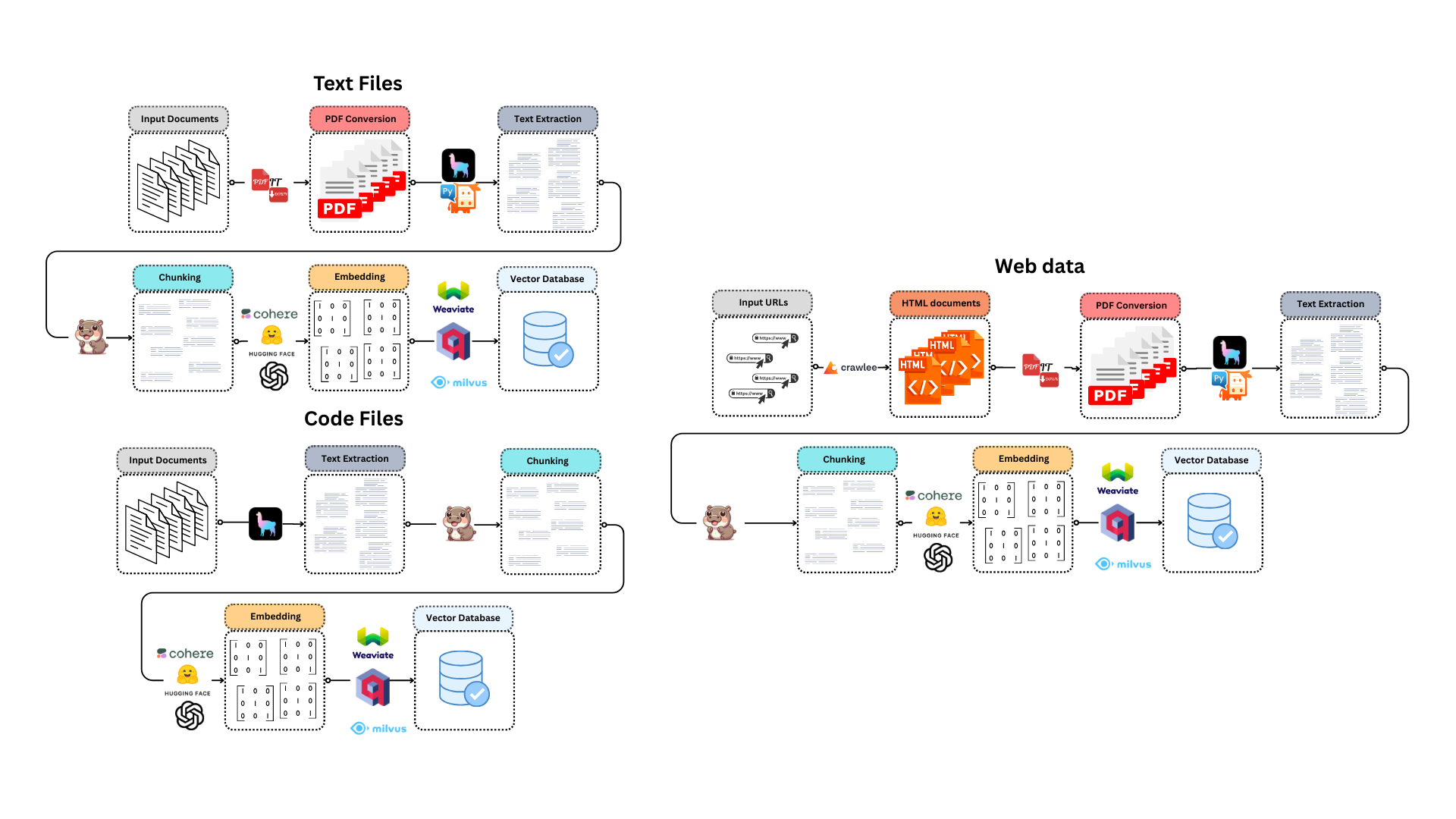
For text files
- The input files are converted into PDF by PdfItDown
- The PDF text is extracted using LlamaIndex-compatible reader
- The text is chunked exploiting Chonkie's functionalities
- The chunks are embedded thanks to an Embedding model from Sentence Transformers, OpenAI, Cohere, Jina AI or Model2Vec
- The embeddings are loaded into a LlamaIndex-compatible vector database
For code files
- The text is extracted from code files using LlamaIndex SimpleDirectoryReader
- The text is chunked exploiting Chonkie's CodeChunker
- The chunks are embedded thanks to an Embedding model from Sentence Transformers, OpenAI, Cohere, Jina AI or Model2Vec
- The embeddings are loaded into a LlamaIndex-compatible vector database
For Agent Workflow
- Initialize a vector database (e.g., Qdrant, Weaviate).
- Initialize a language model (LLM) (e.g., OpenAI).
- Create an
IngestAgentinstance. - Use the
create_agentmethod to generate a specific agent type (e.g.,IngestAnythingFunctionAgent,IngestCodeReActAgent). - Ingest data using the agent's
ingestmethod. - Retrieve the agent using the
get_agentmethod for querying and interaction.
Usage
ingest-anything can be installed using pip in the following way:
pip install ingest-anything
# or, for a faster installation
uv pip install ingest-anything
And is available in your python scripts:
- You can initialize the interface for text-based files like this:
from qdrant_client import QdrantClient, AsyncQdrantClient
from llama_index.vector_stores.qdrant import QdrantVectorStore

client_qdrant = QdrantClient("http://localhost:6333")
aclient_qdrant = AsyncQdrantClient("http://localhost:6333")
vector_store_qdrant = QdrantVectorStore(
    collection_name="Test", client=client_qdrant, aclient=aclient_qdrant
)
ingestor = IngestAnything(vector_store=vector_store_qdrant)
- And ingest your files:
# with a list of files
ingestor.ingest(
    chunker="late",
    files_or_dir=[
        "tests/data/test.docx",
        "tests/data/test0.png",
        "tests/data/test1.csv",
        "tests/data/test2.json",
        "tests/data/test3.md",
        "tests/data/test4.xml",
        "tests/data/test5.zip",
    ],
    embedding_model="sentence-transformers/all-MiniLM-L6-v2",
)
# with a directory
ingestor.ingest(
    chunker="token",
    files_or_dir="tests/data",
    tokenizer="gpt2",
    embedding_model="sentence-transformers/all-MiniLM-L6-v2",
)
- You can also initialize the interface for code files
import os
from dotenv import load_dotenv
import weaviate
from llama_index.vector_stores.weaviate import WeaviateVectorStore

load_dotenv()

cluster_url = os.getenv("weaviate_cluster_url")
api_key = os.getenv("weaviate_admin_key")
client_weaviate = weaviate.connect_to_weaviate_cloud(
    cluster_url=cluster_url,
    auth_credentials=weaviate.auth.AuthApiKey(api_key),
)
vector_store_weaviate = WeaviateVectorStore(
    weaviate_client=client_weaviate, index_name="Test"
)

ingestor = IngestCode(vector_store=vector_store_qdrant)
- And then ingest your code files:
os.environ["OPENAI_API_KEY"] = "YOUR_API_KEY"
ingestor.ingest(
    files=[
        "tests/code/acronym.go",
        "tests/code/animal_magic.go",
        "tests/code/atbash_cipher_test.go",
    ],
    embedding_model="text-embedding-3-small",
    language="go",
)
You can also create a RAG agent in a fully automated way:
Agent Workflow example
from qdrant_client import QdrantClient
from llama_index.llms.openai import OpenAI
from llama_index.vector_stores.qdrant import QdrantVectorStore
from ingest_anything.agent import IngestAgent

# 1. Initialize Vector Database and LLM
client = QdrantClient(":memory:")  # Or your Qdrant setup
llm = OpenAI(api_key="YOUR_API_KEY")

# 2. Initialize IngestAgent
agent_factory = IngestAgent()
vector_store = QdrantVectorStore(
    client=client, collection_name="my_collection"
)

# 3. Create Agent
agent = agent_factory.create_agent(
    vector_database=vector_store,
    llm=llm,
    ingestion_type="anything",  # or "code"
    agent_type="function_calling",  # or "react"
)

# 4. Ingest Data
agent.ingest(
    files_or_dir="path/to/documents",
    embedding_model="sentence-transformers/all-mpnet-base-v2",
    chunker="semantic",
    similarity_threshold=0.8,
)

# 5. Get Agent for Querying
function_agent = (
    agent.get_agent()
)  # or react_agent = agent.get_agent() if you chose react
Find a representation of the agent workflow in the following diagram:
graph LR
A[Initialize Vector Database] --> B(Initialize LLM);
B --> C{Create IngestAgent};
C --> D{Create Agent with create_agent};
D --> E{Ingest Data with ingest};
E --> F{Get Agent with get_agent};
F --> G[Ready for Querying];
You can find a complete reference for the package in REFERENCE.md
Contributing
Contributions are always welcome!
Find contribution guidelines at CONTRIBUTING.md
License and Funding
This project is open-source and is provided under an MIT License.
If you found it useful, please consider funding it.
Release history Release notifications | RSS feed


Download files
Download the file for your platform. If you're not sure which to choose, learn more about installing packages.
Source Distribution
Built Distribution
Filter files by name, interpreter, ABI, and platform.
If you're not sure about the file name format, learn more about wheel file names.
Copy a direct link to the current filters
File details
Details for the file ingest_anything-1.1.0.post1.tar.gz.
File metadata
- Download URL: ingest_anything-1.1.0.post1.tar.gz
- Upload date:
- Size: 6.4 MB
- Tags: Source
- Uploaded using Trusted Publishing? No
- Uploaded via: python-httpx/0.28.1
File hashes
| Algorithm | Hash digest | |
|---|---|---|
| SHA256 |
12991715c210f14fb6a333fdee7af907a9b28f3ba6c0ba187eac396545e65c17
|
|
| MD5 |
d60af539d848e17e90a81f92a3e3fe75
|
|
| BLAKE2b-256 |
3cd3b5cf8d4bb8c653d2c3e02d7aac398c69a56297141c7ea9518fbf1ac7f1cf
|
File details
Details for the file ingest_anything-1.1.0.post1-py3-none-any.whl.
File metadata
- Download URL: ingest_anything-1.1.0.post1-py3-none-any.whl
- Upload date:
- Size: 14.4 kB
- Tags: Python 3
- Uploaded using Trusted Publishing? No
- Uploaded via: python-httpx/0.28.1
File hashes
| Algorithm | Hash digest | |
|---|---|---|
| SHA256 |
f73e4e42cf500e49784640b09198aa0795792e59bf2140f786e0a3275852c679
|
|
| MD5 |
7b84b871b8061b63d9d8aaf5bc7d1972
|
|
| BLAKE2b-256 |
2adb0b4df9c23dccb3fe0a9587c7555a5206918334729178d52dd56316ddd04d
|






