
Data Ingestion Framework

Project description
Ingestify
Ingest everything – JSON, CSV, tracking ZIPs, even MP4 – keep it version‑safe, sync only what changed, and analyse while you ingest.
Why Ingestify?
Football‐data APIs are often slow, rate‑limited or just down. One parsing bug and you’re forced to pull tens of gigabytes again.
Ingestify fixes that by building your own data lake of untouched provider files and fetching only what’s new:
-
Own your lake – The first time you ask for a match, Ingestify downloads the original files (metadata, line‑ups, events, tracking, video) and stores them untouched in local disk, S3, GCS… every later query hits your lake, not the provider.
-
Never re‑fetch the world – A file‑level checksum / timestamp check moves only changed bundles across the wire.
-
Atomic, complete packages – A Dataset is all‑or‑nothing:
Dataset type Always contains Match Dataset metadata + line‑ups + events Tracking Dataset metadata + raw tracking frames
You never analyse events v2 with lineups v1, or yesterday’s first half with today’s second half.
- Query while ingesting – Datasets stream out of the engine the moment their files land, so notebooks or downstream services can start before the full season is in.
The Ingestify Workflow
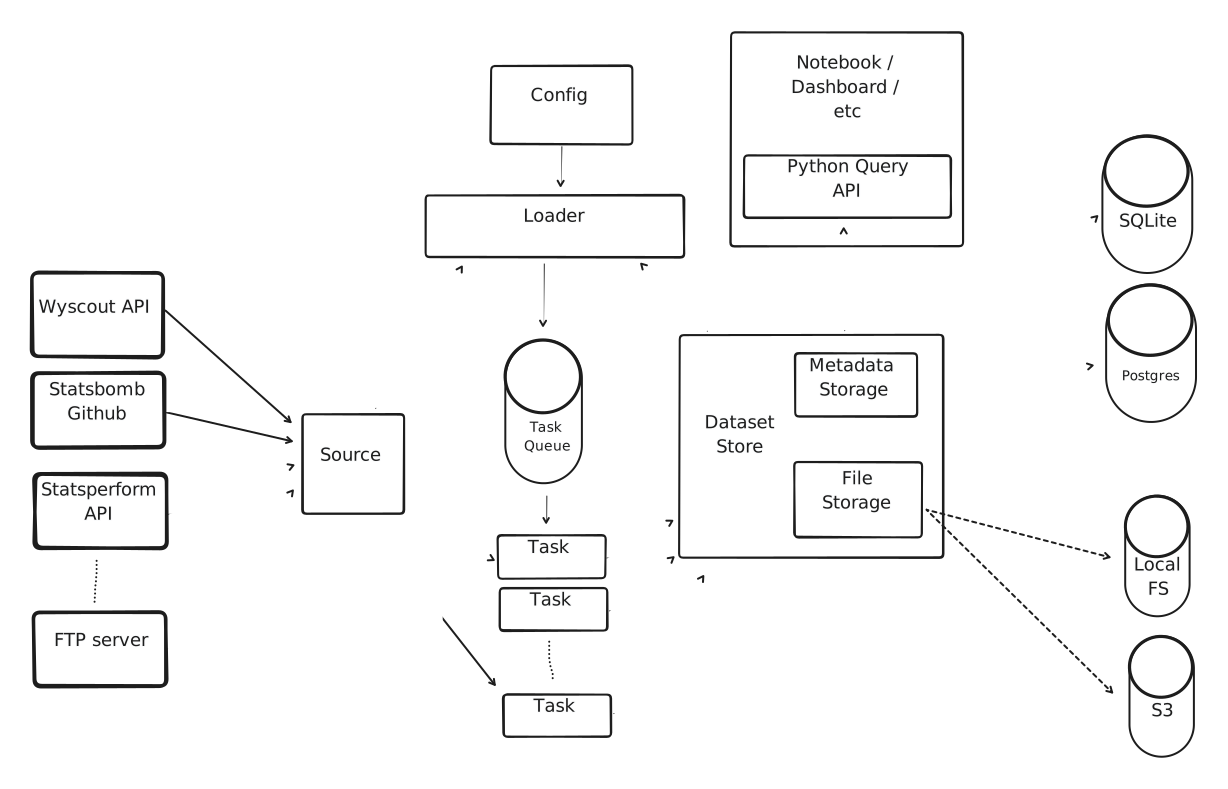
What you gain
For football‑analytics practitioners
| Pain | Ingestify fix |
|---|---|
| API slowness / downtime | One request → lake; retries and parallelism happen behind the scenes. |
| Full re‑ingest after a bug | File‑level deltas mean you fetch only the corrected bundles. |
| Partial / drifting data | Dataset is atomic, versioned, and validated before it becomes visible. |
| Waiting hours for a season to sync | Stream each Dataset as soon as it lands; analyse while you ingest. |
| Boilerplate joins | engine.load_dataset_with_kloppy(dataset) → analysis‑ready object. |
For software engineers
| Need | How Ingestify helps |
|---|---|
| Domain‑Driven Design | Dataset, Revision, Selector plus rich domain events read like the problem space. |
| Event‑driven integrations | Subscribe to RevisionAdded and push to Kafka, AWS Lambda, Airflow… |
| Pluggable everything | Swap Source, FetchPolicy, DatasetStore subclasses to add providers, change delta logic, or move storage back‑ends. |
| Safety & speed | Multiprocessing downloader with temp‑dir commits – no half‑written matches; near‑linear I/O speed‑ups. |
| Any file type | JSON, CSV, MP4, proprietary binaries – stored verbatim so you parse / transcode later under version control. |
Quick start
pip install ingestify # or: pip install git+https://github.com/PySport/ingestify.git
Developing a new Source
When developing a new Source, use the debug_source() helper for rapid iteration:
from ingestify import Source, debug_source

class MyCustomSource(Source):
    provider = "my_provider"

    def __init__(self, name: str, api_key: str):
        super().__init__(name)
        self.api_key = api_key

    def find_datasets(self, dataset_type, data_spec_versions, **kwargs):
        # Your source implementation
        ...

# Quick debug - runs full ingestion with temp storage
if __name__ == "__main__":
    source = MyCustomSource(name="test", api_key="...")

    debug_source(
        source,
        dataset_type="match",
        data_spec_versions={"events": "v1"},
    )
The debug_source() helper:
- ✅ Creates an ephemeral dev engine with temp storage
- ✅ Configures logging automatically
- ✅ Runs the full ingestion cycle
- ✅ Shows storage location and results
Perfect for testing your source before adding it to production config!
Minimal config.yaml
main:
  metadata_url: sqlite:///database/catalog.db   # where revision metadata lives
  file_url: file://database/files/              # where raw files live
  default_bucket: main

sources:
  statsbomb:
    type: ingestify.statsbomb_github            # open‑data provider

ingestion_plans:
  - source: statsbomb
    dataset_type: match
    # selectors can narrow the scope
    # selectors:
    #   - competition_id: 11
    #     season_id: [90]
First ingest
When you configured event subscribers, all domain events are dispatched to the subscriber. Publishing the events to Kafka, RabbitMQ or any other system becomes trivial.
mkdir -p database
pip install kloppy

ingestify run                                # fills your data lake
Using the data
By default, Ingestify will search in your DatasetStore when you request data. You can pass several filters to only fetch what you need.
from ingestify.main import get_engine

engine = get_engine("config.yaml")

for dataset in engine.iter_datasets(
        dataset_state="complete",
        provider="statsbomb",
        dataset_type="match",
        competition_id=11,
        season_id=90):
    df = (
        engine
        .load_dataset_with_kloppy(dataset)
        .to_df(engine="polars")
    )
    df.write_parquet(f"out/{dataset.identifier['match_id']}.parquet")
Auto Ingestion
When you don't want to use event driven architecture but just want to work with the latest data, ingestify got you covered. With the auto_ingest option, ingestify syncs the data in the background when you ask for the data.
from ingestify.main import get_engine

engine = get_engine("config.yaml")

for dataset in engine.iter_datasets(
        # When set to True it will first do a full sync and then start yielding datasets
        auto_ingest=True,

        # With streaming enabled all Datasets are yielded when they are up-to-date (not changed, or refetched)
        # auto_ingest={"streaming": True}

        dataset_state="complete",
        provider="statsbomb",
        dataset_type="match",
        competition_id=11,
        season_id=90):
    df = (
        engine
        .load_dataset_with_kloppy(dataset)
        .to_df(engine="polars")
    )
    df.write_parquet(f"out/{dataset.identifier['match_id']}.parquet")
Open data
Ingestify has build-in support for StatsBomb Open Data (more to come).
mkdir database_open_data
pip install kloppy
import logging, sys

from ingestify.main import get_engine

logging.basicConfig(
    level=logging.INFO,
    format="%(asctime)s [%(levelname)s] %(name)s: %(message)s",
    stream=sys.stderr,
)

engine = get_engine(
    metadata_url="sqlite:///database_open_data/catalog.db",
    file_url="file://database_open_data/files/"
)

dataset_iter = engine.iter_datasets(
    # This will tell ingestify to look for an Open Data provider
    auto_ingest={"use_open_data": True, "streaming": True},

    provider="statsbomb",
    dataset_type="match",
    competition_id=43,  # "FIFA World Cup"
    #season_id=281
)

for dataset in dataset_iter:
    kloppy_dataset = engine.load_dataset_with_kloppy(dataset)
    logging.info(f"Loaded {kloppy_dataset}")
Event Log
Ingestify ships a built-in event log that lets a separate service (or cron job) react to dataset lifecycle events — without polling the database or coupling services together.
How it works
Ingestify ingestion run
  └── EventLogSubscriber writes to event_log table (same DB)

Consumer process (your service / cron)
  └── EventLogConsumer reads new rows, calls your callback, advances cursor
The cursor is per-reader — multiple independent consumers can each track their own position.
Enable the subscriber
Add one line to config.yaml:
event_subscribers:
  - type: ingestify.infra.event_log.EventLogSubscriber
That's it. The event_log and reader_state tables are created automatically in the same database as the rest of ingestify.
Write a consumer
# run_consumer.py
from ingestify.infra.event_log import EventLogConsumer

def on_event(event) -> None:
    if event.event_type == "revision_added":
        trigger_downstream(event.dataset.dataset_id)

# Run once (e.g. from a cron job):
EventLogConsumer.from_config("config.yaml", reader_name="my-service").run(on_event)

# Or keep running, polling every 5 seconds:
EventLogConsumer.from_config("config.yaml", reader_name="my-service").run(on_event, poll_interval=5)
on_event receives a domain event with event.event_type and event.dataset. Available event types: dataset_created, revision_added, metadata_updated.
from_config reads metadata_url from your existing config.yaml — no duplicate connection strings.
run() returns 0 on success and 1 if a processing error occurred. On error the cursor is not advanced, so the failing event will be retried on the next run.
Roadmap
- Workflow orchestration helpers (Airflow, Dagster, Prefect)
- Built‑in Kafka / Kinesis event emitters
- Streaming data ingestion
- Data quality hooks (Great Expectations)
Stop refetching the world. Own your data lake, keep it version‑safe, and analyse football faster with Ingestify.
Release history Release notifications | RSS feed


Download files
Download the file for your platform. If you're not sure which to choose, learn more about installing packages.
Source Distribution
Built Distribution
Filter files by name, interpreter, ABI, and platform.
If you're not sure about the file name format, learn more about wheel file names.
Copy a direct link to the current filters
File details
Details for the file ingestify-0.15.5.tar.gz.
File metadata
- Download URL: ingestify-0.15.5.tar.gz
- Upload date:
- Size: 85.2 kB
- Tags: Source
- Uploaded using Trusted Publishing? Yes
- Uploaded via: twine/6.1.0 CPython/3.13.12
File hashes
| Algorithm | Hash digest | |
|---|---|---|
| SHA256 |
59c7a1af25d36f079b146f557064c999ca31bc2dc87b8786b7e08ee97d1031f4
|
|
| MD5 |
ddceacb6abc4e390b54b02ca52738fbd
|
|
| BLAKE2b-256 |
bf7aa967eb8b6a7206ed3cac9b0af97bf6c0d8ae97924fc11b42d1c7fedb9a19
|
Provenance
The following attestation bundles were made for ingestify-0.15.5.tar.gz:
Publisher:
release.yml on PySport/ingestify
-
Statement:
-
Statement type:
https://in-toto.io/Statement/v1 -
Predicate type:
https://docs.pypi.org/attestations/publish/v1 -
Subject name:
ingestify-0.15.5.tar.gz -
Subject digest:
59c7a1af25d36f079b146f557064c999ca31bc2dc87b8786b7e08ee97d1031f4 - Sigstore transparency entry: 1401587192
- Sigstore integration time:
-
Permalink:
PySport/ingestify@74c9ead2ad96dc28c719193272a9fd485c9b9446 -
Branch / Tag:
refs/heads/main - Owner: https://github.com/PySport
-
Access:
public
-
Token Issuer:
https://token.actions.githubusercontent.com -
Runner Environment:
github-hosted -
Publication workflow:
release.yml@74c9ead2ad96dc28c719193272a9fd485c9b9446 -
Trigger Event:
workflow_dispatch
-
Statement type:
File details
Details for the file ingestify-0.15.5-py3-none-any.whl.
File metadata
- Download URL: ingestify-0.15.5-py3-none-any.whl
- Upload date:
- Size: 112.2 kB
- Tags: Python 3
- Uploaded using Trusted Publishing? Yes
- Uploaded via: twine/6.1.0 CPython/3.13.12
File hashes
| Algorithm | Hash digest | |
|---|---|---|
| SHA256 |
7dd7119cef895cfbbb7350fb9f41246ab30efe85d9b25f94a3cf2d8d5015d2fb
|
|
| MD5 |
246050bfb272b5fc9b0bb6469651495b
|
|
| BLAKE2b-256 |
782c177c83fd31c9342dfdacb6f75c2d0589aeb2f2fd922c253a15cedac12312
|
Provenance
The following attestation bundles were made for ingestify-0.15.5-py3-none-any.whl:
Publisher:
release.yml on PySport/ingestify
-
Statement:
-
Statement type:
https://in-toto.io/Statement/v1 -
Predicate type:
https://docs.pypi.org/attestations/publish/v1 -
Subject name:
ingestify-0.15.5-py3-none-any.whl -
Subject digest:
7dd7119cef895cfbbb7350fb9f41246ab30efe85d9b25f94a3cf2d8d5015d2fb - Sigstore transparency entry: 1401587286
- Sigstore integration time:
-
Permalink:
PySport/ingestify@74c9ead2ad96dc28c719193272a9fd485c9b9446 -
Branch / Tag:
refs/heads/main - Owner: https://github.com/PySport
-
Access:
public
-
Token Issuer:
https://token.actions.githubusercontent.com -
Runner Environment:
github-hosted -
Publication workflow:
release.yml@74c9ead2ad96dc28c719193272a9fd485c9b9446 -
Trigger Event:
workflow_dispatch
-
Statement type:






