
Tired of manually creating folder structures for your film/video projects? Want a folder structure that dynamically changes based on the needs for your project? Then Init-Film was made for you! By filmmakers, for filmmakers ;)

Project description
Init-Film
Tired of manually creating folder structures for your film/video projects?
Want a folder structure that dynamically changes based on the needs for your project?
Then Init-Film was made for you!
By filmmakers, for filmmakers ;)
Key features:
- ♥️ Supports Windows, Linux, and macOS
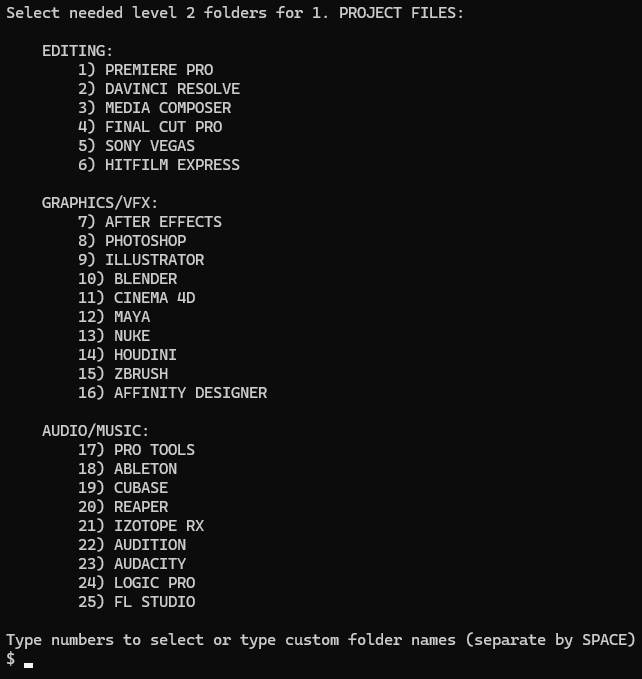
- ✅ Dynamically create folder structures by selecting options from a list
- 🖋️ Use custom folder names
- 📝 Import file templates & project assets to reuse across multiple projects
- ✨ Customize the prefix style to your preference!
- 🖱️ Start a new project by right-clicking in a folder and selecting "Start Init-Film Project" (Windows only)
->>Watch showcase<<-
Before installing:
Make sure you have any of the following Python versions installed (tested with tox):
Installation:
Method 1 (from PyPi):
Watch YouTube tutorial
Use pip install init-film to install the latest version of init-film.
Method 2 (from source):
- Download the repo by using
git clone https://github.com/andreasdelabie/init-filmor download the zip folder from the releases. - Navigate to the folder by using
cd [path to folder]or using a file explorer. - Use
pip install .to install the script.
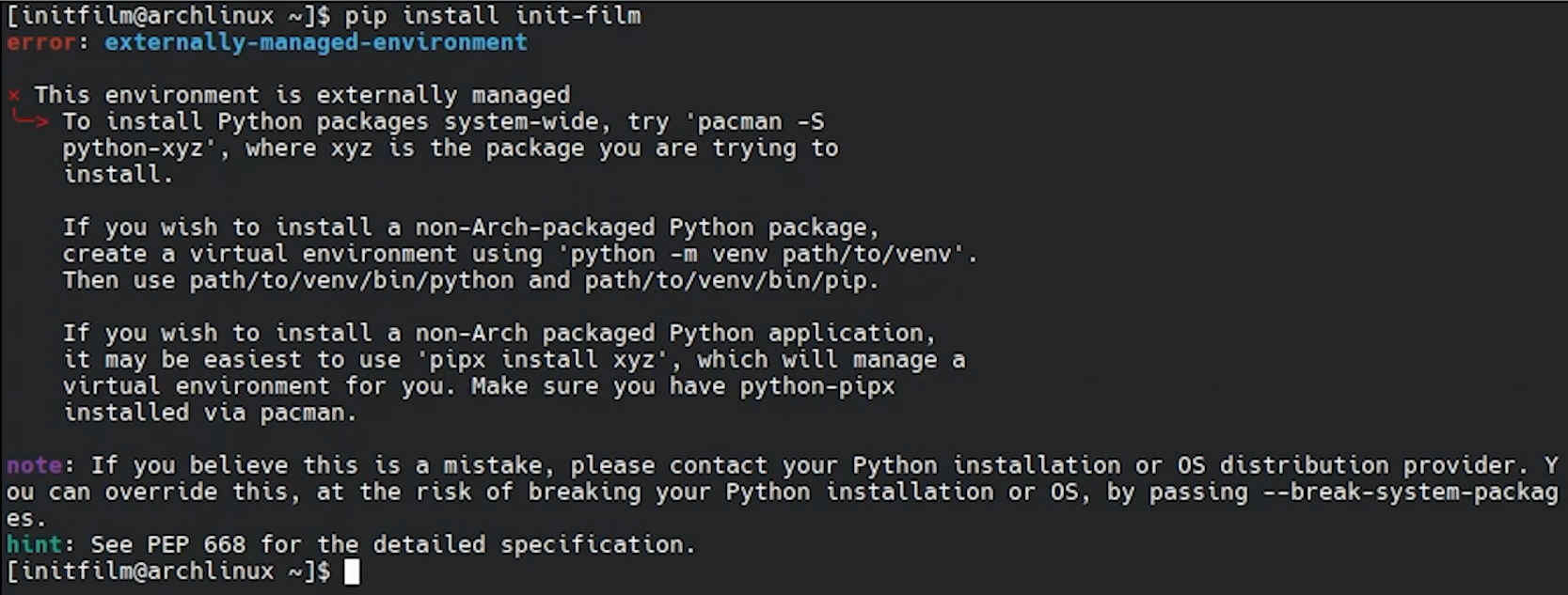
Error: externally-managed-environment
Check out the documentation for externally managed environments.
Usage:
Basic usage:
Use the CLI command init-film in any folder to start a new film/video project.
Custom folder names:
Folder names can't contain spaces (with the exception of the project name). Instead use a - or _.
Configuration:
- Use
init-film --set-number-style <style>to set the number style todefault(1. PROJECT FILES) ordouble(01. PROJECT FILES). - Use
init-film --set-separator-style <style>to set the separator style todot(default),underscore,parenthesis, orspace. - Use
init-film --set-templates-pathto set the template path topython(.../site-packages/initfilm/templates) or a custom path (ex.C:/Users/Spielberg/Videos/templates). Make sure to ALWAYS USE FORWARD SLASHES! - Use
init-film --show-configto print the current configuration and the path to theconfig.jsonfile.
Templates:
Put your template files in the relative template folders (use init-film --show-templates-path to show the location).
Init-Film will automatically detect them and let you select them when creating a new project.
Example:
If I use the following folder structure:
1. PROJECT FILES
  1. PREMIERE PRO
  2. AFTER EFFECTS
2. ASSETS
  1. LOGOS
  2. GRAPHICS
3. FOOTAGE
4. AUDIO
  1. SFX
  2. MUSIC
5. EXPORT
6. CUSTOM-FOLDER
I put the template files in the templates folder like this:
PROJECT FILES
  PREMIERE PRO
    YouTube_Video_Preset.prproj
  AFTER EFFECTS
    Animation_Preset.aep
ASSETS
  LOGOS
    Logo1.png
    Logo2.jpg
  GRAPHICS
    Explosion.mov
    Title.ai
AUDIO
  SFX
    Explosion.wav
    Whoosh.mp3
  MUSIC
    Theme_Song.wav
    Outro_Song.wav
CUSTOM-FOLDER
  Custom_Folder_Template_File.docx
Add shortcut to Windows context menu (right click menu):
- Use
init-film --add-shortcutto add Init-Film to your Windows context menu. - Use
init-film --remove-shortcutto remove it.
Help:
Use init-film --help or init-film -h to show the help screen.
Updating:
Use pip install --upgrade init-film to update to the latest version of init-film.
Uninstalling:
Use pip uninstall init-film to fully uninstall init-film from your system.
Support:

Release history Release notifications | RSS feed


Download files
Download the file for your platform. If you're not sure which to choose, learn more about installing packages.
Source Distribution
Built Distribution
Filter files by name, interpreter, ABI, and platform.
If you're not sure about the file name format, learn more about wheel file names.
Copy a direct link to the current filters
File details
Details for the file init_film-1.3.3.tar.gz.
File metadata
- Download URL: init_film-1.3.3.tar.gz
- Upload date:
- Size: 25.9 kB
- Tags: Source
- Uploaded using Trusted Publishing? No
- Uploaded via: twine/6.1.0 CPython/3.13.2
File hashes
| Algorithm | Hash digest | |
|---|---|---|
| SHA256 |
b51aecb8bdbb3a492e83ba1995f3b01fba4fdde98b8f1b978bce2ab9a6b197c6
|
|
| MD5 |
8fb702c0ef053703eaea042cd619e362
|
|
| BLAKE2b-256 |
952a7ca30b9615a9bf888218653124acee728c8d5c42898f1729b23b659a4978
|
File details
Details for the file init_film-1.3.3-py3-none-any.whl.
File metadata
- Download URL: init_film-1.3.3-py3-none-any.whl
- Upload date:
- Size: 27.7 kB
- Tags: Python 3
- Uploaded using Trusted Publishing? No
- Uploaded via: twine/6.1.0 CPython/3.13.2
File hashes
| Algorithm | Hash digest | |
|---|---|---|
| SHA256 |
88fe223aa1f5560303866bb1bb7c0a3bbecb5465cfd51ccc8f3bdd5a94044482
|
|
| MD5 |
1566c43cf6da07afd3f41705de55fa12
|
|
| BLAKE2b-256 |
caddde155f9d2b9e8cb627e4537ddf8717c02fdd4963ac3d62976f8120d4a68a
|






