
A cross-platform CLI for scaffolding production-ready projects

Project description
initra

A cross-platform CLI for scaffolding production-ready starter projects.
Generate fully-configured starter projects for Python, Node.js, Ruby, and Java from one command.
Install
# Recommended
pipx install initra

# Secondary option
python3 -m pip install initra
See INSTALL.md for detailed installation options.
First Command
initra myapi python fastapi
Demo
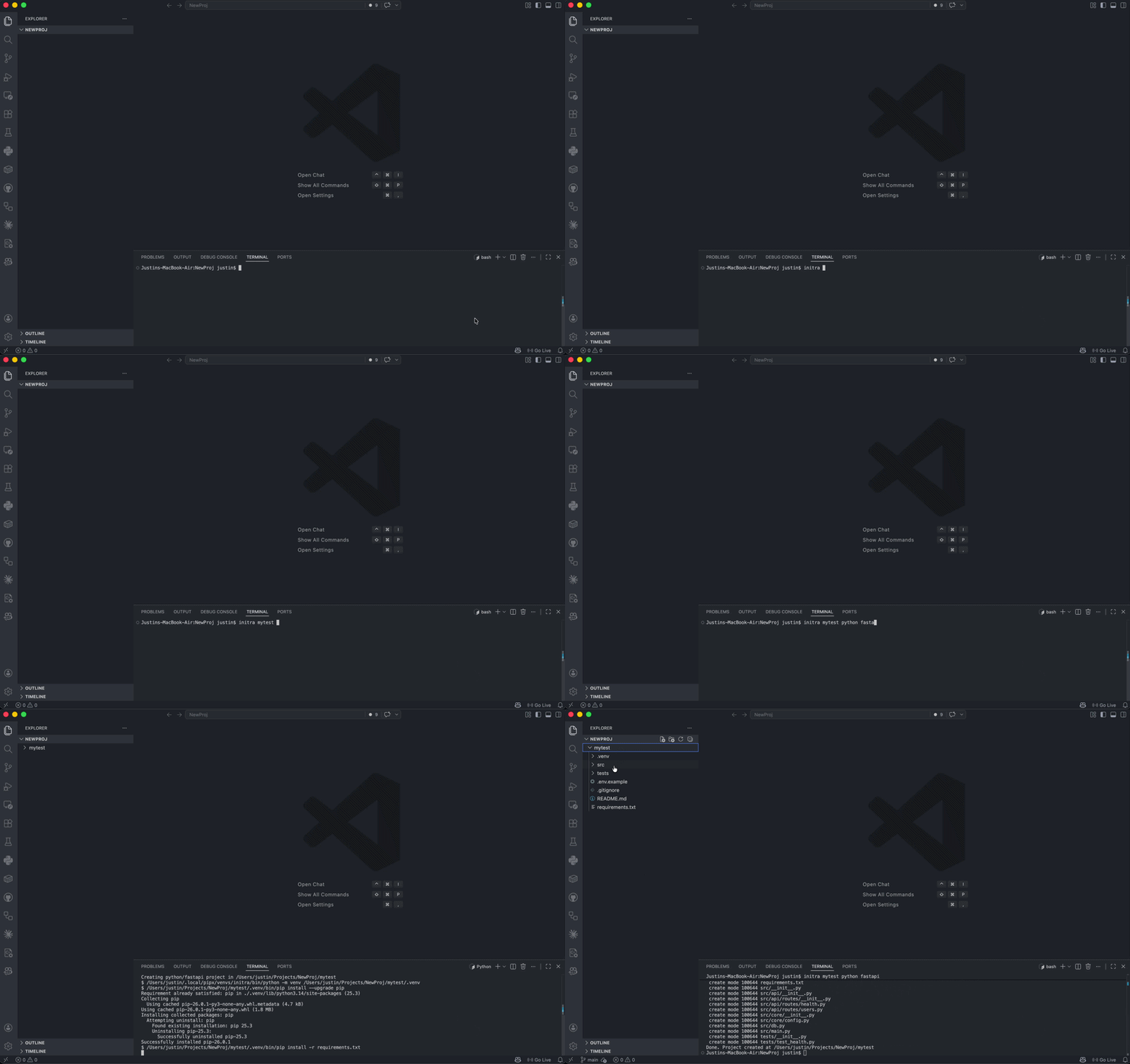
Replace
docs/demo.gifwith an updated terminal recording before publishing major feature updates.
Quick Start
# FastAPI REST API with automatic virtual environment
initra myapi python fastapi
cd myapi && source .venv/bin/activate

# Express server with TypeScript and VS Code
initra server node express --ts --open

# Full-stack Next.js with GitHub repo
initra app node next --gh --public

# Rails app
initra blog ruby rails

# Spring Boot microservice
initra service java springboot
Command Format
initra <name> <language> <framework> [options]
Features
✅ Multiple Languages & Frameworks
- Python: Flask, FastAPI, Django, Aiohttp
- Node.js: Express (JS/TS), Next.js, Koa
- Ruby: Rails, Sinatra
- Java: Spring Boot, Javalin
✅ Automatic Setup
- Project directory creation
- Git repository initialization
- Framework-specific boilerplate code
- Language-appropriate
.gitignorefiles - Dependency file generation and installation
- Python virtualenv creation (auto-installed)
✅ Developer Integrations
- Create GitHub repositories with
--ghflag - Open projects in VS Code with
--openflag - TypeScript support for Express projects
- Interactive prompts when run with no arguments
Options
| Option | Description |
|---|---|
--ts |
Use TypeScript for Express |
--gh |
Create GitHub repository |
--public |
Make GitHub repo public |
--open |
Open in VS Code |
--no-install |
Skip dependency installation |
--no-git |
Skip git initialization and commit |
--dry-run |
Preview actions without writing files |
--output-dir |
Choose a base directory for generated projects |
--json |
Print machine-readable scaffold summary |
--list |
List supported stacks and exit |
Supported Stacks
Python
- Flask – Lightweight, flexible
- FastAPI – Modern, async, type-safe
- Django – Full-featured, batteries-included
- Aiohttp – Async server framework for lightweight services
Node.js
- Express – Simple HTTP server (JavaScript)
- Express + TypeScript – Type-safe Express with
--ts - Next.js – Full-stack React/SSR
- Koa – Minimal async middleware framework
Ruby
- Rails – Full web framework
- Sinatra – Minimal Ruby web framework
Java
- Spring Boot – Enterprise framework
- Javalin – Lightweight Java/Kotlin web framework
Examples
Python FastAPI with auto-installed dependencies:
initra myapi python fastapi
cd myapi
source .venv/bin/activate  # Auto-created
pip install -r requirements.txt
uvicorn src.main:app --reload
TypeScript Express with GitHub and VS Code:
initra api node express --ts --gh --public --open
cd api
npm install
npm run dev
Next.js with GitHub:
initra webapp node next --gh --open
cd webapp
npm run dev
Django full-stack:
initra blog python django
cd blog
source .venv/bin/activate
python manage.py migrate
python manage.py runserver
Rails:
initra store ruby rails
cd store
bundle install
bin/rails server
Spring Boot:
initra users java springboot
cd users
./mvnw spring-boot:run
Koa:
initra service node koa
cd service
npm install
npm run dev
Sinatra:
initra web ruby sinatra
cd web
bundle install
bundle exec ruby app.rb
Javalin:
initra api java javalin
cd api
mvn compile exec:java
Best-Practice Command Recipes
Use these as copy/paste starters for common workflows.
1) Safe preview first, then scaffold for real
# Preview exactly what will be created (no files written)
initra orders-api python fastapi --dry-run --license --tutorial

# Run the same scaffold for real after preview
initra orders-api python fastapi --license --tutorial
2) Multi-tag setup for a production-ready Node project
initra billing-service node express --ts --gh --public --open --license
3) Generate into a dedicated workspace folder
initra auth-service python django --output-dir ~/dev/services
4) CI/automation-friendly output
# Get machine-readable scaffold details for scripts/pipelines
initra analytics-api node koa --json
5) Faster local scaffolding when you want full manual control
initra playground ruby sinatra --no-install --no-git
What Gets Created
Each project includes:
- ✅ Working starter code with health endpoints
- ✅ Language-specific
.gitignore - ✅
README.mdwith setup & run instructions - ✅ Dependency files (
requirements.txt,package.json, etc.) - ✅ Tests directory with example tests
- ✅ Git repository with initial commit
- ✅ Python virtualenv (
.venvfor Python projects)
Testing Generated Projects
Python Tests
initra myapp python fastapi
cd myapp
source .venv/bin/activate
python -m unittest discover -s tests
Node.js (TypeScript) Tests
initra myapp node express --ts
cd myapp
npm install
npm test
Node.js (JavaScript) Tests
initra myapp node express
cd myapp
npm install
npm test
Ruby Tests
initra myapp ruby rails
cd myapp
bundle install
bin/rails test
Java Tests
initra myapp java springboot
cd myapp
./mvnw test
Installation & Setup Details
See INSTALL.md for:
- Framework prerequisites
- Alternative installation methods
- Troubleshooting
- Detailed verification steps
See USAGE.md for:
- Complete command reference
- Framework-specific examples
- Interactive mode walkthrough
- Advanced usage patterns
Local Development
# Run directly without installation
python3 initra.py myapp python flask

# Install in editable mode
python3 -m pip install -e .
initra myapp python fastapi

# Run automated CLI tests
python3 -m unittest discover -s tests
Prerequisites
- Python 3.10+ – For running the CLI
- Git – For repository initialization
- Framework CLIs – Rails, Spring, etc. (installed separately)
Optional:
- GitHub CLI (
gh) – For--ghflag - VS Code – For
--openflag
Contributing
- Fork the repository
- Create a feature branch
- Make focused changes
- Open a pull request
License
MIT
Release history Release notifications | RSS feed


Download files
Download the file for your platform. If you're not sure which to choose, learn more about installing packages.
Source Distribution
Built Distribution
Filter files by name, interpreter, ABI, and platform.
If you're not sure about the file name format, learn more about wheel file names.
Copy a direct link to the current filters
File details
Details for the file initra-0.1.1.tar.gz.
File metadata
- Download URL: initra-0.1.1.tar.gz
- Upload date:
- Size: 66.3 kB
- Tags: Source
- Uploaded using Trusted Publishing? No
- Uploaded via: twine/6.2.0 CPython/3.11.15
File hashes
| Algorithm | Hash digest | |
|---|---|---|
| SHA256 |
4123c6bb7b1c1ffca5f600ff1aacbd3953f67e0dd1a7770f8c584d961f603fb5
|
|
| MD5 |
33111d0db29bdff4297fd489755a5387
|
|
| BLAKE2b-256 |
c7a5726406c3dc4a9354679efef91ab91a13dc8e3ff92224e61d3170042242b1
|
File details
Details for the file initra-0.1.1-py3-none-any.whl.
File metadata
- Download URL: initra-0.1.1-py3-none-any.whl
- Upload date:
- Size: 91.6 kB
- Tags: Python 3
- Uploaded using Trusted Publishing? No
- Uploaded via: twine/6.2.0 CPython/3.11.15
File hashes
| Algorithm | Hash digest | |
|---|---|---|
| SHA256 |
21feff624bfca158661df715d6d5783275a33bdd64bbbc628708349178785340
|
|
| MD5 |
7faedbd0b1b22445a16ddf164b1c30a1
|
|
| BLAKE2b-256 |
6717a91d89dd9cab445da8d27264365b2cde1698c8ca3558a9bf0c2bbbfaf49f
|






