
Injinja: Injectable Jinja Configuration tool. Insanely configurable... config system.
Verified details
These details have been verified by PyPIProject links
GitHub Statistics
Maintainers

Project description
injinja 🥷
Injinja: Injectable Jinja Configuration tool.
Insanely configurable... config system.
Quickstart
injinja.py is ~500 LOC and runs stand-alone. You can literally take that one file and embed it into your system right now.
This project aims to add some SLDC rigour, testing and publication around this one core file.
USAGE:
uvx injinja -e home_dir="$HOME" -c 'samples/config/*' -t sql/ddl/warehouse__roles.sql.j2
# OR
uv run injinja.py -e home_dir="$HOME" -c 'samples/config/*' -t sql/ddl/warehouse__roles.sql.j2
Two step templating configuration system:
- Runtime
DYNAMICconfiguration (-eor--env) - Can template the
STATICconfiguration (-cor--config) - To allow deep and rich config to populate your
TEMPLATEfile (-tor--template).
WHY?
Imagine a folder full of database DDL SQL files that you want to template based on complex configurations your base templates use Jinja2 syntax to iterate over all the possible variations.
Now imagine maintaining entire copies of those config for dev, test, prod? No thank you.
Overview
Inspired by some prior work I have been icubating since 2021 and also a style of platform engineering I am seeing which is configuration driven platform components.
This setup allows for configuration driven code based akin to Kubernetes, dbt etc with what I like to called Recursive Folders of Config.
- Split up
One Big Fat YAMLinto many smaller sensible.ymlfiles - Organise your
ymlconfig into hierarchical folders. - Just like
dbtassume every config file isjinjatemplated first - Magically they are all
RecursivelyDeepMerged at runtime so it is like they were alwaysOne Big Fat YAML.
*All of the above also works with json and toml and mixing them. You're welcome! 🦾
Oh yeah, and then apply this ultra flexible config to your target jinja template output file.
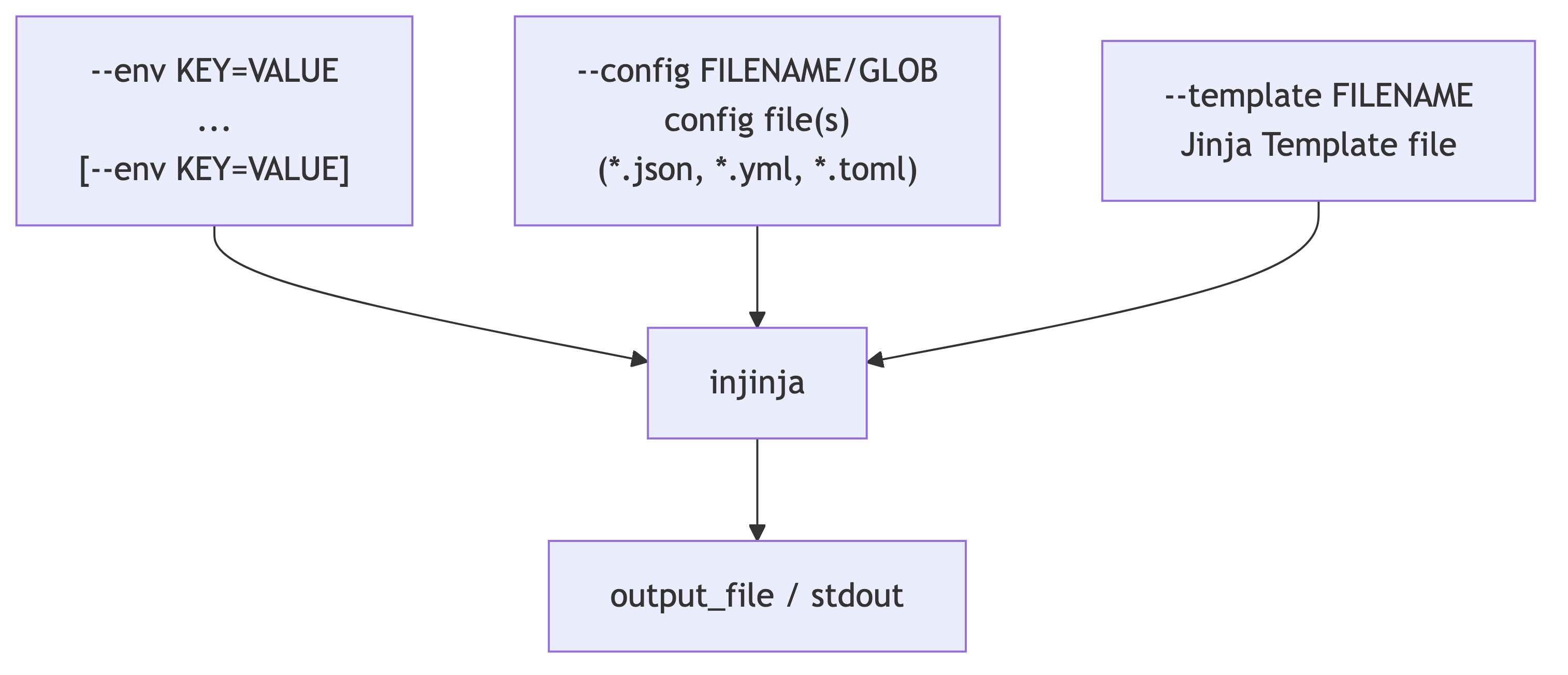
- Literally ANY config schema in a file format YML, JSON or TOML can be treated as a Jinja2 Template itself.
- This makes for VERY dynamic config.
- Then that config IS the config provided for a target Jinja template.
- This final template could be terraform, SQL, js, python or even more JSON or YAML.
Output defaults to stdout or an output file can be specified.
This allows some "ahead-of-time config" (STATIC) and some "just-in-time config" (DYNAMIC) to all be injected into a final output.
Absence of the "just-in-time" config results in merely merging the config file into the template.
Templating variables and not providing a value will throw an error to ensure templating is correct at runtime.
User Guide
Installation
# Instant standalone tool use
uvx injinja --help

# OR install
uv add injinja
# OR
pip install injinja
injinja --help

USAGE: Injinja [-h] [-d] [-e ENV] [-p PREFIX] [-c CONFIG] [-t TEMPLATE] [-f FUNCTIONS] [-o OUTPUT] [-v VALIDATE] [-s {json,yml,yaml,toml}]

Injinja: Injectable Jinja Configuration tool. Insanely configurable... config system.

        - Collate DYNAMIC configuration from environment variables using --env, --prefix flags
        - Collate the STATIC configuration (files) using the --config flags.
        - DYNAMIC config templates the STATIC config.
        - The _Templated STATIC Config_ is then applied to your target Jinja2 template file using the --template flag.
        - The output is then rendered to either stdout or a target file.

        OPTIONALLY:
        - Can take custom Jinja2 Functions to inject into the Jinja2 Templating Engine Environment
        - Can take a validation file to assist with checking expected templated output against a known file.

options:
  -h, --help            show this help message and exit
  -d, --debug
  -e ENV, --env ENV     Environment variables to pass to the template. Can be KEY=VALUE or path to an .env file.
  -p PREFIX, --prefix PREFIX
                        Import all environment variables with given prefix. eg 'MYAPP_' could find MYAPP_NAME and will import as `myapp.name`. This argument can be repeated.
  -c CONFIG, --config CONFIG
                        The configuration file(s) to use. Either specify a single file, repeated config flags for multiple files or a glob pattern.
  -t TEMPLATE, --template TEMPLATE
                        The Jinja2 template file to use.
  -f FUNCTIONS, --functions FUNCTIONS
                        Path or glob pattern to a python file containing custom functions to use in the template.
  -o OUTPUT, --output OUTPUT
  -v VALIDATE, --validate VALIDATE
                        Filename of an outputfile to validate the output against.
  -s {json,yml,yaml,toml}, --stdin-format {json,yml,yaml,toml}
                        Format of the configuration data piped via stdin (json, yaml, toml). If set, injinja will attempt to read from stdin. eg cat config.json | python3 injinja.py --stdin-format json
Intermediate Guide
Architecture
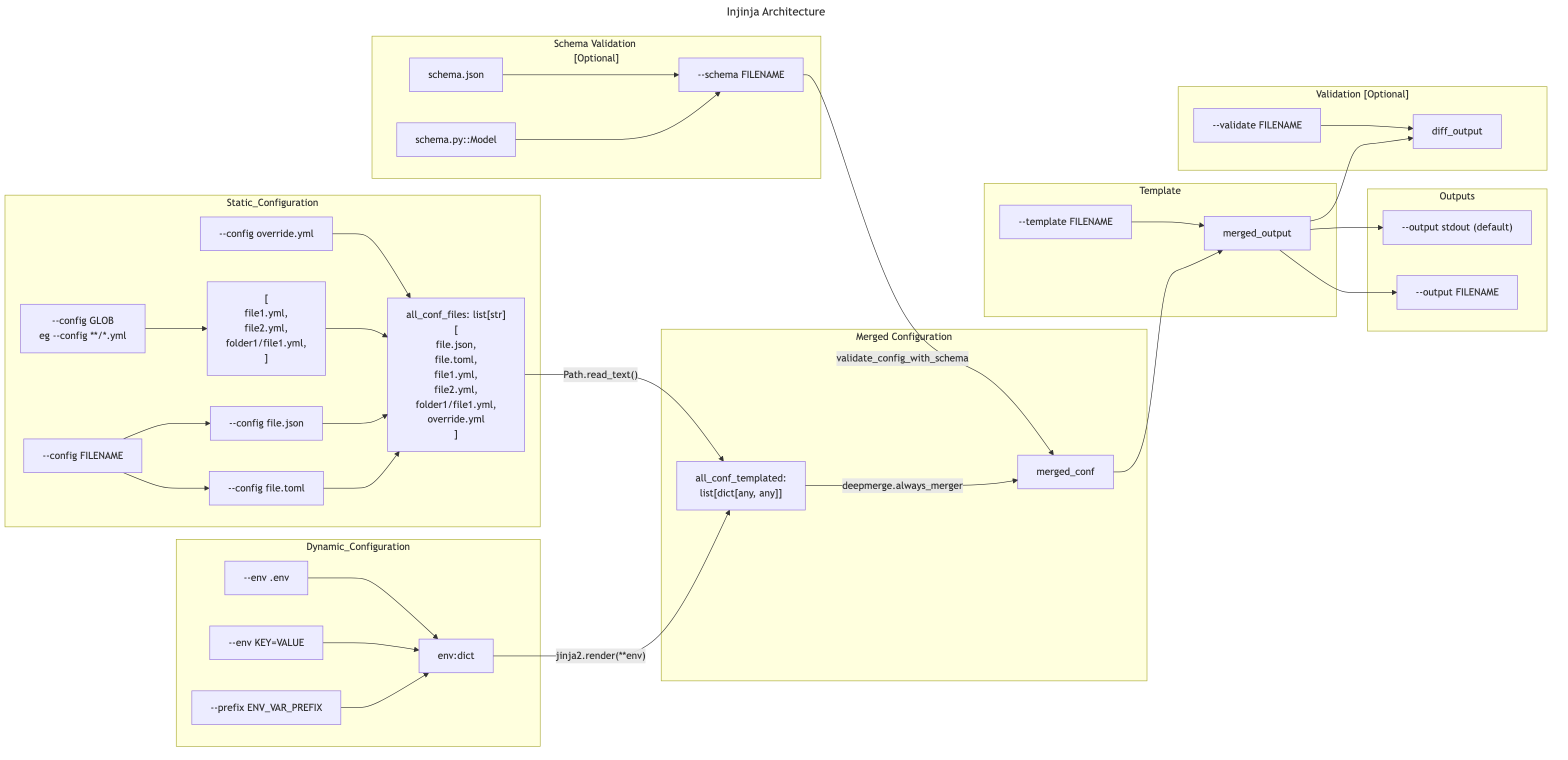
Advanced - Collections of config files
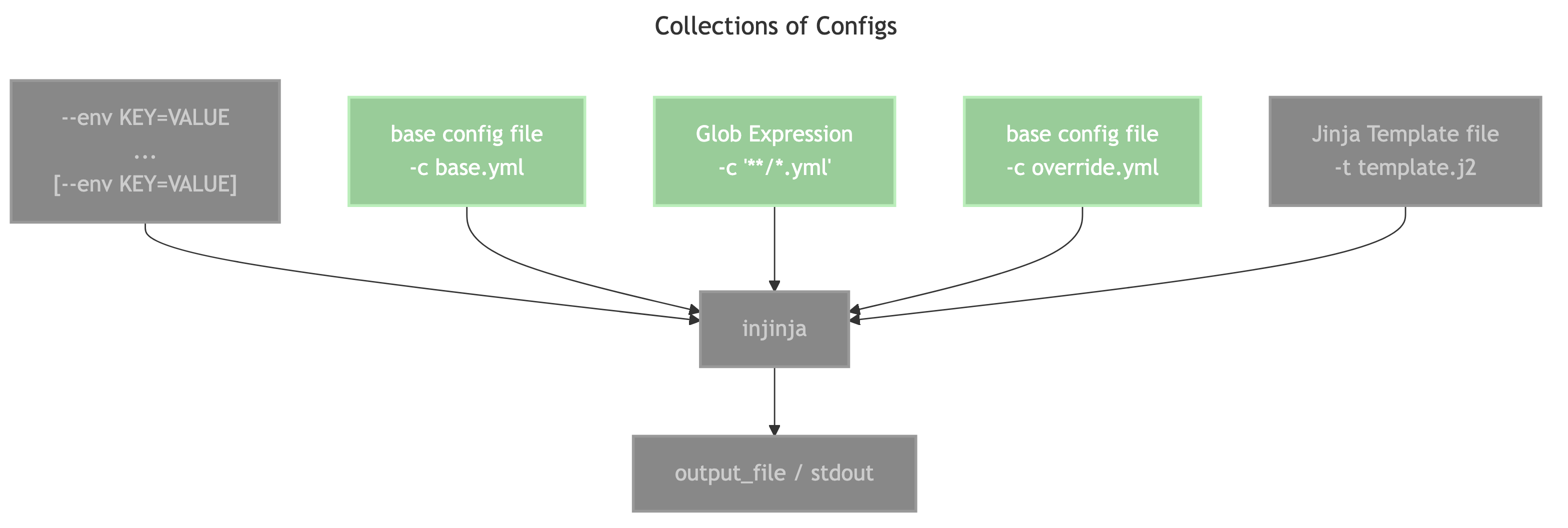
- Firstly the
--envflags are collected and turned into adict - Next the
--config/-cflags are collected- If the value passes the
pathlib.Path(c).is_file()check then it is used as-is. - If it fails the above check then it is attempted to be expanded using
glob.glob(c) - The order of the
-cflags allow re-specifying the same file again as the last file to ensure it is an override file.
- If the value passes the
- This list of configs are each independently templated with the
dictfrom--env - They then use
deepmerge.always_mergerto iteratively layer the config to make a final config. (Hence the importance of the ordering of flags.)
Testing
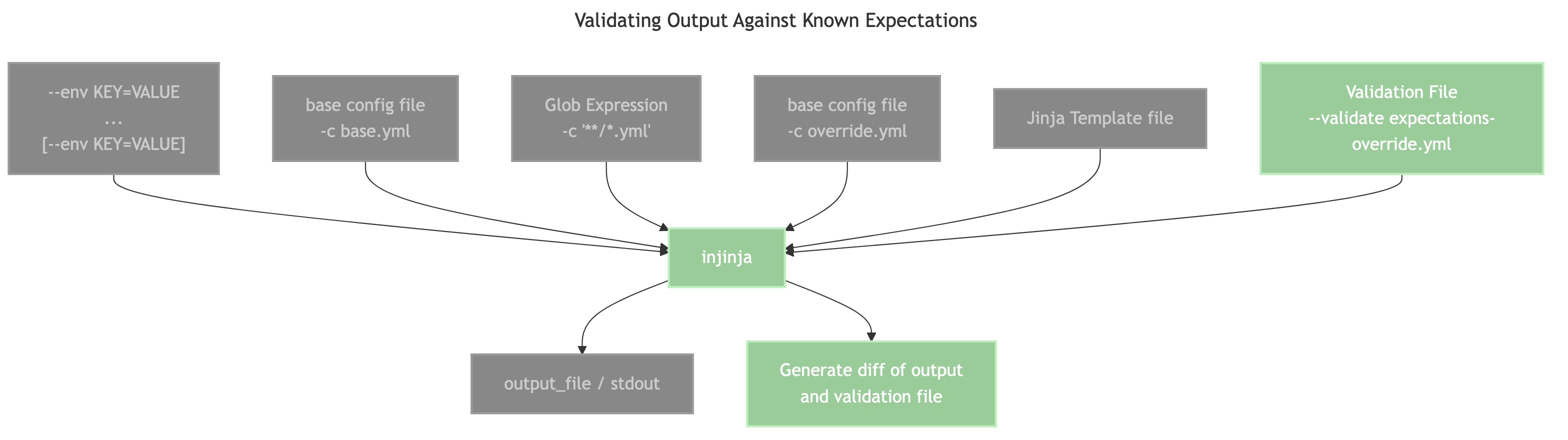
For the sake of some testing, adding the flag for a fixed text output allows the use of difflib to generate a text diff for sanity checking output from an expectation.
Debugging
Export Merged Config
Addded the --output options of either config-json or config-yaml / config-yml, which will actually output the merged config to stdout. This can then be filtered and triaged using tools like jq or yq.
Stream Config from stdin
Added the --stdin-format json and --stdin-format yml so that we can stream input that is potentially the output of jq and continue templating.
This was the easiest way to add jq functionality without vendoring the tool into injinja.
Here is a broken out example:
# The '-o config-json' skips the templating file and outputs the merged config
python3 injinja.py -c config/**/*.yml -o config-json | \

# Leverage tools like jq to filter subsets of the config eg a single COPY INTO statement for testing and debugging
jq '.tables[] | keys' | \

# Take the output of jq as input back into injinja.py to finish templating.
python3 injinja.py --stdin-format json -t template.sql -o finalfile.sql
Roadmap and TODO list
Project details
Verified details
These details have been verified by PyPIProject links
GitHub Statistics
Maintainers
Release history Release notifications | RSS feed


Download files
Download the file for your platform. If you're not sure which to choose, learn more about installing packages.
Source Distributions
Built Distribution
Filter files by name, interpreter, ABI, and platform.
If you're not sure about the file name format, learn more about wheel file names.
Copy a direct link to the current filters
File details
Details for the file injinja-1.0.1-py3-none-any.whl.
File metadata
- Download URL: injinja-1.0.1-py3-none-any.whl
- Upload date:
- Size: 12.6 kB
- Tags: Python 3
- Uploaded using Trusted Publishing? Yes
- Uploaded via: uv/0.8.13
File hashes
| Algorithm | Hash digest | |
|---|---|---|
| SHA256 |
eb60456662932401904433cbd78346599511dcdbd0e969758f03dce2fda6ebec
|
|
| MD5 |
e8f5b4a17a213b74ee39927c0fd2b8f8
|
|
| BLAKE2b-256 |
bf436ad71fddf590d7032911093929afcf4f42902aad8ed1096c45b2a0b2fd46
|






